Smart home app development in 2026 costs $40,000 to $220,000+, depending on device protocols like Z-Wave and INSTEON, hub integration, and automation depth. An MVP takes 10 to 14 weeks to build, while a full multi-property platform can take up to 9 months.
When a motion sensor triggers at midnight,
does your app alert the homeowner, or just log it?

A homeowner installs a smart lock through her security app.
She adds cameras through another app.
Her thermostat comes with a third manufacturer app.
Three devices. Three apps. Three logins.
One Tuesday night, her front-door motion sensor triggers an alert.
The notification lands in an app she rarely opens.
She checks the lock app to confirm the door is secure.
Then she opens the camera app to see what triggered the sensor.
Four minutes later, she confirms it was a false alarm.
She has not lost trust in her devices.
She has lost trust in managing them separately.
Why 2026 Is the Defining Year for Smart Home Systems
1. Market Has Outgrown Single-Device Apps
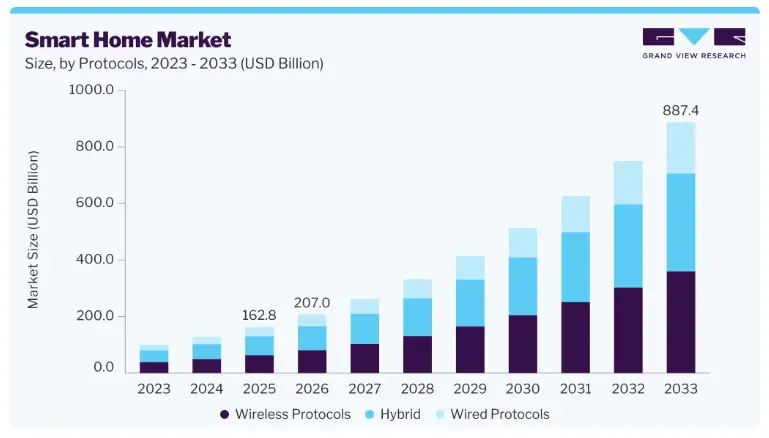
The smart home market is projected to hit $207 billion in 2026.
Most new entrants underestimate what unifying device protocols actually takes.
Founders in this space need a team that has shipped real hub integration, not a demo.
2. Scattered Apps Are Losing Homeowners Fast
Every new device adds another login screen.
Homeowners abandon ecosystems that feel scattered instead of smart.
The real opportunity isn’t another device app.
It’s the control layer above them all.
3. Multi-Property Owners Are an Underserved Segment
Vacation rental hosts and multi-property owners manage systems twice over.
Most smart home apps were never built for account-level property switching.
That gap is wide open right now,
and it will not stay open long.
Where Most Smart Home Apps Fall Short
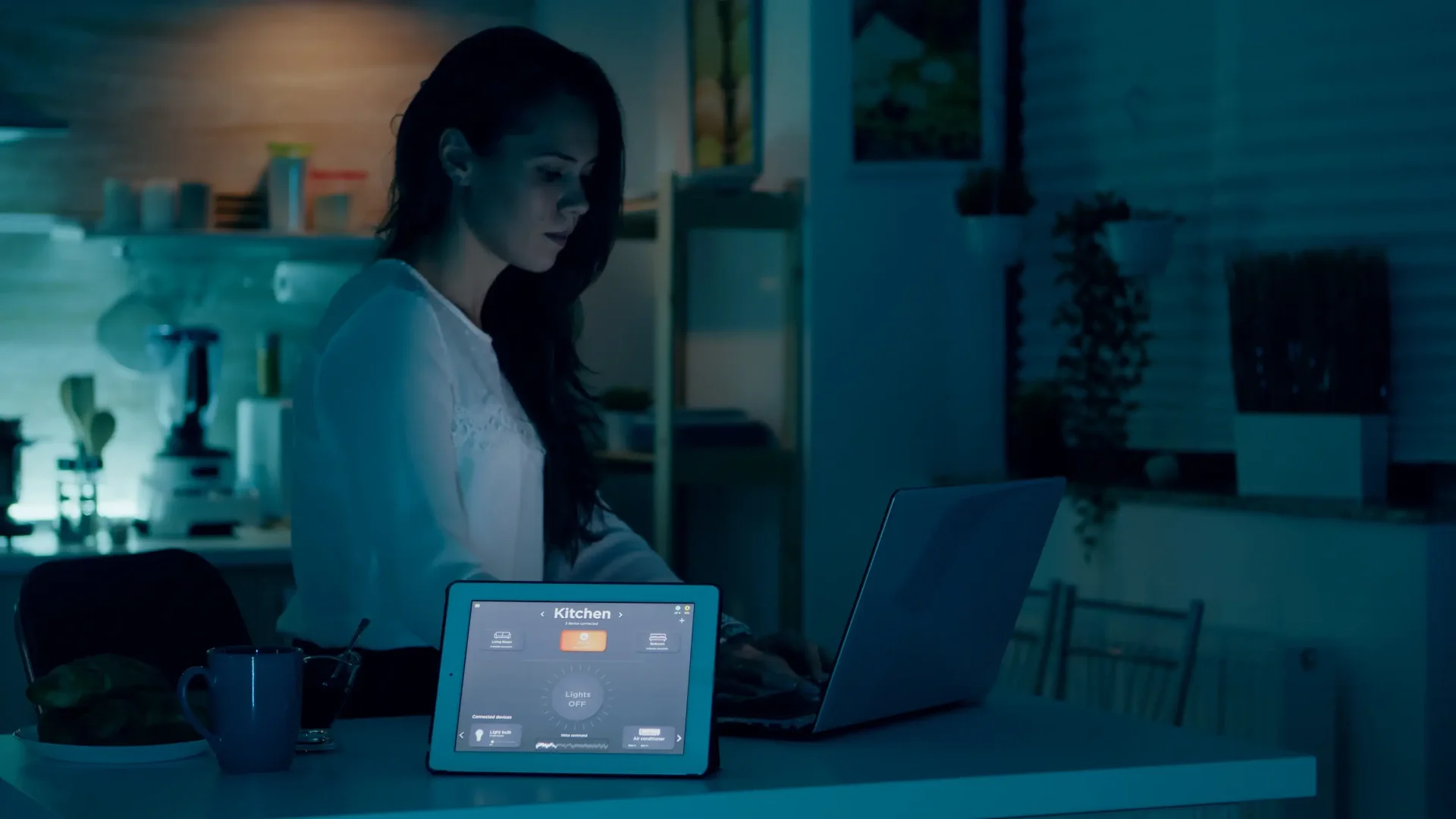
Homeowners don’t reject smart devices.
They reject disconnected control.
1. Device Clutter Breaks the Daily Habit
A lighting app, a lock app, a camera app.
Three habits instead of one.
Users abandon systems that require app-switching for basic tasks.
A true smart home app collapses every device into one habit loop.
2. Hub Integration Gets Treated as an Afterthought
INSTEON, Z-Wave, and Zigbee run on entirely different languages.
Teams that add protocol support later on face full rebuilds.
Hub architecture belongs at the foundation, added before anything else.
3. Security Gets Bundled as a Checkbox Feature
A camera feed without instant alerts is just storage.
Motion sensors without role-based access create false confidence.
Homeowners trust systems that respond in seconds, over ones that just record.
How Device Connectivity Works in a Smart Home App
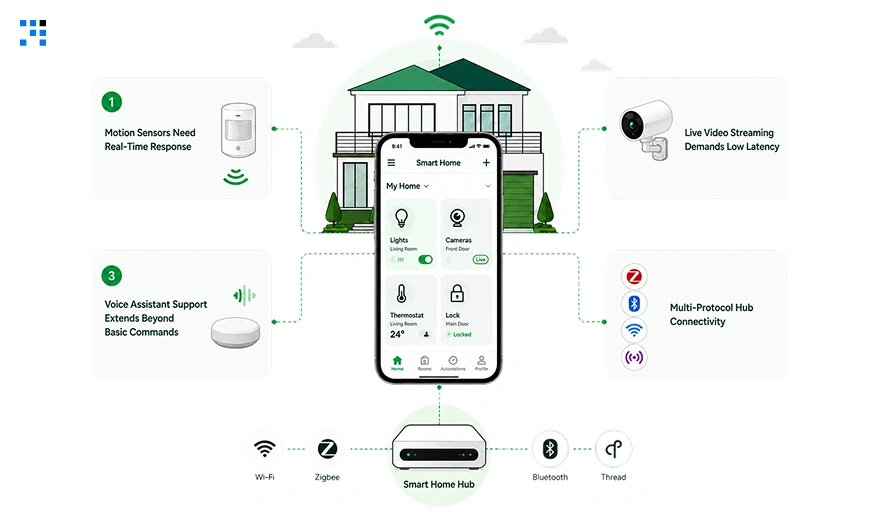
A smart home app is only as strong as its connection layer.
1. Motion Sensors Need Real-Time Response
A trigger means nothing if the alert arrives late.
Delayed alerts turn security features into liability, not protection.
Real-time processing is non-negotiable at the architecture level.
2. Live Video Streaming Demands Low Latency
Buffering during an emergency breaks the entire point of a camera feed.
Homeowners check cameras when something feels wrong, not when it’s convenient.
A stable stream during a spike in traffic is the actual product.
3. Voice Assistant Support Extends Beyond Basic Commands
A single command should never be the limit for what voice can do.
“Goodnight” should lock doors, dim lights, and set the thermostat together.
Single-command voice control is a demo feature, not a product feature.
4. Multi-Protocol Hub Connectivity
INSTEON and Z-Wave devices must sync through one central hub.
Fragmented protocol support forces homeowners back into multiple apps.
Unified hub connectivity is what makes “one app” actually true.
Where AI Belongs in Smart Home App Development
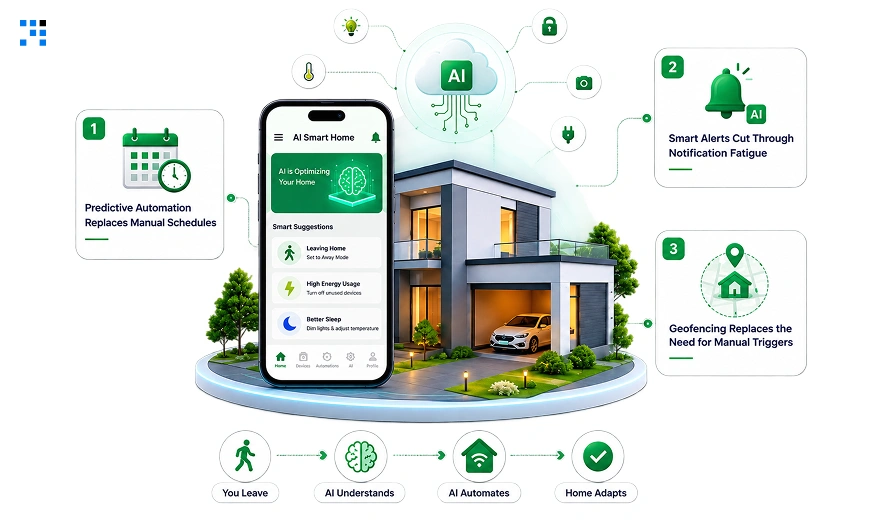
1. Predictive Automation Replaces Manual Schedules
AI models learn occupancy patterns from device usage data.
Lights, climate, and locks adjust before the homeowner asks.
That shift moves the app from reactive to predictive.
2. Smart Alerts Cut Through Notification Fatigue
Raw motion sensor data floods homeowners with false alarms.
AI filters package deliveries from real intrusion risks.
Fewer alerts, higher trust with faster real response.
3. Geofencing Replaces the Need for Manual Triggers
AI-driven geofencing detects when a homeowner leaves the property.
Locks engage, lights dim, and climate adjusts without any command.
That’s automation working before the homeowner even thinks to act.
What It Actually Costs to Build a Smart Home App in 2026
Cost scales with protocol depth and automation intelligence, not screen count.
| Platform Tier | What’s Included | Cost Range | Timeline |
|---|---|---|---|
| MVP | Device control, room-based UI, basic alerts | $40,000 – $75,000 | 10 – 14 weeks |
| Mid-Level | Automation engine, live streaming, voice support | $85,000 – $150,000 | 16 – 22 weeks |
| Full Platform | Multi-property switching, AI prediction, role-based access | $160,000 – $220,000+ | 6 – 9 months |
An MVP proves device control before you scale into more hubs.
Mid-level and full-platform builds only make sense once real homeowners test that MVP.
Custom software development lets each tier build on the last, not replace it.
Skip a tier, and you rebuild the protocol layer twice.
How a Smart Home App Earned 65% User Satisfaction
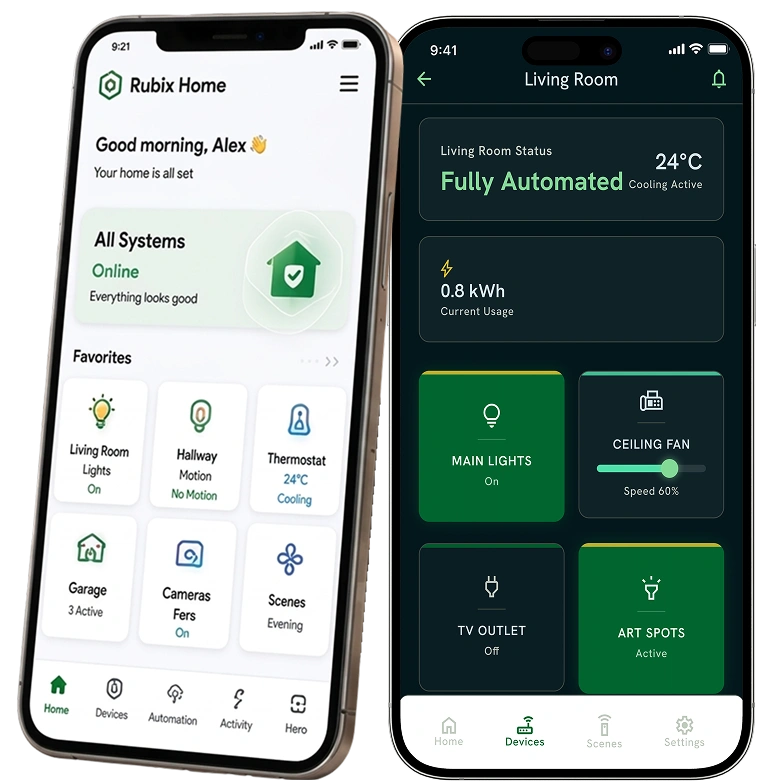
Rubix Home was built to fix disconnected smart device control.
Homeowners were juggling five separate apps for one property.
Multi-property owners had zero unified view across homes.
Devices fell out of sync every time a command lagged.
Control Layer Built From Scratch
We connected every device type through one central hub layer.
Lighting, locks, cameras, and thermostats synced into a single command flow.
Every layer synced through the ISY-994i hub with INSTEON and Z-Wave protocols.
What Changed for Rubix Home After Launch
| Metric | Result |
|---|---|
| Homeowner Satisfaction Score | 65% rate post-launch |
| Manual Device Adjustments | 45% fewer tasks per homeowner |
| Security Alert Response Time | 50% faster from trigger to action |
| Multi-Property Management Effort | 60% less time spent switching homes |
This isn’t just about app convenience.
These are the numbers that come from building one connected system instead of five apps.
Want to see how we mapped the full device ecosystem?
Why You Can Trust Us to Build Your Smart Home App
1. We Audit Your Device Ecosystem First
Every protocol your devices run on gets mapped in week one.
Sync failures, alert delays, and access gaps surface before code starts.
That audit becomes the blueprint for the entire build.
2. We Prioritise the Control Layer
Core device control and real-time alerts ship in the first version.
Automation and multi-property features wait until version two.
Real homeowner behaviour shapes what gets built next.
3. We Test With Real Devices Before Finalising Anything
Actual hubs and sensors connect during development, not after launch.
Integration failures caught early save weeks of rework later.
The app goes live already synced to real hardware.
4. Full Ownership Transfers at Handover
Source code, documentation, and protocol certifications transfer at launch.
No vendor lock-in on the hub integrations already built.
Your team can extend the platform without starting over.
Homeowners switching to a connected competitor won’t wait for you to catch up.
Every scattered app you keep live is costing trust you won’t get back.
FAQs
That’s the exact problem a central hub solves. We build the app to speak to your hub, not individual devices. ISY-994i and similar hubs translate protocols into one command layer. Your app never needs to know the difference.
Real-time architecture delivers alerts within seconds of a trigger. Delayed alerts defeat the purpose of a security layer. We build alert pipelines separate from general app traffic to avoid lag.
Not if the CDN and streaming infrastructure are scoped correctly upfront. We design for concurrent camera feeds from day one. Your busiest security moment should be your most reliable one.
Yes, but the command architecture needs to support it from the MVP stage. Adding it later on means rebuilding intent recognition. We plan for it structurally even if you launch without it.
We separate property context at the account level, not the device level. Homeowners switch properties the way they switch bank accounts. It stays simple no matter how many properties they manage.
We build an abstraction layer between your app and individual device APIs. A manufacturer change updates one integration point, not your entire app. That’s the difference between a fragile build and a scalable one.