Property valuation software estimates what a property is worth using recent sales, rent, and condition. It helps real estate businesses price listings, buy smarter, track risk, and back every decision with clear numbers instead of guesses.
Would you bet your next deal on a number nobody can explain?

Friday, 5:00 PM.
A commercial property agent lists an office for $450,000.
The price comes from two old sales and market experience.
Three weeks pass. Serious buyers are still missing.
Nearby, a similar office sells for $410,000.
The seller starts asking questions.
The agent cuts the price, losing room to negotiate.
Now, every new listing feels harder to price confidently.
The problem wasn’t a lack of effort.
It was making a pricing decision without enough current market data.
A better valuation at the start could have changed the outcome.
How to Choose the Right Property Valuation Software
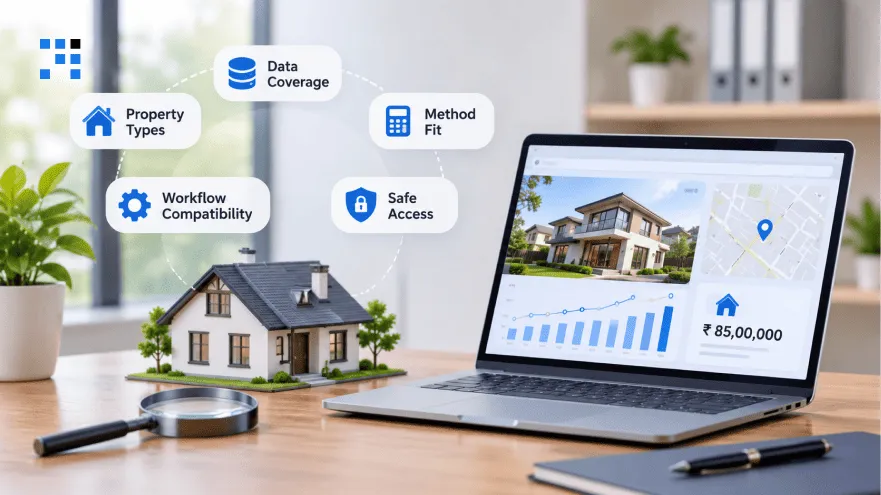
1. Property Types
List the property types your business deals with each month.
Homes, rentals, land, and commercial buildings need different valuation approaches.
Pick a tool that handles all of them well.
2. Data Coverage
Check whether it covers the cities where you actually work.
Find out how many recent sales it holds nearby.
Weak data means unreliable numbers, however polished the screen looks.
3. Method Fit
Confirm it supports sales, income, and cost-based valuation methods.
Purpose matters, since a loan check differs from a listing.
Choose software that adapts instead of forcing one method everywhere.
4. Workflow Compatibility
Connections with your CRM, accounts, and document storage save time.
Copying numbers between systems invites mistakes and wastes hours.
Start by listing the tools your team uses daily.
5. Safe Access
Decide who can view, edit, and approve each valuation.
Audit trails and quality checks should come built in.
Local professional rules may apply to how valuations get shared.
What Are the Features of Commercial Property Valuation Software

1. Comparable Sales
Recent nearby sales form the base of most valuations.
Adjustments account for size, age, and condition differences between properties.
Poor matches carry less weight than close, recent ones.
2. Market Data
Records, past sales, rents, and locations all sit together.
Fresh updates matter because old data gives outdated answers.
Ask how often data refreshes and where it comes from.
3. Method Choices
Sales comparison works for homes, while income suits rented buildings.
Cost-based methods fit special buildings that have few similar sales.
Better tools let you choose the method for each job.
4. Scenario Testing
Test what happens if rent drops or vacancies rise.
Higher costs or a lower sale price can be tried.
Seeing worst cases early keeps big deals from surprising you.
5. Clear Records
Every source, assumption, adjustment, and review note stays saved.
Changes are logged, so nobody wonders who edited a number.
Managers can explain any estimate to buyers, lenders, or auditors.
Reports then reach clients with comps, photos, and maps attached.
How Property Valuation Software Improves Business Decisions

1. Listing Prices
Agents compare recent sales, condition, location, and nearby competing listings.
Pricing too high scares buyers and stretches the selling time.
Setting it too low leaves your seller’s money behind.
Backed numbers let you defend the price in any conversation.
2. Screening Deals
Investors view estimated value next to the asking price first.
Next, they add expected rent, repair costs, and target returns.
Weak deals drop out before you pay for deeper checks.
3. Rental Income
Rental value depends on income left after vacancies and expenses.
Dividing that income by the area’s return rate gives value.
Change one assumption, and you see the value move instantly.
4. Portfolio Risk
Values change as markets move, so yesterday’s numbers go stale.
You can see which cities hold too much money.
Properties losing value get flagged early for a closer look.
Early warnings give you time to act before losses grow.
5. Lending Support
Lenders use valuations to judge what a property is worth.
Safe loan limits come from that value and the deposit.
Still, value is one input, never the whole credit decision.
6. Redevelopment Plans
Land value comes first, then renovation costs and planning limits.
Estimated finished value shows whether the project can earn profit.
Numbers that do not work save you from expensive mistakes.
What Helped NexaValue Cut Manual Data Entry by 60%
NexaValue is a real estate valuation firm in Australia.
Their appraisers knew what properties were worth but lacked time.
Hours went into finding sales, retyping notes, and chasing approvals.
Valuation Challenges
| Area | What Was Happening |
|---|---|
| Comparable Research | Appraisers lost hours finding recent sales. |
| Value Consistency | Two valuers reached two different values. |
| Field Notes | Inspection notes were retyped at the office. |
| Report Formatting | Formatting errors reached the lender. |
| Review Queue | Finished reports waited days for approval. |
| Audit Records | Credit teams questioned how values were reached. |
Everything depended on spreadsheets, emails, and retyping.
And that was slowing every report down.
Our Solution
We built one web-based platform for appraisers, reviewers, and lenders.
Orders, comparable sales, inspections, and reports now live in one place.
Gaps in the table above all got a direct fix.
Results Achieved
| Metric | Impact |
|---|---|
| Manual Data Entry | Reduced by 60% |
| Report Turnaround | 45% faster |
| Valuations Per Appraiser | 2X more |
| Review Revisions | 35% fewer |
Appraisers could now track each report from assignment to final approval.
Valuations now have an owner, a status, and a record.
How We Build Property Valuation Software
1. Workflow Mapping
Our team starts by sitting with appraisers, reviewers, and lenders.
Mapping today’s process shows exactly where reports get stuck.
Requirements are written down and approved before any coding begins.
2. First Release
Features get ranked against real daily problems your team faces.
Launching small keeps the first version on time and affordable.
Extra features are added after real users ask for them.
3. Valuation-Focused Design
Screens are designed around how valuers work in the field.
Quick updates from a phone matter more than fancy visuals.
Reviewers see what needs action next, without hunting around.
4. Market Testing
Testing uses your real orders instead of sample data.
Links to your CRM and accounts get fully checked.
Onboarding sessions help your team feel comfortable from day one.
Improvements are then planned from how people use it

Slow valuations mean late decisions and lost deals.
Start with orders and comparable sales.
Expand as your needs grow.
FAQs
Commercial property valuation software works best when enough comparable sales are available. Unusual buildings often need manual adjustments and an experienced valuer’s judgment. The system can support this with clear records of the data and assumptions behind each estimate.
Small teams can benefit when manual research and report preparation take up too much time. Starting with orders, comparable sales, and reports keeps the first version focused. We help prioritize these workflows before expanding the software.
The transition can happen in stages while existing work continues. Historical records can move in batches, followed by testing with a small group before wider rollout. We plan the migration around active valuations to reduce disruption.
Yes, the platform can connect with CRM, accounting, and document management tools, depending on their integration options. This helps reduce duplicate entries and keeps client details, fees, and reports connected. We assess your existing systems first to determine the right approach.
Access permissions, audit logs, and regular backups help protect valuation records. Permissions control who can view, edit, or approve information, while audit logs track changes. We plan these safeguards alongside the system architecture rather than adding them after launch.
