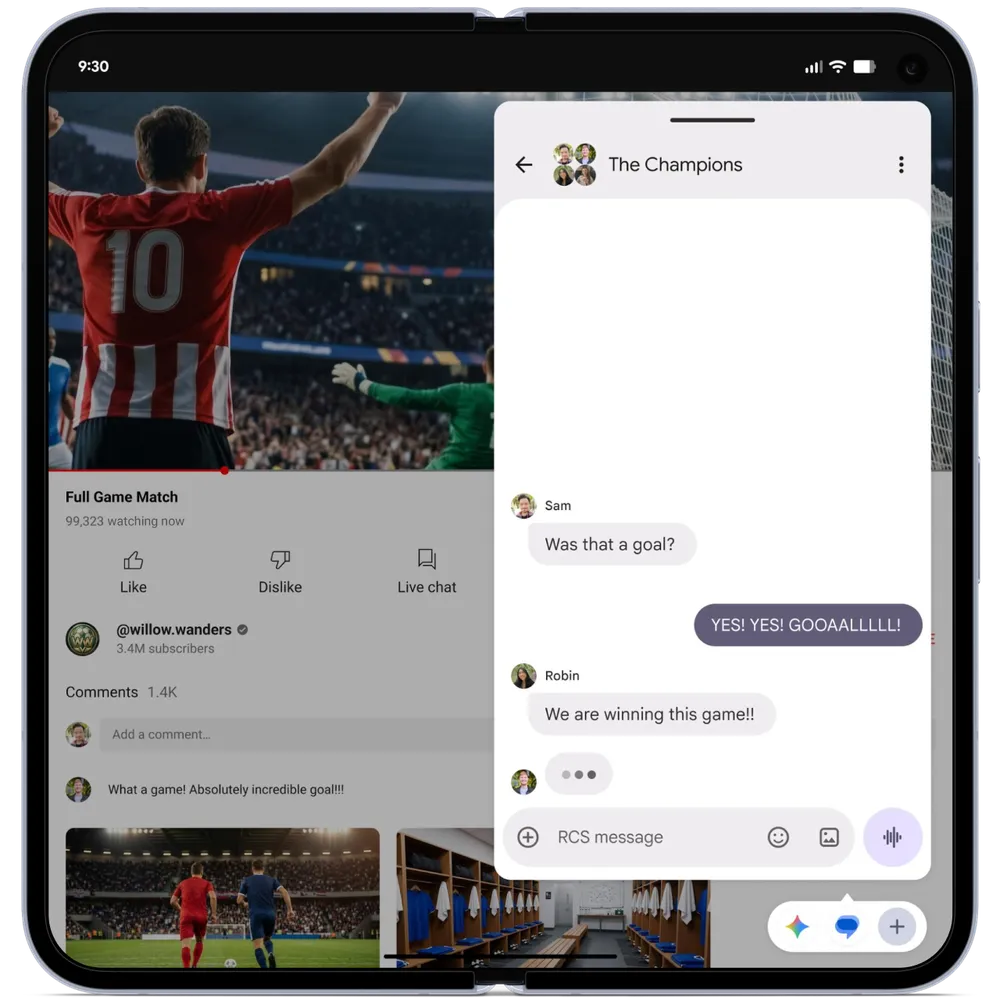
Android 17’s Bubble Interface allows apps to run as floating windows on top of other apps. Users can resize, move, minimize, and reopen apps without losing their place, making multitasking faster and reduces interruptions.
Is your app built for how Android users worked yesterday
or how they’ll work tomorrow?
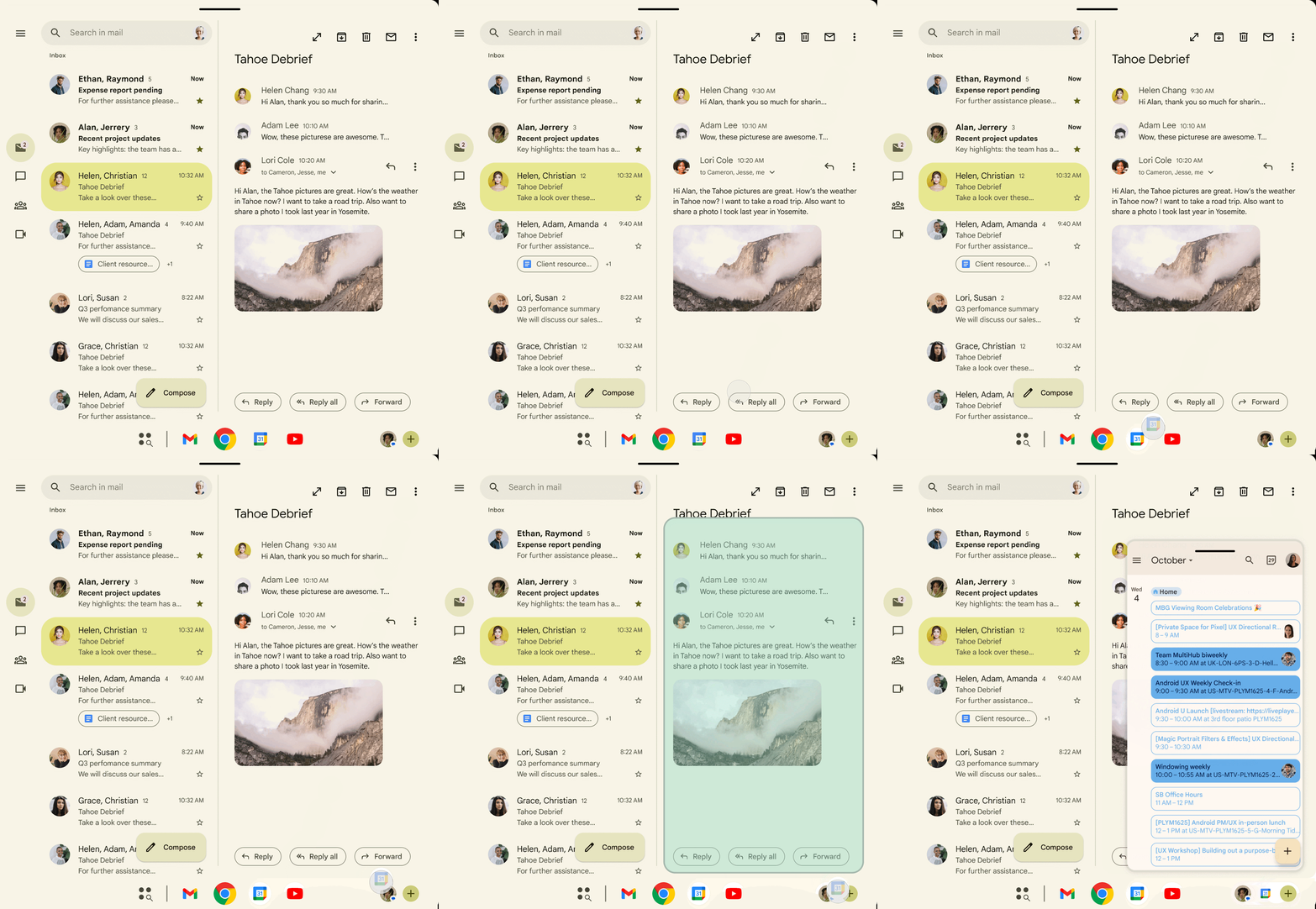
Your user is mid-task in your app.
A message comes in.
They switch to reply and your app disappears.
Form data disappears, sessions time out, and scroll positions reset.
Users are forced to restart tasks they had already completed moments earlier.
That is the problem Android 17’s Bubble Interface was built to end.
And that is a problem your app is probably still causing.
Why App Owners Can’t Afford to Ignore Android 17’s App Bubbles
1. Android 17 Is Raising User Expectations
580+ million large-screen Android devices are in active use today.
What Android 17 introduced is not a feature update.
It is a new competitive standard for every app on the platform.
2. The New Home for Active Apps
On tablets and foldables, the Bubble Bar is the new home base.
One tap to switch contexts.
Apps that fit naturally into this workflow are more likely to stay open and in use.
3. Adaptive Apps Get a Store Visibility Advantage
Apps meeting adaptive quality standards earn a Google Play badge.
They get surfaced more prominently in the store.
Visibility advantage for those that adapt.
Discoverability penalty for those that don’t.
4. The Device Breakdown
| Device Type | Bubble Feature | UX Impact |
|---|---|---|
| Phones | App Bubbles floating overlay | Quick reference without switching |
| Tablets / Foldables | Bubble Bar dedicated taskbar | Persistent multi-app hub |
| Desktop Mode | Interactive PiP always-on-top | Multiple workflows at the same time |
Multitasking UX Is a New Design Category
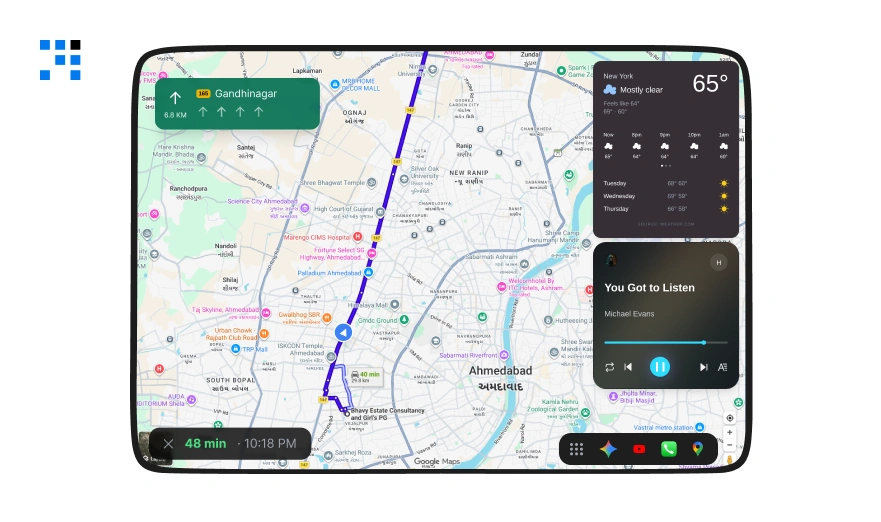
1. Responsive Design Is Not the Same Thing
Responsive design adapts to screen size.
Adaptive layout reflows for device type.
Multitasking UX is different.
It adapts to window state such as floating, minimized, docked & full-screen.
App development is entering a new phase where preserving user context matters.
Screen adaptation alone is no longer enough.
2. No Design Firm Owns This Category Yet
Every firm talks about responsive
Many talk adaptive.
Zero are talking about multi-app workflow continuity at the UI layer.
Android 17 is the first mobile OS to address this at system level.
The category is new and the window to own it closes fast.
3. Android 17 Introduces a New UX Challenge
| Traditional UX | What It Handles | What Multitasking UX Adds |
|---|---|---|
| Responsive Design | Screen Size Adaptation | States like floating, docked, and minimized |
| Adaptive Layout | Device Types | User task context across apps |
| Seamless Experience | Cross-device Continuity | Preserves cross-window continuity |
| Progressive Design | UI Complexity | Multi-window management |
How Android 17 Bubbles Actually Work
1. Activation Takes One Step
Long-press any app icon and tap Bubble to launch it as a floating window.
Users can move, resize, and minimize the app without leaving their current task.
The app remains accessible and can be reopened instantly whenever needed.
2. The Bubble Bar Lives on Large Screens
On tablets and foldables, a Bubble Bar sits at the bottom of the display.
All active floating apps are visible in one tap.
It works like a desktop taskbar.
Power users will live here.
Your app needs to be here too.
3. What Users Are Actually Doing With It
| Use Case | App Category | The UX Principle |
|---|---|---|
| Reply to messages without leaving a dashboard | CRM, project management | No workflow abandonment |
| Reference a doc while filling a form | ERP, procurement, B2B tools | Parallel context two tasks visible simultaneously |
| Watch a tutorial while completing an assessment | LMS, training platforms | Media and action coexistence |
| Check navigation while messaging dispatch | Logistics, fleet tracking | Communication and navigation together |
| Copy data from source app into another | Data-heavy B2B tools | Cross-window data flow with zero friction |
The constant-switch behavior breaks productivity in every B2B workflow today.
Apps designed for this pattern become the ones users keep open.
Not the ones they close when something else comes up.
Android 17 Made Adaptation Mandatory
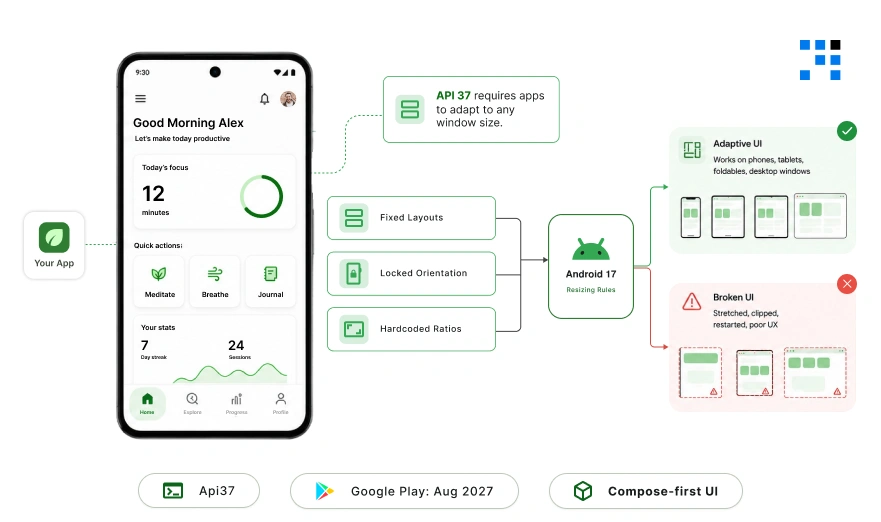
1. The Escape Hatch Is Gone
API level 37 no longer allows apps to stay locked into fixed layouts on tablets and foldables.
Your app must adapt to any window size.
Including a bubble shrunk to a fraction of the screen.
2. Google Play Deadline Is August 2027
Google Play requires all apps to target API level 37 by August 2027.
While the distribution deadline is August 2027, the UX impact is already here.
Android 17 users on Pixel can bubble your app right now.
The broken experience is already live.
3. Jetpack Compose Is Now the Baseline
All new Android APIs and libraries are built exclusively for Jetpack Compose.
Bubble UX requires dynamic recomposition on window size change.
Compose handles this natively and XML cannot replicate it cleanly.
Compose-first is not optional.
It is the baseline for bubble-ready apps.
4. What Breaks When You Don’t Adapt
| App Limitation | What Users Experience |
|---|---|
| Fixed orientation logic | Broken layout when bubbled on a tablet |
| Lost app state | Forms wiped | Scroll position lost | Session restarted. |
| XML-only layouts | Inconsistent UX across foldable Devices |
| Hardcoded aspect ratios | Pillarboxed or stretched UI in floating windows |
How We Build Android Apps for the Platform Android 17 Is Creating
1. Audit Comes Before Architecture
We run a full adaptive UX audit runs first.
Window state behavior. State persistence. Layout breakpoints at minimum bubble dimensions.
Most apps fail at least two of these before we begin.
We map every screen to its bubble state variant.
Not whether it displays whether the user’s work survives the transition.
2. Every Window State Gets Its Own Interaction Map
Full-screen, split-screen, and floating bubble.
Every interaction is mapped across all three.
Jetpack Compose handles recomposition logic.
NavigationSuiteScaffold manages the nav shift from bottom bar to edge rail.
Window Metrics drives layout decisions in real-time.
3. The Bubble Flow Ships Before the Full App Does
Bubble interaction gets prototyped first.
That is where most UX breaks happen.
Catching it early saves weeks.
We test on minimum bubble dimensions which most teams skip this.
That is why apps look fine in full-screen and break the moment they float.
We deliver Compose-first codebases.
Android 17 is live on Pixel today.
The rest of the ecosystem follows throughout 2026.
Every week you wait is a week your app is broken on 580 million large-screen devices.
The architecture decisions and design patterns are already mapped.
We start with what you have and build toward what Android 17 requires.
FAQs
Yes. Android 17 ships on phones too. Any Android 17 user can long-press your app and bubble it regardless of device size. The question is not whether users will try it. It is whether your app survives it.
State preservation fails first. Users open your app in a bubble, do something, switch back, and return to a restarted session. After that, layout fixed orientations and hardcoded aspect ratios produce broken UIs in floating windows. Both are user-facing failures with no visible error messages.
Both. But the damage is worse in B2B. Enterprise users are more likely to have tablets and foldables, more likely to run multiple apps simultaneously, and less forgiving of data loss mid-workflow. Consumer apps lose a rating. B2B apps lose a contract.
It is a significant gap. XML layouts do not recompose dynamically for window size changes which is exactly what bubble transitions require. A Compose migration is the clean path. We have done this for several clients and the process is faster than most teams expect.
Google Play requires API level 37 targeting by August 2027. But that is the distribution cutoff not the UX cutoff. Android 17 users on Pixel can bubble your app today. The broken experience is live now, not in 2027.
Gemini Intelligence arrives on select advanced devices later in 2026. It will operate across the same multi-window environment bubbles create. Apps with clean adaptive architecture will integrate Gemini features more naturally. Apps that are not adaptive will have a harder time when Gemini starts reaching across app boundaries.