The stock trading app market is increasing as people are trying to achieve financial freedom.
In India, platforms like Zerodha, Groww, and Upstox have changed how millions invest daily.
Businesses and startups are trying to create their own stock trading apps to meet the growing demand for real-time trading, charts, and a smooth user experience.
So, why should you build a stock trading app clone like Zerodha in ReactJS?
- ReactJS is built for speed & scalability, which is perfect for handling real-time stock updates.
- Its component-based structure allows you to build reusable features like dashboards, candlestick charts, and order books with ease.
- With React, you can deliver fast, interactive, and mobile-friendly trading platforms that users love.
In this blog, you’ll learn step-by-step how to build a Zerodha clone in ReactJS, integrate stock market APIs, and create a real-time trading dashboard.
Plus, we’ll share the demo code snippets to create Zerodha Clone in ReactJs and modify it as you want.
What Makes Zerodha the Benchmark in Stock Trading Apps?
Zerodha has become India’s most trusted stock trading app because it delivers exactly what traders want:
- Real-time stock market data with WebSocket connections.
- Advanced candlestick charts and technical indicators for analysis.
- Smooth user interface and fast order execution.
- Scalable architecture that handles millions of daily trades.
That’s why developers and businesses want to clone Zerodha’s trading model in ReactJS & you need to learn from its success and create your own unique solutions.
A Zerodha clone in ReactJS is a stock trading app built with React that replicates core features like live market data, charts, portfolio management, and order placement.
It helps developers quickly prototype a trading app, and businesses can customize it to launch their own fintech product.
What Are the Tech Stack & Tools You’ll Need?
Let’s go through the tech stack required to build a ReactJS stock trading app clone:
- ReactJS (frontend) for building interactive trading dashboards.
- Node.js / Express (backend) for handling APIs, authentication, and order placement.
- WebSockets to ease real-time stock price updates in React.
- Chart.js or Recharts for candlestick charts, line charts, and indicators.
- Brokerage & Market Data APIs Zerodha Kite Connect, Alpha Vantage, or Yahoo Finance API.
This ensures your Zerodha clone ReactJS app is fast, scalable, and production-ready.
Step-by-Step: Building the Zerodha Clone in ReactJS
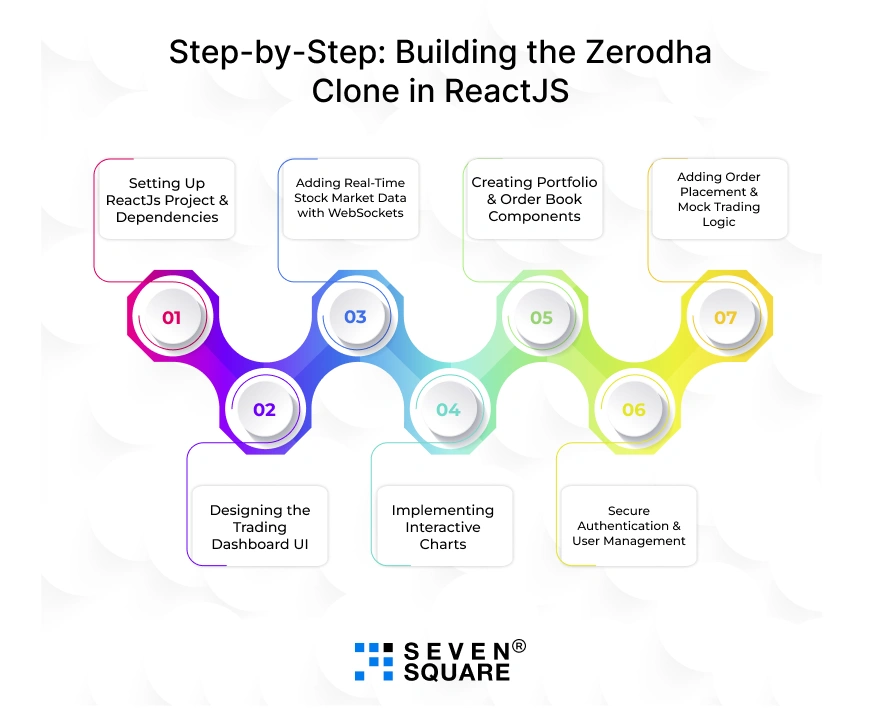
Let’s start building your Zerodha clone in ReactJS. Here is a step-by-step tutorial with code snippets you can directly use in your project.
Step 1: Setting Up ReactJs Project & Dependencies
First, create a new React project using Vite (faster than CRA):
            # Create a ReactJS project
            npm create vite@latest zerodha-clone --template react

            cd zerodha-clone

            # Install dependencies
            npm install axios recharts socket.io-client react-router-dom tailwindcss
Initialize TailwindCSS:
npx tailwindcss init -p
Now you can start building your ReactJS trading app clone.
Step 2: Designing the Trading Dashboard UI (Zerodha-Like UX)
Your dashboard should look clean and familiar. Create a Navbar, Sidebar, and Trading Panel:
            // src/components/Dashboard.jsx
            import React from "react";

            export default function Dashboard() {
            return (
                <div className="flex h-screen bg-gray-50">
                {/* Sidebar */}
                <aside className="w-60 bg-gray-900 text-white p-4">
                    <h2 className="text-xl font-bold">Zerodha Clone</h2>
                    <ul className="mt-6 space-y-3">
                    <li>Dashboard</li>
                    <li>Portfolio</li>
                    <li>Orders</li>
                    </ul>
                </aside>

                {/* Trading Panel */}
                <main className="flex-1 p-6">
                    <h1 className="text-2xl font-bold">Live Stock Dashboard</h1>
                    <div id="chart-area" className="mt-4"></div>
                </main>
                </div>
            );
            }
With TailwindCSS, the layout becomes responsive and mobile-friendly.
Step 3: Adding Real-Time Stock Market Data with WebSockets
To update prices in real time, use WebSockets:
            // src/components/LivePrices.jsx
            import React, { useEffect, useState } from "react";
            import { io } from "socket.io-client";

            export default function LivePrices() {
            const [prices, setPrices] = useState({});

            useEffect(() => {
                const socket = io("wss://your-stock-api-websocket");

                socket.on("priceUpdate", (data) => {
                setPrices(data);
                });

                return () => socket.disconnect();
            }, []);

            return (
                <div className="bg-white shadow rounded p-4 mt-4">
                <h2 className="text-xl font-semibold">Live Stock Prices</h2>
                {Object.keys(prices).map((symbol) => (
                    <p key={symbol}>
                    {symbol}: <span className="font-bold">₹{prices[symbol]}</span>
                    </p>
                ))}
                </div>
            );
            }
This will fetch live stock updates in ReactJS for your Zerodha clone.
Step 4: Implementing Interactive Charts (Candlestick & Indicators)
For technical analysis, integrate Recharts candlestick charts:
            // src/components/StockChart.jsx
            import React from "react";
            import { LineChart, Line, XAxis, YAxis, Tooltip, ResponsiveContainer } from "recharts";

            const data = [
            { time: "09:30", price: 210 },
            { time: "10:00", price: 215 },
            { time: "10:30", price: 212 },
            { time: "11:00", price: 220 },
            ];

            export default function StockChart() {
            return (
                <div className="bg-white p-4 rounded shadow mt-4">
                <h2 className="text-xl font-semibold">Candlestick Chart</h2>
                <ResponsiveContainer width="100%" height={300}>
                    <LineChart data={data}>
                    <XAxis dataKey="time" />
                    <YAxis />
                    <Tooltip />
                    <Line type="monotone" dataKey="price" stroke="#2563eb" strokeWidth={2} />
                    </LineChart>
                </ResponsiveContainer>
                </div>
            );
            }
You can extend this with RSI, MA, and Bollinger Bands for a real Zerodha-like experience.
Step 5: Creating Portfolio & Order Book Components
A portfolio shows holdings, while an order book tracks trades:
            // src/components/Portfolio.jsx
            import React, { useState } from "react";

            export default function Portfolio() {
            const [portfolio] = useState([
                { symbol: "TCS", qty: 10, price: 3500 },
                { symbol: "INFY", qty: 5, price: 1600 },
            ]);

            return (
                <div className="bg-white p-4 rounded shadow mt-4">
                <h2 className="text-xl font-semibold">My Portfolio</h2>
                <table className="w-full mt-2">
                    <thead>
                    <tr>
                        <th>Stock</th>
                        <th>Qty</th>
                        <th>Price</th>
                    </tr>
                    </thead>
                    <tbody>
                    {portfolio.map((p, i) => (
                        <tr key={i}>
                        <td>{p.symbol}</td>
                        <td>{p.qty}</td>
                        <td>₹{p.price}</td>
                        </tr>
                    ))}
                    </tbody>
                </table>
                </div>
            );
            }
This gives users a Zerodha-style portfolio & order book experience.
Step 6: Adding Order Placement & Mock Trading Logic
Simulate trades with buy/sell buttons:
            // src/components/TradeBox.jsx
            import React, { useState } from "react";

            export default function TradeBox() {
            const [orders, setOrders] = useState([]);

            const placeOrder = (type) => {
                const newOrder = { stock: "TCS", type, qty: 1, price: 3500 };
                setOrders([...orders, newOrder]);
            };

            return (
                <div className="bg-white p-4 rounded shadow mt-4">
                <h2 className="text-xl font-semibold">Place Order</h2>
                <button
                    className="bg-green-600 text-white px-4 py-2 rounded mr-2"
                    onClick={() => placeOrder("BUY")}
                >
                    Buy
                </button>
                <button
                    className="bg-red-600 text-white px-4 py-2 rounded"
                    onClick={() => placeOrder("SELL")}
                >
                    Sell
                </button>

                <h3 className="mt-4 font-bold">Orders:</h3>
                <ul>
                    {orders.map((o, i) => (
                    <li key={i}>{o.type} {o.qty} {o.stock} @ ₹{o.price}</li>
                    ))}
                </ul>
                </div>
            );
            }
This creates a mock order placement flow like Zerodha’s trading panel.
Step 7: Secure Authentication & User Management
Add JWT authentication and protect routes:
            // src/utils/PrivateRoute.jsx
            import React from "react";
            import { Navigate } from "react-router-dom";

            export default function PrivateRoute({ children }) {
            const token = localStorage.getItem("token");
            return token ? children : <Navigate to="/login" />;
            }
With JWT login/signup, only authenticated users can trade.
Explore the Code to Create a Stock Trading Clone like Zerodha in ReactJs.
What Are the Best Practices for Building a Real Stock Trading App?
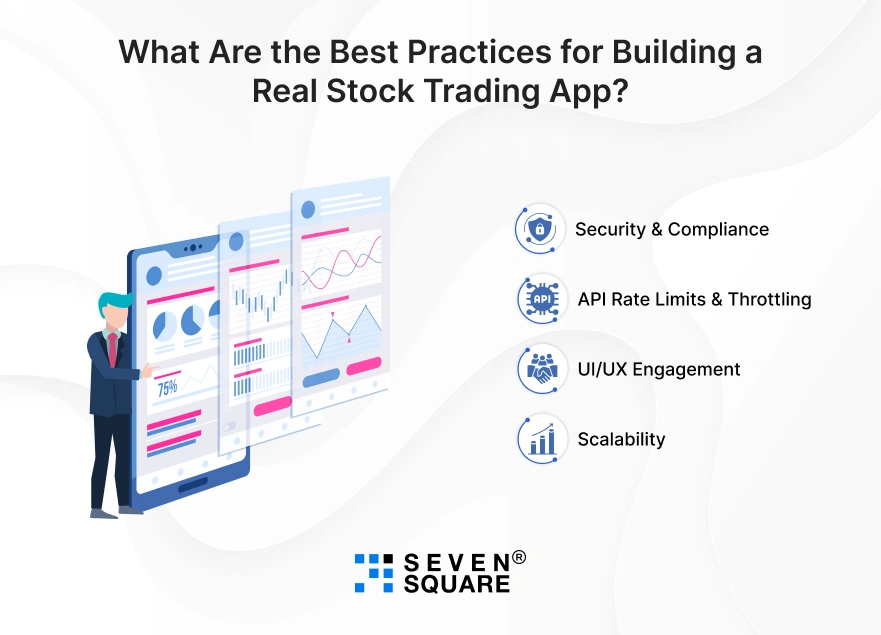
When you are going beyond a simple clone into a real-world stock trading platform, you’ll need to follow some best practices:
- Security & Compliance: Implement secure authentication (JWT, OAuth), encrypt user data, and follow financial compliance rules.
- API Rate Limits & Throttling: Most brokerage APIs (like Zerodha Kite Connect) have call limits that use caching and queuing.
- UI/UX Engagement: Keep the interface simple, fast, and mobile-friendly. Add dark mode for traders.
- Scalability: Architect your app with microservices and cloud deployment so it can handle thousands of users trading simultaneously.
These steps ensure your ReactJS trading app can compete with platforms like Zerodha or Groww.
What Are the Advanced Features You Can Add (Creating More Than Zerodha Clone)?
If you want to differentiate your stock trading app, consider adding advanced features:
- AI-based Stock Recommendations for personalized trading insights using machine learning.
- Push Notifications for Price Alerts to notify users when a stock crosses a set price.
- Social Trading (Copy Trades) lets users follow and copy successful traders.
- Dark Mode is a must-have for traders who spend hours on charts.
Adding these features will make your Zerodha clone in ReactJS stand out and attract more users.
How Can We Help You Build Trading Apps Faster?
If you want to go beyond just cloning Zerodha and launch a production-ready trading app, we can help.
Here’s how we add value:
- Custom ReactJS Stock Trading Apps for your business.
- Brokerage API Integration (Zerodha Kite Connect, AngelOne, Alpha Vantage, etc.).
- Real-Time Dashboards with WebSockets & live charts.
- Scalable FinTech Solutions that grow with your user base.
- End-to-End Deployment with security & compliance.
Want a Fintech Solution? Contact Us Now!
Build, Clone, & Innovate
Now you can start to build a Zerodha-like stock trading app in ReactJS with real-time data, charts, and secure features.
If you want a production-ready trading app with scalability and security, then reach out to us & we’ll help you build faster.
FAQs
- By using ReactJS for the frontend, Node.js for the backend, WebSockets for real-time data, and APIs like Kite Connect.
- Zerodha Kite Connect, Alpha Vantage, and Yahoo Finance API are popular options.
- Yes, you can connect React with Kite Connect via backend APIs and WebSocket streaming.
- Manage trades in state, display holdings, and use a backend API to handle logic.