Custom ERP costs more upfront than standard ERP. Standard ERP usually costs more over five years once complexity shows up. Standard ERP fits simple, stable, low-exception production. Custom ERP fits deep BOMs, frequent routing changes, or heavy compliance needs.
Does your ERP know what happened on your floor today,
or just what got logged?

A production planner opens the ERP every morning.
The system says 400 units are ready to ship.
The warehouse counts closer to 280.
Nobody questions the gap anymore, they just adjust it.
A batch got reworked last week, off-system.
A supplier substitution got logged in a group chat.
The ERP never learned about either change.
By month-end, three teams reconcile three different truths.
The ERP isn’t wrong.
It just never saw the real production day.
What Actually Decides Custom ERP for Manufacturing Fit

1. Planned Customization Beats Accidental Customization
Standard ERP rarely stays standard past year one.
Manufacturing complexity forces extensions, scripts, and side tools.
Custom ERP software plans that complexity in advance.
Accidental customization costs more and controls far less.
2. Revenue Is the Wrong Fit Signal
A $6 million make-to-stock plant may run a standard ERP fine.
A $3.5 million process or ETO plant often can’t.
BOM depth and routing predict fit better than revenue.
Manufacturing ERP systems succeed or fail on complexity, not size.
3. BOM Complexity Decides Your ERP Path
Simple, shallow bills of material fit generic templates well.
Deep, variant-heavy BOMs strain that template fast.
That complexity is the clearest early signal.
It tells you exactly when custom ERP becomes necessary.
4. Spreadsheets Reveal ERP Gaps
If a workflow still lives in Excel after go-live, it doesn’t fit.
Audit those spreadsheets before your next budget cycle.
They map exactly where manufacturing ERP systems fall short.
Each spreadsheet is a feature your ERP never built.
Where Standard ERP Breaks on the Shop Floor
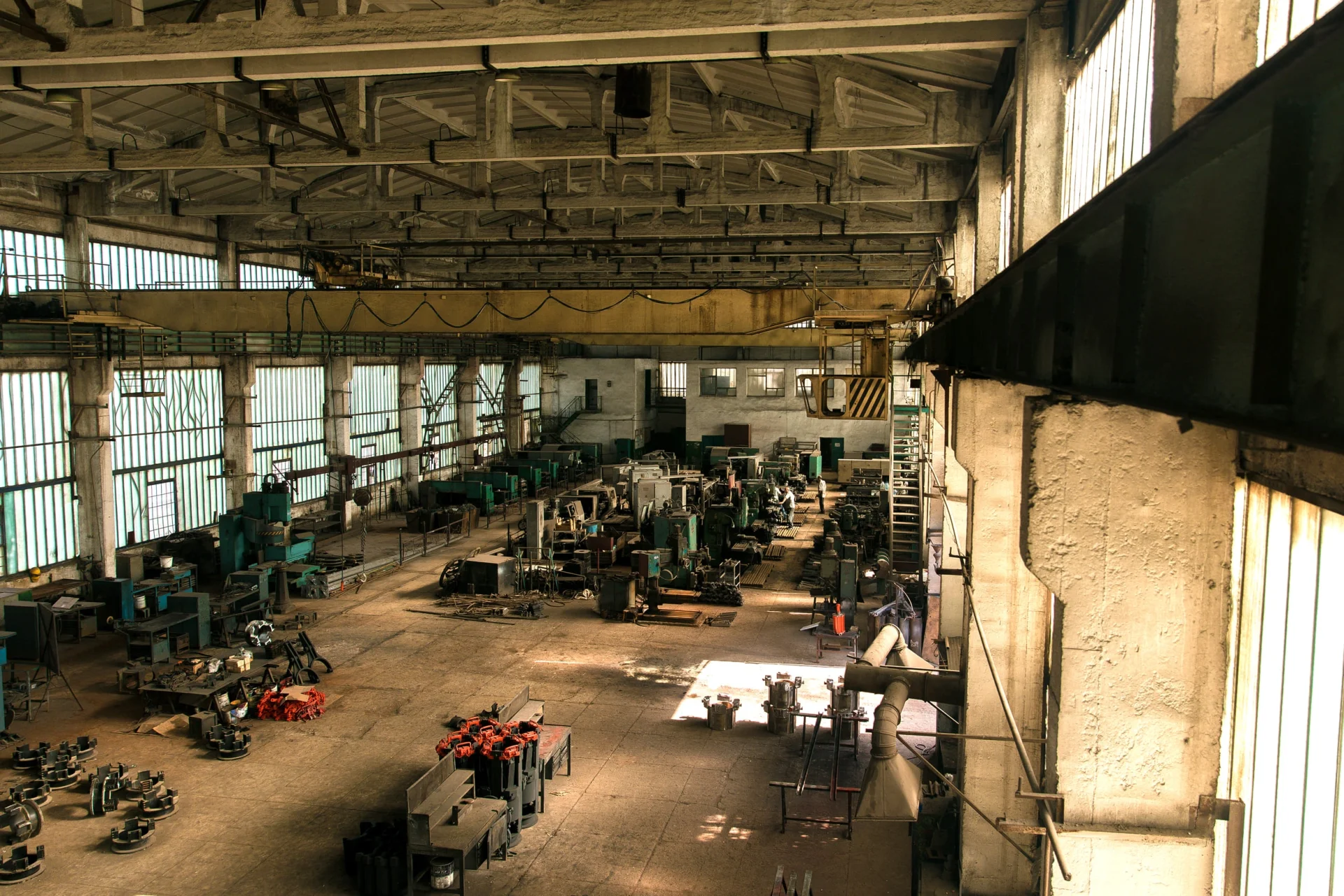
1. ERP Handles Paperwork Not Shop Floor Reality
ERP tracks transactions well.
It tracks exceptions poorly.
Rework, scrap, and inspection holds need something else.
That something else is MES or a custom layer.
2. Routing Changes Break What ERP Expects
Production scheduling software inside standard ERP assumes routing stays stable.
Real plants change routing every week.
Tooling shifts, substitutions, demand changes, none of it waits.
Planning and shop floor drift apart fast.
3. ERP Can’t See Machine Downtime in Real Time
ERP was never built for live machine data.
Machine downtime tracking needs continuous signals, not manual entries.
OEE tracking software needs that same live feed.
ERP and MES integration exists specifically to close this gap.
4. Compliance Rules Turn One Global ERP Local Anyway
Every region adds its own tax and compliance rule.
No “global” ERP survives contact with local requirements.
Every market ends up needing its own setup.
Compliance quietly turns standard ERP into custom ERP anyway.
Here is how that gap plays out in practice.
| Factor | Standard ERP | Custom ERP |
|---|---|---|
| Workflow fit | Broad fit, forces process change | Fits real shop-floor workflow |
| Shop-floor execution | Weak, needs MES or workarounds | Built around actual production flow |
| Speed to go live | Faster upfront | Slower design, cleaner long-term fit |
| Customization burden | Looks low, grows fast | Planned from day one |
| Cost structure | Lower entry, hidden spend later | Higher upfront, often lower five-year TCO |
| Best fit | Simple, stable operations | Complex, high-exception manufacturing |
This table is not about which option is cheaper.
It is about which option matches your actual operation.
Custom manufacturing software earns its cost back through fit.
Get this call right early, or rebuild it in three years.
Why Your ERP Cost Is Never the License Fee

1. Implementation Costs More Than the License
License fees are only 30 to 40 percent of total spend.
Implementation, training, and integration make up the rest.
A 100-user SAP rollout can run $798K to $2 million over three years.
That’s the real number CFOs should compare.
2. Customization Debt Builds After You Go Live
Every custom fix added later needs testing and review.
That debt compounds silently, year after year.
Planned custom ERP avoids this by fixing scope upfront.
Nothing gets bolted on after the fact.
3. Failed ERP Projects Cost More Than Custom Ever Would
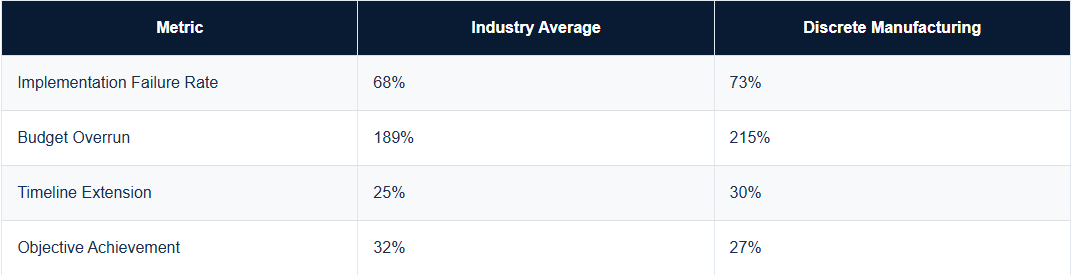
Discrete manufacturing ERP projects fail at a 73 percent rate.
Average cost overruns run near 215 percent.
A mid-sized implementation already costs close to $450,000.
That’s before any of those overruns hit.
4. Five Year Cost Beats Sticker Price Every Time
Compare software, implementation, customization, and support together.
Never compare one line item alone.
That’s the only honest way to evaluate ERP implementation cost.
Anything less hides the real number from you.
Where AI Actually Fits Inside Your ERP Stack

1. AI Reads Machine Data Your ERP Never Sees
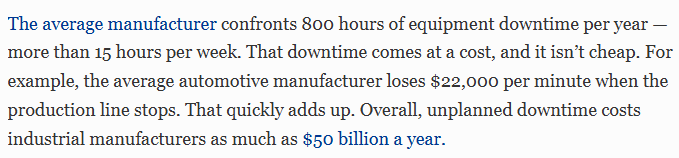
Unplanned downtime costs manufacturers $50 billion a year.
AI reads sensor data continuously, not on a schedule.
That closes a gap ERP alone can’t close.
Your ERP waits for entries but AI doesn’t.
2. Predictive Alerts Beat Reactive Firefighting
Predictive maintenance cuts breakdowns by 70 to 75 percent.
Most plants still run reactive, missing that gain.
AI flags failure risk before the machine stops.
That’s the difference between fixing and preventing.
3. AI Belongs Beside ERP Not Buried in It
Bolting AI into standard ERP creates upgrade risk.
A separate AI layer avoids that fragility entirely.
It survives your next ERP upgrade intact.
Keep AI modular, not welded to your core system.
4. Custom AI Solutions Make AI Useful on the Floor
Generic AI dashboards are built for finance teams.
A shift supervisor needs something built for the floor.
AI solutions run on your BOM, routing, and OEE data.
That’s what turns an AI feature into an AI advantage.
How to Actually Decide Between Custom and Standard ERP

1. Classify Your Manufacturing Model First
Discrete, process, engineer-to-order, and mixed-mode plants differ.
Each needs a different data model underneath.
Get this wrong and every next decision inherits the error.
Start here, not with a vendor demo.
2. Map Your Process Complexity Honestly
Count BOM levels, routing changes, and rework frequency.
High numbers across the board mean you need custom.
Low, stable numbers mean standard ERP holds up fine.
Your own data decides this, not a sales pitch.
3. Separate Planning From Execution Layers
Keep ERP for finance, procurement, and system-of-record work.
Push execution logic to MES or a custom layer.
This one split cuts most future upgrade friction.
Don’t force execution into a system built for records.
4. Calculate Real Five Year Ownership Cost Before Signing
Don’t compare license price against build cost directly.
Compare full five-year ownership, including your team’s time.
That number should drive your decision, not the quote.
The cheapest quote is rarely the cheapest system.
How We Fix an ERP That Doesn’t Fit Your Floor
1. Map the Operation Before Touching a Single Screen
BOM structure comes first, not a template.
Routing logic gets walked floor by floor, line by line.
Compliance load gets mapped across every region in play.
That mapping alone reveals what’s actually needed.
No build decision happens before this step.
2. Plant Engineers Test It Before It Ever Goes Live
Working prototypes go in front of plant managers first.
Engineers break it, flag it, and it gets fixed.
Every workflow gap surfaces before development locks in.
That single step kills months of post launch rework.
Nothing ships to the floor untested by the people using it.
3. ERP and Custom Layer Run Together for Years
Every integration point between ERP, MES, and the custom layer gets documented.
Each piece stays version controlled from day one.
The next ERP upgrade won’t break custom logic.
Technical debt from someone else’s shortcuts never gets inherited.
It gets built once and stays accountable long after.

Manufacturing ERP fit isn’t a one-time decision,
it’s a five-year bet.
FAQs
Usually not. Most plants keep ERP for finance and procurement and add a custom layer for execution. We audit what is actually broken before recommending any replacement, so you never pay to rebuild what already works.
If exceptions like rework, scrap, and inspection holds are already living in spreadsheets, that is your answer. We map those exceptions first and build the layer that actually absorbs them, instead of forcing another rigid module on your team.
Only if it is built without discipline. We document every integration point and keep the custom layer separate from ERP core logic. That separation is exactly what protects your future ERP upgrades from breaking.
Most focused builds run 10 to 16 weeks from mapping to go-live, depending on complexity. We phase the rollout around one production line first, so your operation never stops while we build.