Multi-device user sessions can be managed using Express, Redis, and JWT in Node.js. Each login gets a separate session linked to the user and device. This lets businesses track active sessions, manage concurrent logins, and revoke access remotely.
What Is Multi-Device Session Management?
Multi-device session management allows your app to recognize and manage each user session on a per-device basis.
It’s the system behind features like:
- Seeing where you’re logged in (e.g., WhatsApp Web, Gmail, & Netflix).
- Remotely logging out of other devices.
- Detecting unauthorized logins on new devices.
Apps like WhatsApp, Google, or banking platforms, track which devices a user is logged in on and let them manage those sessions easily.
That’s the power of multi-device session tracking. The benefits include:
- Better security through device-specific session control.
- Improved user experience.
- Support for concurrent session handling so users can be logged in on multiple devices without conflicts.
This becomes especially important for B2B apps, admin portals, or collaborative tools where multiple logins are standard.
How Node.js Handles Multi-Device Sessions
By default, Node.js (especially with Express) uses sessions stored in memory or via middleware like express-session.
These sessions are tied to cookies that identify the user. However, in a multi-device setup, simple session cookies aren’t enough. Why?
Because you need to associate multiple sessions with a single user and distinguish them by device.
That’s where a session store like Redis shines. Redis lets you:
- Store sessions in a persistent, fast-access database.
- Group multiple sessions under a single user ID.
- Invalidate sessions across one or more devices easily.
In short, proper Node.js session handling with Express sessions and Redis is the foundation for multi-device support.
System Design: Multi-Device Session Architecture
Let’s see how a multi-device session system works in Node.js:
Architecture Flow:
User → Auth Endpoint → Server → Session Store (Redis) → Device Session Mapping
Every time a user logs in:
- A new session (or token) is created.
- It’s tagged with the device ID.
- The session is saved in Redis & mapped to the user.
This setup allows actions like:
- Logging out from one or all devices.
- Listing active sessions with timestamps.
- Secure session validation per device.
Key Considerations:
- Scalability: Redis allows high-speed storage of thousands of sessions.
- Security: Encrypt tokens, validate device fingerprints.
- Isolation: Each device/session is independent, reducing risk.
This architecture is the core of a secure multi-device login system in Node.js, and it supports future scaling.
Step-by-Step: Build a Multi-Device Session System in Node.js
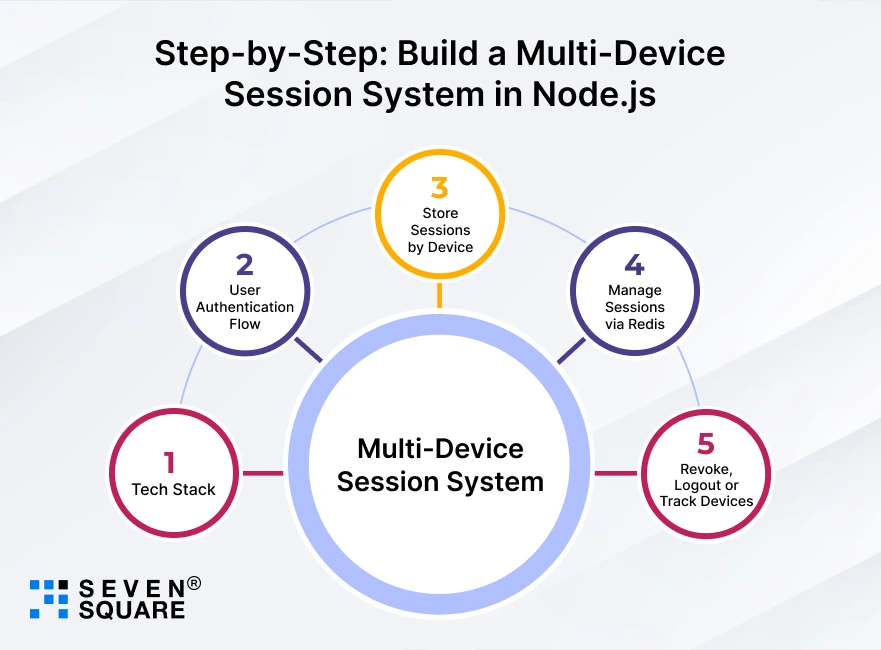
Learn to build a fully working multi-device session management system using modern tools and best practices.
Step 1: Tech Stack
- Node.js: Backend runtime
- Express.js: Server framework
- Redis: Stores sessions per device
- JWT: For stateless authentication
- UUID: To identify devices uniquely
This combination gives you a flexible, scalable, and secure setup.
Step 2: User Authentication Flow
- User logs in via /login with credentials
- A JWT token is generated along with a device ID
- JWT + Device ID is stored in Redis against the user ID
- All requests from that device must send the JWT
Learn to build token-based authentication in NodeJs with JWT.
Step 3: Store Sessions by Device
Each session is tied to a unique device identifier (UUID). This helps us distinguish between mobile, web, tablet, etc.
Here’s how to generate and use it:
const { v4: uuidv4 } = require('uuid');
            // When user logs in
            const deviceId = uuidv4(); // Unique per device
            const token = jwt.sign({ userId }, process.env.JWT_SECRET);
           // Store session in Redis
            await redisClient.hset(`sessions:${userId}`, deviceId, token);
This creates a Redis hash like:
sessions:user123
├── device_1: token123
└── device_2: token456
Step 4: Manage Sessions via Redis
Redis lets you:
- View all active sessions for a user
- Track sessions per device
- Remove or update tokens easily
To fetch all devices:
            const sessions = await redisClient.hgetall(`sessions:${userId}`);
            console.log("Active Devices:", Object.keys(sessions));
Step 5: Revoke, Logout or Track Devices
Need to log out a user from one device or all?
Revoke all sessions except current:
            const sessions = await redisClient.hgetall(`sessions:${userId}`);
                for (const device in sessions) {
                if (device !== currentDeviceId) {
                    await redisClient.hdel(`sessions:${userId}`, device);
                }
            }
Logout from specific device:
await redisClient.hdel(`sessions:${userId}`, targetDeviceId);
This is multi-session user management in Node.js simplified as Redis is doing the heavy lifting for session tracking.
Explore the full GitHub code for multi-device sessions in Node.js.
How We Implement Multi-Device Session Management
1. Session Architecture
The session architecture is designed around your application’s authentication requirements.
Each device receives an independently manageable user session.
Redis can store active sessions for fast access and control.
The structure also supports multiple application servers as usage grows.
2. Device Management
Device-level controls make active sessions easier to monitor and manage.
Users can view connected devices and revoke specific sessions remotely.
Login limits can restrict the number of concurrent sessions.
Automatic logout rules can remove older or inactive sessions.
3. Security Controls
JWT authentication can secure requests across multiple connected devices.
Redis enables quick session validation and targeted session revocation.
Expiration policies help prevent inactive sessions from remaining accessible.
Additional controls can address suspicious or unauthorized login activity.
4. Concurrent Logins
Growing applications need session infrastructure that handles concurrent users efficiently.
Redis provides fast access to frequently requested session information.
Distributed Node.js servers can share session data through centralized storage.
The setup can expand alongside increasing users and login activity.
5. Custom Requirements
Different products require different rules for managing user sessions.
A SaaS platform may need stricter limits for admin accounts.
Subscription products may require trusted devices or session monitoring.
Custom workflows can align session behavior with specific business requirements.
Need multi-device session management for your application?
FAQs
Consider your user types, supported devices, security requirements, and concurrent login rules. We structure the authentication flow around these needs before development begins. That helps avoid access issues as your product expands across devices.
Users can view connected devices, monitor login activity, and revoke unwanted access. We can build a dedicated device-management experience within your account settings. It gives users greater visibility and control over their account access.
Yes, device limits can be configured around your business or subscription model. For example, premium accounts could allow more concurrent device access. We can also trigger automatic logout when users exceed defined limits.
Strong authentication requires token validation, expiration rules, and targeted access revocation. We can combine JWT, Redis, and additional safeguards based on your requirements. These measures help protect accounts while supporting increasing login activity.
Only the selected device access can be revoked without affecting other devices. We can also support logout-from-all-devices for broader account protection. These options give users greater control when they suspect unauthorized access.