Users expect mobile apps to work everywhere, even with slow internet, no network, or unstable connections.
This is why offline-first mobile experiences have become a must-have for modern apps.
Whether you’re building a productivity tool, field app, finance app, eCommerce app, or enterprise platform, a Flutter offline sync system ensures your product remains reliable in every condition.
A strong offline mode combined with automatic data sync improves app stability, reduces user frustration, and keeps data consistent across devices.
When your app supports offline mode + auto sync, users can continue their work smoothly, and everything syncs in the background when the internet returns.
The benefits are powerful:
- Smooth user experience (no waiting for network calls).
- Faster load times due to local caching.
- Reduced API load, saving server costs.
- Higher user retention, especially in regions with weak networks.
This blog will walk you step-by-step on how to build a Flutter offline sync library that works smoothly, using the right architecture, storage engines, sync queues, delta sync, and background sync strategies.
What Is Offline Sync in Flutter?
Offline sync means your Flutter app continues working even without the internet and automatically syncs the data when online again.
This approach is called offline-first architecture, where the app stores data locally first and communicates with the server whenever a network connection is available.
A user’s journey often looks like this:
Online → Offline → Online Again
- The app keeps working.
- Data is saved locally.
- Queued actions sync automatically.
- Conflicts are resolved cleanly.
- The user never loses progress.
Where Offline Sync Is Used?
Many real-world apps depend on offline-first behavior:
- Finance apps (expense tracking, loan apps, & fintech tools).
- Field-service apps (surveys, inspections, & meter readings).
- Sales CRMs (offline lead updates, orders, & follow-ups).
- Healthcare apps (patient records, reports, & prescriptions).
- Travel apps (bookings, offline maps, & trip data).
Why Flutter Is Perfect for Offline-First Solutions?
- Fast cross-platform development.
- Strong package ecosystem (Hive, Sqflite, ObjectBox, connectivity_plus).
- Lightweight UI updates during sync.
- Easy to create background processes.
- Smooth performance even with large offline data sets.
This makes Flutter one of the best frameworks for building offline-first, sync-ready mobile apps.
How Your Flutter Offline Sync Library Should Work?
Here’s how a solid offline-first Flutter architecture functions:
High-Level Data Flow
Write Data → Save Locally → Add to Sync Queue → Sync to Server → Resolve Conflicts → Update UI
Event-Based Sync vs Scheduled Sync
- Event-Based
- On reconnect
- On app open
- On specific actions
- Scheduled Sync
- Every X minutes
- Ideal for field apps
Best Practices for API Design
- Use versioning.
- Support delta sync.
- Add timestamps for conflict resolution.
- Use lightweight JSON.
- Keep endpoints stateless.
This ensures your offline-first Flutter app remains scalable and stable.
Step-by-Step Guide: Build Your Own Flutter Offline Sync Library
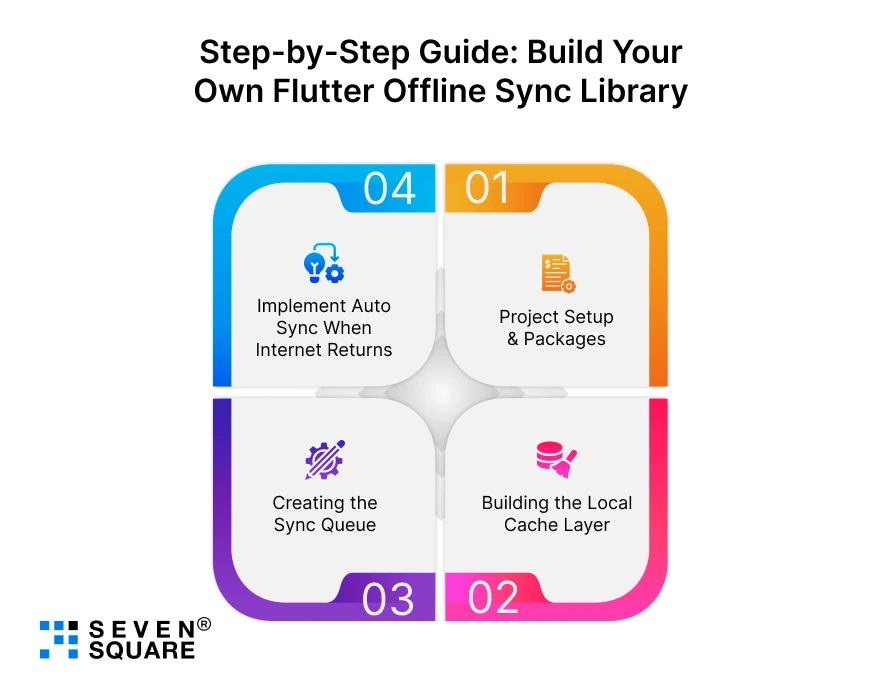
We’ll build a minimal but production-minded offline sync system for Flutter.
Step 1: Project Setup & Packages
pubspec.yaml includes both Hive and Sqflite options; pick one storage engine for your project or support both.
                name: flutter_offline_sync
                description: Offline-first Flutter app with auto sync example

                environment:
                sdk: ">=2.18.0 <3.0.0"

                dependencies:
                flutter:
                    sdk: flutter

                # Networking
                http: ^0.13.6
                dio: ^5.0.0

                # Network detection (connectivity_plus is the de-facto choice)
                connectivity_plus: ^4.0.0

                # Local storage (choose one)
                hive: ^2.2.3
                hive_flutter: ^1.1.0
                # OR
                sqflite: ^2.2.8
                path_provider: ^2.0.14

                # Background tasks (optional, for production)
                workmanager: ^0.6.2

                dev_dependencies:
                hive_generator: ^2.0.0
                build_runner: ^2.4.6
Initialize Hive (if using Hive)
                // main.dart (partial)
                import 'package:flutter/material.dart';
                import 'package:hive_flutter/hive_flutter.dart';

                Future<void> main() async {
                WidgetsFlutterBinding.ensureInitialized();
                await Hive.initFlutter();
                // Register adapters: Hive.registerAdapter(TodoAdapter());
                await Hive.openBox('sync_queue');
                await Hive.openBox('local_data');
                runApp(MyApp());
                }
Initialize Sqflite (if using Sqflite)
               // db_helper.dart (partial)
                import 'package:path/path.dart';
                import 'package:sqflite/sqflite.dart';

                class DbHelper {
                static final DbHelper instance = DbHelper._();
                static Database? _db;
                DbHelper._();

                Future<Database> get db async {
                    if (_db != null) return _db!;
                    _db = await _initDB('offline_sync.db');
                    return _db!;
                }

                Future<Database> _initDB(String fileName) async {
                    final path = join(await getDatabasesPath(), fileName);
                    return await openDatabase(path, version: 1, onCreate: _create);
                }

                Future _create(Database db, int version) async {
                    await db.execute('''
                    CREATE TABLE local_items (
                    id TEXT PRIMARY KEY,
                    data TEXT,
                    updated_at INTEGER
                    )
                    ''');
                    await db.execute('''
                    CREATE TABLE sync_queue (
                    id TEXT PRIMARY KEY,
                    action TEXT,
                    payload TEXT,
                    attempts INTEGER,
                    created_at INTEGER
                    )
                    ''');
                }
                }
Step 2: Building the Local Cache Layer
You need models and storage helpers.
Example Model (simple JSON-compatible model)
               // models/item.dart
                class Item {
                final String id;
                final Map<String, dynamic> data;
                final DateTime updatedAt;

                Item({required this.id, required this.data, DateTime? updatedAt})
                    : updatedAt = updatedAt ?? DateTime.now();

                Map<String, dynamic> toJson() => {
                        'id': id,
                        'data': data,
                        'updated_at': updatedAt.toIso8601String(),
                    };

                factory Item.fromJson(Map<String, dynamic> json) => Item(
                        id: json['id'],
                        data: Map<String, dynamic>.from(json['data']),
                        updatedAt: DateTime.parse(json['updated_at']),
                    );
                }
Hive Local Storage Helper
               // storage/hive_storage.dart
                import 'package:hive/hive.dart';
                import '../models/item.dart';
                import 'dart:convert';

                class HiveStorage {
                final Box localBox = Hive.box('local_data');

                Future saveItem(Item item) async {
                    await localBox.put(item.id, jsonEncode(item.toJson()));
                }

                Item? getItem(String id) {
                    final raw = localBox.get(id);
                    if (raw == null) return null;
                    return Item.fromJson(Map<String, dynamic>.from(jsonDecode(raw)));
                }

                List<Item> getAllItems() {
                    return localBox.values
                        .map((e) => Item.fromJson(Map<String, dynamic>.from(jsonDecode(e))))
                        .toList();
                }

                Future<void> deleteItem(String id) async {
                    await localBox.delete(id);
                }
                }
Sqflite Local Storage Helper
               // storage/sqflite_storage.dart
                import 'dart:convert';
                import 'package:sqflite/sqflite.dart';
                import '../models/item.dart';
                import '../db_helper.dart';

                class SqfliteStorage {
                Future<void> saveItem(Item item) async {
                    final db = await DbHelper.instance.db;
                    await db.insert(
                    'local_items',
                    {'id': item.id, 'data': jsonEncode(item.data), 'updated_at': item.updatedAt.millisecondsSinceEpoch},
                    conflictAlgorithm: ConflictAlgorithm.replace,
                    );
                }

                Future<Item?> getItem(String id) async {
                    final db = await DbHelper.instance.db;
                    final rows = await db.query('local_items', where: 'id = ?', whereArgs: [id]);
                    if (rows.isEmpty) return null;
                    final r = rows.first;
                    return Item(
                    id: r['id'] as String,
                    data: Map<String, dynamic>.from(jsonDecode(r['data'] as String)),
                    updatedAt: DateTime.fromMillisecondsSinceEpoch(r['updated_at'] as int),
                    );
                }

                Future<List<Item>> getAllItems() async {
                    final db = await DbHelper.instance.db;
                    final rows = await db.query('local_items');
                    return rows.map((r) => Item(
                    id: r['id'] as String,
                    data: Map<String, dynamic>.from(jsonDecode(r['data'] as String)),
                    updatedAt: DateTime.fromMillisecondsSinceEpoch(r['updated_at'] as int),
                    )).toList();
                }
                }
Handling Updates from API
When the server returns an updated item, merge it into the local cache. Use updated_at timestamps (critical for delta sync & conflict resolution).
               Future<void> applyServerUpdate(Item serverItem) async {
                final existing = await storage.getItem(serverItem.id); // any storage implementation
                    if (existing == null || serverItem.updatedAt.isAfter(existing.updatedAt)) {
                        await storage.saveItem(serverItem);
                    } else {
                        // local change is newer — handle via conflict resolution
                    }
                }
Step 3: Creating the Sync Queue (Offline Action Queue)
A reliable sync queue persists pending actions (create/update/delete) until they are pushed to the server.
OfflineAction model
              // models/offline_action.dart
                class OfflineAction {
                final String id; // uuid
                final String action; // e.g., 'create', 'update', 'delete'
                final Map payload;
                final int attempts;
                final DateTime createdAt;

                OfflineAction({
                    required this.id,
                    required this.action,
                    required this.payload,
                    this.attempts = 0,
                    DateTime? createdAt,
                }) : createdAt = createdAt ?? DateTime.now();

                Map<String, dynamic> toJson() => {
                        'id': id,
                        'action': action,
                        'payload': payload,
                        'attempts': attempts,
                        'created_at': createdAt.toIso8601String(),
                    };

                factory OfflineAction.fromJson(Map<String, dynamic> json) => OfflineAction(
                        id: json['id'],
                        action: json['action'],
                        payload: Map<String, dynamic>.from(json['payload']),
                        attempts: json['attempts'] ?? 0,
                        createdAt: DateTime.parse(json['created_at']),
                    );
                }
Queue Manager (using Hive – adapt for Sqflite)
              // sync/queue_manager.dart
                import 'package:hive/hive.dart';
                import '../models/offline_action.dart';
                import 'dart:convert';
                import 'package:uuid/uuid.dart';

                class QueueManager {
                final Box queueBox = Hive.box('sync_queue');
                final uuid = Uuid();

                Future<String> enqueue(String action, Map<String, dynamic> payload) async {
                    final id = uuid.v4();
                    final offlineAction = OfflineAction(id: id, action: action, payload: payload);
                    await queueBox.put(id, jsonEncode(offlineAction.toJson()));
                    return id;
                }

                List<OfflineAction> getAllPending() {
                    return queueBox.values.map((e) => OfflineAction.fromJson(jsonDecode(e))).toList();
                }

                Future<void> remove(String id) async => await queueBox.delete(id);

                Future<void> incrementAttempts(String id) async {
                    final raw = queueBox.get(id);
                    if (raw == null) return;
                    final action = OfflineAction.fromJson(jsonDecode(raw));
                    final updated = OfflineAction(
                    id: action.id,
                    action: action.action,
                    payload: action.payload,
                    attempts: action.attempts + 1,
                    createdAt: action.createdAt,
                    );
                    await queueBox.put(id, jsonEncode(updated.toJson()));
                }
                }
Retrying Failed Actions (exponential backoff)
                Future<void> processQueue() async {
                    final pending = queueManager.getAllPending();
                    for (final action in pending) {
                        try {
                        final success = await syncEngine.processAction(action);
                        if (success) await queueManager.remove(action.id);
                        else {
                            await queueManager.incrementAttempts(action.id);
                            if (action.attempts >= 5) {
                            // report to server or escalate
                            }
                        }
                        } catch (e) {
                        await queueManager.incrementAttempts(action.id);
                        }
                    }
                }
Delta Sync Approach
Delta sync syncs only changed records. Implement server APIs that accept a changed_since timestamp and return only modified items. Locally, keep updated_at on each record.
                // Example fetch delta from server
                Future<List<Item>> fetchDelta(DateTime? lastSync) async {
                final since = lastSync?.toIso8601String() ?? '';
                final response = await http.get(Uri.parse('$apiBase/items/delta?since=$since'));
                // parse and return Item list
                }
Use lastSyncedAt in local preferences to avoid full sync.
Step 4: Implement Auto Sync When Internet Returns
Use connectivity_plus to watch network state and trigger background sync.
For background sync when the app is closed, integrate workmanager or platform-specific background jobs (Android JobScheduler, iOS BGTasks). Below is a foreground & reconnect example.
Connectivity Listener + Trigger
                import 'dart:async';
                import 'package:connectivity_plus/connectivity_plus.dart';

                class ConnectivityService {
                final Connectivity _connectivity = Connectivity();
                StreamSubscription? _sub;

                void start( Function onOnline ) {
                    _sub = _connectivity.onConnectivityChanged.listen((result) async {
                    final isOnline = result != ConnectivityResult.none;
                    if (isOnline) {
                        // call the sync engine
                        onOnline();
                    }
                    });
                }

                void dispose() {
                    _sub?.cancel();
                }
                }
Sync Engine Triggered on Reconnect
                // sync/sync_engine.dart
                class SyncEngine {
                final QueueManager queueManager;
                final storage; // HiveStorage or SqfliteStorage
                DateTime? lastSync;

                SyncEngine(this.queueManager, this.storage);

                Future<void> syncPending() async {
                    // 1. Sync queued actions first (client -> server)
                    await processQueue();

                    // 2. Fetch server deltas (server -> client)
                    final serverItems = await fetchDelta(lastSync);
                    for (final it in serverItems) {
                    await applyServerUpdate(it);
                    }

                    lastSync = DateTime.now();
                }

                Future<bool> processAction(OfflineAction action) async {
                    // map action.action to API call
                    // return true on success, false on transient failure
                }
                }
Here’s the Complete GitHub Code to Build a Flutter Offline Sync Library That Work Smoothly.
What Are the Performance Optimization Tips for Offline Sync Flutter Apps?
To ensure your offline-sync library stays fast and efficient, follow these performance techniques:
Reduce Sync Load
- Only send changed fields
- Avoid syncing unnecessary tables
- Use compression if needed
Optimize DB Reads/Writes
- Use Hive for fast caching
- Use indices in Sqflite
- Use ObjectBox for large datasets
Prevent API Over-Calling
- Batch actions
- Use debounce strategies
- Add cooldown periods
Use Background Isolates
- Offload heavy processing
- Avoid UI lag
- Run sync logic on a separate isolate
These steps boost your offline data sync performance.
Why Choose Us for Building Offline-First Flutter Apps?
We build offline-first Flutter apps that perform smoothly even in unstable network environments.
- Deep expertise in offline sync, offline-first architecture, and Flutter offline libraries.
- Expertise using Hive, Sqflite, ObjectBox, connectivity_plus, and custom sync engines.
- Proven experience building scalable, secure, and high-performance apps.
- Strong track record in working with global clients across industries.
- Transparent process, fast delivery, and long-term support.
Want a Scalable Offline-First Flutter App? Contact Us Today!
What Are the Advanced Features You Can Add to Make It Production-Ready?
To take your Flutter offline sync solution to the next level:
- Encrypted storage for sensitive data.
- Batch syncing to reduce server load.
- Token refresh + secure sync for authenticated apps.
- Multi-device conflict resolution across multiple users.
- Incremental delta sync for faster updates.
- Push-based sync using WebSockets for real-time systems.
These features make your library enterprise-ready.
Build Offline-First. Sync Smart. Scale Fast
Building a reliable Flutter offline sync library is one of the smartest ways to make your mobile app faster, smoother, and more user-friendly.
With the right architecture, queuing system, local storage engine, and background sync logic, your app can offer a seamless experience even without the internet.
FAQs
- Use connectivity_plus to detect online state, then trigger your sync engine to process queued actions automatically.
- No single package solves everything. Most apps combine Hive, Sqflite, connectivity_plus, and a custom sync engine.
- Use background isolates, event triggers, and scheduled tasks to run sync without blocking UI.
- Choose Sqflite or ObjectBox for heavy data, indexing, and complex relationships.