Bulk file processing sounds simple until your Laravel or PHP app crashes at the worst time.
Many businesses try to process thousands of files or massive CSVs using basic loops or synchronous requests.
This leads to timeouts, memory leaks, slow queue performance, and server overload. In real-world projects, we often see:
- Laravel workers are stuck due to large file uploads.
- PHP scripts are crashing because of RAM overload.
- Slow queues are struggling with high-volume file processing.
- The entire application freezes during bulk file imports.
In this blog, you will learn how to build a scalable bulk file processing system in PHP & Laravel using queues, jobs, chunking, and parallel processing.
By the end, you’ll know exactly how to create a production-ready engine that can process thousands or even millions of files without downtime with real Laravel code.
What Does “Scalable Bulk File Processing” Mean in Laravel?
A “scalable” bulk file processing system in Laravel means your app can handle large files, high volumes, and continuous workloads without slowing down or crashing.
Your Laravel app should be able to process 100, 10,000, or even 1 million files with consistent performance. A scalable Laravel file processing system relies on:
- Queues to process files in the background.
- Workers running in parallel.
- Chunking to avoid loading entire files into memory.
- Event-driven logic to automate steps.
- Storage options like Local Disk or AWS S3.
Your architecture will look like this (high-level):
- Users upload bulk files.
- The system stores them securely.
- A file watcher triggers processing.
- Queues & Jobs handle the heavy tasks.
- Each file is processed in chunks.
- Status updates & notifications keep users informed.
Here you can learn how to build this entire flow using PHP & Laravel, with real code examples.
What Are the Core Laravel Features That Make Bulk Processing Powerful?
Before building your bulk file processing engine, you need to understand the Laravel features that make large-scale processing possible.
- Queues & Workers: They allow your system to process files in the background, preventing long waits and timeouts.
- Job Batching: Batch jobs help process thousands of files in groups, improving speed and giving you better monitoring.
- Event-Driven Processing: Laravel’s event system helps trigger actions automatically when uploads finish or when a file is processed.
- Chunked File Reading: Instead of loading a 500MB file into memory, Laravel can read it line by line or chunk by chunk, a major win for scalability.
- Storage Handling (Local + S3): Your processing engine can easily work with local storage, S3 buckets, or any cloud storage, helping you scale globally.
All these features combine to create a powerful Laravel bulk file processing pipeline.
How Your Laravel Bulk File Processing Engine Will Work?
Before writing any code, here’s the architecture behind a scalable bulk file processing PHP Laravel system:
Upload Module
- Users upload multiple files (CSV/XML/Images/PDFs).
- Files are validated, stored, and queued for processing.
File Watcher
- A watcher automatically detects new uploads and sends them for processing.
- It eliminates the need for manual file selection.
Processing Pipeline
This is the core layer where files are:
- Read in chunks
- Processed line by line
- Cleaned, validated, transformed
- Saved into the database
Queue Workers
Multiple Laravel queue workers run in parallel:
- Speeding up processing
- Avoiding timeouts
- Allowing distributed scaling
Notification / Status Tracking Module
Users see real-time updates like:
- “Processing started”
- “File 1 of 300 completed”
- “Batch completed”
This increases transparency and improves user experience.
Step-By-Step Guide to Build a Bulk File Processing System
Here you will learn to build a scalable bulk file processing system in PHP & Laravel completely from scratch.
1. Create the Project Setup
Step 1: Install Laravel
You can create a fresh Laravel project using Composer:
                composer create-project laravel/laravel bulk-file-processing
                cd bulk-file-processing
Install dependencies required for queues and processing:
composer require predis/predis
Step 2: Configure Queue Driver
Open .env:
QUEUE_CONNECTION=redis
Start Redis (locally or Docker):
docker run --name redis -p 6379:6379 -d redis
Step 3: Install Laravel Horizon (For Scaling)
Horizon is the best tool for monitoring large-scale Laravel file processing systems.
                composer require laravel/horizon
                php artisan horizon:install
                php artisan migrate
                php artisan horizon
Set Horizon as the default supervisor in .env:
HORIZON_PREFIX=bulk-processing
Step 4: Configure Supervisor (For Production)
Create config /etc/supervisor/conf.d/laravel-worker.conf:
                [program:laravel-worker]
                process_name=%(program_name)s_%(process_num)02d
                command=php /var/www/html/artisan horizon
                autostart=true
                autorestart=true
                user=www-data
                numprocs=1
                redirect_stderr=true
                stdout_logfile=/var/log/horizon.log
Reload:
                sudo supervisorctl reread
                sudo supervisorctl update
                sudo supervisorctl start laravel-worker:*
Your Laravel processing engine is now ready.
2. Designing the File Upload + Validation Module
To build a scalable file upload system, we need to:
- Accept large/bulk files
- Store them efficiently
- Avoid memory issues
- Queue them for background processing
Step 1: Create Controller for Uploads
php artisan make:controller FileUploadController
Add this code:
                namespace App\Http\Controllers;

                use Illuminate\Http\Request;
                use App\Jobs\ProcessBulkFile;
                use Illuminate\Support\Facades\Storage;

                class FileUploadController extends Controller
                {
                    public function upload(Request $request)
                    {
                        $request->validate([
                            'files.*' => 'required|file|max:51200', // 50MB per file
                        ]);

                        foreach ($request->file('files') as $file) {
                            $path = $file->store('uploads');

                            // Dispatch job for processing
                            ProcessBulkFile::dispatch($path);
                        }

                        return response()->json([
                            'message' => 'Files uploaded successfully. Processing started!'
                        ]);
                    }
                }
Step 2: Routes
Add in routes/web.php:
                use App\Http\Controllers\FileUploadController;

                Route::post('/upload-files', [FileUploadController::class, 'upload']);
Step 3: Avoid File-Size Bottlenecks
Laravel automatically stores files using streams, avoiding RAM overload. To improve scalability:
- Use S3 for large workloads.
- Use chunk-level validation.
- Never process files inside the controller.
3. Queue-Based Processing: The Brain of the System
Step 1: Create Job
php artisan make:job ProcessBulkFile
Add this inside app/Jobs/ProcessBulkFile.php:
                namespace App\Jobs;
                use Illuminate\Bus\Queueable;
                use Illuminate\Contracts\Queue\ShouldQueue;
                use Illuminate\Foundation\Bus\Dispatchable;
                use Illuminate\Queue\InteractsWithQueue;
                use Illuminate\Queue\SerializesModels;
                use App\Services\FileProcessorService;

                class ProcessBulkFile implements ShouldQueue
                {
                    use Dispatchable, InteractsWithQueue, Queueable, SerializesModels;

                    public $path;

                    public function __construct($path)
                    {
                        $this->path = $path;
                    }

                    public function handle()
                    {
                        (new FileProcessorService)->process($this->path);
                    }
                }
Step 2: Chunking File Data
This prevents Laravel from loading entire files into memory. Example in service class:
                $handle = fopen(Storage::path($path), 'r');

                while (($line = fgetcsv($handle, 10000, ",")) !== false) {
                    // process line
                }
Step 3: Processing Logic Example
Process CSV rows:
                foreach ($dataChunk as $row) {
                    User::updateOrCreate(
                        ['email' => $row[1]],
                        ['name' => $row[0], 'status' => 'Imported']
                    );
                }
4. Building the Processing Engine
Create service:
php artisan make:service FileProcessorService
Create app/Services/FileProcessorService.php:
                namespace App\Services;
                use Illuminate\Support\Facades\Log;
                use Illuminate\Support\Facades\Storage;
                class FileProcessorService
                {
                    public function process($path)
                    {
                        $fullPath = Storage::path($path);
                        $handle = fopen($fullPath, 'r');

                        if (!$handle) {
                            Log::error("Cannot open file: $path");
                            return;
                        }

                        $batch = [];
                        $batchSize = 500; // Process 500 lines per chunk

                        while (($line = fgetcsv($handle, 10000, ',')) !== false) {

                            $batch[] = $line;

                            if (count($batch) >= $batchSize) {
                                $this->processChunk($batch);
                                $batch = [];
                            }
                        }

                        // Process remaining data
                        if (!empty($batch)) {
                            $this->processChunk($batch);
                        }

                        fclose($handle);
                    }

                    private function processChunk($chunk)
                    {
                        foreach ($chunk as $row) {
                            try {
                                // Example logic
                                \App\Models\Record::create([
                                    'name' => $row[0],
                                    'email' => $row[1],
                                    'status' => 'Processed',
                                ]);

                            } catch (\Exception $e) {
                                Log::error("Row failed: " . $e->getMessage());
                            }
                        }
                    }
                }
5. Handling Large CSV, XML, Images & PDFs in Bulk
You can process different file types using the same pipeline.
CSV File Processing
- Handled via chunk reading.
XML Processing Example
                $xml = new \XMLReader();
                $xml->open($fullPath);

                while ($xml->read() && $xml->name !== 'item') {}

                while ($xml->name === 'item') {
                    $node = simplexml_load_string($xml->readOuterXML());
                    // process node
                    $xml->next('item');
                }
Image Processing Example
                $image = Image::make(Storage::path($path))
                ->resize(800, 600)
                ->save(Storage::path('processed/'.$filename));
PDF Processing Example
                $text = (new \Smalot\PdfParser\Parser)
                ->parseFile($fullPath)
                ->getText();
Here’s the Complete GitHub Code to Build a Bulk File Processing System in PHP & Laravel.
How We Can Help To Build Scalable Laravel Solutions?
- We build complete Bulk File Processing Engines using PHP & Laravel, with file upload, validation, queues, workers, chunk processing, & dashboards.
- Experts in handling large CSV, XML, PDF, Image, and JSON files with chunk-based processing and optimized storage.
- Our team configures Laravel Queue, Redis, Horizon, and Supervisor for ultra-fast processing of thousands of records.
- We build systems with retry strategies, fallback workers, and auto-recovery for stable performance.
Want a Customized PHP & Laravel Solution? Contact Us Now!
How to Add Notifications, Logs & Progress Tracking?
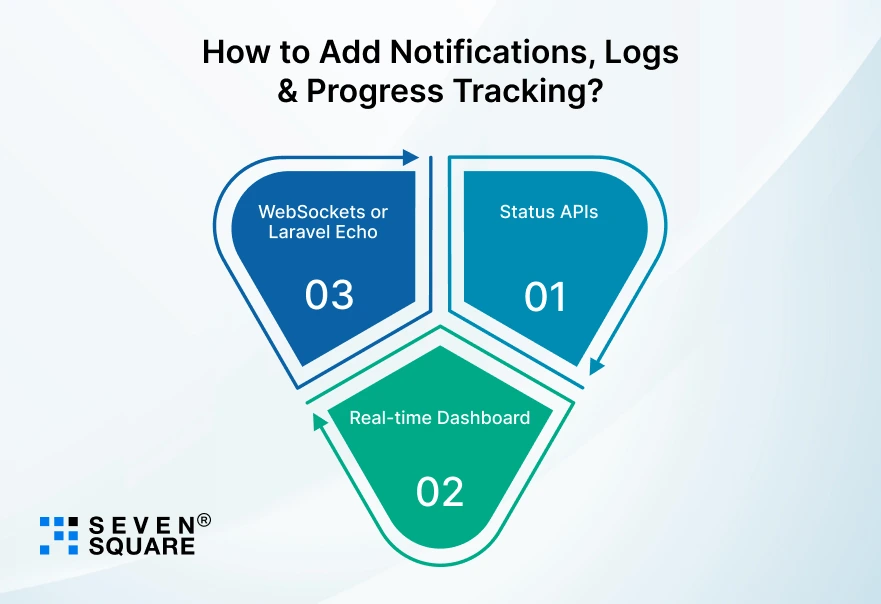
A scalable system isn’t complete without visibility. Add:
1. Status APIs
Provide APIs like:
- /status/{fileId}
- /batch-progress/{batchId}
2. Real-time Dashboard
- Show % progress, pending jobs, and completed batches using Laravel Horizon.
3. WebSockets or Laravel Echo
Enable instant notifications like:
- “File processed successfully”
- “Error in file #23”
- “Batch completed”
This creates a professional-grade file processing platform.
Build Once & Scale to Millions of Files with Laravel
A scalable bulk file processing system is important for businesses managing large workloads.
With Laravel’s queues, workers, chunking, event-driven processing, and Redis optimization, you can build a powerful engine that processes thousands or even millions of files without slowing down.
FAQs
- Yes, Laravel can process millions of files when you use queues, chunking, Redis, and Horizon.
- The key is to avoid loading full files into memory and rely on asynchronous background processing.
- Redis is the best choice for bulk file processing in Laravel because it is fast, lightweight, and handles thousands of jobs per second.
- Yes, PHP can handle heavy loads when combined with Laravel’s chunked file reading, queues, and distributed workers.
- The secret is processing small chunks instead of whole files.