A social media post scheduler helps you plan, schedule, and publish posts automatically across platforms like Instagram, Facebook, and Twitter.
It saves time, ensures consistent posting, and improves audience engagement.
Most third-party scheduling tools come with high monthly costs, limited customization, restricted APIs, and lack full control over data.
Many businesses outgrow these tools quickly and struggle with platform limitations. That’s it, it is a preferable choice for building a ReactJS scheduler app.
With a custom solution, you get full ownership, flexible features, and the freedom to design workflows that match your exact needs.
A custom social media scheduling tool built with ReactJS gives you speed, control, and long-term cost savings.
Here you will learn to build a social media app scheduler in ReactJs with complete code.
What Features Make a Social Media Scheduler App Production-Ready?
A production-ready content scheduler app goes beyond basic scheduling.
- It supports multi-platform post scheduling, allowing users to plan posts for Instagram, Facebook, Twitter, and more from one interface.
- Key features include drafts, queued posts, and recurring schedules, helping users manage content efficiently.
- Proper time-zone handling ensures posts go live at the correct time, regardless of user location.
- Auto-publishing logic is important for hands-free automation, while a clean dashboard with analytics and status tracking shows whether posts are published, pending, or failed.
When these features come together, your social media scheduling tool becomes reliable, scalable, and ready for real-world business use.
What’s the Best Way to Build a Social Media Post Scheduler in ReactJS?
The best way to build a social media post scheduler in ReactJS is by starting with a clean, scalable foundation.
- ReactJS is ideal for scheduling dashboards because it offers fast UI rendering, reusable components, and smooth state management.
- You can choose between a Single Page Application (SPA) or a modular component architecture, depending on project size.
- Modular components work best for long-term scalability and easier maintenance.
- Scalable scheduling logic in React apps is handled through proper state flow, background job triggers, and API-driven scheduling.
Following best practices like reusable hooks, clean folder structures, & error handling ensures your ReactJS scheduler app stays easy to maintain and extend.
How Does a ReactJS Social Media Scheduler Work?
A ReactJS scheduling app follows a simple but powerful architecture.
- The frontend is built using ReactJS, providing a responsive scheduler UI with calendars, post editors, and status indicators.
- The backend handles scheduling logic using cron jobs, queues, or worker services to publish posts at the right time.
- A structured database stores scheduled content, timestamps, platform details, and publishing status
- APIs connect the React app to backend services, sending scheduled data and receiving real-time updates.
This clean scheduling app architecture ensures reliability, performance, and smooth automation across platform
How to Build a Social Media Post Scheduler in ReactJS? (Step-by-Step)
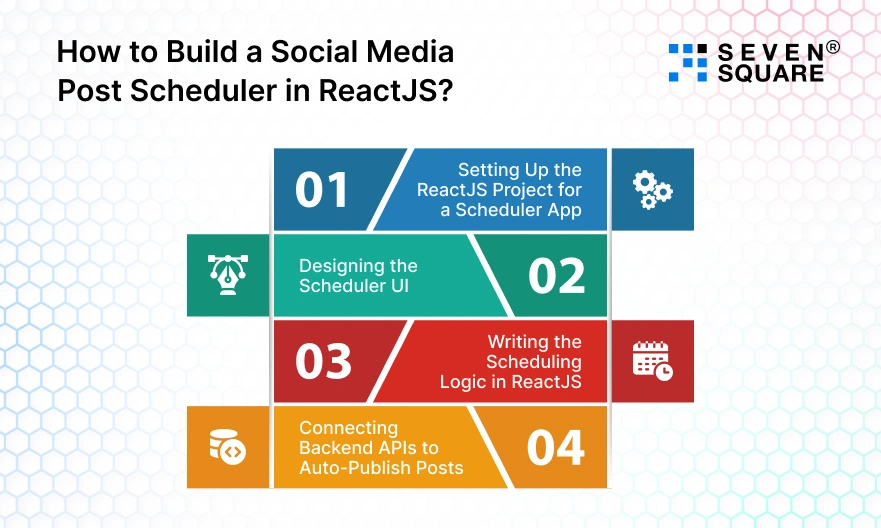
This ReactJS scheduler tutorial walks you through building a real social media post scheduler from scratch, from setup to auto-publishing logic.
Step 1: Setting Up the ReactJS Project for a Scheduler App
To build a social media scheduler in ReactJS, start with a clean and scalable project structure. This helps your app grow without becoming messy.
Project Structure
src/
├── components/
│ ├── SchedulerCalendar.jsx
│ ├── PostEditor.jsx
│ └── StatusBadge.jsx
├── services/
│ └── api.js
├── pages/
│ └── Dashboard.jsx
├── utils/
│ └── timeUtils.js
├── App.jsx
└── main.jsx
Essential Libraries
npm install axios dayjs react-calendar
Why these libraries?
- axios: API communication.
- dayjs: Date, time, and time-zone handling.
- react-calendar: Scheduling UI.
This setup is perfect for any ReactJS scheduler app.
Step 2: Designing the Scheduler UI (Calendar + Post Editor)
A good social media scheduler tutorial focuses on usability. Your users should easily select dates, write posts, and preview content.
Scheduler Calendar Component
                import Calendar from "react-calendar";
                import "react-calendar/dist/Calendar.css";

                export default function SchedulerCalendar({ onDateSelect }) {
                return (
                    <Calendar
                    onChange={onDateSelect}
                    minDate={new Date()}
                    />
                );
                }
Post Composer with Preview
                export default function PostEditor({ content, setContent }) {
                return (
                    <div>
                    <textarea
                        placeholder="Write your social media post..."
                        value={content}
                        onChange={(e) => setContent(e.target.value)}
                    />
                    <p><strong>Preview:</strong> {content}</p>
                    </div>
                );
                }
This UI works well for content scheduler apps used by everyone.
Step 3: Writing the Scheduling Logic in ReactJS
Scheduling logic is the core of any ReactJS scheduler tutorial.
Handling Date, Time & Time-Zone Logic
                import dayjs from "dayjs";
                export function formatSchedule(date) {
                return dayjs(date).toISOString();
                }
Saving Scheduled Posts
                import axios from "axios";
                import { formatSchedule } from "../utils/timeUtils";

                const schedulePost = async (content, date) => {
                await axios.post("/api/schedule", {
                    content,
                    scheduledAt: formatSchedule(date),
                    platform: "instagram"
                });
                };
This logic ensures your ReactJS scheduling app stores posts accurately and avoids time-zone errors.
Step 4: Connecting Backend APIs to Auto-Publish Posts
Auto-publishing turns your app into a true social media automation tool.
Triggering Scheduled Jobs
                import cron from "node-cron";

                cron.schedule("* * * * *", async () => {
                // fetch posts where scheduledAt <= now
                // publish to social media API
                });
Status Updates & Error Handling
                try {
                    publishPost(post);
                    updateStatus("published");
                } catch (error) {
                    updateStatus("failed");
                }
Your React app can display these updates in real time using API polling or WebSockets.
What Is the Complete UI for a Social Media Post Scheduler in ReactJS?
This UI works perfectly for a ReactJS scheduler app and can be easily extended into a full social media automation tool.
UI Folder Structure
src/
├── components/
│ ├── Sidebar.jsx
│ ├── SchedulerCard.jsx
│ ├── PostEditor.jsx
│ ├── PlatformSelector.jsx
│ └── Header.jsx
├── pages/
│ └── Dashboard.jsx
├── styles/
│ └── scheduler.css
└── App.jsx
Dashboard Layout (Main UI)
Dashboard.jsx
                import Header from "../components/Header";
                import Sidebar from "../components/Sidebar";
                import SchedulerCard from "../components/SchedulerCard";
                import PostEditor from "../components/PostEditor";
                import "../styles/scheduler.css";

                export default function Dashboard() {
                    return (
                        <div className="app">
                        <Sidebar />
                        <div className="main">
                            <Header />
                            <div className="content">
                            <SchedulerCard />
                            <PostEditor />
                            </div>
                        </div>
                        </div>
                    );
                }
Sidebar (Navigation UI)
Sidebar.jsx
                export default function Sidebar() {
                return (
                    <aside className="sidebar">
                    <h2>Scheduler</h2>
                    <ul>
                        <li>Dashboard</li>
                        <li>Scheduled Posts</li>
                        <li>Analytics</li>
                        <li>Settings</li>
                    </ul>
                    </aside>
                );
                }
Header (Top Bar UI)
Header.jsx
                export default function Header() {
                return (
                    <header className="header">
                    <h1>Social Media Post Scheduler</h1>
                    <button>Create Post</button>
                    </header>
                );
                }
Scheduler Card (Date & Time UI)
SchedulerCard.jsx
                import { useState } from "react";

                export default function SchedulerCard() {
                const [date, setDate] = useState("");

                return (
                    <div className="card">
                    <h3>Schedule Post</h3>
                    <input
                        type="datetime-local"
                        value={date}
                        onChange={(e) => setDate(e.target.value)}
                    />
                    <p>Selected Time: {date}</p>
                    </div>
                );
                }
Post Editor with Live Preview
PostEditor.jsx
                import { useState } from "react";
                import PlatformSelector from "./PlatformSelector";

                export default function PostEditor() {
                const [content, setContent] = useState("");

                return (
                    <div className="card">
                    <h3>Create Social Media Post</h3>

                    <PlatformSelector />

                    <textarea
                        placeholder="Write your post content here..."
                        value={content}
                        onChange={(e) => setContent(e.target.value)}
                    />

                    <div className="preview">
                        <h4>Live Preview</h4>
                        <p>{content || "Your post preview will appear here..."}</p>
                    </div>

                    <button className="schedule-btn">Schedule Post</button>
                    </div>
                );
                }
Styling (Clean & Modern UI)
scheduler.css
                body {
                margin: 0;
                font-family: Arial, sans-serif;
                background: #f4f6f8;
                }

                .app {
                display: flex;
                }

                .sidebar {
                width: 220px;
                background: #1e293b;
                color: #fff;
                min-height: 100vh;
                padding: 20px;
                }

                .sidebar ul {
                list-style: none;
                padding: 0;
                }

                .sidebar li {
                margin: 15px 0;
                cursor: pointer;
                }

                .main {
                flex: 1;
                }

                .header {
                background: #fff;
                padding: 15px 25px;
                display: flex;
                justify-content: space-between;
                align-items: center;
                }

                .content {
                display: grid;
                grid-template-columns: 1fr 1fr;
                gap: 20px;
                padding: 25px;
                }

                .card {
                background: #fff;
                padding: 20px;
                border-radius: 8px;
                }

                textarea {
                width: 100%;
                min-height: 100px;
                margin-top: 10px;
                }

                .preview {
                background: #f1f5f9;
                padding: 10px;
                margin-top: 10px;
                }

                .platforms label {
                margin-right: 10px;
                }

                .schedule-btn {
                margin-top: 10px;
                background: #2563eb;
                color: #fff;
                padding: 10px;
                border: none;
                cursor: pointer;
                }
Here’s the Complete GitHub Code to Build a Social Media Post Scheduler in ReactJs.
Build a High-Performance ReactJs Solution with Us
- We design scalable social media post scheduler solutions using ReactJS customized for everyone.
- Our team builds secure, fast, and reliable ReactJS scheduler apps with clean architecture and production-ready scheduling logic.
- Our experts implement real-time status tracking, analytics dashboards, and error-handling for high-performance ReactJS scheduling apps.
- From MVP to SaaS, we deliver end-to-end ReactJS social media scheduler app development.
Want a Customized & Scalable ReactJs Solution? Contact Us Today!
How to Scale Your ReactJS Scheduler into a SaaS Product?
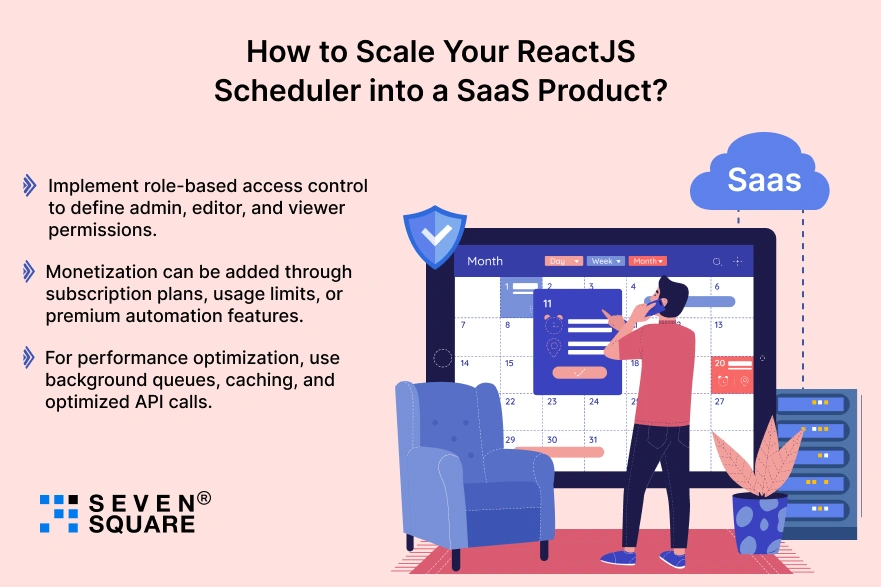
To turn your ReactJS scheduler app into a SaaS product, start by adding multi-user support.
- Implement role-based access control to define admin, editor, and viewer permissions.
- Monetization can be added through subscription plans, usage limits, or premium automation features.
- For performance optimization, use background queues, caching, and optimized API calls.
With these steps, your scheduler evolves into a powerful social media automation tool ready for growth.
Is Building a Custom Social Media Post Scheduler in ReactJS Worth It?
When compared to ready-made tools, a custom social media post scheduler in ReactJS offers better long-term value.
While third-party tools charge recurring fees, custom development is a one-time investment.
You gain complete flexibility, full data ownership, and the ability to add features whenever your business grows.
Custom development makes sense for everyone who needs control, scalability, and brand-specific workflows.
FAQs
- You schedule posts by saving content, date, and platform details in a database and triggering backend jobs through APIs from the React app.
- Yes, ReactJS handles the frontend while real-time scheduling is managed by backend services, queues, and cron jobs.
- Node.js with cron jobs or queue systems works best for building scalable scheduling logic.
- Yes, you can build a free version using open-source tools and extend it later with premium features.