White label mobile apps are apps built once and reused for multiple brands with different names, themes, and configurations.
This means one React Native white label architecture powering many apps that look different but share the same core logic.
Companies avoid rebuilding the same app again and again by using white labeling mobile apps in React Native.
Why do startups and enterprises prefer one codebase & multiple apps?
- Maintaining separate codebases is expensive and slow.
- With one codebase and multiple apps in React Native, teams ship features faster, fix bugs once, and scale without extra development cost.
- Startups move quicker, while enterprises maintain consistency and control across all branded apps.
What are the common issues you face without a proper React Native white label architecture?
- Without a planned architecture, teams face messy conditionals, duplicated code, broken builds, and branding conflicts.
- Scaling becomes painful, releases slow down, and adding a new brand feels risky.
- A well-designed React Native white label architecture solves these problems early.
In this blog, you will learn about multi app architecture in React Native with GitHub Code you use directly in your project.
When Do You Need Multi-App Architecture?

SaaS products launching multiple branded apps
- Many SaaS platforms offer apps for different partners or customers.
- Using a multi app architecture in React Native, they can launch new branded apps quickly without rewriting features.
Agencies building apps for different clients
- Agencies often build similar apps for multiple clients.
- A React Native multi-brand app structure lets them reuse components, screens, and logic while customizing branding per client.
Multi-tenant platforms with custom branding
- Multi-tenant products need separate branding for each tenant.
- A white label setup keeps data secure while allowing visual customization at scale.
Faster go-to-market with React Native multi-brand apps
- With shared logic and brand-level configs, teams reduce development time and launch apps faster, gaining a strong competitive advantage.
What Are the Core Concepts Behind a Scalable White Label React Native Setup?
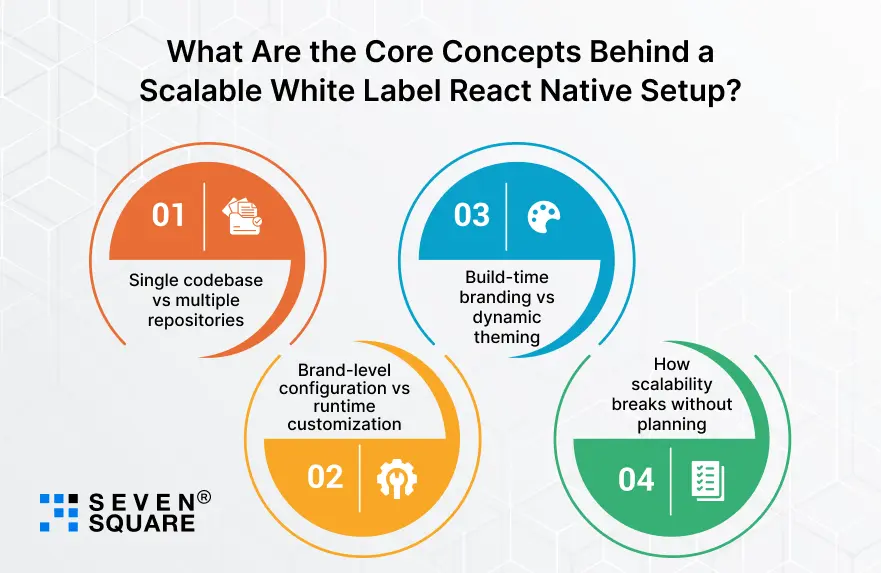
1. Single codebase vs multiple repositories
- A single codebase with multiple apps in React Native is easier to maintain, test, and scale.
- Multiple repositories increase cost, complexity, and technical debt.
2. Brand-level configuration vs runtime customization
- Brand-level configuration controls app name, icons, APIs, and features.
- Runtime customization handles themes and UI behavior. Separating both keeps the system clean.
3. Build-time branding vs dynamic theming
- Build-time branding is ideal for app store builds, while dynamic theming improves flexibility.
- Using both is one of the best practices for white label apps.
4. How scalability breaks without planning
- Without structure, adding brands leads to fragile code and slow releases.
- Planning early ensures long-term scalability and stability.
Project Structure for Multi-App White Label React Native Apps
To scale, you need to define how to structure multiple brand apps in one React Native project. A clean folder structure keeps shared logic reusable and brand logic isolated.
Folder Structure That Supports Multiple Brands
                /apps
                /brandA
                    app.config.ts
                    assets/
                /brandB
                    app.config.ts
                    assets/

                /core
                api/
                navigation/
                services/

                /config
                brand.config.ts
                env.config.ts

                /theme
                index.ts
                brandThemes.ts
Shared Core Logic vs Brand-Specific Layers
- /core: Business logic shared across all apps.
- /apps/brandX: Brand-specific assets and configs.
- /config: Environment and brand setup.
- /theme: UI styling per brand.
This structure avoids duplication and makes adding a new brand simple and safe.
How to Manage Brand Configuration?
A strong React Native branding configuration ensures each app looks and behaves correctly without hardcoding values everywhere.
Brand-Specific App Names, Icons, Splash Screens
                // apps/brandA/app.config.ts
                export default {
                appName: "Brand A App",
                bundleId: "com.brandA.app",
                logo: require("./assets/logo.png"),
                splash: require("./assets/splash.png"),
                };
Environment-Based Configuration (Dev, Staging, Prod)
                // config/env.config.ts
                export const ENV = {
                dev: {
                    apiUrl: "https://dev.api.example.com",
                },
                prod: {
                    apiUrl: "https://api.example.com",
                },
                };
Using JSON / TS Config Files Per Brand
               // config/brand.config.ts
                export const BRANDS = {
                brandA: {
                    theme: "brandA",
                    features: { chat: true },
                },
                brandB: {
                    theme: "brandB",
                    features: { chat: false },
                },
                };
Each build loads only its own brand config using environment variables, making this React Native config for multiple apps safe and scalable.
How to Implement Theme & UI Customization Per Brand?
A clean theme system is the heart of React Native theme customization for brands.
Centralized Theme Engine
               // theme/brandThemes.ts
                export const brandThemes = {
                brandA: {
                    colors: {
                    primary: "#0057FF",
                    background: "#FFFFFF",
                    },
                    font: "Roboto",
                },
                brandB: {
                    colors: {
                    primary: "#FF5500",
                    background: "#F9F9F9",
                    },
                    font: "Poppins",
                },
                };
Applying Theme Dynamically
               // theme/index.ts
                import { brandThemes } from "./brandThemes";

                export const getTheme = (brand: string) => {
                return brandThemes[brand];
                };
Dynamic Theme Switching vs Static Builds
- Static builds: Best for app stores
- Dynamic switching: Best for feature previews
Using both gives maximum flexibility without UX issues.
Scaling UI Changes Without Breaking UX
All UI changes happen inside the theme layer, not components, keeping the app stable as brands grow.
How to Handle Android & iOS Flavors for White Label Apps?
Handling React Native environment flavors on Android and iOS allows multiple branded apps from one codebase.
Android Product Flavors (Simple Explanation)
               productFlavors {
                brandA {
                    applicationId "com.brandA.app"
                }
                brandB {
                    applicationId "com.brandB.app"
                }
                }
iOS Schemes & Build Configurations
Create separate schemes in Xcode ( BrandA, BrandB ) and map each to a specific config file.
Mapping Flavors to Brand Configs
               const BRAND = process.env.APP_BRAND;
                import { BRANDS } from "../config/brand.config";

                export const currentBrand = BRANDS[BRAND];
Automating Builds for Multiple Apps
CI pipelines can loop through brands and generate APKs/IPAs automatically, saving huge release time.
How to Write Clean & Reusable Code for Multi-App Architecture?
This is where your React Native white label architecture example with code is useful.
Feature Isolation Strategy
               // core/features/chat.ts
                export const isChatEnabled = (features: any) => {
                return features.chat === true;
                };
Avoiding Brand-Specific Conditionals Everywhere
Instead of if (brand === “A”), always rely on config-driven logic.
Dependency Injection for Brand Logic
               // core/brandResolver.ts
                import { currentBrand } from "../config";

                export const resolveBrandValue = (key: string) => {
                return currentBrand[key];
                };
Sample Config Loader (Ready to Use)
               // core/configLoader.ts
                export const loadConfig = () => {
                return {
                    apiUrl: process.env.API_URL,
                    brand: process.env.APP_BRAND,
                };
                };
This keeps your code clean, testable, and future-proof.
Here’s the Complete GitHub Code to Build a Multi-App White Label Architecture in React Native.
Our Expertise in Multi-App White Label Architecture
- Our team designs scalable React Native white label architecture that supports multiple branded apps from a single, clean codebase.
- We help startups and enterprises build multiple apps from one codebase using proven React Native multi-app architecture strategies.
- Our team creates flexible React Native multi-brand app structures with clear separation of core logic and brand-specific layers.
- Our developers implement secure React Native branding configuration to manage app names, icons, themes, and features per brand.
- We use best practices for white label apps to avoid code duplication, reduce bugs, and simplify long-term maintenance.
Want a Customized React Native App? Contact Us Today!
Is React Native the Right Choice for White Label Multi-App Products?
React Native provides fast development, shared logic, and near-native performance. However, complex native customization may require extra effort.
When React Native is best?
- React Native is ideal for SaaS apps, marketplaces, internal tools, and consumer apps that need multiple branded versions.
Alternatives
- Native apps offer deeper control but higher cost.
- Flutter is another option, but React Native has a stronger ecosystem and community support.
For most businesses, a white label React Native app offers the best balance of speed, scalability, and cost efficiency.
Build Once, Brand Many, & Scale Faster
A strong white label architecture allows teams to manage multiple apps with confidence.
Good architecture reduces bugs, speeds up development, and simplifies future growth.
By sharing logic and managing branding smartly, businesses launch faster and spend less while scaling efficiently.
FAQs
- Yes. With proper configuration and isolation, React Native fully supports multi-tenant white label apps at scale.
- There’s no hard limit. With clean architecture and configs, one codebase can support dozens of branded apps.
- Expo works well for simpler setups.
- For advanced React Native white label apps with environment configs, the React Native CLI offers more control.