Most Flutter apps fail not because of bad features, but because teams guess user behavior instead of measuring it.
Developers often think users love a screen, a button, or a flow, without real app usage analytics to prove it.
This is where Flutter app usage tracking becomes critical. App usage data shows what users actually do, not what we think they do.
It helps teams understand which screens users spend time on, where they drop off, and which actions matter most.
For growth, UX improvement, and retention, app usage analytics in Flutter answers key questions like:
- Why are users leaving the app early?
- Which features drive engagement?
- Where does the user journey break?
Many Flutter developers struggle with analytics clarity. They ask:
- How do I track real user behavior in Flutter?
- How can I measure app usage without slowing performance?
- How do I control analytics data instead of relying fully on third-party tools?
An App Usage Analytics SDK solves these problems by giving visibility, control, and insights.
In this blog, you can see how to build an app usage analytics SDK in Flutter with GitHub code.
What Is an App Usage Analytics SDK in Flutter?
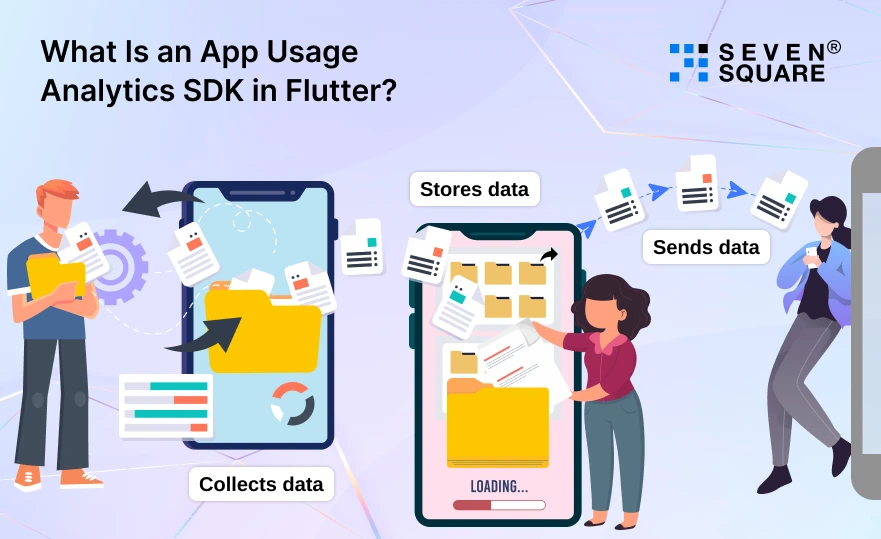
A Flutter analytics SDK is a small, reusable library that tracks how users interact with your app.
It records app usage data like screen views, sessions, and user actions, then sends that data for analysis. A usage analytics SDK in Flutter does three things:
- Collects data: Screen visits, events, & session time.
- Stores data: Temporarily saves events safely.
- Sends data: Pushes usage data to a server or analytics system.
Unlike manual logging, a Flutter analytics SDK automates tracking in a clean and consistent way. There’s also an important difference:
- App-level analytics track overall app usage (sessions, screens, lifecycle).
- Feature-level analytics track specific actions (clicks, filters, purchases).
A well-designed Flutter analytics SDK supports both to give teams a complete picture of user behavior.
Why Build a Custom Flutter Analytics SDK Instead of Using Firebase?
Firebase Analytics works well, but it’s not perfect for every app. Many teams hit limits when scaling, customizing, or controlling data.
That’s why more developers explore a custom Flutter analytics SDK. Common limitations of ready-made analytics tools include:
- Limited control over data structure.
- Vendor lock-in.
- Performance overhead.
- Restricted customization.
With Flutter analytics without Firebase, you gain full data ownership. You decide what to track, how long to store it, and where it’s sent.
This is especially important for businesses with strict privacy, compliance, or performance requirements. A custom Flutter analytics SDK makes sense when:
- You need lightweight and optimized tracking.
- You want analytics across multiple Flutter apps.
- You’re building a white-label or enterprise solution.
- You want to reduce long-term analytics costs.
This approach gives flexibility that most off-the-shelf tools cannot.
What Are the Key App Usage Metrics That Your Flutter Analytics SDK Should Track?
A strong Flutter usage analytics implementation focuses on meaningful data.
The goal is to understand real user behavior in Flutter apps. Important metrics your Flutter analytics SDK should track include:
- App sessions & active time: Know how often users open the app and how long they stay engaged.
- Screen views & navigation flow: Track which screens users visit and how they move through the app.
- Custom user events: Capture clicks, taps, form submissions, and feature interactions.
- App lifecycle events: Monitor install, app launch, background, resume, and termination events.
Together, these metrics give clear insights into how users experience your Flutter app.
What is the Architecture of a Scalable App Usage Analytics SDK in Flutter?
A scalable SDK architecture for Flutter analytics keeps tracking reliable, fast, and easy to maintain. At a high level, the analytics SDK design includes:
- A tracking interface exposed to the app.
- An event manager to handle analytics events.
- Storage for temporary event data.
- A network layer to send data to APIs.
Data flow usually looks like this:
Event → Queue → Storage → API
Using clean architecture ensures the Flutter analytics SDK stays modular. This makes it easier to update, test, and reuse across projects.
Setting Up the Flutter Analytics SDK Project (Step-by-Step)
Before tracking app usage, we need a clean and reusable Flutter analytics SDK structure. A well-organized SDK makes it easy to maintain, scale, and reuse across multiple apps.
Project Structure for Flutter Analytics SDK Development
Create a separate Flutter package for the analytics SDK:
flutter_analytics_sdk/
│
├── lib/
│ ├── flutter_analytics_sdk.dart
│ ├── core/
│ │ ├── analytics_manager.dart
│ │ ├── analytics_event.dart
│ │ └── analytics_session.dart
│ │
│ ├── tracking/
│ │ ├── screen_tracker.dart
│ │ ├── event_tracker.dart
│ │ └── lifecycle_tracker.dart
│ │
│ ├── storage/
│ │ └── analytics_storage.dart
│ │
│ └── network/
│ └── analytics_api.dart
│
└── pubspec.yaml
Core Folders & Responsibilities
- core/:SDK logic, event models, session handling.
- tracking/:Flutter analytics tracking (screens, events, lifecycle).
- storage/:Local storage for offline app usage analytics.
- network/:Sending analytics data to backend APIs.
This structure helps when you build an analytics SDK in Flutter that works across apps and teams.
Preparing the SDK for Reuse Across Multiple Apps
Expose a single public entry point:
                library flutter_analytics_sdk;
                export 'core/analytics_manager.dart';
This allows businesses to reuse the same Flutter analytics SDK across multiple apps, white-label projects, or enterprise products.
How to Implement Core Analytics Features in Flutter?
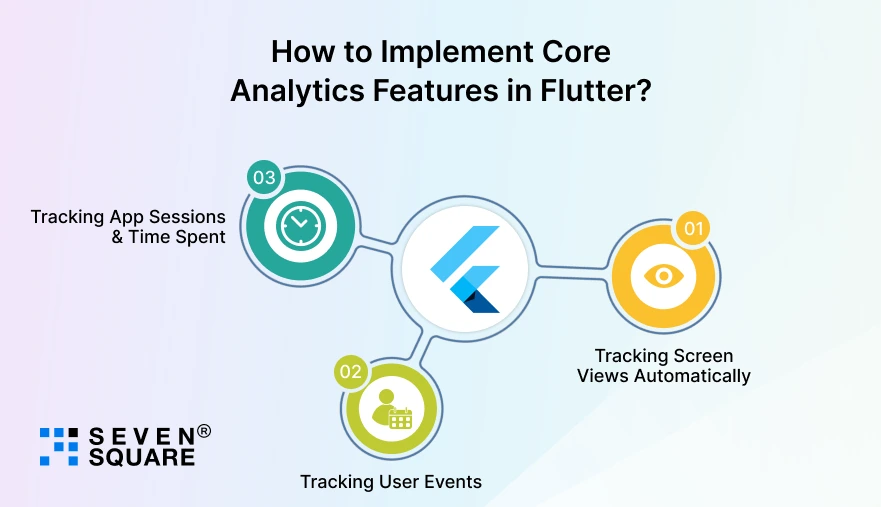
Now let’s implement the core features needed to track real app usage in Flutter.
Step 1: Tracking Screen Views Automatically
Detect Screen Changes Using NavigatorObserver
        import 'package:flutter/widgets.dart';
        class ScreenTracker extends NavigatorObserver {
        DateTime? _screenStartTime;
        String? _currentScreen;

        @override
        void didPush(Route route, Route? previousRoute) {
            _trackScreen(route.settings.name);
        }

        @override
        void didPop(Route route, Route? previousRoute) {
            _trackScreen(previousRoute?.settings.name);
        }

        void _trackScreen(String? screenName) {
            final now = DateTime.now();

            if (_currentScreen != null && _screenStartTime != null) {
            final duration = now.difference(_screenStartTime!).inSeconds;

            AnalyticsManager.instance.trackScreen(
            name: _currentScreen!,
            duration: duration,
            );
            }

            _currentScreen = screenName ?? 'Unknown';
            _screenStartTime = now;
        }
        }
Use It in Your App
        MaterialApp(
            navigatorObservers: [ScreenTracker()],
        );
This enables automatic Flutter app usage tracking without manual screen logging.
Step 2: Tracking User Events
Event Model
            class AnalyticsEvent {
            final String name;
            final Map <String, dynamic> parameters;
            final DateTime timestamp;

            AnalyticsEvent({
                required this.name,
                this.parameters = const {},
            }) : timestamp = DateTime.now();
            }
Event Tracker
            class EventTracker {
            void trackEvent(String name, {Map <String, dynamic> ? params}) {
                final event = AnalyticsEvent(
                name: name,
                parameters: params ?? {},
                );

                AnalyticsManager.instance.logEvent(event);
            }
            }
Example Usage
            EventTracker().trackEvent(
            'add_to_cart',
            params: {
                'product_id': 'P123',
                'price': 49.99,
            },
            );
This allows businesses to track app usage in Flutter with full control over event data.
Step 3: Tracking App Sessions & Time Spent
Lifecycle Tracker
        import 'package:flutter/widgets.dart';
        class LifecycleTracker with WidgetsBindingObserver {
        DateTime? _sessionStart;

        void start() {
            WidgetsBinding.instance.addObserver(this);
            _sessionStart = DateTime.now();
        }

        @override
        void didChangeAppLifecycleState(AppLifecycleState state) {
            if (state == AppLifecycleState.paused ||
                state == AppLifecycleState.detached) {
            _endSession();
            } else if (state == AppLifecycleState.resumed) {
            _sessionStart = DateTime.now();
            }
        }

        void _endSession() {
            if (_sessionStart == null) return;

            final duration =
                DateTime.now().difference(_sessionStart!).inSeconds;

            AnalyticsManager.instance.trackSession(duration);
        }
        }
Start Tracking Sessions
            final lifecycleTracker = LifecycleTracker();
            lifecycleTracker.start();
This helps measure real user engagement.
Here’s the Full GitHub Code to Build an App Usage Analytics SDK in Flutter.
How Do We Build a High-Performing Flutter App?
- We build custom Flutter analytics SDKs that track real app usage without affecting performance or user experience.
- Our team designs scalable app usage analytics SDKs in Flutter tailored for startups, enterprises, and multi-app businesses.
- We help businesses implement Flutter app usage tracking with full data ownership and flexible event tracking.
- Our developers specialize in custom Flutter analytics SDK development without Firebase dependency or vendor lock-in.
- Our experts design a clean SDK architecture for Flutter analytics that works smoothly across multiple apps.
Want to Build a Custom Flutter App? Contact Us Now!
When Should You Use a Custom App Usage Analytics SDK?
A custom Flutter analytics SDK is perfect for many real-world scenarios.
- Startups benefit from flexibility and lower long-term costs.
- Enterprises need data control, privacy, and performance guarantees.
- Multi-app products can share one analytics SDK across apps.
- White-label apps require configurable and reusable analytics logic.
If you plan to scale, reuse code, or avoid third-party limitations, a custom app usage analytics SDK is a smart investment.
Is Building Your Own Flutter Analytics SDK Worth It?
Building your own Flutter analytics SDK gives you control, flexibility, and deep insight into app usage.
You track exactly what matters, optimize performance, and own your data. You should build a custom SDK if:
- You need customized analytics.
- You manage multiple Flutter apps.
- You care about performance and scalability.
You should buy or use tools if:
- You want instant setup.
- You don’t need customization.
- Analytics is not core to your product.
Over time, your Flutter analytics SDK can evolve to add dashboards, real-time tracking, and AI-driven insights.
FAQs
- An App Usage Analytics SDK in Flutter is a reusable library that tracks user behavior, sessions, screen views, and events inside Flutter apps.
- A custom Flutter analytics SDK offers better data ownership, flexible tracking, improved performance, and avoids Firebase limitations and vendor lock-in.
- Yes, a well-designed Flutter analytics SDK can be reused across multiple apps, including white-label and enterprise applications.
- A lightweight Flutter app usage analytics SDK uses background processing and event batching to avoid UI lag or performance issues.