Latest applications are judged upon features, performance, security, transparency, and accountability.
That’s why it becomes important to have a secure Audit Logging & Activity Trail System in Node.js.
In many Node.js applications, teams still depend upon basic logs or scattered tracking logic.
When something goes wrong, data changes, permission updates, or suspicious actions, teams often struggle to answer a simple question: Who did what, and when?
An audit trail system in Node.js solves this problem by recording critical user actions in a structured and secure way.
It helps developers debug faster, helps businesses meet compliance standards, and helps organizations build trust with their users.
From admin dashboards and SaaS platforms to fintech and healthcare systems, Node.js audit logging for security and compliance is no longer optional.
In this blog, you’ll learn how to build a secure audit logging system in Node.js using Express middleware and MongoDB.
We’ll include architecture and production-ready code that you can use immediately.
What Is an Audit Logging & Activity Trail System in Node.js?
An audit logging & activity trail system in Node.js is a structured way to record who did what, when, and from where inside your application.
It captures important user and system actions and stores them securely for future review.
Application logs vs audit logs vs activity trails
- Application logs: Used by developers to debug errors and performance issues.
- Audit logs: Used to track critical actions like logins, updates, deletions, and permission changes.
- Activity trails: A complete timeline of user behavior across the system.
A Node.js activity trail system combines all of this into a reliable history of actions that cannot be easily altered or removed.
When do you actually need an audit trail system?
You need an audit trail system in Node.js if:
- Your app has admins or multiple user roles.
- You store sensitive or business-critical data.
- You want accountability and transparency.
- You must meet security or compliance requirements.
If your app is growing, an audit trail is required.
What Are the Use Cases Where Audit Logs Are Non-Negotiable?
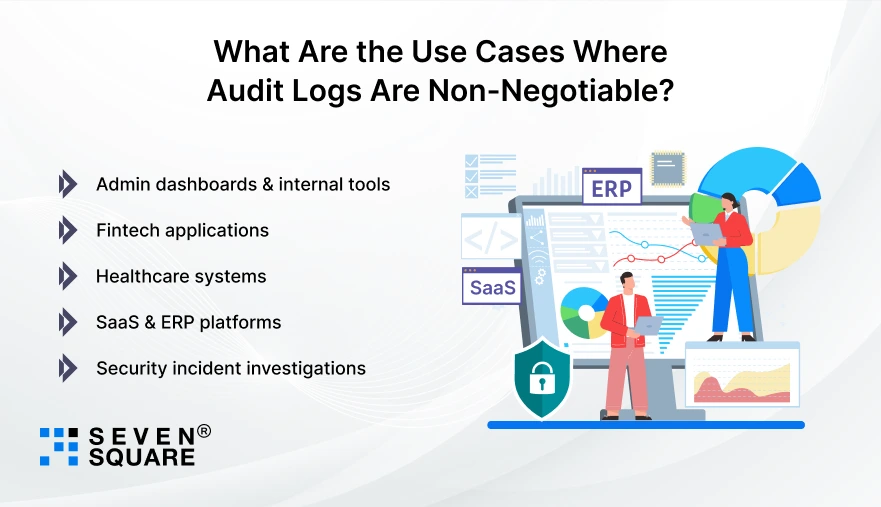
Audit logging becomes critical the moment your Node.js app is used by real users in real business scenarios.
- Admin dashboards & internal tools: Track who changed settings, roles, or configurations.
- Fintech applications: Every transaction, approval, or balance change must be auditable.
- Healthcare systems: Patient data access must be tracked for security and privacy.
- SaaS & ERP platforms: Customers expect transparency and traceability.
- Security incident investigations: Audit logs help teams understand what went wrong and fix it fast.
This is why Node.js audit logging for security and compliance is now a standard requirement for modern applications.
How a Secure Audit Logging System Works in Node.js?
A strong audit logging solution is an architecture.
High-level Node.js logging system architecture
Think of it like this:
- A request enters your Node.js application.
- Authentication identifies the user.
- Middleware intercepts the request.
- Important actions are captured.
- Audit data is stored securely.
- Logs are available for review and analysis.
Where audit logging fits in a Node.js app?
The best place to implement audit logging is:
- Inside Express middleware.
- At service or controller boundaries.
- Around critical business actions.
Request lifecycle & audit capture points
Audit logs should capture:
- User identity.
- Action performed.
- Resources affected.
- Timestamp and IP.
- Before and after state (when applicable).
This structured approach creates a reliable Node.js logging system architecture that scales as your app grows.
How to Design a Tamper-Proof Audit Trail?
Before writing a single line of code, you must design your audit trail carefully.
What should be logged?
- User actions (create, update, delete).
- Permission or role changes.
- Login and authentication events.
- Critical system operations.
Immutable vs editable logs
A tamper-proof audit log in Node.js should be:
- Write-only.
- Non-editable.
- Protected by access controls.
Essential audit metadata
Every log entry should include:
- Timestamp.
- Actor identity (user or system).
- IP address.
- Action metadata.
This ensures secure audit log storage and long-term trust in your system.
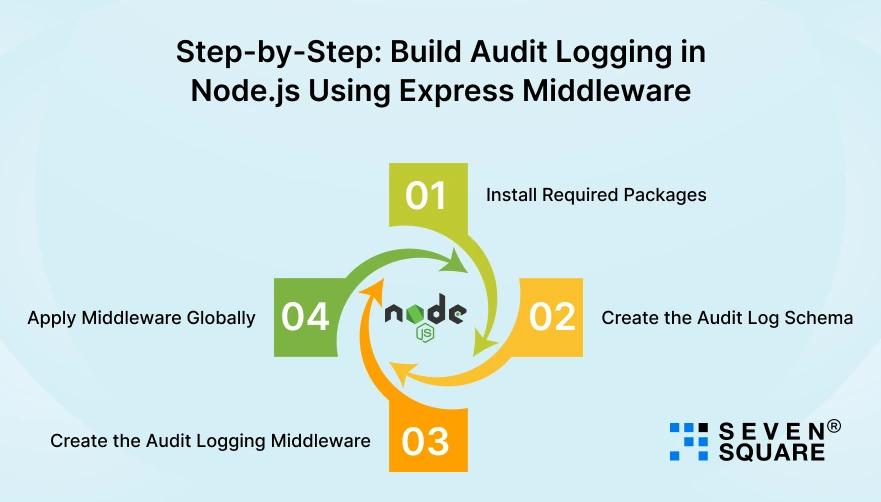
Step-by-Step: Build Audit Logging in Node.js Using Express Middleware
Why Middleware Is Best for Audit Logging?
Express middleware is the cleanest and safest way to implement audit logging in Node.js because:
- It runs automatically for every request.
- You don’t need to repeat logging logic in controllers.
- It captures user actions before and after execution.
- It keeps audit logic separate from business logic.
Using middleware audit logging in Node.js ensures consistency, scalability, and security.
What This Middleware Will Do?
Our audit logging middleware will:
- Track authenticated user actions.
- Capture HTTP method, route, and response status.
- Store logs securely in MongoDB.
- Work automatically for every API call.
This approach is ideal for tracking user activity in Node.js applications.
Step 1: Install Required Packages
npm install express mongoose
Step 2: Create the Audit Log Schema (MongoDB + Mongoose)
models/AuditLog.js
                const mongoose = require("mongoose");
                const auditLogSchema = new mongoose.Schema(
                {
                    userId: {
                    type: mongoose.Schema.Types.ObjectId,
                    required: false,
                    index: true
                    },
                    action: {
                    type: String,
                    required: true
                    },
                    method: {
                    type: String,
                    required: true
                    },
                    route: {
                    type: String,
                    required: true
                    },
                    statusCode: {
                    type: Number
                    },
                    ipAddress: {
                    type: String
                    },
                    userAgent: {
                    type: String
                    },
                    metadata: {
                    type: Object
                    },
                    createdAt: {
                    type: Date,
                    default: Date.now,
                    immutable: true
                    }
                },
                { versionKey: false }
                );

                module.exports = mongoose.model("AuditLog", auditLogSchema);
- This schema is write-once.
- immutable: true helps create tamper-proof audit logs in Node.js.
Step 3: Create the Audit Logging Middleware
middleware/auditLogger.js
                const AuditLog = require("../models/AuditLog");
                const auditLogger = async (req, res, next) => {
                const startTime = Date.now();

                res.on("finish", async () => {
                    try {
                    await AuditLog.create({
                        userId: req.user?.id || null, // from auth middleware
                        action: `${req.method} ${req.originalUrl}`,
                        method: req.method,
                        route: req.originalUrl,
                        statusCode: res.statusCode,
                        ipAddress: req.ip,
                        userAgent: req.headers["user-agent"],
                        metadata: {
                        durationMs: Date.now() - startTime
                        }
                    });
                    } catch (error) {
                    console.error("Audit logging failed:", error.message);
                    }
                });

                next();
                };

                module.exports = auditLogger;
Why Does This Work Well?
- Logs after the response finishes.
- Never block the main request.
- Automatically tracks all user actions.
- Ideal for secure audit logging in Node.js.
Step 4: Apply Middleware Globally
app.js
                const express = require("express");
                const mongoose = require("mongoose");
                const auditLogger = require("./middleware/auditLogger");

                const app = express();

                mongoose.connect("mongodb://localhost:27017/audit_logs");

                app.use(express.json());

                // Mock authentication (replace with real auth)
                app.use((req, res, next) => {
                req.user = { id: "64fabc1234567890abcdef12" };
                next();
                });

                // Apply audit logging middleware
                app.use(auditLogger);

                // Example route
                app.post("/users", (req, res) => {
                res.status(201).json({ message: "User created" });
                });

                app.listen(3000, () => {
                console.log("Server running on port 3000");
                });
You have now successfully implemented audit logging with Express.js using middleware.
How to Store Audit Logs Securely? (MongoDB Example)
Choosing the right database is important for an Audit Logging & Activity Trail System in Node.js.
Why MongoDB Works Well for Audit Trails?
MongoDB is an excellent choice for Node.js audit storage because:
- Flexible schema for evolving audit data.
- Handles high write volume efficiently.
- Easy indexing for fast searches.
- Works naturally with Node.js & Mongoose.
This makes Node.js audit storage with MongoDB reliable and scalable.
Indexing for Fast Search & Filtering
Add indexes to improve performance when querying logs.
                auditLogSchema.index({ userId: 1 });
                auditLogSchema.index({ createdAt: -1 });
                auditLogSchema.index({ action: 1 });
These indexes allow:
- Fast user-based audit lookups.
- Time-based filtering.
- Efficient admin dashboards.
Write-Once Strategy for Secure Audit Logs
Audit logs must never be edited or deleted manually.
Best practices:
- Do NOT expose, update or delete APIs.
- Allow only create and read operations.
- Restrict access to admin roles only.
Example read-only API:
                app.get("/audit-logs", async (req, res) => {
                const logs = await AuditLog.find()
                    .sort({ createdAt: -1 })
                    .limit(100);

                res.json(logs);
                });
This approach ensures:
- Secure audit log storage.
- Compliance readiness.
- Protection against internal misuse.
Here’s the Complete GitHub Code to Build an Audit Logging & Activity Trail System in NodeJs.
How Do We Create Audit Logging & Activity Trail Systems in Node.js?
We design and build secure, scalable, and compliance-ready audit logging solutions customized for real business needs.
- We architect secure audit logging in Node.js that tracks every critical action without impacting application performance.
- Our team builds tamper-proof audit logs in Node.js using write-once storage and strict access controls.
- We implement middleware audit logging in Node.js to capture user activity automatically across all APIs.
- Our solutions help businesses track user activity in Node.js with complete visibility and accountability.
- We design Node.js activity trail systems that scale smoothly for startups, SaaS platforms, and enterprises.
Want a Scalable & Customized NodeJs Solution? Contact Us Today!
What Should You Store in an Audit Log? (With Data Model)
A clean data model makes audit logs useful and searchable.
Sample audit log schema
A typical Node.js audit logs example code structure includes:
- userId
- action
- resource
- resourceId
- beforeState
- afterState
- timestamp
- ipAddress
- userAgent
Why do before & after states matter?
They help you:
- Investigate issues.
- Reverse mistakes.
- Understand system behavior.
When Audit Logging Becomes a Competitive Advantage?
Strong audit logging does more than meet compliance; it builds trust. A secure Audit Logging & Activity Trail System in Node.js:
- Improves security visibility.
- Makes debugging faster.
- Protect your business legally.
- Increases customer confidence.
With the right architecture and clean code, audit logging becomes a core strength.
FAQs
- You start by identifying critical actions, add middleware to capture them, store logs securely, and expose controlled access for review.
- Using centralized middleware with structured logs, immutable storage, and role-based access controls.
- Yes. Most security and data protection standards require audit trails to prove accountability.
- They should not be. A proper audit logging system makes logs write-only and tamper-proof.