Most Flutter apps don’t fail because of bad design; they fail because of bad releases.
Many teams follow the risky strategy of “release everything to everyone.” The moment a new feature is merged into production, it becomes visible to 100% of users.
If something breaks, crashes, payment errors, or performance drops, the only fix is a hotfix release or rollback from the app store. That costs time, ratings, and user trust.
This is exactly why feature rollout in Flutter apps is critical for production-ready applications.
Instead of exposing new functionality to every user, modern apps use feature flags in Flutter to gradually enable features. You can:
- Roll out to 10% of users first.
- Test performance before full release.
- Instantly disable a broken feature.
- Run controlled experiments.
In this blog, you’ll build a custom in-app feature rollout manager in Flutter with a scalable system that supports percentage rollout, role-based control, & environment configuration.
What Is a Feature Rollout Manager in Flutter?
A Flutter feature rollout manager is a system that controls when, how, and to whom a feature becomes visible inside a Flutter app without requiring a new app store release.
It is the backbone of modern in-app feature management in Flutter applications.
Feature Flags vs Feature Toggles
In practice, the terms are often used interchangeably:
- Feature flags in Flutter: Boolean or configurable switches that turn features ON or OFF.
- Feature toggle system in Flutter: A structured implementation of feature flags with rollout logic, rules, and conditions.
Remote Config vs In-App Rollout System
Many developers rely only on Firebase Remote Config. While useful, it’s not a complete architecture.
| Remote Config | In-App Feature Rollout Manager |
| Cloud-based values | Structured feature control layer |
| Simple toggles | Percentage + role-based logic |
| Limited architecture | Clean, scalable design |
A well-built Flutter feature rollout manager combines both local logic and remote control.
They rely on advanced feature management architecture in Flutter-like systems to avoid mass failures.
When Should You Use Feature Flags in Flutter Apps?
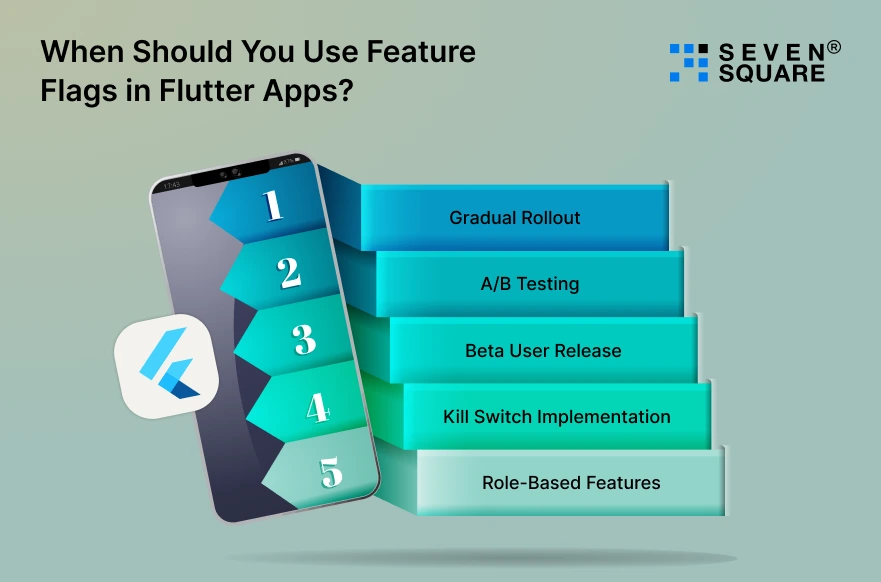
Not every feature needs a rollout system. But in production apps, feature flags are essential. Here’s when to use them:
1. Gradual Rollout
- Instead of exposing a feature to 100% of users, you can implement a gradual feature rollout in Flutter, for example, enabling a new payment system to only 20% of users first.
- This reduces risk and improves stability.
2. A/B Testing
With Flutter A/B testing feature flags, you can:
- Show Variant A to 50% of users.
- Show Variant B to the remaining 50%.
- Compare engagement or conversion.
This is powerful for startups and businesses optimizing UI or pricing.
3. Beta User Release
- Want to test a feature with internal users only?
- A remote feature toggle in Flutter allows you to enable features only for selected user IDs or tester accounts.
4. Kill Switch Implementation
- If a production feature starts crashing, you shouldn’t wait for an app update.
- A kill switch allows you to instantly disable a feature from your Flutter feature flag system.
5. Role-Based Features
- Admin-only dashboards.
- Premium user features.
- Subscription-based access.
This is where Flutter dynamic UI based on feature flags becomes powerful.
How to Build a Scalable Feature Flag System in Flutter?
Here’s how to design a proper feature management architecture in Flutter.
Clean Architecture Approach
Separate your feature flag logic from UI.
Structure:
                Presentation Layer
                Business Logic Layer
                Data Layer
Your UI should not directly depend on Firebase or raw config values. It should depend on a Feature Service.
This makes your Flutter feature flag system testable and scalable.
Centralized FeatureConfig Layer
Create a single source of truth:
FeatureConfig
This layer:
- Loads feature values.
- Applies percentage logic.
- Handles environment control.
- Caches results.
This becomes the heart of your in-app feature management Flutter architecture.
FeatureFlag Model
Instead of Booleans, define a model:
                class FeatureFlag {
                final String key;
                final bool isEnabled;
                final int rolloutPercentage;
                final List allowedRoles;
                }
Now your flags support:
- Percentage rollout.
- Role-based access.
- Full toggle control.
Repository Pattern
Create:
FeatureRepository
It decides:
- Fetch from remote config.
- Use local fallback.
- Cache results.
This abstraction makes your Flutter feature rollout manager clean and future-proof.
Architecture Diagram Explanation
UI Layer
↓
Feature Service
↓
Feature Repository
↓
Remote Config / Local Storage
This is how you build a scalable, production-grade Flutter feature flag system.
Step-by-Step: Implementing the In-App Feature Rollout Manager in Flutter
We’ll build a custom Flutter feature rollout manager from scratch.
Folder structure:
lib/
├── core/
│ ├── feature_flags/
│ │ ├── feature_flag.dart
│ │ ├── feature_repository.dart
│ │ ├── feature_service.dart
│ │ ├── rollout_manager.dart
Step 1: Create the Feature Flag Model
This is the foundation of our Flutter feature flag system. Instead of using a simple Boolean, we create a flexible model.
feature_flag.dart
                class FeatureFlag {
                final String key;
                final bool enabled;
                final int rolloutPercentage; // 0 - 100
                final List<String>? allowedRoles;

                const FeatureFlag({
                        required this.key,
                        required this.enabled,
                        this.rolloutPercentage = 100,
                        this.allowedRoles,
                });

                factory FeatureFlag.fromJson(Map<String, dynamic> json) {
                        return FeatureFlag(
                        key: json['key'],
                        enabled: json['enabled'],
                        rolloutPercentage: json['rolloutPercentage'] ?? 100,
                        allowedRoles: json['allowedRoles'] != null
                        ? List<String>.from(json['allowedRoles'])
                        : null,
                        );
                }
                }
This model supports:
- Global enable/disable.
- Percentage rollout.
- Role-based control.
- Remote configuration compatibility.
This is already more powerful than most basic Flutter feature flag examples online.
Step 2: Build the Feature Flag Service
Now we create a centralized service for in-app feature management in Flutter.
feature_repository.dart
This layer abstracts local or remote data.
                abstract class FeatureRepository {
                Future<Map<String, FeatureFlag>> fetchFeatures();
                }
rollout_manager.dart
Handles percentage logic.
                import 'dart:convert';
                import 'package:crypto/crypto.dart';

                class RolloutManager {
                bool isUserInRollout(String userId, int rolloutPercentage) {
                        if (rolloutPercentage >= 100) return true;
                        if (rolloutPercentage <= 0) return false;

                        final bytes = utf8.encode(userId);
                        final digest = md5.convert(bytes);
                        final hashValue = digest.bytes.fold(0, (sum, byte) => sum + byte);

                        return (hashValue % 100) < rolloutPercentage;
                }
                }
This enables the Flutter feature flag system with percentage rollout.
feature_service.dart
Main service developers will use it.
                import 'feature_flag.dart';
                import 'feature_repository.dart';
                import 'rollout_manager.dart';

                class FeatureService {
                final FeatureRepository repository;
                final RolloutManager rolloutManager;

                Map<String, FeatureFlag> _features = {};

                FeatureService({
                        required this.repository,
                        required this.rolloutManager,
                });

                Future<void> initialize() async {
                        _features = await repository.fetchFeatures();
                }

                bool isEnabled(
                        String key, {
                        required String userId,
                        String? userRole,
                }) {
                        final feature = _features[key];

                        if (feature == null) return false;

                        // Global disabled
                        if (!feature.enabled) return false;

                        // Role check
                        if (feature.allowedRoles != null &&
                        userRole != null &&
                        !feature.allowedRoles!.contains(userRole)) {
                        return false;
                        }

                        // Percentage rollout
                        return rolloutManager.isUserInRollout(
                        userId,
                        feature.rolloutPercentage,
                        );
                }
                }
This is your core Flutter feature rollout manager.
Step 3: Implement Percentage-Based Rollout Logic
Now let’s demonstrate how to configure a feature for 30% rollout.
Example JSON config:
                {
                "new_dashboard": {
                        "key": "new_dashboard",
                        "enabled": true,
                        "rolloutPercentage": 30
                }
                }
The hashing logic ensures:
- The same user always gets the same result.
- Exactly ~30% of users see the feature.
- Stable rollout behavior.
This is how you gradually release features in Flutter without app updates.
Step 4: Add Local + Remote Config Support
Now, let’s support remote feature toggles in Flutter. You can plug Firebase Remote Config or any API.
Example local repository:
local_feature_repository.dart
                import 'dart:convert';
                import 'feature_flag.dart';
                import 'feature_repository.dart';

                class LocalFeatureRepository implements FeatureRepository {
                @override
                Future<Map<String, FeatureFlag>> fetchFeatures() async {
                        const jsonString = '''
                        {
                        "new_dashboard": {
                        "key": "new_dashboard",
                        "enabled": true,
                        "rolloutPercentage": 50
                        },
                        "beta_payment": {
                        "key": "beta_payment",
                        "enabled": true,
                        "rolloutPercentage": 100,
                        "allowedRoles": ["admin"]
                        }
                        }
                        ''';

                        final Map<String, dynamic> decoded = json.decode(jsonString);

                        return decoded.map((key, value) =>
                        MapEntry(key, FeatureFlag.fromJson(value)));
                }
                }
To integrate Firebase Remote Config:
Replace fetchFeatures() with remote values. This creates a scalable Flutter feature flag system with hybrid support.
Step 5: Connect Flags to UI Dynamically
Now let’s use this in the UI.
Initialize in main.dart
                final featureService = FeatureService(
                repository: LocalFeatureRepository(),
                rolloutManager: RolloutManager(),
                );

                void main() async {
                WidgetsFlutterBinding.ensureInitialized();
                await featureService.initialize();
                runApp(MyApp());
                }
Use in Widget
                class HomePage extends StatelessWidget {
                final String userId;
                final String userRole;

                const HomePage({
                        super.key,
                        required this.userId,
                        required this.userRole,
                });

                @override
                Widget build(BuildContext context) {
                        final isNewDashboardEnabled = featureService.isEnabled(
                        "new_dashboard",
                        userId: userId,
                        userRole: userRole,
                        );

                        return Scaffold(
                        body: Column(
                        children: [
                        const Text("Home Page"),

                        if (isNewDashboardEnabled)
                                const Text("🚀 New Dashboard Enabled"),

                        if (!isNewDashboardEnabled)
                                const Text("Old Dashboard"),
                        ],
                        ),
                        );
                }
                }
This shows Flutter dynamic UI based on feature flags. No rebuild from app store required.
Step 6: Add Kill Switch Support
The kill switch is simple:
Just set:
                "new_dashboard": {
                "key": "new_dashboard",
                "enabled": false
                }
Because the service checks:
if (!feature.enabled) return false;
You can instantly disable:
- Payment features.
- New UI modules.
- Risky experiments.
This is essential for production apps and businesses.
Here’s the Complete GitHub Code to Implement In-App Feature Rollout Manager in Flutter.
How Do We Help To Build Scalable Flutter Apps?

- We design scalable Flutter feature rollout manager systems using clean architecture and modular code structure.
- Our team builds advanced feature flags in Flutter with percentage-based and role-based control logic.
- We implement complete Flutter feature flag systems with percentage rollout for safe feature releases.
- We develop custom in-app feature management Flutter solutions tailored for startups and enterprises.
- Our architecture supports remote feature toggle Flutter with hybrid local and remote config integration.
Want to Have a Customized & Scalable Flutter App? Contact Us Today!
Building Production-Ready Flutter Apps with Safe Rollouts
If you are building a serious Flutter application, you cannot rely on “release and hope.” A well-designed Flutter feature rollout manager gives you:
- Safer deployments.
- Gradual feature rollout control.
- Remote feature toggle capability.
- Role-based feature access.
- Instant kill switches.
- Cleaner feature management architecture.
If you’re building scalable Flutter applications and need advanced architecture support, consider implementing this system as part of your core infrastructure.
FAQs
- You can add feature flags in Flutter by creating a centralized feature management service that controls feature visibility using Boolean flags, percentage rollout logic, or remote configuration tools like Firebase Remote Config.
- No, Flutter does not provide built-in feature rollout functionality.
- You must implement a custom Flutter feature rollout manager or use remote configuration services to control feature availability dynamically.
- You can implement gradual feature rollout in Flutter using percentage-based logic.
- Assign users into buckets based on user ID hashing and enable the feature for a defined rollout percentage.
- A kill switch can be implemented using feature flags in Flutter.
- When the flag is turned OFF remotely, the related feature becomes instantly disabled without requiring an app update.