Have you ever used an app where swiping felt slightly off?
Users do not complain about it. They just close the app and never come back. Here is how to build a gesture performance engine that makes sure that never happens.
You probably closed the app and never went back. That’s the cost of poor gesture performance, and it happens more often than you’d think.
When we started building complex mobile interfaces in React Native, everything looked smooth in early testing.
But as the app grew, more animations, more interactions, more users, things started breaking down quietly. Swipes felt laggy. Transitions stuttered.
Sometimes the screen froze for just a split second. That split second is all it takes to lose a user.
If your app isn’t handling those events efficiently, it falls behind, and users feel it instantly because react native gesture performance is something every person experiences.
Most people try a quick fix, simplify a component, & reduce an animation. But that rarely solves the real problem.
Proper react native gesture optimization requires a structured approach that controls how gesture events are processed from the ground up.
This is exactly what this blog covers. We’ll build a reusable Gesture Performance Optimization Engine in React Native that ensures smooth animations.
It eliminates unnecessary processing and delivers the kind of fluid experience users expect from a great app.
Why Do Gestures Lag in React Native Apps?
Consider your phone like a busy restaurant kitchen. There are two chefs working side by side, one handles the orders (JavaScript thread), and one handles the plating and presentation (UI thread).
Learn about Hybrid Rendering Strategy in Flutter.
When everything runs smoothly, food goes out fast, and customers are happy.
But when the order chef gets overwhelmed with too many requests at once, the presentation chef is left waiting, and customers notice the delay.
That’s exactly what happens when React Native gesture performance breaks down.
The Most Common Reasons Gestures Feel Broken

- Too many updates at once: Every small movement triggers a re-render, like reprinting the entire menu every time a customer adds one item to their order.
- Overloaded processing: Heavy logic running in the background blocks the screen from updating, like a chef doing accounting while trying to cook.
- Poor animation handling: Animations calculated on the wrong side slow everything down, creating stutters instead of smooth transitions.
- Frame drops during swipes: When the app can’t keep up with your finger speed, it skips frames, the visual equivalent of a stutter.
How Gestures Actually Travel Through Your App?
- Your finger touches the screen: The device registers a touch event.
- The app recognizes the gesture: swipe, drag, pinch, or tap.
- The order chef gets to work: JavaScript processes what should happen next.
- The presentation chef updates the screen: The UI renders the visual response.
What Is a Gesture Performance Optimization Engine? & Why Your App Needs One?
A Gesture Performance Optimization Engine is a system designed to manage gesture interactions efficiently across an app.
Instead of letting every gesture event directly trigger UI updates, this engine processes events through an optimized pipeline.
It filters unnecessary updates, manages animation execution, and ensures that gestures remain smooth even during complex interactions.
It is a control layer that improves react native animation performance by optimizing how gesture events are handled internally.
- Prevent unnecessary re-renders: The engine filters gesture updates so components don’t re-render excessively.
- Maintain smooth animations: Animations are handled efficiently to keep transitions fluid.
- Centralize gesture processing: Instead of scattered gesture logic across components, everything is managed in one system.
- Achieve 60 FPS gestures: Proper optimization ensures gestures stay responsive & reach smooth react native 60fps animation optimization standards.
Improve React Native Gesture Performance with Us
- Our team specializes in react native gesture performance optimization, helping apps eliminate lag, frame drops, and unresponsive UI interactions.
- We build scalable gesture optimization architectures that improve react native gesture handler performance and maintain smooth gesture interactions across complex apps.
- We implement advanced react native performance optimization strategies that ensure fast rendering and consistent mobile app responsiveness.
- Our developers create reusable gesture performance optimization engines that reduce unnecessary re-renders and improve application scalability.
Want to Optimize React Native Gestures?
Architecture of the Gesture Optimization Engine
The React native gesture optimization architecture keeps gesture interactions predictable and scalable.
- Gesture Event Controller: Captures and manages gesture events before they trigger UI updates.
- Render Throttling System: Limits how often UI updates occur during rapid gesture interactions.
- UI Thread Animation Handler: Ensures animations run smoothly without blocking the interface.
- UI Thread Animation Handler: Tracks the current state of gestures like dragging, swiping, or pinching.
- Performance Monitoring Module: Tracks frame drops and gesture latency to maintain optimal react native animation optimization.
This architecture helps create a scalable performance layer for complex applications.
Here’s the
Step-by-Step: Building the Gesture Performance Optimization Engine
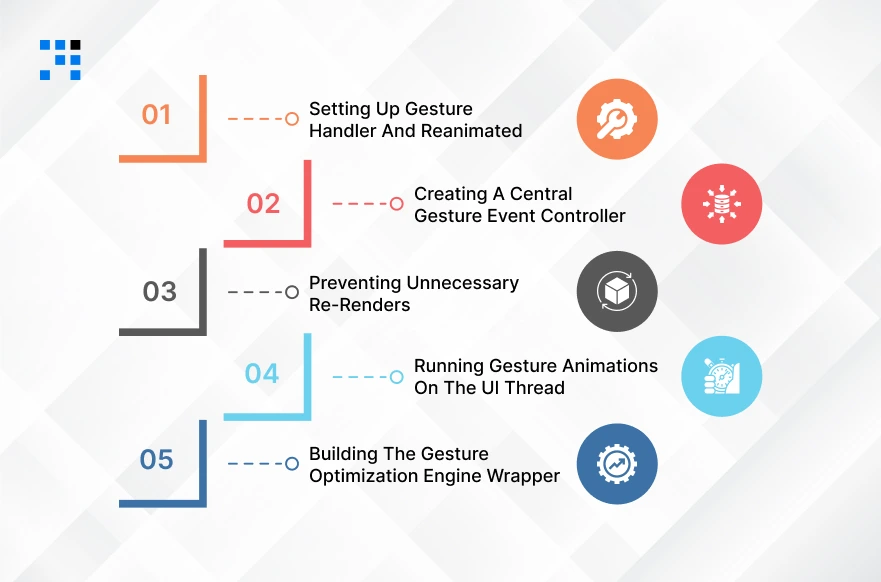
Now we’ll build a Gesture Performance Optimization Engine in React Native step-by-step.
Step 1: Setting Up Gesture Handler and Reanimated
Before building the optimization engine, we need two libraries that significantly improve react native gesture handler performance.
Install Required Libraries
                npm install react-native-gesture-handler
                npm install react-native-reanimated
If you’re using Expo:
npx expo install react-native-gesture-handler react-native-reanimated
Configure Reanimated
Update babel.config.js
                module.exports = {
                presets: ['module:metro-react-native-babel-preset'],
                plugins: ['react-native-reanimated/plugin'],
                }
Here’s a simple react native gesture optimization example using Gesture Handler and Reanimated.
                import React from "react";
                import { View, StyleSheet } from "react-native";
                import { GestureDetector, Gesture } from "react-native-gesture-handler";
                import Animated, { useSharedValue, useAnimatedStyle } from "react-native-reanimated";

                export default function GestureExample() {

                const translateX = useSharedValue(0);

                const panGesture = Gesture.Pan()
                        .onUpdate((event) => {
                        translateX.value = event.translationX;
                        });

                const animatedStyle = useAnimatedStyle(() => ({
                        transform: [{ translateX: translateX.value }]
                }));

                return (
                        <GestureDetector gesture={panGesture}>
                        <Animated.View style={[styles.box, animatedStyle]} />
                        </GestureDetector>
                );
                }

                const styles = StyleSheet.create({
                box: {
                        width: 120,
                        height: 120,
                        backgroundColor: "blue",
                        borderRadius: 12,
                }
                });
It’s like installing two specialized tools before starting a job, one tool listens to your finger movements with precision, & the other makes the screen respond smoothly without lag.
This step simply sets both tools up so your app can handle gestures fluidly, like a touchscreen that follows your finger instantly.
Step 2: Creating a Central Gesture Event Controller
In complex applications, gestures fire dozens of events per second. If each event directly triggers UI updates, performance quickly drops.
To solve this, we create a central gesture event controller that manages gesture streams efficiently.
Create GestureController.js
                class GestureController {

                constructor() {
                        this.listeners = [];
                }

                subscribe(listener) {
                        this.listeners.push(listener);
                }

                unsubscribe(listener) {
                        this.listeners = this.listeners.filter(l => l !== listener);
                }

                emit(event) {
                this.listeners.forEach(listener => listener(event));
                }
                }

                const gestureController = new GestureController();

                export default gestureController;
Use the Controller in a Gesture Component
                import gestureController from "./GestureController";

                const panGesture = Gesture.Pan()
                .onUpdate((event) => {
                        gestureController.emit({
                        type: "PAN_MOVE",
                        translationX: event.translationX
                        });
                });
You are hiring a traffic controller at a busy intersection, instead of every car (gesture event) driving directly into the city & causing chaos, the controller manages the flow and sends each car to the right place at the right time.
This prevents the app from getting overwhelmed by too many simultaneous updates.
Step 3: Preventing Unnecessary Re-Renders
One of the biggest performance issues in React Native gestures is excessive re-rendering.
Every state update during a gesture can trigger a full component render. This significantly impacts performance.
Memoization with React.memo
Memoization ensures components only re-render when necessary.
                import React from "react";

                const GestureCard = React.memo(({ style }) => {
                return (
                        <Animated.View style={style} />
                );
                });

                export default GestureCard;
Event Throttling
Gesture events can fire 100+ times per second. Throttling limits how often updates occur.
                function throttle(func, limit) {
                let lastCall = 0;

                return function (...args) {
                        const now = Date.now();

                        if (now - lastCall >= limit) {
                        lastCall = now;
                        func(...args);
                        }
                };
                }
Usage:
                const optimizedEmit = throttle((event) => {
                gestureController.emit(event);
                }, 16);
16ms corresponds roughly to 60FPS rendering.
Batch Updates
Batching groups multiple updates into a single render cycle.
                import { unstable_batchedUpdates } from "react-native";
                gestureController.subscribe((event) => {
                unstable_batchedUpdates(() => {
                        // handle multiple updates together
                });
                });
These strategies improve react native performance optimization.
Step 4: Running Gesture Animations on the UI Thread
A major reason gestures feel laggy is because animation calculations run on the JavaScript thread.
If the JS thread is busy, the animation pauses. The solution is react native UI thread animation optimization.
Example Using Reanimated Worklets
                import { Gesture } from "react-native-gesture-handler";
                import Animated, {
                useSharedValue,
                useAnimatedStyle
                } from "react-native-reanimated";

                export default function OptimizedGesture() {

                const translateX = useSharedValue(0);

                const panGesture = Gesture.Pan()
                        .onUpdate((event) => {
                        "worklet";
                        translateX.value = event.translationX;
                        });

                const animatedStyle = useAnimatedStyle(() => {
                        return {
                        transform: [{ translateX: translateX.value }]
                        };
                });

                return (
                        <GestureDetector gesture={panGesture}>
                        <Animated.View style={[styles.box, animatedStyle]} />
                        </GestureDetector>
                );
                }
Step 5: Building the Gesture Optimization Engine Wrapper
Create OptimizedGestureView.js
                import React from "react";
                import { GestureDetector, Gesture } from "react-native-gesture-handler";
                import Animated, {
                useSharedValue,
                useAnimatedStyle
                } from "react-native-reanimated";

                export default function OptimizedGestureView({ children }) {

                const translateX = useSharedValue(0);

                const gesture = Gesture.Pan()
                        .onUpdate((event) => {
                        "worklet";
                        translateX.value = event.translationX;
                        });

                const animatedStyle = useAnimatedStyle(() => ({
                        transform: [{ translateX: translateX.value }]
                }));

                return (
                        <GestureDetector gesture={gesture}>
                        <Animated.View style={animatedStyle}>
                        {children}
                        </Animated.View>
                        </GestureDetector>
                );
                }
Using the Optimization Engine
Now developers can simply wrap UI components.
                import OptimizedGestureView from "./OptimizedGestureView";

                export default function ExampleScreen() {
                return (
                        <OptimizedGestureView>
                        <View style={{ width: 150, height: 150, backgroundColor: "purple" }} />
                        </OptimizedGestureView>
                );
                }
It is like a pre-built, high-performance car frame; developers simply wrap any screen element inside it and instantly get smooth, optimized gesture handling without writing the complex logic from scratch.
Explore a Project Called Cheerio That We Developed in React Native.
When Should You Build a Gesture Optimization Layer?
- Complex gesture-heavy apps: Apps with multiple swipe, drag, and pinch interactions benefit greatly from optimization.
- Interactive dashboards: Data-heavy interfaces with draggable widgets require smooth gesture handling. See Our Complete Guide about Fintech Mobile App Development.
- Maps and drag systems: Map navigation, route planning, and location-based interactions demand responsive gestures.
- Gaming interfaces: Games and highly interactive applications require near-perfect gesture responsiveness.
In these cases, a gesture optimization layer ensures consistent performance and smooth user experiences.
FAQs
- A common react native gesture lag fix is reducing unnecessary state updates during gestures and using optimized gesture libraries.
- Running animations on the UI thread can also improve responsiveness.
- Frame drops often occur when heavy computations run on the JavaScript thread.
- Optimizing gesture logic and improving react native animation performance can help prevent this issue.
- For smoother interactions, gesture animations should run on the UI thread while lightweight logic can remain on the JavaScript thread.
- To achieve smooth react native 60fps animation optimization, developers should minimize JS thread work, optimize gesture handlers, and ensure animations run efficiently on the UI thread.