Can a beginner build an Airbnb-like app in ReactJS?
Yes, this tutorial walks through building a vacation rental clone with components, routing, a booking widget, a search bar, and full working source code included.
Have you ever used Airbnb to book a vacation home or a cozy apartment?
Airbnb is one of the most popular vacation rental apps in the world. It lets people list their properties for rent and allows travelers to search, view, and book them online.
In this blog, we are going to build our very own Airbnb clone, a vacation rental app using ReactJS.
Wondering how apps like Airbnb are built, this blog is for you to follow to build one by yourself.
ReactJS is fast, beginner-friendly, and used by companies like Netflix, Instagram, and Airbnb itself.
By the end of this tutorial, you will have a working vacation rental app clone with features like property listings, search and filters, a detailed property page, and a user-friendly booking interface, all built with ReactJS.
What Is an Airbnb Clone App?
An Airbnb clone is a web application that works like Airbnb. It has similar features and design, but you own it and can customize it however you like.
Businesses use Airbnb clones to launch their own vacation rental platforms without building everything from scratch.
Instead of inventing a new recipe, you follow an existing recipe and make it your own by adding your personal touch.
What Are the Key Features of Our Airbnb Clone?
- Home page with a search bar and featured listings.
- Property listing cards with images, price, and rating.
- Search and filter by location, price, and date.
- Individual property detail page.
- Booking section with a date picker.
- Responsive design works on mobile and desktop.
- Navigation bar and footer.
Why Are We a Trusted App Development Partner?
- Our expert ReactJS developers build fast, scalable, and pixel-perfect vacation rental apps customized according to your business needs.
- We specialize in building Airbnb clone apps with features like real-time booking, search filters, and secure payment gateways.
- Our team follows agile development methodology, ensuring on-time delivery, transparent communication, and zero surprises.
- Our full-stack team handles everything, UI/UX design, ReactJS frontend, Node.js backend, database, and cloud deployment.
- We build fully responsive vacation rental websites that look stunning and work smoothly on mobile, tablet, and desktop.
Want Your Own Airbnb Clone?
Which Tools & Technologies Will We Use?
Just understand what each one does, and we will set them up together.
- ReactJS: The main JavaScript library we use to build our app’s user interface.
- Tailwind CSS: A styling tool that makes our app look beautiful without writing complex CSS from scratch.
- React Router DOM: Helps us navigate between different pages inside our app (e.g., from the home page to a property details page).
- React DatePicker: A ready-made calendar component that lets users pick check-in and check-out dates.
- Node.js & npm: Node.js runs JavaScript on your computer. npm (Node Package Manager) installs all the tools and libraries we need.
What Do You Need Before Starting?
If you are building an Airbnb Clone for the first time, here is what you need:
- A computer (Windows, Mac, or Linux).
- Node.js is installed (it is free).
- A code editor, we suggest VS Code (also free).
- Basic understanding of HTML and JavaScript (helpful, but not required).
If you have never coded before, think of HTML as the structure of a website, JavaScript as its brain, and ReactJS as the smart framework that combines them efficiently.
Here’s the
Step-by-Step Guide to Build an Airbnb Clone in ReactJS
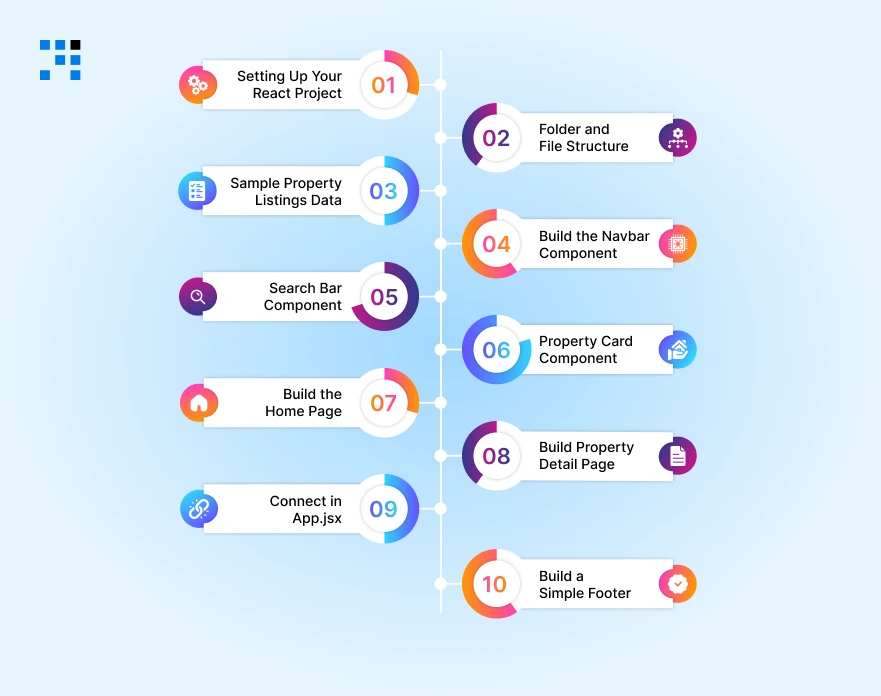
Here’s the complete guide to understanding how to build Airbnb like app in ReactJS.
Step 1: Setting Up Your React Project
Open your terminal (Command Prompt on Windows, Terminal on Mac/Linux) and run the following commands one by one.
Create a New React App
We will use Vite, which is a faster and more modern way to create React apps:
                npm create vite@latest airbnb-clone -- --template react
                cd airbnb-clone
                npm install
This creates a brand new React project folder called ‘airbnb-clone’ on your computer.
Install Required Libraries
Now install the tools we need:
                npm install react-router-dom
                npm install react-datepicker
                npm install react-icons
                npm install -D tailwindcss postcss autoprefixer
                npx tailwindcss init -p
Configure Tailwind CSS
Open the tailwind.config.js file and update it like this:
                /** @type {import('tailwindcss').Config} */
                export default {
                content: ['./index.html', './src/**/*.{js,ts,jsx,tsx}'],
                theme: {
                        extend: {},
                },
                plugins: [],
                }
Then open src/index.css and replace everything with:
                @tailwind base;
                @tailwind components;
                @tailwind utilities;
You are all set! Now let us build the app structure.
Step 2: Folder and File Structure
A clean folder structure keeps your code organized. Here is how we will set it up inside the src folder:
src/
├── components/
│ ├── Navbar.jsx
│ ├── Footer.jsx
│ ├── PropertyCard.jsx
│ ├── SearchBar.jsx
│ └── DateRangePicker.jsx
├── pages/
│ ├── Home.jsx
│ └── PropertyDetail.jsx
├── data/
│ └── listings.js
├── App.jsx
└── main.jsx
Step 3: Create Sample Property Listings Data
Since we are building a clone (without a real backend), we will use fake data to simulate property listings. Create a file at src/data/listings.js:
                // src/data/listings.js
                const listings = [
                {
                        id: 1,
                        title: 'Cozy Beach House in Goa',
                        location: 'Goa, India',
                        price: 4500,
                        rating: 4.8,
                        reviews: 120,
                        image: 'https://source.unsplash.com/600x400/?beach,house',
                        type: 'Entire home',
                        beds: 3,
                        baths: 2,
                        description: 'A beautiful beach house with a stunning ocean view.',
                },
                {
                        id: 2,
                        title: 'Mountain Cabin in Manali',
                        location: 'Manali, Himachal Pradesh',
                        price: 3200,
                        rating: 4.6,
                        reviews: 85,
                        image: 'https://source.unsplash.com/600x400/?mountain,cabin',
                        type: 'Private room',
                        beds: 2,
                        baths: 1,
                        description: 'Escape to the mountains in this warm and cozy cabin.',
                },
                {
                        id: 3,
                        title: 'City Apartment in Mumbai',
                        location: 'Mumbai, Maharashtra',
                        price: 2800,
                        rating: 4.5,
                        reviews: 200,
                        image: 'https://source.unsplash.com/600x400/?apartment,city',
                        type: 'Entire apartment',
                        beds: 1,
                        baths: 1,
                        description: 'Modern apartment in the heart of Mumbai.',
                },
                ];

                export default listings;
Step 4: Build the Navbar Component
The Navbar appears at the top of every page. It shows the logo and navigation links. Create src/components/Navbar.jsx:
                // src/components/Navbar.jsx
                import { Link } from 'react-router-dom';
                import { FaAirbnb } from 'react-icons/fa';

                const Navbar = () => {
                return (
                        <nav className='flex items-center justify-between px-8 py-4 shadow-md bg-white sticky top-0 z-50'>
                        {/* Logo */}
                        <Link to='/' className='flex items-center gap-2 text-rose-500 font-bold text-2xl'>
                        <FaAirbnb size={32} />
                        <span>airbnb</span>
                        </Link>

                        {/* Navigation Links */}
                        <div className='flex items-center gap-6 text-sm font-medium text-gray-600'>
                        <Link to='/' className='hover:text-rose-500 transition'>Home</Link>
                        <button className='border border-gray-300 rounded-full px-4 py-2 hover:shadow-md transition'>
                        Sign Up
                        </button>
                        </div>
                        </nav>
                );
                };

                export default Navbar;
Step 5: Build the Search Bar Component
The search bar is a key feature, it allows users to filter listings by location. Create src/components/SearchBar.jsx:
                // src/components/SearchBar.jsx
                import { useState } from 'react';
                import { FaSearch } from 'react-icons/fa';

                const SearchBar = ({ onSearch }) => {
                const [query, setQuery] = useState('');

                const handleSearch = () => {
                        onSearch(query);
                };

                return (
                        <div className='flex items-center border border-gray-300 rounded-full px-4 py-2
                                        shadow-md w-full max-w-lg mx-auto bg-white'>
                        <input
                        type='text'
                        placeholder='Search destinations...'
                        value={query}
                        onChange={(e) => setQuery(e.target.value)}
                        className='flex-1 outline-none text-sm text-gray-700 placeholder-gray-400'
                        />
                        <button
                        onClick={handleSearch}
                        className='bg-rose-500 text-white rounded-full p-2 ml-2 hover:bg-rose-600 transition'
                        >
                        <FaSearch />
                        </button>
                        </div>
                );
                };

                export default SearchBar;
Step 6: Build the Property Card Component
Each listing will be shown as a card with an image, location, price, and rating. Create src/components/PropertyCard.jsx:
                // src/components/PropertyCard.jsx
                import { Link } from 'react-router-dom';
                import { FaStar } from 'react-icons/fa';

                const PropertyCard = ({ listing }) => {
                return (
                        <Link to={`/property/${listing.id}`} className='block group'>
                        <div className='rounded-2xl overflow-hidden shadow-sm hover:shadow-lg transition duration-300'>
                        {/* Property Image */}
                        <div className='relative'>
                        <img
                                src={listing.image}
                                alt={listing.title}
                                className='w-full h-56 object-cover group-hover:scale-105 transition duration-300'
                        />
                        </div>

                        {/* Property Info */}
                        <div className='p-4 bg-white'>
                        <div className='flex justify-between items-start'>
                                <h3 className='font-semibold text-gray-800 text-sm truncate'>{listing.title}</h3>
                                <div className='flex items-center gap-1 text-sm text-gray-700'>
                                <FaStar className='text-rose-500' size={12} />
                        <span>{listing.rating}</span>
                                </div>
                        </div>
                        <p className='text-gray-500 text-xs mt-1'>{listing.location}</p>
                        <p className='text-gray-500 text-xs'>{listing.type}</p>
                        <p className='mt-2 text-sm font-semibold text-gray-800'>
                                ₹{listing.price.toLocaleString()}
                                <span className='font-normal text-gray-500'> / night</span>
                        </p>
                        </div>
                        </div>
                        </Link>
                );
                };

                export default PropertyCard;
Step 7: Build the Home Page
The Home page is the main page users land on. It shows the search bar and a grid of all property listings. Create src/pages/Home.jsx:
                // src/pages/Home.jsx
                import { useState } from 'react';
                import listings from '../data/listings';
                import PropertyCard from '../components/PropertyCard';
                import SearchBar from '../components/SearchBar';

                const Home = () => {
                const [filtered, setFiltered] = useState(listings);

                const handleSearch = (query) => {
                        const results = listings.filter((l) =>
                l.location.toLowerCase().includes(query.toLowerCase()) ||
                l.title.toLowerCase().includes(query.toLowerCase())
                        );
                        setFiltered(results);
                };

                return (
                        <div className='min-h-screen bg-gray-50'>
                        {/* Hero Section */}
                        <div className='bg-rose-50 py-16 px-4 text-center'>
                        <h1 className='text-4xl font-bold text-gray-800 mb-4'>
                        Find your next perfect stay
                        </h1>
                        <p className='text-gray-500 mb-8'>
                        Discover thousands of unique homes and experiences
                        </p>
                        <SearchBar onSearch={handleSearch} />
                        </div>

                        {/* Listings Grid */}
                        <div className='max-w-7xl mx-auto px-4 py-10'>
                        <h2 className='text-2xl font-semibold text-gray-800 mb-6'>
                        Available Properties
                        </h2>
                        {filtered.length === 0 ? (
                        <p className='text-center text-gray-400 py-20'>
                                No properties found. Try a different location.
                        </p>
                        ) : (
                        <div className='grid grid-cols-1 sm:grid-cols-2 md:grid-cols-3 lg:grid-cols-4 gap-6'>
                                {filtered.map((listing) => (
                                <PropertyCard key={listing.id} listing={listing} />
                                ))}
                        </div>
                        )}
                        </div>
                        </div>
                );
                };

                export default Home;
Step 8: Build the Property Detail Page
When a user clicks on a property card, they are taken to its detail page where they can see full information and a booking section. Create src/pages/PropertyDetail.jsx:
// src/pages/PropertyDetail.jsx
import { useParams } from 'react-router-dom';
import { useState } from 'react';
import DatePicker from 'react-datepicker';
import 'react-datepicker/dist/react-datepicker.css';
import listings from '../data/listings';
import { FaStar, FaBed, FaBath, FaHome } from 'react-icons/fa';
const PropertyDetail = () => {
const { id } = useParams();
const listing = listings.find((l) => l.id === parseInt(id));
const [checkIn, setCheckIn] = useState(null);
const [checkOut, setCheckOut] = useState(null);
if (!listing) return Property not found.
;
const nights = checkIn && checkOut
? Math.ceil((checkOut - checkIn) / (1000 * 60 * 60 * 24))
: 0;
return (
<div className='max-w-5xl mx-auto px-4 py-10'>
{/* Title */}
<h1 className='text-3xl font-bold text-gray-800 mb-2'>{listing.title}</h1>
<div className='flex items-center gap-2 text-sm text-gray-500 mb-6'>
<FaStar className='text-rose-500' />
<span>{listing.rating} · {listing.reviews} reviews</span>
<span>· {listing.location}</span>
</div>
{/* Image */}
<img
src={listing.image}
alt={listing.title}
className='w-full h-96 object-cover rounded-2xl mb-8'
/>
<div className='grid grid-cols-1 md:grid-cols-3 gap-8'>
{/* Left: Details */}
<div className='md:col-span-2'>
<div className='flex gap-6 text-sm text-gray-600 mb-6'>
<span className='flex items-center gap-1'><FaHome /> {listing.type}</span>
<span className='flex items-center gap-1'><FaBed /> {listing.beds} beds</span>
<span className='flex items-center gap-1'><FaBath /> {listing.baths} baths</span>
</div>
<hr className='my-4' />
<h2 className='text-xl font-semibold mb-2'>About this place</h2>
<p className='text-gray-600 leading-relaxed'>{listing.description}</p>
</div>
{/* Right: Booking Widget */}
<div className='border rounded-2xl p-6 shadow-md h-fit'>
<p className='text-xl font-bold text-gray-800 mb-4'>
₹{listing.price.toLocaleString()}
<span className='text-sm font-normal text-gray-500'> / night</span>
</p>
<div className='mb-3'>
<label className='text-xs text-gray-500 uppercase font-medium'>Check-in</label>
<DatePicker
selected={checkIn}
onChange={(date) => setCheckIn(date)}
selectsStart
startDate={checkIn}
endDate={checkOut}
minDate={new Date()}
placeholderText='Add date'
className='w-full border rounded-lg px-3 py-2 text-sm mt-1'
/>
</div>
<div className='mb-4'>
<label className='text-xs text-gray-500 uppercase font-medium'>Check-out</label>
<DatePicker
selected={checkOut}
onChange={(date) => setCheckOut(date)}
selectsEnd
startDate={checkIn}
endDate={checkOut}
minDate={checkIn}
placeholderText='Add date'
className='w-full border rounded-lg px-3 py-2 text-sm mt-1'
/>
</div>
{nights > 0 && (
<div className='flex justify-between text-sm text-gray-600 mb-2'>
<span>₹{listing.price} x {nights} nights</span>
<span>₹{(listing.price * nights).toLocaleString()}</span>
</div>
)}
<button className='w-full bg-rose-500 text-white rounded-xl py-3 font-semibold
hover:bg-rose-600 transition mt-2'>
Reserve
</button>
</div>
</div>
</div>
);
};
export default PropertyDetail;
Step 9: Connect Everything in App.jsx
Now we wire all the pages and components together using React Router. Update your src/App.jsx:
                // src/App.jsx
                import { BrowserRouter as Router, Routes, Route } from 'react-router-dom';
                import Navbar from './components/Navbar';
                import Footer from './components/Footer';
                import Home from './pages/Home';
                import PropertyDetail from './pages/PropertyDetail';

                function App() {
                return (
                        <Router>
                        <Navbar />
                        <Routes>
                        <Route path='/' element={<Home />} />
                        <Route path='/property/:id' element={<PropertyDetail />} />
                        </Routes>
                        <Footer />
                        </Router>
                );
                }

                export default App;
Step 10: Build a Simple Footer
                Create src/components/Footer.jsx:
                // src/components/Footer.jsx
                const Footer = () => {
                return (
                        <footer className='bg-gray-100 border-t mt-16 py-8 px-4'>
                        <div className='max-w-7xl mx-auto flex flex-col md:flex-row justify-between
                                        items-center text-sm text-gray-500'>
                        <p>© 2025 Airbnb Clone. Built with ReactJS.</p>
                        <div className='flex gap-4 mt-4 md:mt-0'>
                        <a href='#' className='hover:text-rose-500 transition'>Privacy</a>
                        <a href='#' className='hover:text-rose-500 transition'>Terms</a>
                        <a href='#' className='hover:text-rose-500 transition'>Support</a>
                        </div>
                        </div>
                        </footer>
                );
                };

                export default Footer;
What You Can Build Next in this App?

This is a starter project. Here are some exciting features you can add to make it more powerful:
- User Authentication: Let users sign up and log in using Firebase or JWT tokens.
- Add a Map: Show property locations on a Google Map using the Google Maps API for React.
- Payment Gateway: Integrate Stripe or Razorpay to accept real payments.
- Host Listing Form: Allow property owners to add and manage their listings.
- Reviews and Ratings: Let users leave reviews after their stay.
- Image Upload: Use Cloudinary to allow hosts to upload real property images.
- Database: Connect to a real backend using Node.js with Express and MongoDB (MERN Stack).
Once you add user authentication and a real database, this becomes a production-ready vacation rental app.
Want a Customized App Like Airbnb?
Why Build an Airbnb Clone?
You might wonder: why would a business want an Airbnb clone? Here is one of the main reason:
If you want to launch your own vacation rental platform for a specific niche, like pet-friendly homes, luxury villas, or properties in a specific region, an Airbnb clone gives you a head start.
Your Airbnb Clone is Just the Beginning
The Airbnb clone is just the beginning. Now you know how to build an Airbnb clone vacation rental app using ReactJS.
From setting up the project to building search, listings, a property detail page, & a date-based booking system.
The beauty of ReactJS is that once you understand the building blocks, components, state, props, and routing, you can build almost any web application.
FAQs
- Yes, some basic knowledge of HTML and JavaScript helps, but you do not need to be an expert.
- This tutorial is written in simple steps that even beginners can follow.
- If you follow this tutorial step by step, you can have a basic working version ready in 5 to 7 days.
- A more polished version with extra features like user login, payments, & a real database may take 2 to 4 weeks depending on your experience level.
- You can host your Airbnb clone for free using platforms like Vercel or Netlify.
- Just connect your GitHub repository, click deploy, and your app gets a live public URL in minutes. No server setup required.
- Yes, you can integrate the Google Maps API for React using the library @react-google-maps/api.
- It lets you display a map on the property detail page showing exactly where the rental is located, just like the real Airbnb does.
- You will need a free Google Maps API key from the Google Cloud Console.