Tired of sending updated Excel or PDF catalogs again and again?
We’ll show you how to turn your existing catalog into a product catalog web app that’s easier to handle & user-friendly.
Managing your product catalog in Excel sheets or PDF files might have worked before, but today, it’s slowing your business down. Most manufacturers struggle with:
- Hard to search products: Finding the right SKU in Excel or scrolling through long PDF catalogs wastes time.
- No real-time updates: One small change means editing and re-sharing files again and again.
- Poor customer experience: Distributors and clients can’t easily browse, filter, or explore products.
Converting Excel or PDF catalogs into a product catalog web app allows manufacturers to create a searchable, dynamic, and real-time updated system.
Instead of static files, you get a smart, interactive product catalog that improves speed, accuracy, and user experience.
Why Static Catalogs Are Slowing Down Modern Manufacturers?
Static catalogs like Excel spreadsheets and PDFs are not built for modern business needs. As your product range grows, these tools start creating more problems than solutions.
Limitations of Excel Catalogs
- Difficult to manage large product datasets.
- No structured product catalog management system.
- High chances of manual errors.
- Not designed for customer-facing use.
Issues with PDF Catalogs
- Completely static (no interaction).
- No search, filter, or sorting options.
- Hard to update and redistribute.
- Not optimized for mobile users.
Impact on Sales & Operations
- Sales teams waste time finding product details.
- Distributors struggle with outdated catalogs.
- Increased back-and-forth communication.
- Slower decision-making and order placement.
Imagine a distributor using an outdated PDF catalog and placing an order for products that are no longer available or incorrectly priced.
This leads to missed orders, delays, and lost trust.
This is exactly why many businesses are moving toward a product catalog web app instead of relying on static formats.
How Manufacturers Use Product Catalog Web Apps to Increase Sales?
A product catalog web app directly impacts how manufacturers sell, operate, and scale.
- B2B Distributors Accessing Catalogs: Distributors can browse a web-based product catalog anytime, search products instantly, and get updated pricing without waiting for new Excel or PDF files.
- Sales Teams Using Live Data: With a dynamic product catalog software, they always have access to real-time product information, helping them close deals faster.
- Dealers Placing Faster Orders: With search, filters, and categories, dealers can quickly find products and place orders without confusion.
- Internal Inventory Alignment: Since the catalog is connected to a centralized system, inventory, pricing, & product updates stay aligned across departments.
This is why more businesses are shifting from static files to a product catalog web app to improve efficiency and increase sales.
Want a Reliable Dynamic Web App for Product Catalogs?
Building Something Worth Using Takes Intention
Converting a catalog into a web app isn’t just a technical migration. It becomes a product your distributors, sales teams, and customers actually rely on every day.
Our team shared a perspective that changes how we approach every build:
That same thinking goes into every catalog web app we build, from how data is structured on day one to how the interface feels for a distributor browsing 500 SKUs on a phone.
What Is a Dynamic Product Catalog Web App?
A product catalog web app is a modern, digital solution that transforms your Excel or PDF catalog into an interactive, web-based platform.
It is a web-based product catalog system where all your product data is stored in a database and displayed dynamically for users.
How Does It Differ from Static Catalogs?
- Excel/PDF: Static, manual, hard to update.
- Web App: Dynamic, automated, easy to manage.
Instead of storing product data in files, a database-driven system powers your catalog. This allows you to:
- Instantly update product details.
- Add new products without redesigning files.
- Allow users to search, filter, and explore products easily.
It turns your catalog into a live, intelligent system rather than a static document.
Explore Whether You Should Buy or Build Online Product Catalog Software.
Key Benefits of Converting Excel/PDF Catalogs to a Web Application

Switching from static files to a product catalog web app brings immediate and long-term advantages for manufacturers.
- Real-Time Updates: Update product prices, specs, or availability instantly, no need to resend files.
- Advanced Search & Filters: Users can quickly find products using filters like category, price, size, or SKU, something impossible in a PDF catalog.
- Centralized Product Database: All product data is stored in one place, making it easier to manage and scale.
- Mobile-Friendly Access: Your catalog becomes accessible on mobile, tablet, or desktop, perfect for on-the-go sales teams and distributors.
- Better Distributor & B2B Experience: A web-based product catalog solution improves how distributors interact with your products, leading to faster decisions and higher conversions.
Excel vs PDF vs Product Catalog Web App: What’s the Difference?
Here’s a clear comparison to help you understand why businesses are moving toward dynamic product catalog software:
| Feature | Excel Catalog | PDF Catalog | Product Catalog Web App |
| Data Updates | Manual updates | Manual & repetitive | Real-time updates |
| Searchability | Limited | None | Advanced search & filters |
| Scalability | Difficult with large data | Not scalable | Highly scalable |
| User Experience | Not user-friendly | Static viewing | Interactive & intuitive |
| Automation | No automation | No automation | Fully automated workflows |
- Excel vs database for product catalog: Databases provide scalability and automation.
- PDF catalog vs web catalog: Web apps offer interaction, speed, and real-time data.
A product catalog web app clearly outperforms both Excel and PDF when it comes to efficiency, usability, and business growth.
Here you can see the Best Tech Stack to Build Scalable ERP Mobile App.
How to Convert Excel or PDF Catalog into a Dynamic Web App? (Step-by-Step)
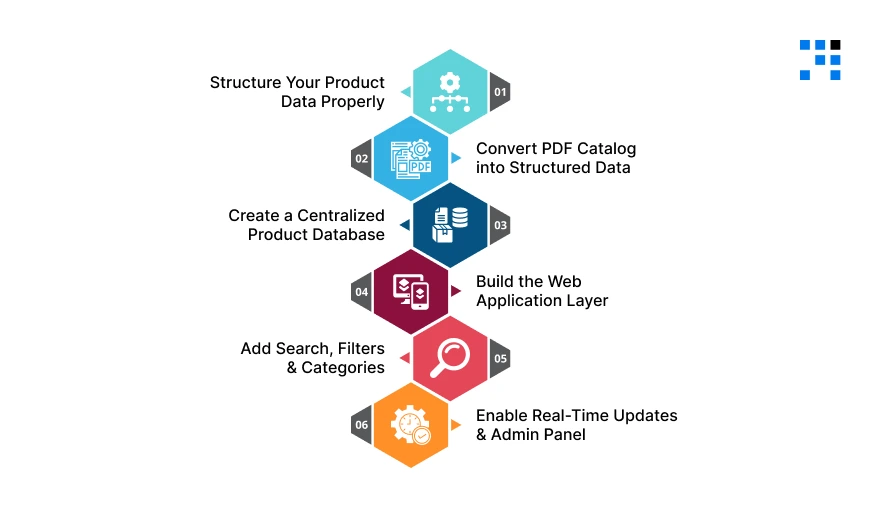
If you’re wondering how to convert Excel product catalog into a web app or change a PDF to a web application, the process is simpler when broken into clear steps.
Step 1: Structure Your Product Data Properly
Before building anything, you need clean and organized data. This is the foundation of your product catalog management system.
Clean Your Excel Data
- Remove duplicate entries.
- Fix missing values.
- Ensure consistent formatting.
Standardize Product Fields
Make sure every product has the same structure:
- SKU (unique product ID).
- Product name.
- Price.
- Category.
- Specifications (size, material, etc.).
- Images or image links.
A well-structured Excel file makes it much easier to convert excel to web app without errors.
Step 2: Convert PDF Catalog into Structured Data
If your catalog is in PDF format, the first step is to extract usable data.
Manual vs Automated Tools
- Manual method: Copy-paste data into Excel (good for small catalogs)
- Automated tools: Use PDF extraction tools to convert data into structured formats like CSV or Excel
Data Extraction Basics
- Identify product sections.
- Extract text, tables, and images.
- Organize everything into rows and columns.
Once done, your PDF now has structured data ready for a pdf to web application process.
Step 3: Create a Centralized Product Database
Now that your data is ready, the next step is to store it in a database.
Choose the Right Database
- SQL (MySQL, PostgreSQL): Best for structured product data.
- NoSQL (MongoDB): Flexible for complex or varied data.
Organize Product Information
- Create tables or collections for products.
- Store SKUs, categories, pricing, and specs.
- Link images and additional assets.
This step transforms your catalog into a centralized product database, which is the core of any product catalog web app.
Step 4: Build the Web Application Layer
This is where your catalog becomes a real, usable application.
Frontend (User Interface)
- Displays product listings.
- Allows users to browse and interact.
- Should be clean, fast, and mobile-friendly.
Backend (Data Handling)
- Connect your database to the frontend.
- Manages product data, updates, and logic.
- Handles user requests and responses.
Together, the frontend and backend create a complete web-based product catalog solution.
Step 5: Add Search, Filters & Categories
This is one of the most important steps for usability.
Why Does It Matter?
Users should never struggle to find products. A good product catalog web app must include:
- Search by product name or SKU.
- Filters (category, price, & specs).
- Organized product categories.
This turns your catalog into a fully interactive and user-friendly system, unlike Excel or PDF files.
Step 6: Enable Real-Time Updates & Admin Panel
The biggest advantage of a web app is control and flexibility.
Easy Product Updates
- Add, edit, or remove products instantly.
- Update pricing or specifications in real time.
Role-Based Access
- Admin panel for internal teams.
- Controlled access for sales teams or distributors.
With this setup, your catalog becomes a dynamic product catalog software that grows with your business.
Want to Upgrade Your Product Catalog to a Dynamic Web App?
Must-Have Features in a Product Catalog Web App
To build a powerful and scalable product catalog web app, you need the right features in place.
- SKU Management System: Organize and manage all products using unique SKUs for better tracking and control.
- Advanced Filtering: Allow users to filter products by category, price, specifications, or availability.
- Product Comparison: Allow users to compare multiple products side by side,very useful for B2B buyers.
- Bulk Upload via Excel: Easily upload or update product data using Excel files, perfect for businesses transitioning from spreadsheets.
- API Integration (ERP/CRM): Connect your catalog with existing systems like ERP or CRM for seamless data flow and automation.
- Role-Based Dashboards: Control access for admins, sales teams, and distributors with customized dashboards.
These features turn your catalog into a complete product catalog management system that supports business growth.
Ready to Turn Your Static Catalog into a Revenue-Driving Web App?
If you’re still managing products in Excel or PDF, you’re missing out on speed, efficiency, and growth opportunities.
By moving to a product catalog web app, you can:
- Convert Excel and PDF catalogs into a dynamic system.
- Improve search, usability, and customer experience.
- Allow real-time updates and better decision-making.
The change from static files to a web-based product catalog solution is required for scaling your business.
FAQs
- To convert Excel to web app, you need to clean and structure your data, store it in a database, and build a web interface that displays and manages the product information dynamically.
- Yes, you can convert a PDF to web application by extracting product data, organizing it into structured formats like Excel or database tables, and then building a dynamic web app.
- The best solution depends on your needs.
- Custom-built product catalog management systems offer more flexibility, while SaaS tools provide quick and easy setup.
- Yes, even small manufacturers benefit from a web-based product catalog, as it improves efficiency & reduces errors.