Struggling to manage state in Flutter apps?
Learn through my simple Provider approach to handle API data, UI updates, and clean architecture without messy setState code.
I’m a Flutter developer, and I wanted to share something I struggled with in the beginning of my professional career: Flutter state management.
This photo was taken while I was working on one of my early Flutter projects. At that time, I was really excited about building apps and learning new things every day.
I got the opportunity to write this blog because I wanted to share what I’ve learned so far, especially the part that confused me the most in the beginning.

When I started building apps, I felt UI design was quite easy.
But managing data, updating UI after API calls, and keeping everything in sync, that’s where real development starts.
In every Flutter application, we deal with data that keeps changing, like:
- Updating UI after API calls.
- Navigating between screens.
- Showing loading indicators.
- Handling authentication.
- Updating form values.
- Managing theme changes.
All of this depends on how well we handle state management in Flutter. So in this blog, I’ll explain how I manage state in my Flutter apps in a simple way.
What is the State in Flutter?
In Flutter, state means the current condition of your app at any given time. For example:
- Is the user logged in or not?
- Has the API data loaded?
- Is a button clicked?
- Is the app showing loading or success UI?
- Did the request fail?
Whenever these values change, and UI updates accordingly, that is called Flutter state management.
Struggling with State Management in Flutter App or Its Structure?
Importance of State Management in Flutter
In the beginning, I used setState in Flutter for everything. It worked fine for small apps. But as my app grew:
- More screens were added.
- API integrations increased.
- Business logic became complex.
- UI updates became frequent.
Managing everything using only setState() started making my code messy and hard to maintain.
That’s when I realized I needed a proper Flutter state management solution.
What Are the State Management Approaches in Flutter?
Flutter provides multiple ways to handle state:
- setState (built-in)
- Provider
- Riverpod
- GetX
- Bloc / Cubit
Each has its own use case.
But in my day-to-day work, I mostly use Provider state management in Flutter because:
- It is easy to understand.
- Lightweight.
- Recommended by the Flutter team.
- Helps separate UI and business logic.
- Good for small to medium apps.
Here’s the Flutter Community that you can be a part of.
How I Use Provider in My Flutter Projects
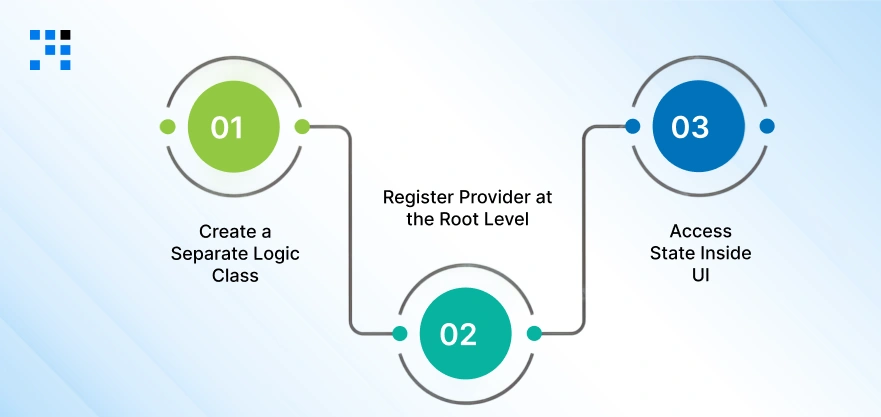
When I started learning Flutter state management, I was confused about how to structure my code properly.
After trying a few things, I found a simple pattern using Provider in Flutter, and now I follow this in almost all my projects.
Let me explain my approach step by step in an easy way.
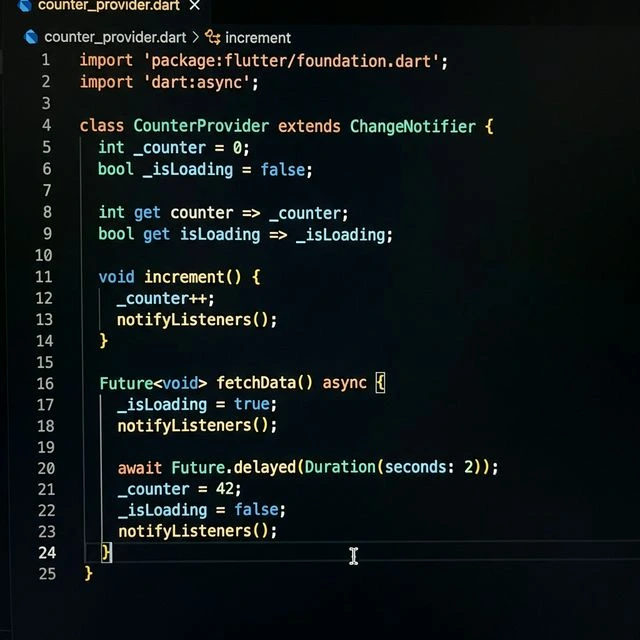
Step 1: Create a Separate Logic Class (Using ChangeNotifier)
The first thing I do is separate my business logic from UI.
Instead of writing everything inside the UI file, I create a separate class that extends ChangeNotifier in Flutter. This class is responsible for:
- Holding the application state.
- Updating the state.
- Notifying the UI when something changes.
For example, inside this class, I usually handle:
- API responses.
- Loading states.
- Counter values.
- Form data updates.
Whenever any data changes, I call notifyListeners() in Flutter.
This is a very important part of Provider state management in Flutter, because it tells Flutter: “Only rebuild the widgets that are listening to this data.”
This makes the app more efficient and avoids unnecessary UI rebuilds. Below is a simple example of a CounterProvider class that I use in my projects.
Step 2: Register Provider at the Root Level
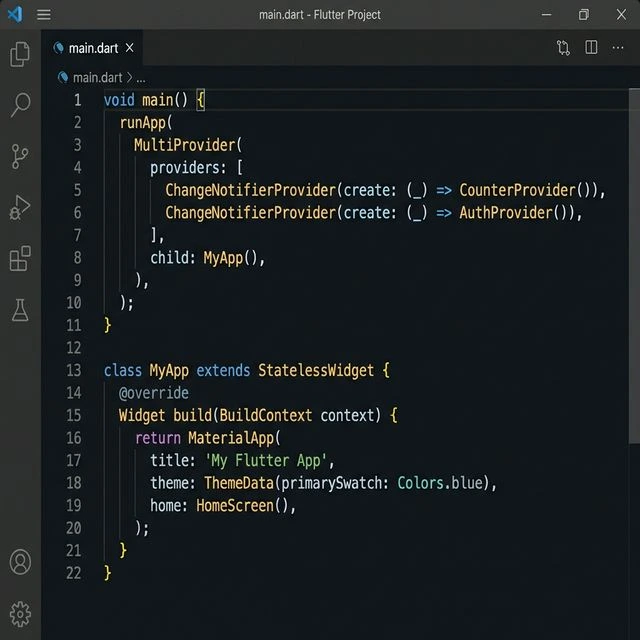
After creating the provider class, the next step is to register it in the app.
Inside the main.dart file, I wrap my application with:
- ChangeNotifierProvider (for a single provider).
- MultiProvider (if I have multiple providers).
This step is very important in Flutter Provider setup because it makes the state available throughout the entire application.
Before using Provider, I used to struggle with passing data between screens. But after doing this, I can easily access the state from anywhere in the app.
You can check the code below for reference.
Step 3: Access State Inside UI
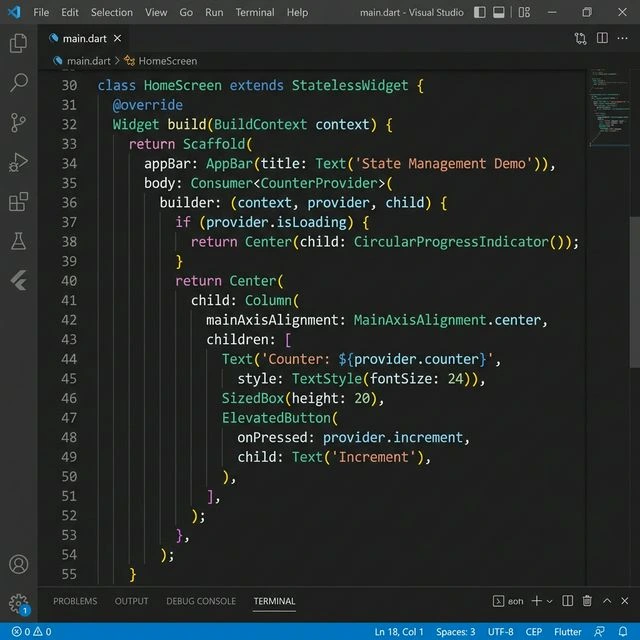
Now comes the part where we use the state inside the UI. Inside my UI screens, I usually use:
- Consumer widget or
- Provider.of()
These help me listen to changes in the state and update the UI automatically. For example:
- When loading starts: Show loader.
- When data comes: Show UI.
- When an error happens: Show a message.
Using this approach in Flutter state management with Provider helps me:
- Keep UI code clean.
- Keep logic separate.
- Build scalable applications.
Below is a simple example where I use the Consumer widget in Flutter inside my HomeScreen.
State Flow in My Flutter Application
This is how data flows in my app:
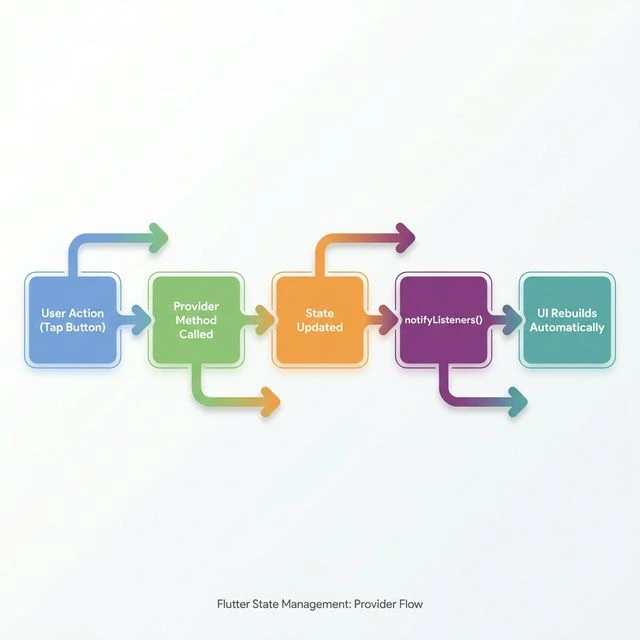
This flow makes my Flutter app architecture more predictable and easier to debug.
Want to Implement This Kind of Clean State Flow in Your App?
Benefits I Experienced Using the Provider
After using Provider state management Flutter, I noticed:
- Better code readability.
- Easy debugging.
- Clear separation of UI and logic.
- Reusable business logic.
- Scalable app structure.
- Fewer UI bugs.
Real World Example: AuthProvider

In my projects, I create an AuthProvider in Flutter to handle:
- Login.
- Logout.
- User session.
This keeps all authentication logic in one place. The UI simply listens to state changes and updates automatically.
What Worked for Me
For me, learning Flutter state management was a turning point.
Using Provider helped me manage dynamic data properly without mixing business logic into UI code.
If you are starting with Flutter, I strongly recommend learning at least one proper state management approach early.
It will make your apps cleaner, scalable, and easier to maintain.
FAQs
- State management in Flutter is the way we handle and update data in an app.
- When data changes, the UI updates accordingly to reflect the current state.
- Provider is a popular state management solution in Flutter.
- It helps manage app data efficiently using ChangeNotifier and allows UI to rebuild only when needed.
- setState is used for simple, local state updates within a widget.
- Provider is used for managing global or shared state across multiple screens in a structured way.
- Yes, Provider is beginner-friendly. It is easy to learn, widely used, and helps developers understand structured state management in Flutter.