Field service management software helps you manage engineers who work at customer sites. It keeps every complaint, job, spare part, and report in one place. A custom build costs between $8,000 and $150,000+, depending on the features you need.
Can your coordinator tell a customer where their engineer is in ten seconds?

Monday, 9:00 AM.
A customer reports a leaking compressor.
The service coordinator notes it on a whiteboard and phones an engineer.
By 2:00 PM, that engineer is still stuck at another site, 40 km away.
Nobody knew, so the customer calls again, now annoyed.
Thursday, 11:00 AM.
A second engineer finally arrives without the right spare part.
He leaves with the work undone.
Next Monday, the third visit fixes it.
That is three visits and five lost days for one complaint.
The customer’s yearly service contract is up for renewal next month,
and they are already asking other companies for quotes.
Your engineers did their jobs.
But you will assume he left over price.
He left because nobody could tell him where his complaint stood.
What Is Field Service Management Software
Field service management software is a system that organizes work done at customer sites. It tracks every complaint, job, engineer, spare part, and report in one place. Businesses use it to stop running service through calls, WhatsApp, and Excel.
1. Core Workflow
Customers raise a request, and it becomes a ticket.
Dispatchers assign the job to an engineer with the right skills.
Engineers update progress from their phones while on site.
Reports, parts used, and closure reach the office instantly.
2. Ideal Users
Any business that sends technicians to customer sites can use it.
HVAC, electrical, and facility maintenance firms see results quickly.
Equipment manufacturers use it for installations, breakdowns, and AMC visits.
Teams can start with field service software for small businesses.
3. Tool Differences
| Tool | What It Manages | Where It Falls Short in Field Work |
|---|---|---|
| CRM | Customer records and sales | No engineer visits or job status |
| CMMS | Maintenance of your own assets | Limited customer-facing service jobs |
| ERP | Finance, stock, and billing | Weak on dispatch and site reports |
FSM fills this gap by managing field operations while integrating with existing business systems.
Why Businesses Need Field Service Management Software
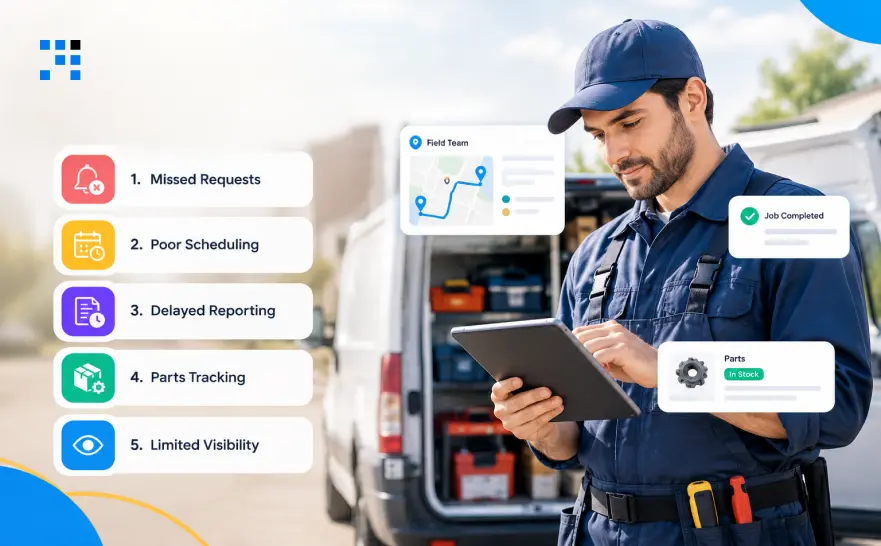
1. Missed Requests
Software Advice found 35% of buyers still use spreadsheets and paper.
Another 36% use CRM or accounting tools never built for field work.
Complaints arrive by call, WhatsApp, and Excel, so some get lost.
One ticket queue gives every complaint a single record.
2. Poor Scheduling
ServiceTrade surveyed 823 technicians, and 45% cited office and field miscommunication.
Engineer assignments often sit in a manager’s head or a chat.
Meanwhile, 44% blamed poor scheduling or last-minute changes.
A dispatch screen shows who is free, and status alerts replace follow-up calls.
3. Delayed Reporting
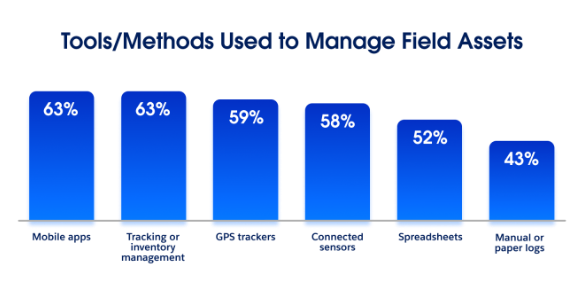
Salesforce found 43% of organizations still use manual or paper logs.
Paper reports reach the office days after the visit.
Approvals get stuck, so billing and follow-ups slip too.
Mobile reports arrive the moment the engineer closes the job.
4. Parts Tracking
Spare parts get used, but nobody writes it down.
Expenses show up weeks later without a matching job.
Repeat visits happen because equipment details were never recorded.
Linking parts and costs to each job solves all three.
5. Limited Visibility
Managers cannot see open jobs, overdue requests, or upcoming AMC visits.
Workloads stay hidden until an engineer complains.
Dashboards show all of this live, so decisions rest on facts.
What Features Should Field Service Management Software Have
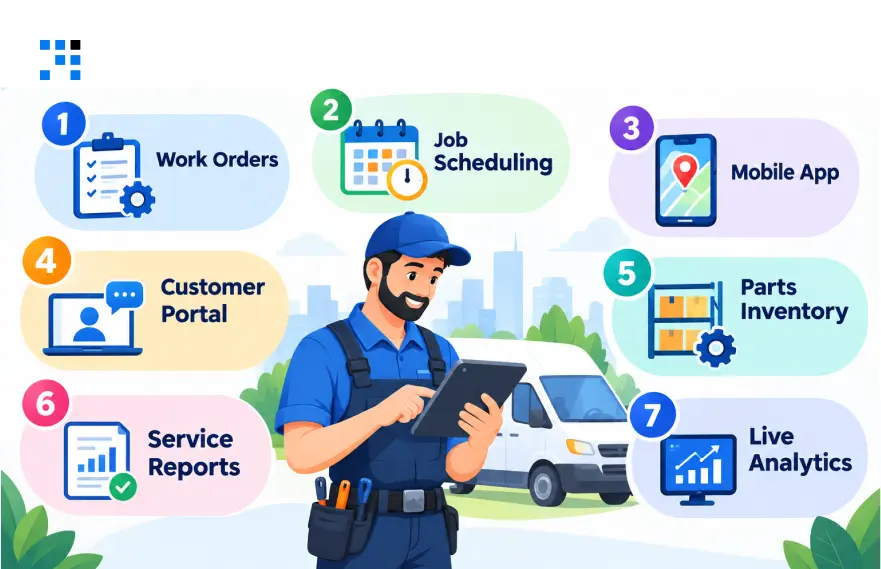
1. Work Orders
Every complaint gets a ticket number and a priority.
Sign-offs happen inside the ticket instead of side chats.
Assignments and status changes are tracked until the job closes.
2. Job Scheduling
Calendars show who is free, which skills they have, and which area they cover.
Route planning cuts travel time between visits.
Clashes get flagged before the engineer leaves home.
3. Mobile App
Technicians open assigned jobs, maps, and equipment history in one app.
Checklists, photos, and signatures replace paper forms.
Offline mode lets them work in basements and remote plants.
4. Customer Portal
Clients can raise requests and book visits without calling anyone.
Job status and notifications answer the “when will you arrive” question.
Past service history stays in the same login.
5. Parts Inventory
Each spare part is linked to the job that used it.
Van stock shows what technicians actually carry today.
Returns and usage update on their own.
Reorder alerts fire before a key part runs out.
6. Service Reports
Digital reports record the work done, labour hours, and expenses.
Photos prove the job was finished properly.
Signatures are captured on the phone before the engineer leaves.
7. Live Analytics
Open jobs, overdue requests, and technician workload are visible at a glance.
First-time fix rate shows where parts or training fall short.
SLA compliance and service cost show which accounts need attention.
Tech Stack for Field Service Management Software
The right stack depends on your workflows, mobile needs, integrations, and expected scale.
A field service management system for 20 technicians needs far less than a multi-tenant SaaS.
| Technology Layer | Options | Purpose |
|---|---|---|
| Web frontend | React, Next.js, Angular | Dispatcher dashboard and admin panel |
| Mobile app | Flutter, React Native, native apps | Technician workflows |
| Backend | Node.js, NestJS, Java, .NET | Business logic and APIs |
| Database | PostgreSQL, MySQL | Jobs, customers, assets, and inventory |
| Maps | Google Maps Platform, Mapbox | Navigation and route planning |
| Cloud | AWS, Azure, Google Cloud | Hosting and infrastructure |
| Notifications | Firebase Cloud Messaging, SMS and email providers | Alerts and reminders |
| Integrations | REST APIs, webhooks | Connecting business systems |
| Analytics | SQL reporting, BI tools | Operational insights |
How Much Does Field Service Management Software Cost
Integrations, offline sync, and mobile apps add the biggest jumps.
Timelines stretch with complexity, testing, and team capacity.
Treat these as planning ranges, not fixed quotes.
| Project Scope | What Is Included | Cost Range | Timeline |
|---|---|---|---|
| MVP | Work orders, technician assignments, basic reports, admin dashboard | $8,000–$15,000 | 6–10 weeks |
| Mid-Level | Mobile app, inventory, customer portal, notifications, selected integrations | $15,000–$35,000 | 3–4 months |
| Advanced | Offline sync, complex workflows, multiple integrations, advanced analytics | $35,000–$70,000 | 4–6 months |
| Enterprise | Multi-tenancy, advanced permissions, multiple business units, scalability, extensive integrations | $70,000–$150,000+ | 6–9+ months |
How Prasad Group Cut Field Complaint Resolution Time by 30%
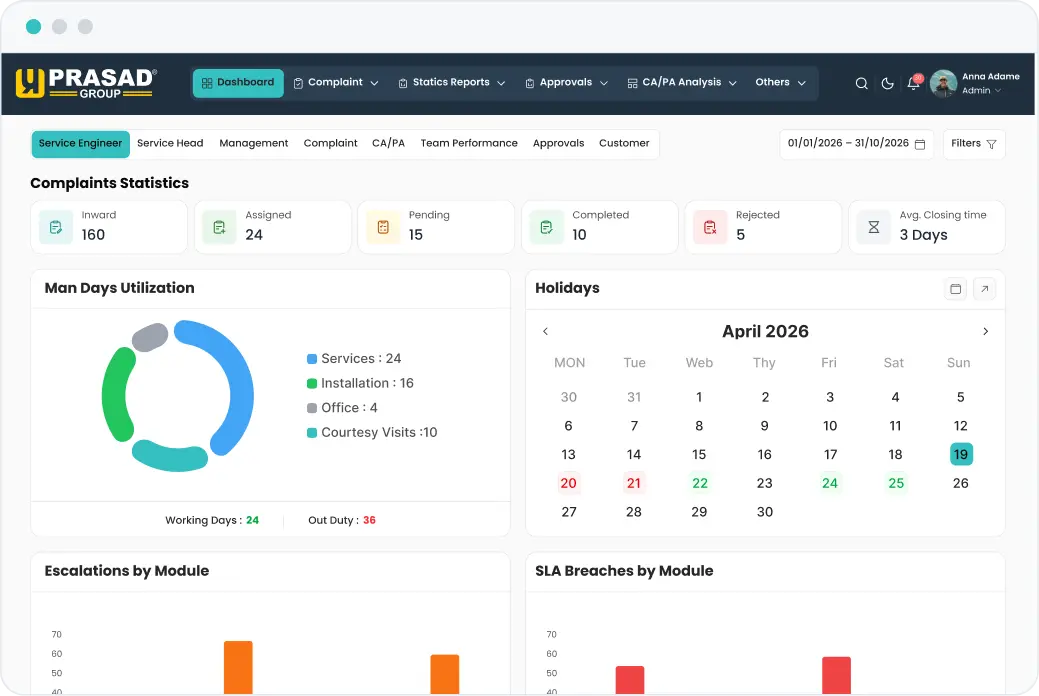
Prasad Group is a plastic processing machinery company in India.
Their engineers were always on the road serving customers.
But no one knew where any complaint stood.
Challenges in Service Management
| Area | What Was Happening |
|---|---|
| Complaint Registration | Requests got missed or duplicated |
| Status Visibility | Customers called daily for updates |
| Engineer Assignment | Jobs were assigned over WhatsApp with no record |
| Field Reports | Paper forms reached the office days late |
| Parts and Expenses | Parts and claims had no paperwork |
| Management Oversight | Leaders could not see what was open or overdue |
Everything depended on calls, chats, and paper.
And that was slowing down every service visit.
How We Improved Service Operations
We built one connected web and mobile platform for their service team.
It unified complaints, engineer assignments, field reports, and service approvals.
Results After Implementation
| Metric | Impact |
|---|---|
| Complaint Handling | Resolved 30% sooner |
| Manual Work | 45% fewer manual tasks |
| Engineer Dispatch | Assigned 35% quicker |
| Service Visibility | 50% clearer view of activities |
The real improvement was better tracking and accountability.
Each complaint now has a clear owner, status, and resolution record.
Want to Know How We Did It?
How We Build Field Service Management Software
1. Workflow Discovery
Our team starts by sitting with dispatchers, engineers, and managers.
Mapping the current process reveals where work gets stuck.
Requirements get documented and approved before development begins.
2. MVP Planning
Essential features get ranked against real daily problems.
User roles, such as dispatcher, engineer, and admin, are defined early.
Release one stays small enough to launch on time.
3. UI/UX Design
Design starts from the technician’s working conditions.
Quick job updates matter more than good-looking screens.
Admin views highlight what needs action next.
4. Connected Development
Backend, web dashboard, mobile app, and database are built together.
APIs connect your ERP, CRM, and accounting tools.
Weekly demos let your team correct course early.
5. Launch Readiness
Testing uses real workflows, not demo data.
Connected systems get checked end to end before deployment.
Onboarding sessions help users adopt it from day one.
Future improvements are planned from live usage.

Every open complaint is a customer waiting.
Start with tickets and dispatch, then grow from real usage.
FAQs
Not if your process is different from what ready-made tools offer. We start with a short workflow review and tell you honestly if an off-the-shelf tool will do. Field service software for small business works best when it starts with tickets, dispatch, and reports, then grows with you.
We never switch everything overnight. Your current process keeps running while we move open complaints and customer data into the new system. We begin with one team or region, fix what engineers find awkward, and then roll out to everyone.
Yes. Every machine gets its own record with installation details, warranty, past complaints, and parts used. Engineers see that history before they leave for the site. We also connect it to your ERP, so machine data is never typed twice.
The dispatcher sees every engineer’s current jobs and reassigns in a few taps. The new engineer and the customer get notified instantly, so nobody has to confirm the change by phone.
We set role-based access from day one, so people see only what they need. Every approval and closure carries a timestamp, which gives you a clear audit trail. Backups and update plans are agreed before launch, not after.
Build what every customer in your niche needs on day one: tickets, dispatch, and mobile reporting. Leave AI features and deep analytics until real users ask for them. In a scoping call, we turn your idea into a clear feature list and budget before any code starts.