Releasing a React Native app to the iOS App used to be slow, stressful, & error-prone.
With the right App Store release automation pipeline, you can build, sign, upload, and release your app automatically without manual steps or last-minute surprises.
That’s why many teams now rely on an App Store release automation pipeline in React Native.
Want to learn how to automate iOS App Store releases using React Native CI/CD pipeline with Fastlane and GitHub Actions?
In this blog, we will explain practical steps and a GitHub setup to help you automate builds, signing, uploads, and releases.
It helps to simplify React Native release automation and ship apps faster with fewer errors.
Why Manual App Store Releases Are Slowing Down React Native Teams?
Manual App Store releases might feel manageable at first, but they quickly become a bottleneck as your React Native app grows.
Hidden risks of manual iOS App Store deployments
- Manual deployments depend heavily on people, local machines, and memory.
- Expired certificates, wrong provisioning profiles, or incorrect build numbers can easily break a release.
- These issues often appear at the last moment, right before submission.
Common mistakes React Native developers repeat
- Many teams manually upload builds, update version numbers by hand, or reuse outdated certificates.
- These repeated mistakes lead to failed App Store submissions, rejected builds, and wasted developer hours.
Why Automation is Required?
- Modern teams rely on React Native release automation to ship faster and safer.
- An automated App Store release pipeline ensures every build follows the same steps, without human errors.
- For teams that release frequently, App Store release automation is essential.
What Is an App Store Release Automation Pipeline in React Native?
An App Store release automation pipeline in React Native is a structured CI/CD process that automatically handles your iOS app releases, from code changes to App Store submission.
How does a CI/CD pipeline work for React Native iOS apps?
A React Native CI/CD pipeline starts when code is pushed to a repository. The pipeline then:
- Builds the iOS app.
- Signs it is using secure certificates.
- Upload it to App Store Connect.
- Prepares it for TestFlight or App Store release.
This entire flow runs automatically without manual intervention.
Build automation vs release automation
- Build automation focuses only on compiling the app.
- Release automation goes further; it manages signing, versioning, uploading, and App Store submission.
- A complete App Store CI/CD pipeline for React Native covers both.
Which Tools Will You Need to Automate React Native App Store Releases?
Choosing the right tools is critical for a reliable automation pipeline.
Why Fastlane Is the Backbone of App Store Automation?
Fastlane for React Native is the industry standard for iOS automation.
- It handles code signing, certificates, and provisioning profiles.
- It automates versioning and builds numbers.
- It uploads and builds directly to App Store Connect.
With a proper Fastlane React Native setup, you can eliminate repetitive manual steps and standardize App Store uploads across your team.
GitHub Actions vs Other CI/CD Tools for React Native
GitHub Actions is one of the best choices for React Native CI/CD because:
- It integrates directly with your code repository.
- It supports secure secrets for iOS signing.
- It scales easily for teams of all sizes.
Tools like Bitrise or CircleCI are also powerful, especially for mobile-focused workflows.
GitHub Actions React Native CI/CD is often preferred due to its flexibility, cost efficiency, and tight GitHub integration.
How Does App Store Release Automation Pipeline Architecture Work?
A standard iOS app release pipeline for React Native follows this flow:
Commit → CI Trigger → Build → Sign → Upload → Release
Here’s how it works:
- A developer pushes code to GitHub.
- GitHub Actions triggers the CI/CD workflow.
- Fastlane builds the iOS app.
- Certificates and provisioning profiles are applied securely.
- The app is uploaded to App Store Connect.
- The release is prepared for TestFlight or App Store submission.
React Native CI/CD pipelines must also handle JavaScript dependencies and cross-platform configurations, making automation even more valuable.
Step-by-Step: Create a React Native App Store Release Automation Pipeline
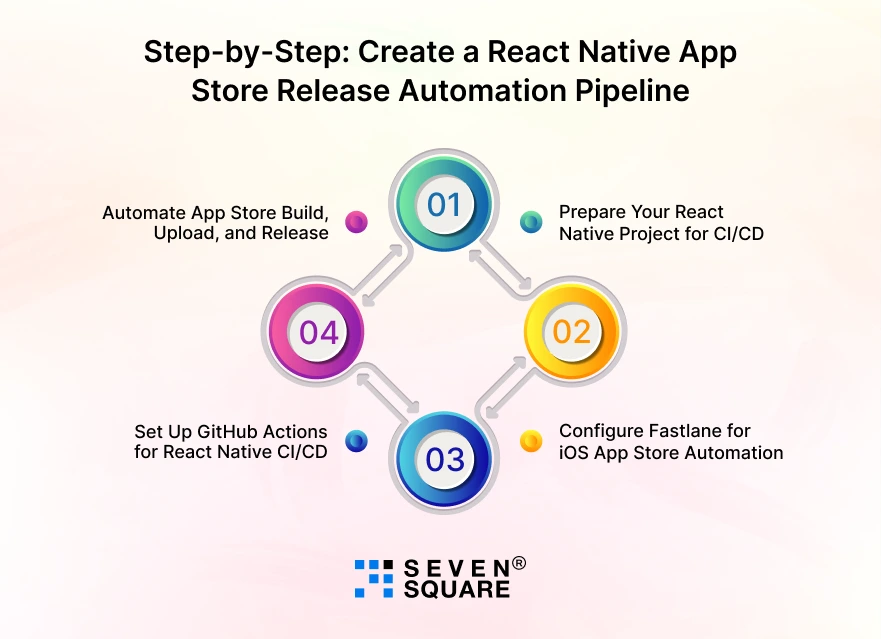
Here you can learn how to automate iOS App Store publishing for a React Native app.
Step 1: Prepare Your React Native Project for CI/CD
Before setting up any React Native CI/CD pipeline, your project must be clean, stable, and automation-ready.
Environment Setup
Make sure your local and CI environments support iOS builds:
- macOS machine (required for iOS builds)
- Node.js (LTS recommended)
- Yarn or npm
- Xcode (latest stable)
- CocoaPods installed
                node -v
                xcodebuild -version
                pod --version
iOS Project Configuration
Navigate to your iOS folder and install dependencies:
                cd ios
                pod install
                cd ..
Ensure:
- The iOS app builds successfully locally.
- Bundle Identifier matches App Store Connect.
- Version and Build Number are correctly set.
App Store Prerequisites
Before automating App Store releases, you must have:
- Apple Developer Account.
- App created in App Store Connect.
- App Store Connect API Key (recommended for CI/CD).
- App identifier and team ID.
This preparation ensures a smooth React Native build and release automation without CI failures.
Step 2: Configure Fastlane for iOS App Store Automation
Fastlane is the backbone of automating iOS app publishing in React Native projects.
Install and Initialize Fastlane
From your project root:
                cd ios
                fastlane init
Choose:
- Manual setup
- Platform: iOS
This creates a fastlane folder with Fastfile.
Configure App Store Connect API Keys
Using API keys is the safest way to automate App Store uploads in CI/CD.
Create an API key in App Store Connect and store values securely:
- APP_STORE_CONNECT_API_KEY_ID
- APP_STORE_CONNECT_API_ISSUER_ID
- APP_STORE_CONNECT_API_KEY_BASE64
Fastlane Configuration (Fastfile)
                default_platform(:ios)
                platform :ios do
                desc "Build and upload app to App Store"
                lane :release do
                    api_key = app_store_connect_api_key(
                    key_id: ENV["APP_STORE_CONNECT_API_KEY_ID"],
                    issuer_id: ENV["APP_STORE_CONNECT_API_ISSUER_ID"],
                    key_content: ENV["APP_STORE_CONNECT_API_KEY_BASE64"],
                    is_key_content_base64: true
                    )

                    increment_build_number(
                    xcodeproj: "YourApp.xcodeproj"
                    )

                    build_app(
                    scheme: "YourApp",
                    export_method: "app-store"
                    )

                    upload_to_app_store(
                    api_key: api_key,
                    skip_metadata: true,
                    skip_screenshots: true
                    )
                end
                end
This lane:
- Automatically increments build numbers.
- Builds the iOS app.
- Upload it to App Store Connect.
This is the core of React Native build and release automation.
Step 3: Set Up GitHub Actions for React Native CI/CD
Now let’s automate everything using GitHub Actions React Native CI/CD.
GitHub Actions Workflow File
Create this file:
.github/workflows/ios-release.yml
GitHub Actions YAML (Complete & Ready to Use)
                name: iOS App Store Release
				on:
				push:
				branches:
				- main
				jobs:
				build-and-release:
				runs-on: macos-latest
				steps:
				- name: Checkout repository
				uses: actions/checkout@v4
				- name: Set up Node.js
				uses: actions/setup-node@v4
				with:
				node-version: 18
				- name: Install dependencies
				run: |
				npm install
				cd ios && pod install
				- name: Set up Ruby
				uses: ruby/setup-ruby@v1
				with:
				ruby-version: 3.1
				- name: Install Fastlane
				run: gem install fastlane
				- name: Run Fastlane release
				env:
				APP_STORE_CONNECT_API_KEY_ID: ${{ secrets.APP_STORE_CONNECT_API_KEY_ID }}
				APP_STORE_CONNECT_API_ISSUER_ID: ${{ secrets.APP_STORE_CONNECT_API_ISSUER_ID }}
				APP_STORE_CONNECT_API_KEY_BASE64: ${{ secrets.APP_STORE_CONNECT_API_KEY_BASE64 }}
				run: |
				cd ios
				fastlane release
Step 4: Automate App Store Build, Upload, and Release
Your App Store release automation pipeline in React Native is now fully functional.
Build iOS App Automatically
GitHub Actions triggers Fastlane, which:
- Builds the app using Xcode
- Applies correct signing
- Generates a production-ready .ipa
Upload to App Store Connect
Fastlane uploads the build automatically to App Store Connect with zero manual steps.
This removes human errors and speeds up React Native release automation dramatically.
Optional: TestFlight Automation
To upload directly to TestFlight, update Fastlane:
                upload_to_testflight(
				api_key: api_key,
				skip_waiting_for_build_processing: true
				)
Now every push can deliver a TestFlight build automatically.
Full GitHub Actions CI/CD Workflow for React Native App Store Release
This GitHub Actions React Native CI/CD pipeline automatically builds, signs, and uploads your iOS app to App Store Connect whenever you push to the main branch.
Workflow File Location
.github/workflows/ios-appstore-release.yml
GitHub Actions YAML
            name: React Native iOS App Store Release
		    on:
			push:
			branches:
			- main
			jobs:
			ios-release:
		    runs-on: macos-latest
			steps:
			- name: Checkout repository
			uses: actions/checkout@v4
			- name: Set up Node.js
			uses: actions/setup-node@v4
            with:
	        node-version: 18
			- name: Install JavaScript dependencies
			run: npm install
			- name: Install CocoaPods dependencies
			run: |
            cd ios
            pod install
			- name: Set up Ruby
			uses: ruby/setup-ruby@v1
            with:
	        ruby-version: 3.1
			- name: Install Fastlane
			run: gem install fastlane
			- name: Run Fastlane App Store Release
			env:
            APP_STORE_CONNECT_API_KEY_ID: ${{ secrets.APP_STORE_CONNECT_API_KEY_ID }}
            APP_STORE_CONNECT_ISSUER_ID: ${{ secrets.APP_STORE_CONNECT_ISSUER_ID }}
            APP_STORE_CONNECT_API_KEY_BASE64: ${{ secrets.APP_STORE_CONNECT_API_KEY_BASE64 }}
            run: |
            cd ios
			fastlane appstore_release
Why Does This Workflow Work?
- Uses macOS runners for iOS builds.
- Secures sensitive data using GitHub secrets.
- Fully automates React Native build and release automation.
- Designed for CI/CD for React Native apps in production.
Fastlane Configuration (Fastfile)
Fastlane handles everything related to automating iOS App Store publishing from signing to uploading.
Fastlane Folder Structure
ios/
└── fastlane/
├── Fastfile
├── Appfile
Appfile (App Store Configuration)
                app_identifier("com.yourcompany.yourapp")
				apple_id("your@email.com")
				team_id("YOUR_TEAM_ID")
This connects your React Native iOS app with App Store Connect.
Fastfile: App Store Release Lane
                default_platform(:ios)

				platform :ios do
				desc "Automate App Store build and release for React Native app"
				lane :appstore_release do

				api_key = app_store_connect_api_key(
				key_id: ENV["APP_STORE_CONNECT_API_KEY_ID"],
				issuer_id: ENV["APP_STORE_CONNECT_ISSUER_ID"],
				key_content: ENV["APP_STORE_CONNECT_API_KEY_BASE64"],
				is_key_content_base64: true
				)

				increment_build_number(
				xcodeproj: "YourApp.xcodeproj"
				)

				build_app(
				scheme: "YourApp",
				export_method: "app-store",
				clean: true
				)

				upload_to_app_store(
				api_key: api_key,
				skip_metadata: true,
				skip_screenshots: true,
				force: true
				)
				end
				end
Here’s the Complete GitHub Code to Create an App Store Release Automation Pipeline in React Native.
Why Do Businesses Trust Us for React Native App Store Automation?
- We design scalable App Store release automation pipelines in React Native tailored for startups, enterprises, and fast-growing businesses.
- Our experts build secure React Native CI/CD pipelines using Fastlane and GitHub Actions for smooth, error-free App Store releases.
- We help teams automate iOS App Store publishing, reducing manual effort, release risks, and deployment time significantly.
- Our team delivers production-ready React Native release automation with real code and GitHub repositories for easy adoption.
Want to Build a Custom React Native App? Contact Us Now!
How Does This React Native Release Pipeline Saves Time & Prevents Errors?
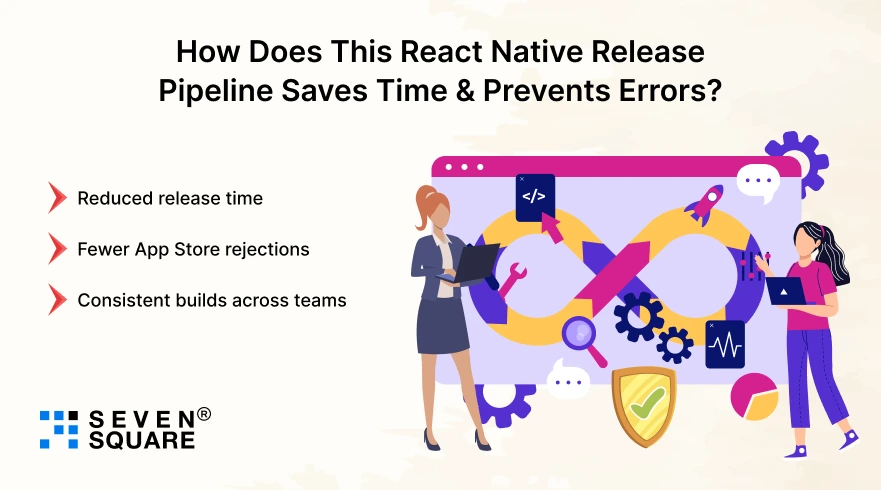
A well-designed React Native release automation pipeline delivers immediate benefits:
- Reduced release time: Releases that once took hours can be completed in minutes.
- Fewer App Store rejections: Automated signing and versioning reduce submission errors.
- Consistent builds across teams: Every release follows the same tested process.
For businesses, this means faster time-to-market. For developers, it means fewer late-night release issues.
When Should You Customize or Scale This Release Pipeline?
As your app grows, your pipeline should grow with it.
- Multi-environment setups: Separate pipelines for staging, QA, and production.
- White-label apps: Automate builds for multiple clients from the same codebase.
- Enterprise React Native apps: Add approvals, security checks, and advanced workflows.
Scaling your CI/CD for React Native apps ensures your release process stays reliable as complexity increases.
Should You Automate App Store Releases in React Native?
If you want faster releases, fewer errors, and a predictable deployment process, automating your App Store releases is the right move.
This App Store release automation pipeline in React Native is ideal for:
- Development teams are shipping frequently.
- Businesses aiming for faster go-to-market.
- Entrepreneurs who want reliable, repeatable releases.
FAQs
- You automate App Store releases by combining Fastlane with a CI/CD tool like GitHub Actions to build, sign, and upload your app automatically.
- Fastlane isn’t mandatory but recommended. It simplifies App Store automation & handles iOS-specific tasks more reliably than manual scripts.
- Yes. GitHub Actions supports encrypted secrets, allowing secure management of certificates, keys, and provisioning profiles.
- Yes, this React Native App Store release pipeline scales well for startups, agencies, and enterprise teams with multiple contributors.