“Your app works fine in development. Then users complain about lag. What changed?”
If you’ve ever thought, “Why is my Flutter widget rebuilding too often?”, you’re not alone.
Everything feels smooth while developing. The UI updates correctly. The animations look fine. But once the app hits production, users start reporting:
- Random frame drops.
- Scroll lag.
- Scroll lag.
- Battery drain.
There are serious Flutter app performance issues. In small apps, extra rebuilds don’t hurt much. But in large production apps with deep widget trees, can:
- Rebuild entire UI sections unintentionally.
- Trigger expensive computations repeatedly.
- Cause dropped frames.
- Reduce overall Flutter widget rebuild performance.
In enterprise apps or complex business platforms:
- Dashboards are rebuilt unnecessarily.
- Provider or Bloc updates cascade across screens.
- State changes ripple across the entire widget tree.
The result?
- Poor user experience.
- Increased infrastructure costs.
- Higher churn.
- Hard-to-debug Flutter widget rebuild performance problems.
Here in this blog, you will learn to create Widget Rebuild Diagnostics Toolkit in Flutter with complete GitHub code.
How Flutter’s Rebuild Mechanism Works?
Before you can debug widget rebuilds in Flutter, you need to understand how rebuilding actually works.
In Flutter, everything is a widget. When state changes, Flutter rebuilds parts of the widget tree to reflect the new UI. Rebuilding itself is not bad. Unnecessary rebuilding is.
Flutter is fast, but rebuilding a large subtree repeatedly can create serious performance issues.
One of the most common causes of a Flutter setState performance issue is misunderstanding its scope. When you call:
setState(() {});
If your widget tree is deep, that can mean dozens or even hundreds of rebuilds.
Why DevTools Alone Isn’t Enough
Flutter DevTools helps, but it doesn’t answer:
- How many times has this widget been rebuilt?
- Which widgets rebuild most frequently?
- Which state change triggered this rebuild?
To truly debug widget rebuilds in Flutter, you need deeper visibility. And that’s where most developers get stuck.
Why Existing Flutter Performance Monitoring Tools Aren’t Enough?
Yes, we have Flutter DevTools rebuild analysis. Yes, we have various Flutter performance monitoring tools.
But here’s the problem: They’re reactive. They show you performance data, but they don’t give you rebuild intelligence at the widget level.
Limitations of DevTools
DevTools can show:
- Frame rendering times.
- CPU usage.
- Memory usage.
- Widget inspector.
But it does NOT:
- Track rebuild frequency per widget.
- Count rebuilds over time.
- Highlight rebuilding widgets in real-time.
- Log rebuild causes automatically.
What’s Missing?
There’s no:
- Visual rebuild highlighter.
- Widget-level rebuild counter.
- Centralized rebuild logger.
- Rebuild analytics dashboard.
Which means developers often rely on guesswork to fix Flutter widget rebuild performance problems.
What is a Custom Flutter Rebuild Tracker Toolkit?
Here we’ll build a Flutter rebuild tracker. A custom toolkit designed specifically for:
- Developers.
- Startups.
- Growing businesses.
- Enterprise Flutter teams.
This is how you build a custom performance monitor in Flutter that gives real visibility into your UI behavior.
What Will This Toolkit Do?
Our custom Flutter performance debugging layer will:
- Track widget rebuilds: Automatically detect when a widget rebuilds.
- Count rebuild frequency: Maintain a rebuild counter per widget.
- Log rebuild causes: Capture the reason behind rebuild triggers.
- Highlight rebuilding widgets: Overlay visual indicators during runtime.
Architecture Preview
At a high level, the system will include:
- A rebuild observer.
- A wrapper widget for tracking.
- A global rebuild logger.
- A metrics aggregator.
- A visual overlay highlighter.
This layered design directly improves Flutter widget rebuild performance by exposing hidden inefficiencies.
What is the Toolkit Architecture to Design a Rebuild Diagnostics Layer?
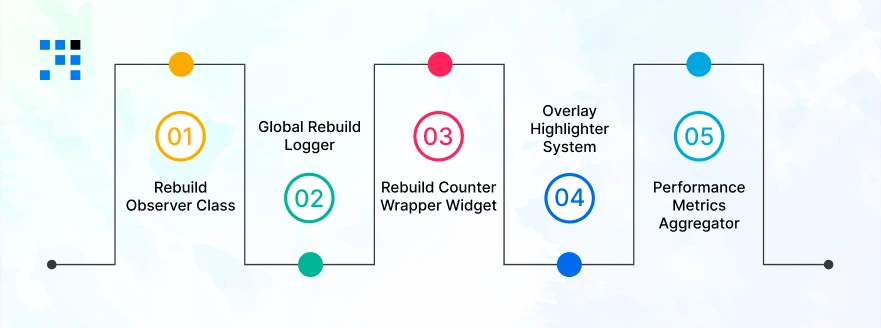
Here’s a mini Flutter performance profiling tutorial, focused on real Flutter performance optimization strategies.
1. RebuildObserver Class
This class hooks into widget lifecycle events and tracks rebuild activity. Responsibilities:
- Listen for build calls.
- Increment rebuild count.
- Report to logger.
2. Global Rebuild Logger
A centralized logger that:
- Stores rebuild frequency.
- Groups by widget type.
- Tracks rebuild timestamps.
- Detects abnormal rebuild patterns.
This becomes your performance intelligence engine.
3. Rebuild Counter Wrapper Widget
A custom wrapper widget that:
- Wraps any target widget.
- Counts rebuilds automatically.
- Sends metrics to the aggregator.
Example usage:
                RebuildTracker(
                child: MyComplexWidget(),
                )
Now you know exactly how often MyComplexWidget rebuilds.
4. Overlay Highlighter System
This is where it gets powerful. When a widget rebuilds:
- A subtle color flash appears.
- You visually see rebuild hotspots.
- Rebuild-heavy areas become obvious.
No more guessing which part of the UI is unstable.
5. Performance Metrics Aggregator
This component:
- Collects rebuild data.
- Collects rebuild data.
- Detects rebuild spikes.
- Helps reduce unnecessary rebuilds in Flutter.
Now you have structured data to improve Flutter widget rebuild performance at scale.
What’s Our Expertise in Flutter Performance Debugging?
- Our developers identify and fix critical Flutter setState performance issues causing unwanted UI rebuilds.
- We resolve complex Flutter inherited widget rebuild problems in Provider, Bloc, and Riverpod architectures.
- We implement real-time Flutter performance monitoring tools beyond standard DevTools capabilities.
- We develop production-ready systems to create a widget rebuild logger in Flutter for enterprise apps.
- We optimize large Flutter dashboards suffering from severe Flutter app performance issues.
Do You Want a Bug-Free Customized Flutter Application?
Step-by-Step Implementation to Build Widget Rebuild Diagnostics Toolkit in Flutter
Let’s build a real Flutter performance analyzer with code. We’ll create a practical Flutter widget rebuild counter example that:
- Tracks widget rebuilds.
- Logs rebuild frequency.
- Detects setState triggers.
- Highlights rebuilding widgets.
- Displays a global performance dashboard.
This is how you create a widget rebuild logger in Flutter the right way.
Creating a RebuildCounter Wrapper
This wrapper will count how many times a widget rebuilds.
Step 1: Create RebuildStats Model
                class RebuildStats {
                final String widgetName;
                int rebuildCount;
                DateTime lastRebuild;

                RebuildStats({
                        required this.widgetName,
                        this.rebuildCount = 0,
                        DateTime? lastRebuild,
                }) : lastRebuild = lastRebuild ?? DateTime.now();

                void increment() {
                        rebuildCount++;
                        lastRebuild = DateTime.now();
                }
                }
Step 2: Create Global Rebuild Registry
                class RebuildRegistry {
                static final Map<String, RebuildStats> _stats = {};

                static void registerRebuild(String widgetName) {
                        if (!_stats.containsKey(widgetName)) {
                        _stats[widgetName] = RebuildStats(widgetName: widgetName);
                        }
                        _stats[widgetName]!.increment();
                }

                static List<RebuildStats> getAllStats() {
                        return _stats.values.toList();
                }

                static void reset() {
                        _stats.clear();
                }
                }
This acts as the core widget rebuild logger.
Step 3: Create RebuildCounter Widget
This is your main Flutter widget rebuild counter example.
                import 'package:flutter/material.dart';

                class RebuildCounter extends StatefulWidget {
                final Widget child;
                final String name;

                const RebuildCounter({
                        Key? key,
                        required this.child,
                        required this.name,
                }) : super(key: key);

                @override
                State<RebuildCounter> createState() => _RebuildCounterState();
                }

                class _RebuildCounterState extends State<RebuildCounter> {
                @override
                Widget build(BuildContext context) {
                RebuildRegistry.registerRebuild(widget.name);

                        return widget.child;
                }
                }
Usage Example
Wrap any widget:
                RebuildCounter(
                name: "HomeScreen",
                child: HomeScreen(),
                )
Now every time HomeScreen rebuilds, it gets counted.
Tracking setState Rebuilds
One major cause of performance issues is improper setState. Let’s track it.
Custom TrackedState Class
Instead of directly using State, extend this:
                abstract class TrackedState<T extends StatefulWidget> extends State<T> {
                @override
                void setState(VoidCallback fn) {
                        super.setState(() {
                        fn();
                RebuildRegistry.registerRebuild(widget.runtimeType.toString());
                        });
                }
                }
Example Usage
                class CounterScreen extends StatefulWidget {
                @override
                State<CounterScreen> createState() => _CounterScreenState();
                }

                class _CounterScreenState extends TrackedState<CounterScreen> {
                int count = 0;

                @override
                Widget build(BuildContext context) {
                        return Scaffold(
                        appBar: AppBar(title: Text("Tracked Counter")),
                        body: Center(
                        child: Text("Count: $count"),
                        ),
                        floatingActionButton: FloatingActionButton(
                        onPressed: () {
                        setState(() {
                                count++;
                        });
                        },
                        child: Icon(Icons.add),
                        ),
                        );
                }
                }
Now every setState call is logged automatically. This helps detect Flutter setState performance issues instantly.
Logging Rebuild Frequency
Now let’s print rebuild logs for debugging.
Add Logger Utility
                class RebuildLogger {
                static void printStats() {
                        final stats = RebuildRegistry.getAllStats();

                        debugPrint("======= REBUILD STATS =======");

                        for (var stat in stats) {
                        debugPrint(
                        "${stat.widgetName} rebuilt ${stat.rebuildCount} times | Last: ${stat.lastRebuild}");
                        }

                debugPrint("=============================");
                }
                }
Call Logger (Example)
You can trigger it with a button:
                ElevatedButton(
                onPressed: () {
                        RebuildLogger.printStats();
                },
                child: Text("Print Rebuild Stats"),
                )
Now you’ve successfully created a widget rebuild logger in Flutter. This is a real Flutter performance analyzer with code.
Highlighting Widgets That Rebuild
Logging is good. Visual feedback is better. Let’s highlight rebuilding widgets.
Rebuild Highlighter Widget
                class RebuildHighlighter extends StatefulWidget {
                final Widget child;

                const RebuildHighlighter({Key? key, required this.child})
                        : super(key: key);

                @override
                State<RebuildHighlighter> createState() => _RebuildHighlighterState();
                }

                class _RebuildHighlighterState extends State<RebuildHighlighter>
                        with SingleTickerProviderStateMixin {
                late AnimationController _controller;
                late Animation<Color?> _colorAnimation;

                @override
                void initState() {
                        super.initState();

                        _controller =
                        AnimationController(vsync: this, duration: Duration(milliseconds: 300));

                        _colorAnimation =
                        ColorTween(begin: Colors.transparent, end: Colors.red.withOpacity(0.3))
                                .animate(_controller);

                        _controller.forward(from: 0);
                }

                @override
                void didUpdateWidget(covariant RebuildHighlighter oldWidget) {
                        super.didUpdateWidget(oldWidget);
                        _controller.forward(from: 0);
                }

                @override
                Widget build(BuildContext context) {
                        return AnimatedBuilder(
                        animation: _colorAnimation,
                        builder: (context, child) {
                        return Container(
                        color: _colorAnimation.value,
                        child: widget.child,
                        );
                        },
                        );
                }
                }
Usage
                RebuildCounter(
                name: "ProfileCard",
                child: RebuildHighlighter(
                        child: ProfileCard(),
                ),
                )
Now, whenever ProfileCard rebuilds, it flashes slightly. You can instantly see rebuild hotspots.
Creating a Global Performance Dashboard
Now, let’s build a simple performance dashboard screen. This makes your toolkit look enterprise-ready for businesses.
Dashboard Screen
                class RebuildDashboard extends StatelessWidget {
                @override
                Widget build(BuildContext context) {
                final stats = RebuildRegistry.getAllStats();

                        return Scaffold(
                        appBar: AppBar(title: Text("Rebuild Performance Dashboard")),
                        body: ListView.builder(
                        itemCount: stats.length,
                        itemBuilder: (context, index) {
                        final stat = stats[index];

                        return ListTile(
                                title: Text(stat.widgetName),
                                subtitle: Text("Rebuilt ${stat.rebuildCount} times"),
                                trailing: Text(
                        "${stat.lastRebuild.hour}:${stat.lastRebuild.minute}:${stat.lastRebuild.second}",
                                ),
                        );
                        },
                        ),
                        );
                }
                }
Navigate to Dashboard
                Navigator.push(
                context,
                MaterialPageRoute(builder: (_) => RebuildDashboard()),
                );
Here’s the Complete GitHub Code to Build Widget Rebuild Diagnostics Toolkit in Flutter.
Stop Guessing & Start Measuring

If you want to:
- Improve Flutter widget rebuild performance.
- Reduce unnecessary rebuilds in Flutter.
- Debug widget rebuilds in Flutter effectively.
- Fix hidden Flutter app performance issues.
Then you need more than DevTools. You need a rebuild diagnostics layer. This toolkit transforms performance debugging from reactive to proactive.
Instead of asking: “Why is my Flutter widget rebuilding too often?” You’ll know exactly why. And once you know, optimization becomes simple.
FAQs
- Your Flutter widget may be rebuilding too often due to improper use of setState, broad state updates, InheritedWidget changes, or poorly scoped Provider and Bloc listeners.
- Excessive rebuilds reduce Flutter widget rebuild performance and can cause Flutter app performance issues in large applications.
- A Flutter widget rebuild counter example is a custom wrapper widget that tracks how many times a specific widget rebuilds.
- It helps measure Flutter widget rebuild performance and identify UI components that are rebuilding excessively.
- Yes. While Flutter rebuilds are lightweight, unnecessary rebuilds in large apps can cause frame drops, input lag, increased CPU usage, & battery drain.
- Poor Flutter widget rebuild performance becomes noticeable in production environments.
- Flutter setState performance issues usually happen when setState is used at a high level in the widget tree.
- This causes large subtrees to rebuild unnecessarily. Tracking setState calls using a Flutter rebuild tracker can significantly reduce unnecessary rebuilds.