Battery performance in React Native apps directly affects user satisfaction. If your app drains battery quickly, users uninstall it, no matter how beautiful your UI is.
Poor battery performance leads to bad reviews, lower ratings, and reduced app retention. Users expect apps to be fast, smooth, and power-efficient.
Users constantly monitor battery health. If they notice your app consuming too much power, they simply delete it.
Good battery optimization improves trust, engagement, and daily active users. That’s why React Native battery optimization should be part of your development process.
Battery Drain Issues in Mobile Apps
Common causes of battery drain:
- Background location tracking.
- Frequent API polling.
- Continuous re-renders.
- Heavy animations.
- Unoptimized background services.
Even large apps have faced backlash due to battery consumption issues. Monitoring battery performance in React Native apps helps avoid these problems early.
In this blog, you can see how a React Native battery consumption analyzer can become useful.
What Is a Battery Consumption Analyzer?

A battery consumption analyzer is a system that tracks, calculates, and analyzes battery usage patterns inside your app. A React Native battery usage tracker monitors:
- Battery level changes over time.
- Charging status.
- Background vs foreground usage.
- Consumption trends.
It helps developers understand how their app affects device power.
Battery Level Detection vs Battery Consumption Monitoring
Many people confuse these two:
- Battery level detection: Just reading the current battery percentage.
- Battery consumption monitoring: Tracking how fast the battery drops while your app is active.
If the battery drops from 80% to 70% in 15 minutes while your app runs, that’s real consumption tracking.
That’s why we built a custom React Native battery monitoring solution using native modules and profiling tools.
What Tools & Libraries Did We Use to Build a Battery Monitoring Analyzer in React Native?
If you want the best libraries for battery monitoring in React Native apps, here are the top options:
- react-native-device-info
- Android / iOS
- Android Studio Energy Profiler
- Xcode Energy Logs
These React Native energy profiling tools help you correlate battery drain with app behavior.
Step-by-Step: Building a Real-Time Battery Consumption Analyzer
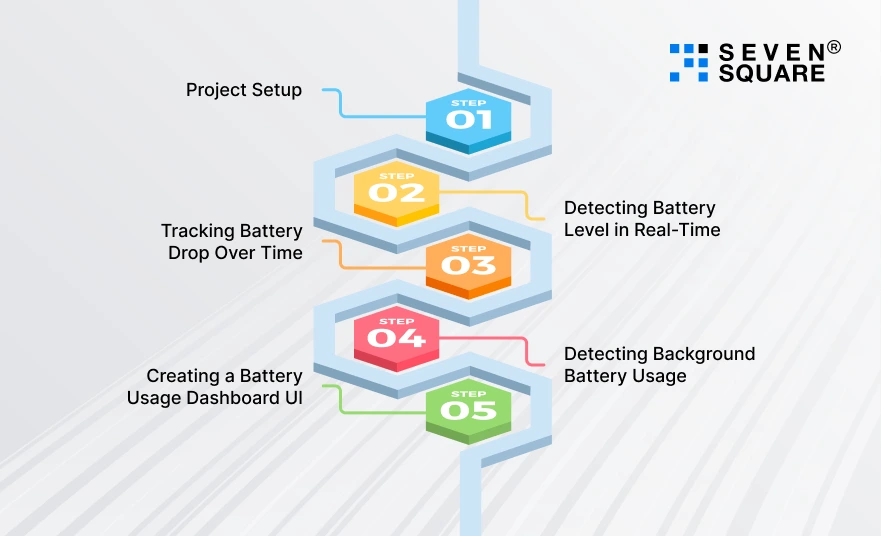
Here’s the step-by-step guide to building a real-time battery consumption analyzer in React Native with working code.
Step 1: Project Setup
Create a New React Native Project
                npx react-native init BatteryAnalyzerApp
                cd BatteryAnalyzerApp
If you’re using Expo:
npx create-expo-app BatteryAnalyzerApp
Install Required Dependencies
We’ll need:
- react-native-device-info → Detect battery level
- @react-native-community/hooks → App state detection
- react-native-chart-kit → Visualize battery drain
Install dependencies:
                npm install react-native-device-info
                npm install react-native-chart-kit react-native-svg
For iOS:
cd ios && pod install
Step 2: Detecting Battery Level in Real-Time
To build a React Native battery monitoring system, we first need to detect battery level changes.
Battery Monitoring Code
Create a file:
                /src/hooks/useBatteryMonitor.js
                import { useEffect, useState } from 'react';
                import DeviceInfo from 'react-native-device-info';

                export const useBatteryMonitor = () => {
                const [batteryLevel, setBatteryLevel] = useState(0);
                const [isCharging, setIsCharging] = useState(false);

                useEffect(() => {
                        // Get initial battery level
                        const fetchBatteryLevel = async () => {
                        const level = await DeviceInfo.getBatteryLevel();
                        const charging = await DeviceInfo.isBatteryCharging();
                        setBatteryLevel(level);
                        setIsCharging(charging);
                        };

                        fetchBatteryLevel();

                        // Listen for battery level changes
                        const batteryListener = DeviceInfo.addEventListener(
                        'batteryLevelDidChange',
                        (level) => {
                        setBatteryLevel(level);
                        }
                        );

                        const chargingListener = DeviceInfo.addEventListener(
                        'batteryStateDidChange',
                        (state) => {
                        setIsCharging(state === 'charging');
                        }
                        );

                        return () => {
                        batteryListener.remove();
                        chargingListener.remove();
                        };
                }, []);

                return { batteryLevel, isCharging };
                };
This allows us to:
- Detects battery level in React Native.
- Monitor charging state.
- Enable real-time battery consumption tracking.
Step 3: Tracking Battery Drop Over Time
Now we build the core logic of a React Native battery consumption analyzer. We will:
- Log battery level every 1 minute.
- Calculate the consumption rate.
- Measure battery usage in RN apps.
Create:
                /src/hooks/useBatteryAnalytics.js
                import { useEffect, useState } from 'react';
                import DeviceInfo from 'react-native-device-info';

                export const useBatteryAnalytics = () => {
                const [batteryHistory, setBatteryHistory] = useState([]);
                const [consumptionRate, setConsumptionRate] = useState(0);

                useEffect(() => {
                        const interval = setInterval(async () => {
                        const level = await DeviceInfo.getBatteryLevel();
                        const timestamp = new Date().toLocaleTimeString();

                        setBatteryHistory((prev) => {
                        const updated = [...prev, { level, timestamp }];

                        if (updated.length > 1) {
                        const first = updated[0].level;
                        const last = updated[updated.length - 1].level;

                        const drop = first - last;
                        setConsumptionRate(drop.toFixed(4));
                        }

                        return updated;
                        });
                        }, 60000); // Every 1 minute

                        return () => clearInterval(interval);
                }, []);

                return { batteryHistory, consumptionRate };
                };
What Does This Do?
- Logs battery percentage every minute.
- Tracks battery drop trend.
- Calculates consumption rate.
- Forms the foundation of a real-time battery consumption tracker in React Native.
Step 4: Detecting Background Battery Usage
Battery drain often happens in the background. We now detect:
- App state changes.
- Idle vs active usage.
- Background battery drain patterns.
Create:
                /src/hooks/useAppStateMonitor.js
                import { useEffect, useState } from 'react';
                import { AppState } from 'react-native';

                export const useAppStateMonitor = () => {
                const [appState, setAppState] = useState(AppState.currentState);
                const [backgroundTime, setBackgroundTime] = useState(0);

                useEffect(() => {
                        let backgroundStart = null;

                        const subscription = AppState.addEventListener(
                        'change',
                        (nextState) => {
                        if (nextState === 'background') {
                        backgroundStart = Date.now();
                        }

                        if (nextState === 'active' && backgroundStart) {
                        const duration = Date.now() - backgroundStart;
                        setBackgroundTime((prev) => prev + duration);
                        backgroundStart = null;
                        }

                        setAppState(nextState);
                        }
                        );

                        return () => subscription.remove();
                }, []);

                return { appState, backgroundTime };
                };
Why Does This Matter?
This helps correlate:
- Background activity.
- Battery drain.
- Performance issues.
Important for detecting excessive battery drain in React Native apps.
Step 5: Creating a Battery Usage Dashboard UI
Now let’s visualize the battery consumption patterns. Create:
                App.js
                import React from 'react';
                import { View, Text, ScrollView, Dimensions } from 'react-native';
                import { LineChart } from 'react-native-chart-kit';
                import { useBatteryMonitor } from './src/hooks/useBatteryMonitor';
                import { useBatteryAnalytics } from './src/hooks/useBatteryAnalytics';
                import { useAppStateMonitor } from './src/hooks/useAppStateMonitor';

                const screenWidth = Dimensions.get('window').width;

                export default function App() {
                const { batteryLevel, isCharging } = useBatteryMonitor();
                const { batteryHistory, consumptionRate } = useBatteryAnalytics();
                const { appState, backgroundTime } = useAppStateMonitor();

                const data = {
                        labels: batteryHistory.map(item => item.timestamp),
                        datasets: [
                        {
                        data: batteryHistory.map(item => item.level * 100)
                        }
                        ]
                };

                return (
                        <ScrollView style={{ padding: 20 }}>
                        <Text style={{ fontSize: 22, fontWeight: 'bold' }}>
                        React Native Battery Consumption Analyzer
                        </Text>

                        <Text>Current Battery Level: {(batteryLevel * 100).toFixed(0)}%</Text>
                        <Text>Charging: {isCharging ? 'Yes' : 'No'}</Text>
                        <Text>Consumption Rate: {consumptionRate}</Text>
                        <Text>App State: {appState}</Text>
                        <Text>Background Time (ms): {backgroundTime}</Text>

                        {batteryHistory.length > 1 && (
                        <LineChart
                        data={data}
                        width={screenWidth - 40}
                        height={220}
                        yAxisSuffix="%"
                        chartConfig={{
                                backgroundColor: "#ffffff",
                                backgroundGradientFrom: "#ffffff",
                                backgroundGradientTo: "#ffffff",
                                decimalPlaces: 0,
                                color: (opacity = 1) => `rgba(0, 122, 255, ${opacity})`,
                        }}
                        style={{ marginVertical: 20 }}
                        />
                        )}
                        </ScrollView>
                );
                }
Here’s the Complete GitHub Code to Build a Battery Consumption Analyzer in React Native.
How Do We Build Smarter Battery-Optimized React Native Apps?
Our team specializes in building scalable, efficient, and battery-optimized mobile applications with real-world production experience.
- We build real-time battery consumption analyzers in React Native with production-ready, scalable architecture.
- Our developers implement advanced React Native battery monitoring code to track real battery usage patterns.
- We design custom React Native battery usage trackers that measure battery usage in React Native apps accurately.
- Our team optimizes battery performance in React Native apps to improve retention and reduce uninstall rates.
Want a Battery Optimized & Scalable React Native App? Contact Us Now!
Android vs iOS: Battery Monitoring Differences
When building a battery monitoring difference on Android & iOS in React Native, understanding platform differences is important.
| Feature | Android | iOS |
| Battery API Access | More flexible | Restricted |
| Background Tracking | Possible with services | Limited |
| Energy Profiling Tools | Android Studio | Xcode |
- Android allows more detailed battery monitoring.
- iOS restricts background tracking for privacy.
- Android background services can impact the battery more aggressively.
- iOS automatically suspends apps to protect battery life.
So your React Native battery analyzer must handle both platforms carefully.
Build Smarter, Not Just Faster
If you are building production apps, battery monitoring should be part of your app architecture.
Why Should Battery Monitoring Be Built Early?
- Prevent negative reviews.
- Improve retention.
- Increase user trust.
- Deliver better performance.
For entrepreneurs and businesses, a React Native battery consumption analyzer ensures your app scales without performance issues.
When to Integrate a Battery Analyzer?
- Before production launch.
- During performance testing.
- When users report battery drain.
- In apps with background services.
FAQs
- You monitor battery usage in React Native by tracking battery level changes.
- Using native APIs, logging app state changes, & correlating performance metrics like CPU and network usage to calculate consumption trends.
- React Native cannot directly detect the exact battery drain per app.
- You can estimate battery consumption by monitoring battery level changes over time and analyzing background activity patterns.
- No, there is no built-in battery consumption API in React Native.
- Developers use native modules, device info libraries, and energy profiling tools to measure battery usage indirectly.
- Optimize battery performance by reducing background tasks, limiting API polling, optimizing re-renders, managing location updates efficiently, and using energy profiling tools to detect bottlenecks.