As React applications grow, performance becomes harder to manage.
Small apps can survive with basic optimizations, but large enterprise React applications need a smarter approach.
A custom React hooks library helps teams reuse optimized logic, reduce re-renders, and maintain consistent enterprise React app performance across multiple projects.
If you are trying to learn about how a custom react hooks library can improve the performance of your app, then you are at the right place.
This blog shows how reusable React hooks for enterprise apps perform while scaling, & why many businesses now rely on React hooks performance optimization.
Why React Performance Becomes a Serious Problem in Large Enterprise Apps?
When a React app grows from 10 components to 1,000+, performance challenges increase rapidly.
In large enterprise React apps, multiple teams work on shared features. This means:
- Unnecessary re-renders caused by poorly managed state.
- Duplicated logic is spread across components.
- Slow UI responses in dashboards, forms, and real-time screens.
Even when teams follow basic React performance best practices, problems remain.
Traditional optimizations like component-level fixes don’t scale well when logic is copied across the code.
As a result, enterprise React app performance becomes inconsistent, unpredictable, and harder to optimize over time.
What Is a Custom React Hooks Library? & Why Enterprises Actually Need One?
A custom React hooks library is a centralized collection of reusable hooks designed to solve common problems across multiple React applications.
Many teams create single custom hooks inside components, but without standardization, this causes issues:
- Hooks are written differently by each developer.
- Performance logic is repeated and often misused.
- Copy-paste hooks silently introduce bugs and re-renders.
A centralized reusable React hooks for enterprise apps library ensures that performance optimizations are written once, tested properly, and reused everywhere.
How a Custom React Hooks Library Improves Performance at Scale?
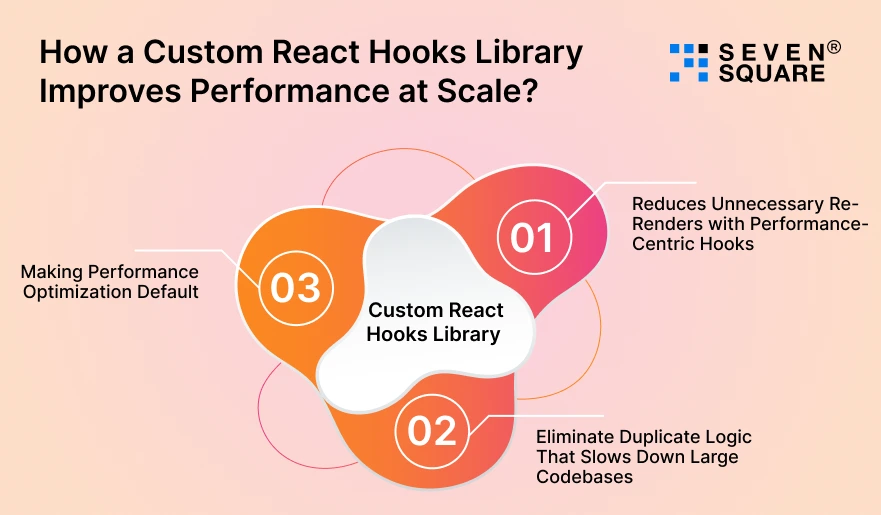
Learn how a react hooks library performs when the app scales.
1. Reduces Unnecessary Re-Renders with Performance-Centric Hooks
One of the biggest advantages of a hooks library is controlling how custom hooks reduce re-renders in React. By centralizing:
- useMemo logic.
- useCallback dependencies.
- State update patterns.
Teams avoid accidental state recalculations. It protects enterprise React app performance across teams and projects.
2. Eliminate Duplicate Logic That Slows Down Large Codebases
Without a hooks library, the same logic gets written 10 to 20 times in different components.
A reusable React hooks approach replaces this with one optimized hook. This means:
- Smaller bundle size.
- Faster debugging.
- More predictable behavior.
- Better alignment with React reusable components.
Less duplication means fewer performance regressions and cleaner enterprise codebases.
3. Making Performance Optimization Default
Performance is often forgotten under deadlines. A custom React hooks library makes React performance optimization techniques the default behavior.
Optimized hooks follow the best practices automatically, so teams:
- Follow performance rules without extra effort.
- Ship faster without sacrificing quality.
- Maintain consistent performance standards.
What is the Architecture of an Enterprise-Ready React Hooks Library?
Here, you can see the complete architecture of an enterprise-ready react hooks library.
1. Folder Structure That Scales Across Multiple React Apps
Following best practices for enterprise React hook libraries starts with structure. A scalable approach includes:
- Domain-driven hook organization (auth, data, UI, performance).
- Clear separation of shared hooks vs app-specific hooks.
- Versioned releases for safe upgrades across projects.
This makes the hooks library reusable across multiple enterprise React apps.
2. Designing Hooks for Performance, Reusability, and Safety
Performance-centric React hooks must follow strict design rules:
- Each hook owns its state clearly.
- Hooks expose minimal APIs.
- Heavy logic stays inside hooks.
Avoiding over-abstraction is important. Too much abstraction can hurt performance and make debugging harder in enterprise applications.
Step-by-Step: How to Build a Reusable React Hooks Library?
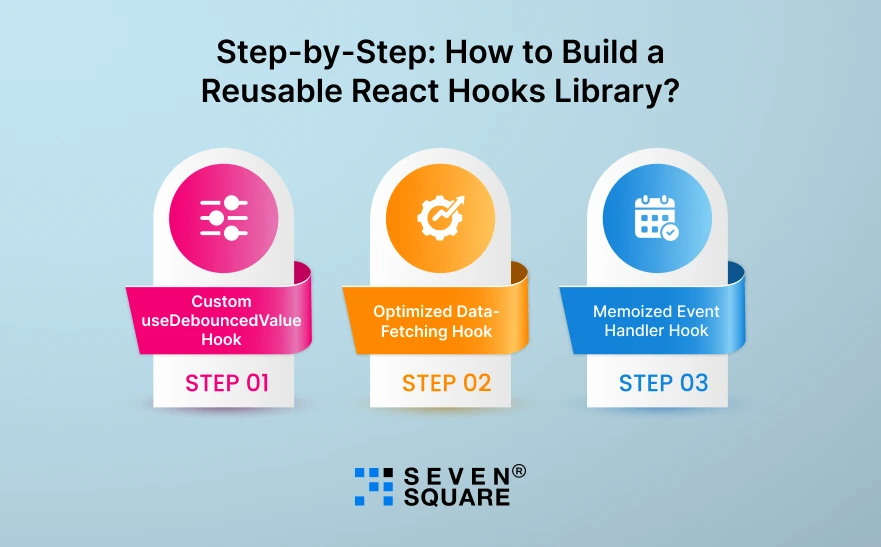
Building a reusable hooks library is one of the best ways to improve enterprise React app performance.
This step-by-step guide shows how to build a reusable React hooks library that works across multiple ReactJS applications and teams.
Set Up the Hooks Library Project
To support enterprise teams, your hooks library must be scalable, typed, tested, and easy to maintain.
Tools for Enterprise Teams
For a production-ready custom React hooks library, use:
- React + TypeScript for safety and consistency.
- ESLint & Prettier for code quality.
- Jest for hook testing.
- Rollup or Vite for building the library.
Project Structure (Enterprise-Friendly)
react-enterprise-hooks/
├── src/
│ ├── hooks/
│ │ ├── useDebouncedValue.ts
│ │ ├── useFetch.ts
│ │ └── useEventCallback.ts
│ ├── index.ts
│ └── types.ts
├── package.json
├── tsconfig.json
└── README.md
TypeScript Configuration (tsconfig.json)
                {
                    "compilerOptions": {
                        "target": "ES2019",
                        "module": "ESNext",
                        "jsx": "react-jsx",
                        "declaration": true,
                        "outDir": "dist",
                        "strict": true,
                        "moduleResolution": "node",
                        "esModuleInterop": true
                    },
                    "include": ["src"]
                }
This setup ensures your reusable React hooks for enterprise apps are safe, predictable, and easy to scale.
Writing Optimized Custom Hooks
Here are example custom React hooks for performance that directly improve React hooks performance optimization in large applications.
Step 1: Custom useDebouncedValue Hook
Use case: Prevents unnecessary re-renders during typing, filtering, or searching.
                import { useEffect, useState } from "react";
                export function useDebouncedValue(value: T, delay = 300): T {
                const [debouncedValue, setDebouncedValue] = useState(value);

                useEffect(() => {
                    const timer = setTimeout(() => {
                    setDebouncedValue(value);
                    }, delay);

                    return () => clearTimeout(timer);
                }, [value, delay]);

                return debouncedValue;
                }
Why does this improve performance?
- Reduces frequent state updates.
- Improves UI responsiveness.
- Ideal for enterprise dashboards and search-heavy screens.
Step 2: Optimized Data-Fetching Hook
Use case: Centralized, reusable, and optimized API fetching logic.
                import { useEffect, useState, useCallback } from "react";
                type FetchState = {
                data: T | null;
                loading: boolean;
                error: string | null;
                };

                export function useFetch(url: string): FetchState {
                const [state, setState] = useState>({
                    data: null,
                    loading: true,
                    error: null
                });

                const fetchData = useCallback(async () => {
                    try {
                    setState(prev => ({ ...prev, loading: true }));
                    const response = await fetch(url);
                    if (!response.ok) throw new Error("Request failed");
                    const result = await response.json();
                    setState({ data: result, loading: false, error: null });
                    } catch (err: any) {
                    setState({ data: null, loading: false, error: err.message });
                    }
                }, [url]);

                useEffect(() => {
                    fetchData();
                }, [fetchData]);

                return state;
                }
Why do enterprises love this hook?
- Prevents duplicated API logic.
- Uses useCallback to avoid unnecessary re-renders.
- Improves enterprise React app performance across teams.
Step 3: Memoized Event Handler Hook
Use case: Avoids re-creating event handlers on every render.
                import { useCallback, useRef } from "react";

                export function useEventCallback any>(
                callback: T
                ): T {
                const ref = useRef(callback);

                ref.current = callback;

                return useCallback(((...args) => ref.current(...args)) as T, []);
                }
Why does this matter at scale?
- Keeps references stable.
- Prevents child component re-renders.
- Perfect for large enterprise ReactJS applications.
Why Do Businesses Trust Us for Custom React Hooks Libraries?
- We build custom React hooks libraries that improve enterprise React app performance and eliminate unnecessary re-renders at scale.
- Our reusable React hooks follow proven React performance best practices for large, complex enterprise applications.
- Our team designs performance-centric React hooks that reduce duplicate logic and improve long-term code maintainability.
- We help enterprises standardize React hooks usage across teams for predictable behavior and consistent performance optimization.
Want to Integrate Custom React Hooks Libraries? Contact Us Now!
What Are the Use Cases Where Custom Hooks Deliver the Best Results?
A custom React hooks library delivers maximum value in performance-sensitive areas like:
- Dashboards with real-time data, where unnecessary re-renders slow updates.
- Complex forms and validation flows, where shared logic improves speed and consistency.
- Shared authentication and permission logic, reused across enterprise apps.
These use cases show why enterprises invest in hooks libraries to protect enterprise React app performance at scale.
Is a Custom React Hooks Library Worth It for Enterprise Apps?
A custom React hooks library makes sense when:
- Your React apps are large and complex.
- Performance issues keep reappearing.
- Multiple teams share logic across projects.
It may not be needed for small apps, but for enterprises, the long-term impact is clear:
- Better enterprise React app performance.
- Consistent optimization.
- Faster development.
- Lower technical debt.
For businesses and developers building enterprise-grade ReactJS applications, a well-designed hooks library is a competitive advantage.
FAQs
- Yes. When optimized properly, custom hooks reduce re-renders, centralize logic, and enforce React performance best practices.
- When multiple teams work on large React apps & performance issues repeat across projects.
- Yes. Custom hooks integrate directly with React’s lifecycle, making them safer and more effective than plain utilities.
- Yes, Reusable React hooks standardize logic, reduce duplication, and prevent long-term performance issues.