What do I need to build an Etsy clone?
Learn key features, backend architecture, and NodeJS code to create your own marketplace app.
Multi-vendor marketplace apps are growing fast.
Platforms like Etsy have shown that anyone can build a profitable online marketplace where buyers and sellers connect easily.
From handmade products to niche marketplaces, this model is getting popular again. Businesses want to build an Etsy-like website to create new income streams.
With the right marketplace app development strategy, you can launch a scalable business without managing inventory.
If you’re planning to build a multi vendor marketplace app or an Etsy clone app, this blog will show you exactly how to do it using NodeJS.
What is an Etsy Clone & How Does It Work?
An Etsy clone is a type of marketplace app where multiple sellers can list and sell their products, and buyers can browse and purchase them.
Consider it as a platform that connects:
- Buyers are looking for unique products.
- Sellers who want to showcase and sell items.
- Admins who manage the platform.
How It Works (Simple Flow)
- Sellers register and upload products.
- Buyers browse products and place orders.
- Payments are processed securely.
- Admin manages users, orders, and commissions.
This multi vendor marketplace model works perfectly for:
- Handmade products.
- Digital goods.
- Niche marketplaces (art, fashion, crafts).
Why Choose NodeJS for Marketplace Development?
Choosing the right technology is key to building a successful marketplace app.
A NodeJS marketplace app is highly popular because it is fast, scalable, and perfect for real-time applications.
NodeJS vs Other Technologies (Quick View)
- Traditional backends can be slower with high traffic.
- NodeJS handles multiple users easily with a non-blocking architecture.
Why is NodeJS Perfect?
- Scalable backend for growing marketplaces.
- Handles real-time updates (orders, chats, notifications).
- Easy API integration for payments and services.
- Fast development and performance.
If you want a scalable marketplace backend using NodeJS, it’s one of the best choices.
Build a Scalable Marketplace App With Us That Actually Grows
- Experience in building Etsy clone apps using NodeJS that are easy to manage and ready to grow.
- Strong understanding of multi vendor marketplace apps where buyers and sellers can interact smoothly.
- Focus on building custom marketplace apps instead of using ready-made templates that limit your business.
- Simple and clean backend structure that makes future updates and scaling easier.
Want to Build Your Own Etsy-Like Marketplace?
Must-Have Features in an Etsy Clone App
To build a successful Etsy like app, you need the right set of features.
Buyer Features
- Easy signup and login.
- Product search and filters.
- Wishlist and cart.
- Secure checkout and payments.
- Order tracking.
Seller Features
- Seller dashboard.
- Product listing and management.
- Order and inventory management.
- Earnings and analytics.
Admin Panel Features
- User and seller management.
- Commission settings.
- Order monitoring.
- Content and category control.
These marketplace app features directly impact your revenue and growth.
How an Etsy Clone Works Behind the Scenes?
Understanding the marketplace architecture helps you build a strong and scalable platform.
High-Level Architecture (Simple)
- Frontend (Web or App).
- Backend (NodeJS server).
- Database (MongoDB).
- APIs for communication.
Tech Stack Example
- NodeJS + Express (backend).
- MongoDB (database).
- REST APIs for data flow.
Flow (Text Diagram)
- User → Frontend → API → NodeJS Backend → Database → Response → User
This simple NodeJS backend architecture ensures smooth performance and scalability.
Here’s the
How to Build an Etsy Clone Using NodeJS? (Step-by-Step)
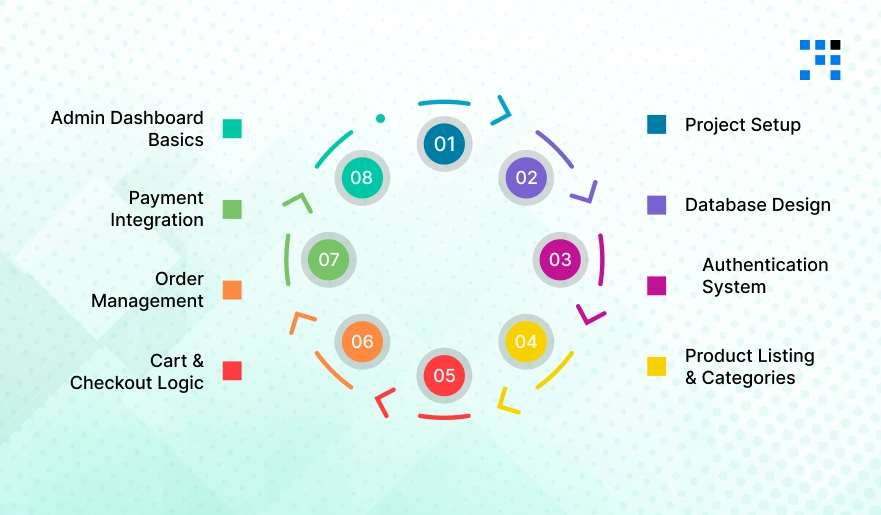
If you’re wondering how to build an Etsy clone using NodeJS, we’ll break it down into simple steps. We’ll build a basic multi vendor marketplace app backend using:
- NodeJS
- Express
- MongoDB
Step 1: Project Setup (NodeJS + Express)
First, create your NodeJS marketplace app backend.
                mkdir etsy-clone
                cd etsy-clone
                npm init -y
                npm install express mongoose dotenv bcryptjs jsonwebtoken cors
Basic Server Setup
                // server.js
                const express = require('express');
                const mongoose = require('mongoose');
                const dotenv = require('dotenv');
                const cors = require('cors');

                dotenv.config();
                const app = express();

                app.use(express.json());
                app.use(cors());

                mongoose.connect(process.env.MONGO_URI)
                .then(() => console.log("MongoDB Connected"))
                .catch(err => console.log(err));

                app.get('/', (req, res) => {
                res.send("Etsy Clone API Running");
                });

                app.listen(5000, () => console.log("Server running on port 5000"));
Step 2: Database Design (Users, Products, Orders)
A strong database is key for any multi vendor marketplace.
User Model
                // models/User.js
                const mongoose = require('mongoose');

                const userSchema = new mongoose.Schema({
                name: String,
                email: String,
                password: String,
                role: { type: String, enum: ['buyer', 'seller', 'admin'], default: 'buyer' }
                });

                module.exports = mongoose.model('User', userSchema);
Product Model
                // models/Product.js
                const mongoose = require('mongoose');

                const productSchema = new mongoose.Schema({
                title: String,
                price: Number,
                description: String,
                seller: { type: mongoose.Schema.Types.ObjectId, ref: 'User' }
                });

                module.exports = mongoose.model('Product', productSchema);
Order Model
                // models/Order.js
                const mongoose = require('mongoose');

                const orderSchema = new mongoose.Schema({
                user: { type: mongoose.Schema.Types.ObjectId, ref: 'User' },
                products: Array,
                totalAmount: Number,
                status: { type: String, default: 'pending' }
                });

                module.exports = mongoose.model('Order', orderSchema);
Step 3: Authentication System (Login & Register)
Every Etsy clone app needs secure authentication.
                // routes/auth.js
                const express = require('express');
                const bcrypt = require('bcryptjs');
                const jwt = require('jsonwebtoken');
                const User = require('../models/User');

                const router = express.Router();

                // Register
                router.post('/register', async (req, res) => {
                const { name, email, password } = req.body;

                const hashedPassword = await bcrypt.hash(password, 10);

                const user = new User({ name, email, password: hashedPassword });
                await user.save();

                res.json({ message: "User Registered" });
                });

                // Login
                router.post('/login', async (req, res) => {
                const { email, password } = req.body;

                const user = await User.findOne({ email });
                if (!user) return res.status(400).json({ message: "User not found" });

                const isMatch = await bcrypt.compare(password, user.password);
                if (!isMatch) return res.status(400).json({ message: "Invalid credentials" });

                const token = jwt.sign({ id: user._id }, "secret", { expiresIn: '1d' });

                res.json({ token });
                });

                module.exports = router;
Add this in server.js:
app.use('/api/auth', require('./routes/auth'));
Step 4: Product Listing & Categories
Allow sellers to list products in your marketplace app.
                // routes/product.js
                const express = require('express');
                const Product = require('../models/Product');

                const router = express.Router();

                // Add Product
                router.post('/add', async (req, res) => {
                const product = new Product(req.body);
                await product.save();
                res.json(product);
                });

                // Get All Products
                router.get('/', async (req, res) => {
                const products = await Product.find().populate('seller', 'name');
                res.json(products);
                });

                module.exports = router;
Step 5: Cart & Checkout Logic
Basic cart logic for your Etsy like app.
                // routes/cart.js
                const express = require('express');

                const router = express.Router();

                let cart = [];

                // Add to Cart
                router.post('/add', (req, res) => {
                cart.push(req.body);
                res.json(cart);
                });

                // Get Cart
                router.get('/', (req, res) => {
                res.json(cart);
                });

                module.exports = router;
Step 6: Order Management
Handle orders in your multi vendor marketplace app.
                // routes/order.js
                const express = require('express');
                const Order = require('../models/Order');

                const router = express.Router();

                // Create Order
                router.post('/create', async (req, res) => {
                const order = new Order(req.body);
                await order.save();
                res.json(order);
                });

                // Get Orders
                router.get('/', async (req, res) => {
                const orders = await Order.find();
                res.json(orders);
                });

                module.exports = router;
Step 7: Payment Integration (Basic Example)
You can integrate Stripe for payments.
                npm install stripe

                // routes/payment.js
                const express = require('express');
                const Stripe = require('stripe');

                const router = express.Router();
                const stripe = new Stripe('your_secret_key');

                router.post('/pay', async (req, res) => {
                const { amount } = req.body;

                const paymentIntent = await stripe.paymentIntents.create({
                        amount,
                        currency: 'usd'
                });

                res.send({
                        clientSecret: paymentIntent.client_secret
                });
                });

                module.exports = router;
Step 8: Admin Dashboard Basics
Admins manage the entire marketplace website.
                // routes/admin.js
                const express = require('express');
                const User = require('../models/User');
                const Order = require('../models/Order');

                const router = express.Router();

                // Get all users
                router.get('/users', async (req, res) => {
                const users = await User.find();
                res.json(users);
                });

                // Get all orders
                router.get('/orders', async (req, res) => {
                const orders = await Order.find();
                res.json(orders);
                });

                module.exports = router;
Final Step: Connect All Routes
Add all routes to your main server:
                app.use('/api/products', require('./routes/product'));
                app.use('/api/cart', require('./routes/cart'));
                app.use('/api/orders', require('./routes/order'));
                app.use('/api/payment', require('./routes/payment'));
                app.use('/api/admin', require('./routes/admin'));
How to Turn Your Etsy Clone into a Business?
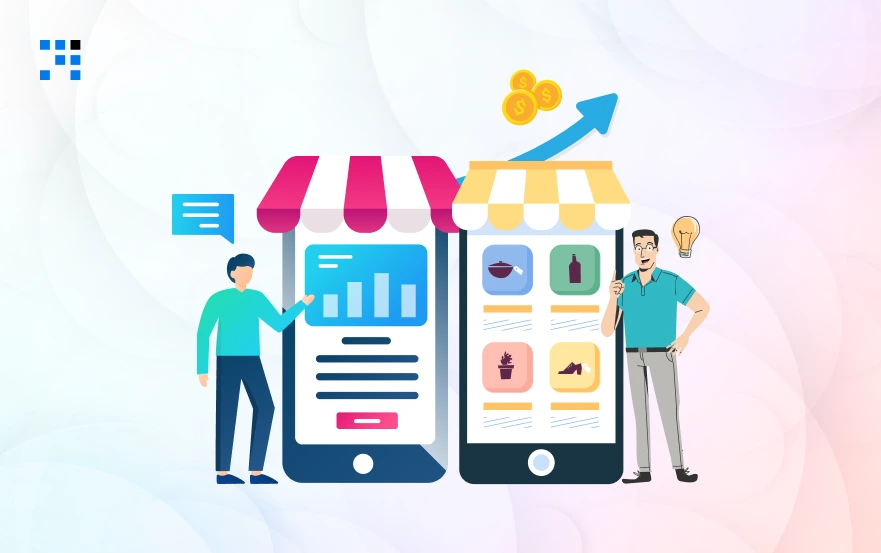
Building an Etsy clone app is just the start. Turning it into a profitable business is the real goal.
Marketplace Business Models
- Commission on every sale.
- Seller subscription plans.
- Featured listings & ads.
Niche Marketplace Ideas
- Handmade products.
- Digital downloads.
- Local artisan marketplaces.
Growth Tips
- Focus on a niche audience.
- Build trust with sellers.
- Invest in marketing.
A strong marketplace business model ensures long-term success.
Planning to Launch a Marketplace App?
Launch Your Marketplace Like Etsy Now!
Building an Etsy clone using NodeJS is not as complicated as it seems when you have the right plan.
With the right features, scalable backend, and marketplace strategy, you can create a powerful platform.
Whether you are a startup or a business owner, this is a great opportunity to build your own marketplace app like Etsy and grow it into a successful business.
FAQs
- An Etsy clone is a multi vendor marketplace app where multiple sellers can list products and buyers can purchase them, similar to Etsy.
- It helps businesses build their own marketplace platform.
- The cost to build an Etsy-like app depends on features, design, and development team.
- A basic marketplace app may cost less, while advanced features increase the budget.
- Important marketplace app features include user login, product listings, seller dashboard, cart, checkout, payments, order management, and admin panel for smooth platform control.
- A multi vendor marketplace is a platform where multiple sellers can sell their products, while the admin manages the platform and earns commission from each transaction.
- A marketplace business model usually earns through commissions, seller subscriptions, featured listings, and advertisements within the platform.