If you can build Instagram in Flutter, you can build Uber Eats too. Here’s how.
The online food delivery industry has become a daily habit, and startups are actively investing in Flutter food delivery app development to launch faster and scale smarter.
If you are planning to build a food delivery app clone Flutter, this is the right time. Customers want fast ordering, real-time tracking, & secure payments.
That’s why businesses want solutions like Uber Eats clone Flutter instead of building from scratch. A clone model helps reduce development time while maintaining scalability & customization.
With Flutter food delivery app development, you write once and deploy everywhere.
That’s why people who want a food delivery app clone Flutter often choose Flutter over native development.
If your goal is to build a scalable Uber Eats clone Flutter, it gives you performance + flexibility + cost control.
Here in this blog, you can get the complete code to build an app like Uber Eats and customize it as you want.
What Features Does a Production-Ready Uber Eats Clone Need?
To successfully build a multi-restaurant delivery app Flutter, you need more than just UI screens.
A real food delivery app clone Flutter must include three core modules: User App, Restaurant Panel, and Admin Dashboard.
User App Features
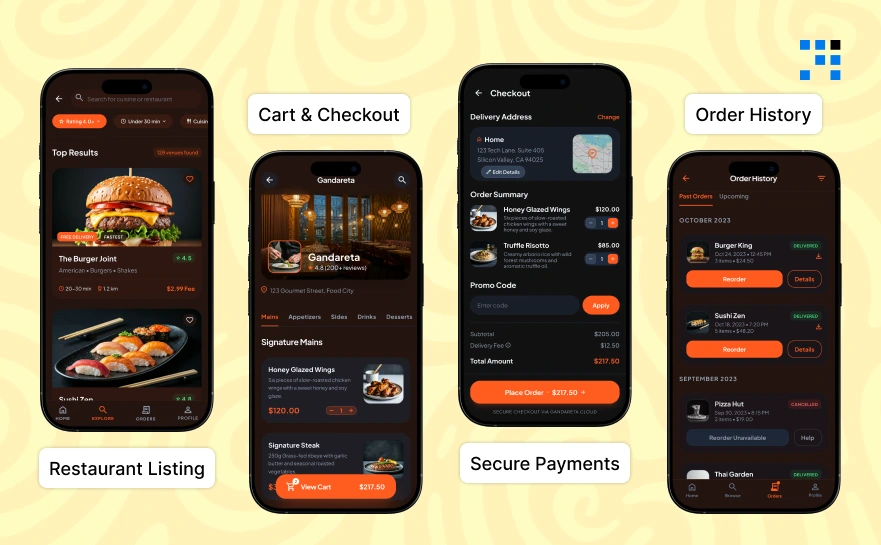
1. User App Features
- Search for cuisine.
- Filter by rating.
- View delivery time.
This is the foundation of your Uber Eats clone Flutter.
2. Cart & Checkout
- Add/remove items.
- Apply coupons.
- Delivery instructions.
Cart logic must be smooth in your build multi-restaurant delivery app Flutter project.
3. Secure Payments
- Stripe / Razorpay.
- Wallet integration.
- Cash on delivery.
Security builds trust in any food delivery app clone Flutter.
4. Order History
Users should see:
- Past orders.
- Reorder option.
- Invoice download.
Restaurant Panel
Restaurant owners need control.
1. Add / Edit Menu
- Add food items.
- Set prices.
- Upload images.
2. Manage Orders
- Accept / Reject.
- Update preparation time.
3. Status Updates
- Order prepared.
- Out for delivery.
Without this, your Uber Eats clone Flutter is incomplete.
Admin Dashboard
This is where businesses control everything.
1. User Management
- Block users.
- Manage delivery partners.
2. Commission Control
- Set platform commission.
- Track earnings.
3. Analytics
- Daily revenue.
- Top restaurants.
- Order insights.
If you want to build a multi-restaurant delivery app Flutter, these features are non-negotiable.
What Is the Best Architecture for a Food Delivery App in Flutter?
Choosing the best architecture for a food delivery app in Flutter determines whether your app survives 10,000 users or crashes at 1,000.
For a serious Flutter app architecture for food delivery, avoid messy code.
Clean Architecture vs MVC vs MVVM
- MVC: Simple but hard to scale.
- MVVM: Better separation.
- Clean Architecture: Best for production apps.
For an Uber Eats clone Flutter, Clean Architecture is recommended because:
- Clear separation of concerns.
- Easy testing.
- Scalable structure.
Recommended Folder Structure for Scalability
A modular structure makes your project professional:
lib/
├── core/
├── features/
├── data/
├── presentation/
This is what makes your best architecture for a food delivery app in Flutter truly production-ready.
How to Design UI Like Uber Eats in Flutter?
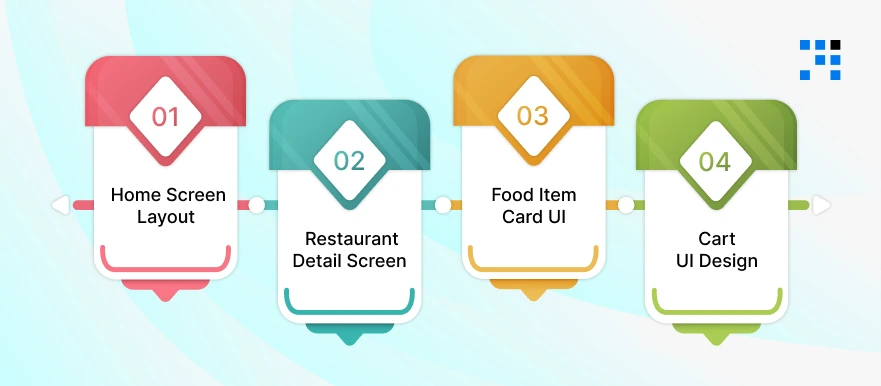
A great Flutter UI design for a food app focuses on spacing, typography, reusable widgets, and smooth scrolling.
1. Home Screen Layout
The home screen in an Uber Eats clone Flutter app should include:
- Location selector.
- Search bar.
- Categories slider.
- Restaurant listing.
Home Screen UI Code
                import 'package:flutter/material.dart';
                import '../widgets/restaurant_card.dart';

                class HomeScreen extends StatelessWidget {
                final List<Map<String, dynamic>> restaurants = [
                        {
                        "name": "Burger House",
                        "image": "https://via.placeholder.com/150",
                        "rating": 4.5
                        },
                        {
                        "name": "Pizza Hub",
                        "image": "https://via.placeholder.com/150",
                        "rating": 4.2
                        },
                ];

                @override
                Widget build(BuildContext context) {
                        return Scaffold(
                        appBar: AppBar(
                        title: Text("Deliver to Home"),
                        elevation: 0,
                        ),
                        body: Column(
                        children: [
                        _buildSearchBar(),
                        Expanded(
                                child: ListView.builder(
                                itemCount: restaurants.length,
                                itemBuilder: (context, index) {
                                return RestaurantCard(
                                name: restaurants[index]["name"],
                                image: restaurants[index]["image"],
                                rating: restaurants[index]["rating"],
                                );
                                },
                                ),
                        ),
                        ],
                        ),
                        );
                }

                Widget _buildSearchBar() {
                        return Padding(
                        padding: const EdgeInsets.all(12.0),
                        child: TextField(
                        decoration: InputDecoration(
                        hintText: "Search restaurants...",
                        prefixIcon: Icon(Icons.search),
                        border: OutlineInputBorder(
                                borderRadius: BorderRadius.circular(30),
                        ),
                        ),
                        ),
                        );
                }
                }
2. Restaurant Detail Screen
This is important when designing a Flutter UI design for a food app.
Restaurant Detail Screen Code
                class RestaurantDetailScreen extends StatelessWidget {
                final String name;

                RestaurantDetailScreen({required this.name});

                final List<Map<String, dynamic>> menu = [
                        {"name": "Cheese Burger", "price": 5.99},
                        {"name": "Veg Pizza", "price": 7.49},
                ];

                @override
                Widget build(BuildContext context) {
                        return Scaffold(
                        appBar: AppBar(title: Text(name)),
                        body: Column(
                        children: [
                        Image.network("https://via.placeholder.com/400x200"),
                        Expanded(
                                child: ListView.builder(
                                itemCount: menu.length,
                                itemBuilder: (context, index) {
                                return ListTile(
                                title: Text(menu[index]["name"]),
                                trailing: Text("\$${menu[index]["price"]}"),
                                );
                                },
                                ),
                        ),
                        ],
                        ),
                        );
                }
                }
3. Food Item Card UI
To properly understand how to design UI like Uber Eats in Flutter, you must create reusable widgets.
Restaurant Cart Widget
                import 'package:flutter/material.dart';
                class RestaurantCard extends StatelessWidget {
                final String name;
                final String image;
                final double rating;

                const RestaurantCard({
                        required this.name,
                        required this.image,
                        required this.rating,
                });

                @override
                Widget build(BuildContext context) {
                        return Card(
                        margin: EdgeInsets.all(12),
                        shape: RoundedRectangleBorder(
                        borderRadius: BorderRadius.circular(15),
                        ),
                        child: Column(
                        crossAxisAlignment: CrossAxisAlignment.start,
                        children: [
                        ClipRRect(
                                borderRadius: BorderRadius.vertical(top: Radius.circular(15)),
                                child: Image.network(image, height: 150, width: double.infinity, fit: BoxFit.cover),
                        ),
                        Padding(
                                padding: const EdgeInsets.all(10.0),
                                child: Column(
                                crossAxisAlignment: CrossAxisAlignment.start,
                                children: [
                                Text(name, style: TextStyle(fontSize: 18, fontWeight: FontWeight.bold)),
                                SizedBox(height: 5),
                                Text("⭐ $rating"),
                                ],
                                ),
                        ),
                        ],
                        ),
                        );
                }
                }
This improves your Flutter UI design for food app consistency.
4. Cart UI Design
Cart UI should be:
- Simple.
- Editable.
- Clear price breakdown.
Cart Screen Code
                class CartScreen extends StatelessWidget {
                final List<Map<String, dynamic>> cartItems = [
                        {"name": "Cheese Burger", "price": 5.99, "qty": 1},
                        {"name": "Veg Pizza", "price": 7.49, "qty": 2},
                ];

                @override
                Widget build(BuildContext context) {
                        double total = cartItems.fold(
                        0, (sum, item) => sum + item["price"] * item["qty"]);

                        return Scaffold(
                        appBar: AppBar(title: Text("Your Cart")),
                        body: Column(
                        children: [
                        Expanded(
                                child: ListView.builder(
                                itemCount: cartItems.length,
                                itemBuilder: (context, index) {
                                final item = cartItems[index];
                                return ListTile(
                                title: Text(item["name"]),
                                subtitle: Text("Qty: ${item["qty"]}"),
                                trailing: Text("\$${item["price"]}"),
                                );
                                },
                                ),
                        ),
                        Padding(
                                padding: const EdgeInsets.all(16.0),
                                child: Column(
                                children: [
                                Text("Total: \$${total.toStringAsFixed(2)}",
                                        style: TextStyle(fontSize: 18)),
                                SizedBox(height: 10),
                                ElevatedButton(
                                onPressed: () {},
                                child: Text("Checkout"),
                                style: ElevatedButton.styleFrom(
                                minimumSize: Size(double.infinity, 50),
                                ),
                                ),
                                ],
                                ),
                        )
                        ],
                        ),
                        );
                }
                }
Here’s the Complete GitHub Code to Build Uber Eats Clone in Flutter.
Step-by-Step: Complete Code for Uber Eats Clone in Flutter

If you’re looking for the complete code for an Uber Eats clone in Flutter with a GitHub repo, this gives you a structured and usable implementation.
Step 1: Project Setup
Create Flutter Project
                flutter create uber_eats_clone
                cd uber_eats_clone
Add Required Dependencies (pubspec.yaml)
                dependencies:
                flutter:
                        sdk: flutter
                        http: ^0.13.6
                        provider: ^6.1.2
                        firebase_core: ^2.27.0
                        firebase_auth: ^4.17.4
                        cloud_firestore: ^4.15.8
                        google_maps_flutter: ^2.6.0
                        geolocator: ^10.1.0
                Then run:
                        flutter pub get
Recommended Folder Structure
lib/
├── core/
├── features/
│ ├── auth/
│ ├── restaurant/
│ ├── cart/
│ ├── order/
├── models/
├── services/
├── providers/
└── main.dart
This structure makes your Uber Eats clone GitHub Flutter project scalable and professional.
Step 2: Authentication (Firebase)
This makes your complete code for Uber Eats clone in Flutter with GitHub repo usable for real users.
Initialize Firebase (main.dart)
                import 'package:firebase_core/firebase_core.dart';
                import 'package:flutter/material.dart';

                void main() async {
                WidgetsFlutterBinding.ensureInitialized();
                await Firebase.initializeApp();
                runApp(MyApp());
                }
Auth Service
                import 'package:firebase_auth/firebase_auth.dart';
                class AuthService {
                final FirebaseAuth _auth = FirebaseAuth.instance;

                Future<User?> signUp(String email, String password) async {
                        final result = await _auth.createUserWithEmailAndPassword(
                        email: email, password: password);
                        return result.user;
                }

                Future<User?> login(String email, String password) async {
                        final result = await _auth.signInWithEmailAndPassword(
                        email: email, password: password);
                        return result.user;
                }

                Future<void> logout() async {
                await _auth.signOut();
                }
                }
This is production-ready authentication for your Uber Eats clone GitHub Flutter app.
Step 3: Restaurant Listing API
This section strengthens your blog for developers searching for complete code for an Uber Eats clone in Flutter with a GitHub repository.
Restaurant Model
                class Restaurant {
                final String id;
                final String name;
                final String image;
                final double rating;

                Restaurant({
                        required this.id,
                        required this.name,
                        required this.image,
                        required this.rating,
                });

                factory Restaurant.fromJson(Map<String, dynamic> json) {
                        return Restaurant(
                        id: json['id'],
                        name: json['name'],
                        image: json['image'],
                        rating: json['rating'].toDouble(),
                        );
                }
                }
API Service
                import 'dart:convert';
                import 'package:http/http.dart' as http;

                class RestaurantService {
                Future<List<Restaurant>> fetchRestaurants() async {
                        final response = await http.get(
                Uri.parse("https://api.example.com/restaurants"),
                        );

                        if (response.statusCode == 200) {
                        final List data = json.decode(response.body);
                        return data.map((json) => Restaurant.fromJson(json)).toList();
                        } else {
                        throw Exception("Failed to load restaurants");
                        }
                }
                }
Restaurant List UI
                FutureBuilder<List<Restaurant>>(
                future: RestaurantService().fetchRestaurants(),
                builder: (context, snapshot) {
                if (!snapshot.hasData) {
                        return CircularProgressIndicator();
                        }

                        final restaurants = snapshot.data!;

                        return ListView.builder(
                        itemCount: restaurants.length,
                        itemBuilder: (context, index) {
                        final restaurant = restaurants[index];
                        return ListTile(
                        leading: Image.network(restaurant.image),
                        title: Text(restaurant.name),
                        subtitle: Text("⭐ ${restaurant.rating}"),
                        );
                        },
                        );
                },
                )
How Can We Build an Uber Eats Like App in Flutter for You?
- We specialize in Flutter food delivery app development with scalable architecture and clean production-ready code.
- Our team builds complete Uber Eats clone Flutter apps with backend, admin panel, and real-time tracking.
- We deliver food delivery app clone Flutter solutions tailored for startups, enterprises, and multi-restaurant businesses.
- Our team designs modern Flutter UI designs for a food app with smooth performance and optimized user experience.
Want to Build a Customized Food Delivery App? Contact Us Today!
Should You Build an Uber Eats Clone in Flutter?
Building an Uber Eats clone Flutter app is a smart move for startups and businesses entering the food delivery market.
With Flutter food delivery app development, you can launch faster and manage both Android and iOS using a single codebase.
- Faster MVP launch with cross-platform development.
- Lower cost compared to native app development.
- Smooth and modern UI for a better user experience.
- Real-time tracking and easy API integration.
- Scalable architecture for multi-restaurant platforms.
A well-built food delivery app clone Flutter, can handle real users, secure payments, and growing traffic.
FAQs
- With Flutter food delivery app development, you can build Android & iOS apps using a single codebase, reducing cost, time, & maintenance efforts.
- Yes. With the best architecture for a food delivery app in Flutter, proper API structure, and scalable backend, Flutter apps can handle thousands of active users smoothly.
- You can integrate Firebase or WebSockets in your Flutter Uber Eats clone with a backend to enable live order updates and delivery tracking functionality.
- Yes. You can build a multi-restaurant delivery app Flutter, with restaurant panels, admin dashboards, commission management, and analytics systems.