What Is a Token Blacklist and Why Do You Need One?
Imagine you work at a big office building. When you join the company, security gives you a keycard to get in.
One day, you suspect your keycard has been stolen. What do you do? You go to security and ask them to deactivate it immediately.
Now think of your web application. When a user logs in, your server gives them a digital keycard called a JWT (JSON Web Token).
The problem? Unlike a physical keycard, a JWT cannot simply be “deactivated” once it is issued. It stays valid until its built-in expiry time runs out.
If a user logs out or if their account is compromised, that token is still usable by anyone who holds it.
This is the problem that a Token Blacklist Service solves. It keeps a list of tokens that should no longer be trusted, even if they have not technically expired yet.
And when your application runs across multiple servers (distributed systems), you need that list to be shared everywhere instantly.
In this blog, you will learn exactly how to build a Distributed Token Blacklist Service in Node.js using Redis.
Who is this guide for?
Whether you are a developer building a REST API, a tech lead designing a microservices architecture, or simply a curious mind wanting to understand how secure logout works, this guide is written for you.
What Is a JWT Token?
A JWT or JSON Web Token is like a signed permission slip. When a user logs in with their email and password, your server creates a JWT and sends it to them.
Every future request the user makes includes that token, and the server uses it to verify: “Yes, this person is logged in.”
A JWT has three parts:
- Header: Describes the token type and the algorithm used to sign it.
- Payload: Contains claims, data like the user’s ID, email, & the token’s expiry time.
- Signature: A cryptographic stamp that proves the token has not been tampered with.
The key thing to understand: JWTs are stateless. The server does not store them.
Once issued, the server trusts any request that comes with a valid token, no database lookup required. This makes JWTs fast and scalable.
If you want to invalidate a token (say, after a user logs out or after suspicious activity is detected), you cannot just “delete” it from the server; there is nothing stored there to delete.
Why “Distributed”? Understanding the Multi-Server Challenge
If your application runs on a single server, a simple in-memory blacklist (just a JavaScript Set or array) would work fine.
But most production applications run across multiple servers or containers, especially microservices architectures.
Here is the challenge: If Server A blacklists a token, Server B and Server C still have no idea. The user could simply route their next request to Server B and get in without any trouble.
Real-World Scenario
You run an e-commerce platform with 5 Node.js instances behind a load balancer. A user reports their account is compromised. You revoke their JWT on instance #1. But their attacker’s next request hits instance #3, which knows nothing about the revocation. The attacker is still in.
This is why we use Redis, a blazing-fast, in-memory data store that all your servers can connect to.
When one server blacklists a token, it writes to Redis. Every other server reads from the same Redis instance. The blacklist becomes truly distributed.
Secure Your NodeJs App With Our Expertise
- Our team has built JWT authentication systems with Redis-backed token revocation for production Node.js applications.
- We design distributed blacklist services that work smoothly across multiple servers and microservices.
- Our developers have implemented secure logout flows that actually invalidate tokens, not just clear them on the client side.
- We have shipped scalable Node.js backends that handle thousands of authenticated requests per second.
Need a Hand With Your NodeJs Backend?
How a Distributed Token Blacklist Works?

Before writing any code, let us understand the flow:
- User logs in: Server creates a JWT with a unique ID (called jti, JWT ID) and an expiry time.
- User makes requests: Server validates the JWT signature AND checks Redis: “Is this jti blacklisted?”
- User logs out (or admin revokes token): Server writes the jti to Redis with a TTL (Time to Live) matching the token’s remaining valid time.
- Future requests with that token: Redis says “blacklisted” → Server rejects the request.
- Token expires naturally: Redis automatically removes the entry (TTL expires). No manual cleanup needed.
With Redis TTL you never need to clean up your blacklist manually. Redis handles it automatically when the token would have expired anyway.
Here’s the
Step-by-Step Code: Building the Blacklist Service in Node.js
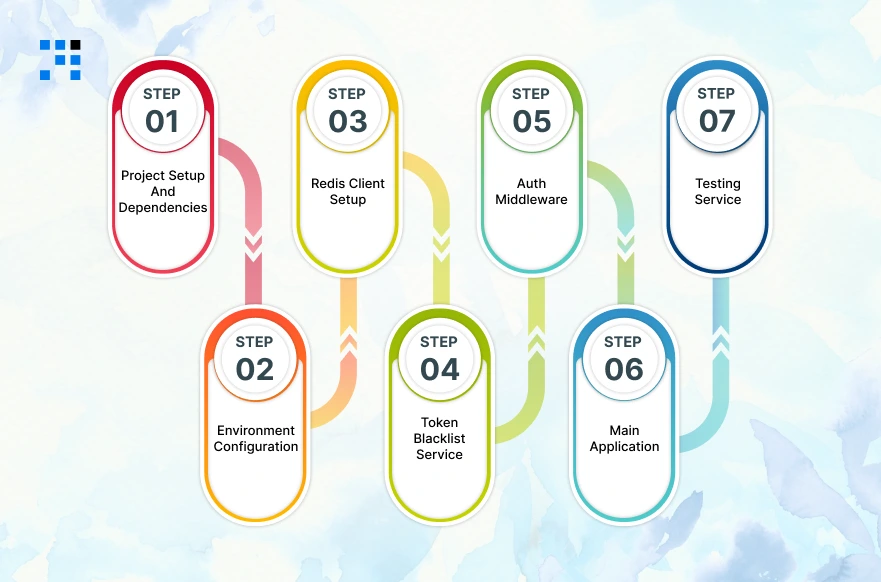
Now let us get into the code. We will build this from scratch. Here is what we are building:
- A Node.js + Express API.
- JWT authentication with login and logout endpoints.
- A Redis-backed token blacklist that works across any number of servers.
- Middleware that checks the blacklist on every protected route.
Step 1: Project Setup and Dependencies
Create a new project folder and initialize it:
                mkdir token-blacklist-service
                cd token-blacklist-service
                npm init -y
                npm install express jsonwebtoken ioredis dotenv uuid
Here is what each package does:
- express: Our web server framework.
- jsonwebtoken: To create and verify JWTs.
- ioredis: A robust Redis client for Node.js.
- dotenv: to manage environment variables securely.
- uuid: to generate unique IDs for each token (the jti claim).
Step 2: Environment Configuration
Create a .env file in your project root:
                # .env
                PORT=3000
                JWT_SECRET=your_super_secret_key_change_this_in_production
                JWT_EXPIRES_IN=3600    	# Token expiry in seconds (1 hour)
                REDIS_HOST=127.0.0.1
                REDIS_PORT=6379
Step 3: Redis Client Setup
Create a file called redisClient.js to manage your Redis connection:
                // redisClient.js
                const Redis = require('ioredis');

                const redis = new Redis({
                host: process.env.REDIS_HOST || '127.0.0.1',
                port: process.env.REDIS_PORT || 6379,
                // In production, add your Redis password:
                // password: process.env.REDIS_PASSWORD,
                retryStrategy: (times) => {
                        // Retry connection every 2 seconds, up to 10 times
                        if (times > 10) return null;
                        return 2000;
                }
                });

                redis.on('connect', () => console.log('✅ Redis connected'));
                redis.on('error', (err) => console.error('❌ Redis error:', err));

                module.exports = redis;
Step 4: The Token Blacklist Service
This is the heart of the system. Create tokenBlacklist.js:
                // tokenBlacklist.js
                const redis = require('./redisClient');

                /**
                * Adds a token's JTI (unique ID) to the blacklist.
                * The TTL ensures Redis automatically removes it when
                * the token would have expired anyway — no manual cleanup!
                *
                * @param {string} jti 	- The unique JWT ID
                * @param {number} ttlSecs - Seconds until the token expires
                */
                async function blacklistToken(jti, ttlSecs) {
                if (ttlSecs <= 0) return; // Already expired, nothing to blacklist

                // Store in Redis with automatic expiry (TTL)
                // Key pattern: "blacklist:"
                await redis.set(`blacklist:${jti}`, 'revoked', 'EX', ttlSecs);
                console.log(`🚫 Token ${jti} blacklisted for ${ttlSecs} seconds`);
                }

                /**
                * Checks whether a token's JTI is on the blacklist.
                *
                * @param {string} jti - The unique JWT ID to check
                * @returns {boolean}  - true if blacklisted, false if valid
                */
                async function isTokenBlacklisted(jti) {
                const result = await redis.get(`blacklist:${jti}`);
                return result === 'revoked';
                }

                module.exports = { blacklistToken, isTokenBlacklisted };
Notice how clean this is. The blacklistToken function stores a simple key-value pair in Redis with a TTL.
The isTokenBlacklisted function just checks if that key exists. Redis handles expiry automatically, you never have to write cleanup code.
Step 5: Auth Middleware
Create middleware/authMiddleware.js to protect your routes:
                // middleware/authMiddleware.js
                const jwt = require('jsonwebtoken');
                const { isTokenBlacklisted } = require('../tokenBlacklist');

                async function authenticate(req, res, next) {
                // 1. Extract the token from the Authorization header
                const authHeader = req.headers['authorization'];
                const token = authHeader && authHeader.split(' ')[1]; // "Bearer "

                if (!token) {
                        return res.status(401).json({ error: 'No token provided' });
                }

                try {
                        // 2. Verify the token's signature and expiry
                        const decoded = jwt.verify(token, process.env.JWT_SECRET);

                        // 3. Check if this specific token has been blacklisted
                        const blacklisted = await isTokenBlacklisted(decoded.jti);
                        if (blacklisted) {
                        return res.status(401).json({ error: 'Token has been revoked. Please log in again.' });
                        }

                        // 4. Token is valid — attach user info to the request
                        req.user = decoded;
                        next();

                } catch (err) {
                        // Handles expired tokens and invalid signatures
                        return res.status(401).json({ error: 'Invalid or expired token' });
                }
                }

                module.exports = authenticate;
Step 6: The Main Application (Auth Routes)
Create app.js with your login, logout, and a protected route:
                // app.js
                require('dotenv').config();
                const express = require('express');
                const jwt = require('jsonwebtoken');
                const { v4: uuidv4 } = require('uuid');
                const { blacklistToken } = require('./tokenBlacklist');
                const authenticate = require('./middleware/authMiddleware');

                const app = express();
                app.use(express.json());

                // ─── MOCK USER DATABASE ───────────────────────────────────────────────────────
                // In production, replace this with a real database query
                const USERS = {
                'alice@example.com': { id: 'user_001', password: 'password123', name: 'Alice' },
                'bob@example.com':   { id: 'user_002', password: 'securepass',  name: 'Bob'   }
                };

                // ─── LOGIN ENDPOINT ───────────────────────────────────────────────────────────
                app.post('/auth/login', (req, res) => {
                const { email, password } = req.body;

                // Validate credentials
                const user = USERS[email];
                if (!user || user.password !== password) {
                        return res.status(401).json({ error: 'Invalid credentials' });
                }

                const expiresInSecs = parseInt(process.env.JWT_EXPIRES_IN) || 3600;

                // Create JWT with a unique jti (JWT ID) — this is what we blacklist later
                const token = jwt.sign(
                        {
                        jti: uuidv4(),    	// Unique ID for this specific token
                        sub: user.id,     	// Subject: the user's ID
                        email: user.email,
                        name: user.name
                        },
                        process.env.JWT_SECRET,
                        { expiresIn: expiresInSecs }
                );

                res.json({
                        message: `Welcome, ${user.name}!`,
                        token,
                        expiresIn: expiresInSecs
                });
                });

                // ─── LOGOUT ENDPOINT ─────────────────────────────────────────────────────────
                app.post('/auth/logout', authenticate, async (req, res) => {
                const { jti, exp } = req.user;

                // Calculate how many seconds remain until this token expires
                const now = Math.floor(Date.now() / 1000);
                const ttlSecs = exp - now;

                // Add the token's jti to the blacklist with its remaining TTL
                await blacklistToken(jti, ttlSecs);

                res.json({ message: 'Logged out successfully. Token has been revoked.' });
                });

                // ─── PROTECTED ROUTE (example) ───────────────────────────────────────────────
                app.get('/api/profile', authenticate, (req, res) => {
                res.json({
                        message: 'This is protected data!',
                        user: {
                        id: req.user.sub,
                        name: req.user.name,
                        email: req.user.email
                        }
                });
                });

                // ─── HEALTH CHECK ────────────────────────────────────────────────────────────
                app.get('/health', (req, res) => {
                res.json({ status: 'ok', timestamp: new Date().toISOString() });
                });

                // ─── START SERVER ─────────────────────────────────────────────────────────────
                const PORT = process.env.PORT || 3000;
                app.listen(PORT, () => {
                console.log(`🚀 Server running on port ${PORT}`);
                });
Step 7: Testing the Service
Let us test the whole flow using curl commands:
1. Login and get a token
                curl -X POST http://localhost:3000/auth/login \
                -H "Content-Type: application/json" \
                -d '{"email": "alice@example.com", "password": "password123"}'

                # Response:
                # {
                #   "message": "Welcome, Alice!",
                #   "token": "eyJhbGciOiJIUzI1NiIsInR5cCI6IkpXVCJ9...",
                #   "expiresIn": 3600
                # }
2. Access a protected route
                curl http://localhost:3000/api/profile \
                -H "Authorization: Bearer <your_token_here>"

                # Response:
                # { "message": "This is protected data!", "user": { ... } }
3. Logout (blacklist the token)
                curl -X POST http://localhost:3000/auth/logout \
                -H "Authorization: Bearer <your_token_here>"

                # Response:
                # { "message": "Logged out successfully. Token has been revoked." }
4. Try using the same token again (should be rejected)
                curl http://localhost:3000/api/profile \
                -H "Authorization: Bearer <your_token_here>"

                # Response (401 Unauthorized):
                # { "error": "Token has been revoked. Please log in again." }
Your token is now dead, even though it has not technically expired yet. And because the blacklist lives in Redis, every server in your fleet will reject that token instantly.
How All the Pieces Fit Together In the Architecture?
Here is the high-level picture of how your distributed token blacklist works across multiple servers:
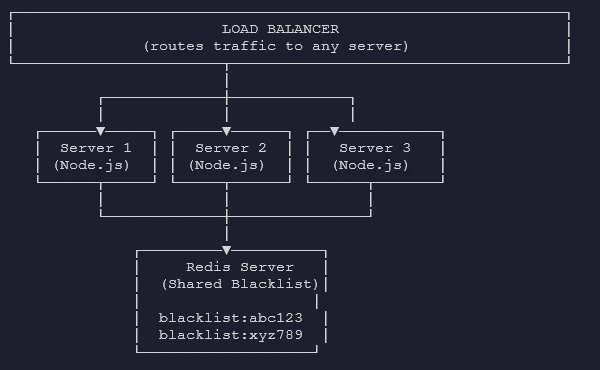
- When any server blacklists a token: Redis stores it.
- When any server checks a token: Redis answers instantly.
- All servers share the SAME truth.
Is a Token Blacklist Always the Right Choice?
It is worth understanding the alternatives and when each approach makes sense:
| Approach | Pros | Cons |
| Short expiry tokens (5 to 15 min) | No blacklist needed. Simple. | User must refresh frequently. UX friction. |
| Redis blacklist (this guide) | Instant revocation. Scales well. Auto-cleanup via TTL. | Requires Redis. One extra lookup per request. |
| Database blacklist | Works without Redis. | Slower. Database becomes a bottleneck under load. |
| Token versioning | Revoke all tokens for a user at once. | More complex. Requires DB lookup per request. |
For most production applications, the Redis blacklist approach in this guide hits the sweet spot: immediate revocation, excellent performance, and automatic cleanup.
You Have the Blueprint: Time to Secure Your App
Now you have just built a production-grade, Distributed Token Blacklist Service in Node.js with Redis.
The pattern you have built here, issue a JWT with a unique jti, check Redis on every request, and write to Redis on logout, is battle-tested and used by large-scale production systems every day.
The best part? It scales effortlessly. Whether you have 2 servers or 200, they all read from and write to the same Redis instance.
Your blacklist is always consistent, always fast, and always up to date.
FAQs
- A list of revoked tokens your server rejects, even before they naturally expire.
- Redis is in-memory, sub-millisecond fast, and auto-expires keys using built-in TTL support.
- No, you still skip database lookups for identity; Redis adds just one fast check.
- It lives in shared Redis, so every server in your fleet sees revocations instantly.