How to create a writing assistant app like Grammarly?
By connecting an AI grammar checker API to a clean, simple interface and letting the technology do everything. We’ve broken down the entire build process in this guide: the real costs, the right tech choices, and step-by-step code your team can use today.
The AI writing tools market is expected to cross $24.7B+ by 2035, as businesses want faster and error-free communication.
Most of this growth is not coming only from big tools, but from startups building niche Grammarly-like apps for different users and industries.
Today, many businesses want to build a Grammarly clone in ReactJS with AI features to improve writing quality and save time.
A simple AI grammar checker app can turn into a strong SaaS product with regular income.
If you’re planning to build a Grammarly-like writing assistant, this gives you a clear view of how it is built using ReactJS, APIs, and production-ready logic.
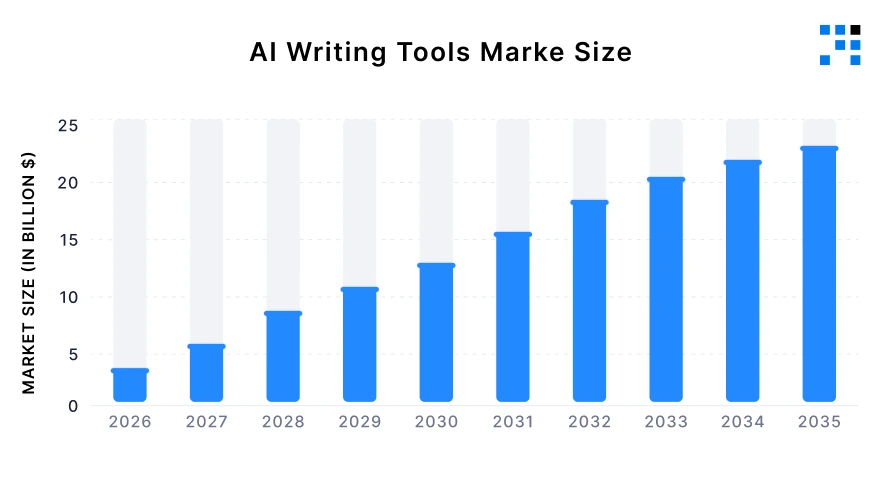
Source: Business Research Insights
Why Building a Grammarly-like App is Still a Real Opportunity in 2026
Grammarly crossed $200M ARR and raised at a $13B valuation. It’s one of the most successful B2B SaaS tools ever built.
So you might be thinking: “The market is already taken: Why would I build a Grammarly clone?”
Here’s the answer: Grammarly’s biggest strength, serving everyone is also its biggest weakness. It’s a one-size-fits-all tool in a world that increasingly needs specialized solutions.
A hospital, a law firm, and an e-commerce brand all have completely different writing needs. Grammarly treats them all the same.
If you want to build a Grammarly clone that actually wins, you don’t compete head-on. You pick a corner of the market Grammarly has ignored, and you go deep.
Explore How SaaS Companies See 25% User Retention After Migrating to ReactJS.
The data backs this up, niche vertical SaaS tools are growing faster than general tools, and they charge more because they solve a real, specific pain.
1. Where Grammarly Falls Short and Where Your Opportunity Is?
Think of it this way: Grammarly is like a general-purpose dictionary. It knows a lot of words. Here are the three gaps where you can build something genuinely better:
Gap 1: No Understanding of Specialized Industries
- Grammarly often flags correct medical, legal, or technical terms as errors. This creates extra work for professionals who must ignore false suggestions.
- A domain-specific grammar checker that understands industry language delivers far more value and accuracy.
Gap 2: Too Expensive for Small and Mid-Sized Teams
- Grammarly pricing doesn’t scale well for small teams. Paying per user quickly becomes expensive without guaranteed ROI.
- A simple, flat pricing model for teams is more attractive and easier to adopt for startups and growing businesses.
Gap 3: No White-Label for Other Software Products
- Grammarly does not allow embedding or white-labeling inside other platforms. SaaS companies building CRMs, HR tools, or editors cannot integrate it easily.
- A grammar API product that can be embedded creates a strong B2B opportunity.
2. Where Real Demand is Coming From?
Real businesses have already validated these models. Here are three patterns that are working right now:
- Legal Writing Checker: AI grammar tool trained on legal contracts, pleadings, and briefs. Detects errors, flags clauses, understands legal language, and delivers high-value accuracy.
- Regional Language Writing Assistant: Grammar checker for Hindi, Arabic, and regional languages. Understands local tone, spelling, and idioms better than generic tools, with huge untapped market demand.
- eCommerce Product Copy Tool: Writing assistant for Shopify stores. Improves product descriptions, checks grammar, and increases conversions, with built-in distribution through Shopify ecosystem.
What Does It Cost to Build a Grammarly Clone in 2026?
One of the first questions every founder asks before committing to a build is: “What’s this actually going to cost me?” It’s the right question to ask early.
If the numbers don’t fit your budget or business model, better to know now than after three months of development. Here’s a complete breakdown:
API Cost Breakdown
Think of these like the engine under the hood: You don’t build your own engine from scratch, you choose one and pay to use it.
There are three main “engines” you can choose from. Each has different strengths, price points, and the right moment to use it:
| API (the engine) | Free tier | Cost / 1k requests | Accuracy | Best for |
|---|---|---|---|---|
| LanguageTool | 20 request /min free | $0.00 (OSS) / ~$0.50 premium | Good for grammar + spell | MVP stage, all budgets |
| OpenAI GPT-4o | Trial credits only. | ~$0.50 input / $1.50 output per 1M tokens | Excellent, context-aware | Tone detection, AI rewrites |
| Cohere Command | Trial tier | ~$0.30 per 1M tokens | Strong for Advanced Text Analysis | Cost-sensitive scale |
- LanguageTool lets you do this for free up to a point, making it the sensible choice when you’re starting out and don’t yet have paying customers.
- OpenAI’s GPT-4o is more powerful, it understands context, meaning, and tone but it costs more per check.
- Cohere is a middle-ground alternative if you’re watching costs at scale.
Development Time and Total Build Cost Estimate
Beyond the ongoing running costs, there’s the one-time cost of building the product itself. Here are realistic figures based on actual projects:
| Stage | What You Build? | Timeline | What Does It Mean for You? | South Asia Cost | US/Europe Cost |
|---|---|---|---|---|---|
| MVP (Minimum Version) |
|
3 to 5 weeks | A working product to test with real users and start charging. Focus is on solving the core problem, not perfection. | $5,000 to $8,000. | $10,000 to $25,000. |
| Full Product (SaaS Ready) |
|
8 to 12 weeks | A complete, scalable SaaS product ready for public launch with user management, payments, and growth tracking. | $20,000 to $35,000. | $45,000 to $60,000. |
How a Grammarly Clone With AI Works: Full System Flow?
You do need a clear picture of how the pieces fit together because that understanding will change your conversations with your development team & your product roadmap.
A Grammarly clone with AI is simpler in architecture than most founders expect. The complexity lives in the user experience.
What Happens From the Moment Someone Starts Typing?
Imagine a user opens your app and starts writing an email. Here’s the chain of events that leads to a grammar suggestion appearing on their screen, broken into five steps:
- Step 1: The user types. They’re writing inside a text box in your app (built in React JS). Every keystroke is captured.
- Step 2: The app waits. The app waits for the user to pause, around 300 to 500 milliseconds of no typing. This is called “debouncing.” Think of it like a smart assistant who waits for you to finish your sentence before responding.
- Step 3: A request is sent to the grammar service. Once the user pauses, the text is sent invisibly, in the background to a grammar checking service (like LanguageTool or OpenAI).
- Step 4: The AI analyses the text. The grammar service uses a process called Natural Language Processing (NLP) to read the text. It breaks the sentence into parts, checks each part against language rules, and identifies errors.
- Step 5: Suggestions appear in the app. The results come back and your app displays them, underlining errors in red, showing suggestions in a panel on the side, just like Grammarly does.
What is NLP and Why Does It Matter for Your Product Decisions?
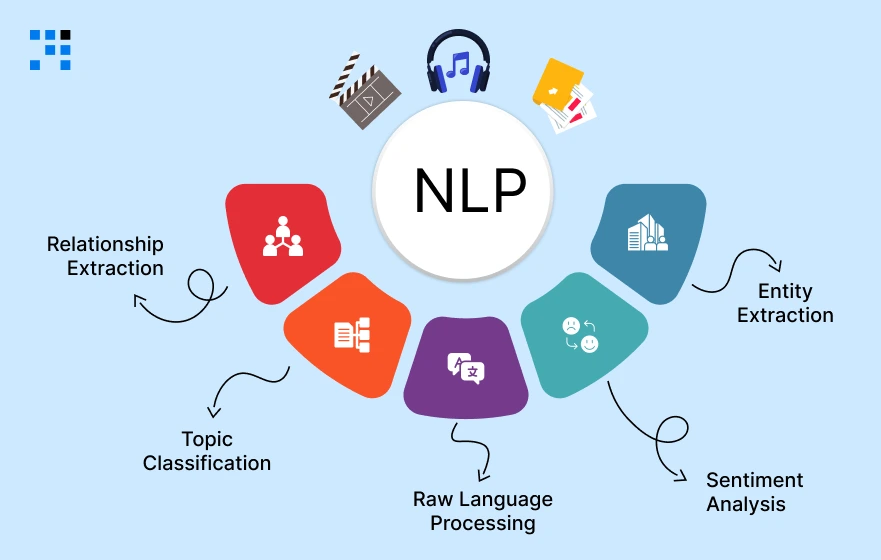
NLP stands for Natural Language Processing. It’s the technology that allows computers to understand human language.
When a user’s text reaches the grammar API, three things happen automatically:
- Tokenization: The sentence is broken into individual pieces: words, punctuation marks, phrases. Think of this like cutting a sentence into puzzle pieces so the machine can examine each one.
- Error Classification: Each piece is checked against language rules. Is this a spelling mistake? A grammar error? A style problem? The system assigns a category to each issue it finds.
- Suggestion Ranking: For each error, the system generates possible fixes and ranks them by confidence. The best suggestion appears first. That’s why Grammarly usually gets it right on the first recommendation.
It helps you explain your product to customers, make the right API choice, and know when the free tier will stop being sufficient.
Must-Have Features for Your AI Grammar Checker App
The smarter approach is to build in phases.
Ship the smallest version that solves the core problem, get real users on it, and then build the next layer only once you understand what they actually need.
Whether you’re building a full writing assistant app or a focused AI grammar checker app, the same discipline applies.
Here’s the phased plan we recommend:
| Phase 1: MVP | Phase 2: Validate | Phase 3: Scale |
|---|---|---|
|
|
|
| Time: 1 to 5 Weeks | Time: 6 to 12 Weeks | Time: 3+ Month |
Why Phase 1 is Enough to Start Charging For?
- The five features in Phase 1, grammar check, spelling, inline highlighting, a suggestion panel, & the ability to accept or dismiss a fix, are the core experience.
- This is what Grammarly charges for.
- If these features solve a real problem for a specific audience (a legal team, an e-commerce store, an HR department), users will pay for it.
- You don’t need tone detection or a browser extension to validate that the market exists.
Why Does Phase 2 Only Come After 100 Users?
- Tone detection and clarity scoring are valuable features but only if you know which kind of users need them most.
- Building them before you have users means guessing.
- Building them after talking to 100 real users means you know exactly how to prioritize, price, and market them.
Why Phase 3 Matters for Long-Term Revenue?
- The browser extension and API-as-a-product are the features that embed your tool deeply into a user’s daily workflow.
- Once a company’s content team is using your browser extension inside Google Docs, Gmail, and their CMS, it becomes very difficult to cancel the subscription.
- This is what reduces churn and justifies a higher “Team” or “Business” pricing tier at $99 to $299/month.
Which niche should your grammar tool own?
Best Tech Stack to Build a Grammarly Clone in React JS (2026)
You do need enough understanding to ask the right questions, challenge poor decisions, & ensure your development team is using tools that will serve your product long-term.
Why is ReactJs Preferable for Frontend?
ReactJS is best for a grammar checker app because it enables real-time state updates, so only changed parts (like suggestions) refresh instantly, keeping the UI fast & smooth.
It also supports powerful rich text editor libraries like Slate.js and TipTap, which handle complex features like highlighting errors inside text.
Finally, component reusability lets you turn features like editors and suggestion panels into reusable modules or even sell them later as embeddable widgets.
Which Grammar API to Use and When to Switch?
- MVP stage → Start with LanguageTool
Free, reliable, and easy to integrate for grammar and spelling checks.
- Need AI features → Add OpenAI GPT-4o
Use it for tone detection, sentence rewrites, and advanced suggestions.
- Scaling (10,000+ users) → Self-host LanguageTool
Reduces API costs significantly and gives more control over performance.
Backend, Database, and Auth Stack
- Node.js + Express: Handles API logic, user requests, and feature control.
- MongoDB: Stores user data, history, and usage flexibly.
- Firebase Auth / Clerk: Quick and secure login setup.
This stack helps you build fast, scale easily, and avoid unnecessary complexity.
How to Build a Grammarly Clone in React JS: Step-by-Step With Full Code?
You can follow this step-by-step guide to understand what’s being built:
Step 1: Project Setup
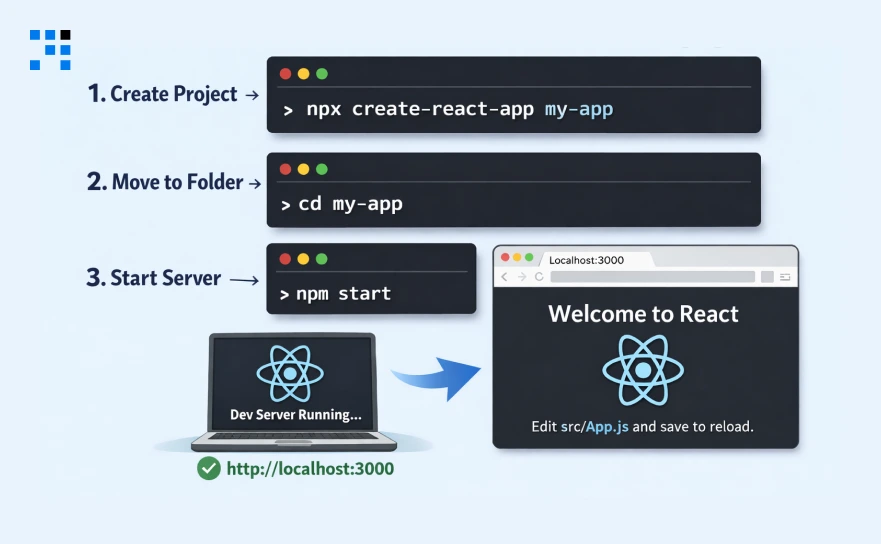
These commands create a new React JS project on your computer, move into that project folder, & start a local development server so you can see your app running in a browser as you build it.
It is the foundation of a building before any rooms are added.
                # Create the project
                npx create-react-app grammarly-clone
                cd grammarly-clone
                npm start
Before writing any components, here’s the folder structure your development team is building towards.
Each folder has a specific responsibility, this organization is what keeps codebase maintainable as the product grows:
src/
components/ ← visual building blocks: editor, suggestion panel, error badges
Editor.jsx ← the main typing area with highlight overlay
SuggestionPanel.jsx ← the right-side panel listing all errors
ErrorBadge.jsx ← each individual error card
hooks/ ← reusable logic (e.g. the debounce + API call)
useGrammarCheck.js ← the brain: waits for typing to stop, then calls the
API
api/ ← connections to external services
languageTool.js ← wrapper for the grammar API with error handling
openai.js ← tone detection and AI rewrite features
styles/
App.css ← visual styling
App.js ← the main file that pulls everything together
Step 2: Building the Text Editor UI
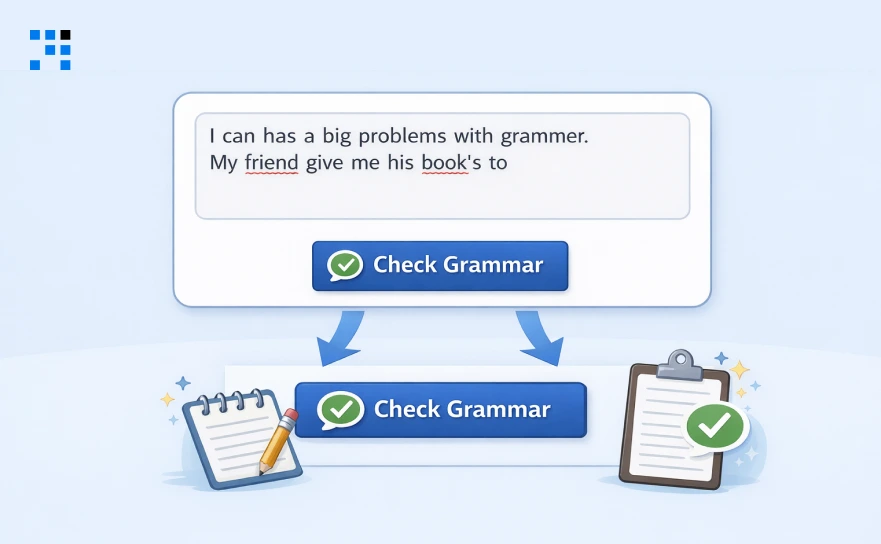
This creates the basic interface your users will see, a typing area and a “Check Grammar” button.
It’s simply the front door of your app. Here’s what it looks like at this checkpoint:
                import React, { useState } from "react";
                import "./App.css";

                function App() {
                const [text, setText] = useState("");

                return (
                        <div className="container">
                        <h1>AI Grammar Checker</h1>
                        <textarea
                        value={text}
                        onChange={(e) => setText(e.target.value)}
                        placeholder="Start typing your content..."
                        rows={10}
                        />
                        <button>Check Grammar</button>
                        </div>
                );
                }

                export default App;
Step 3: Integrating the Grammar API
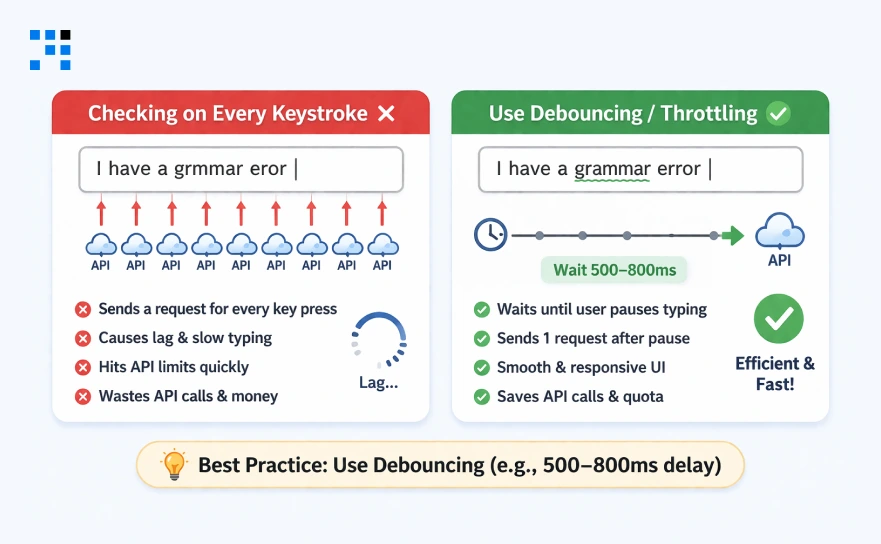
If your app checks grammar on every keystroke, it will send too many requests, causing lag and hitting API limits quickly.
Debouncing fixes this by waiting about 400 milliseconds after typing stops before sending a request, making the app smooth, fast, and efficient.
                        import { useState, useEffect, useRef } from "react";
                        export function useGrammarCheck(text, delay = 400) {
                        const [suggestions, setSuggestions] = useState([]);
                        const [loading, setLoading] = useState(false);
                        const timer = useRef(null);

                        useEffect(() => {
                        clearTimeout(timer.current);
                        if (!text.trim()) { setSuggestions([]); return; }

                        timer.current = setTimeout(async () => {
                        setLoading(true);
                        try {
                        const res = await fetch("https://api.languagetool.org/v2/check", {
                                method: "POST",
                                headers: { "Content-Type": "application/x-www-form-urlencoded" },
                                body: new URLSearchParams({ text, language: "en-US" }),
                        });
                        const data = await res.json();
                        setSuggestions(data.matches || []);
                        } catch (err) {
                        console.error("Grammar API error:", err);
                        // Don't crash the app — just silently fail
                        } finally {
                        setLoading(false);
                        }
                        }, delay);
                        }, [text, delay]);

                        return { suggestions, loading };
                        }
Step 4: Displaying Suggestions
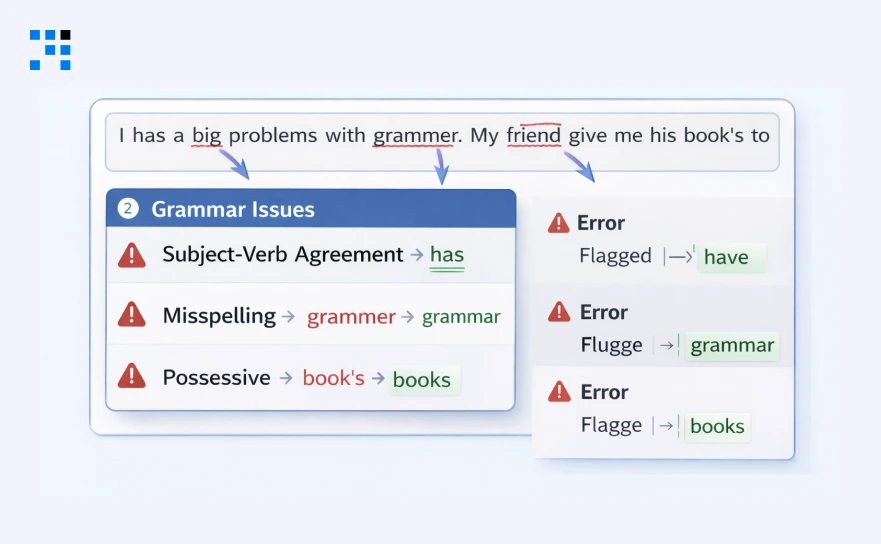
Once the grammar API sends back a list of errors, this step connects that data to the visual display.
Each error gets shown in a panel below or beside the editor with the type of error, the specific word flagged, and the suggested fix.
                        import React, { useState } from "react";
                        import { useGrammarCheck } from "./hooks/useGrammarCheck";

                        function App() {
                        const [text, setText] = useState("");
                        const { suggestions, loading } = useGrammarCheck(text);

                        return (
                        <div className="container">
                        <textarea
                        value={text}
                        onChange={(e) => setText(e.target.value)}
                        placeholder="Start typing..."
                        rows={10}
                        />
                        {loading && <p className="loading">Checking...</p>}
                        <div className="results">
                        {suggestions.map((item, i) => (
                                <div key={i} className="suggestion">
                                <p><strong>Error:</strong> {item.message}</p>
                                <p><strong>Fix:</strong> {item.replacements[0]?.value}</p>
                                </div>
                        ))}
                        </div>
                        </div>
                        );
                        }
Step 5: Error Handling
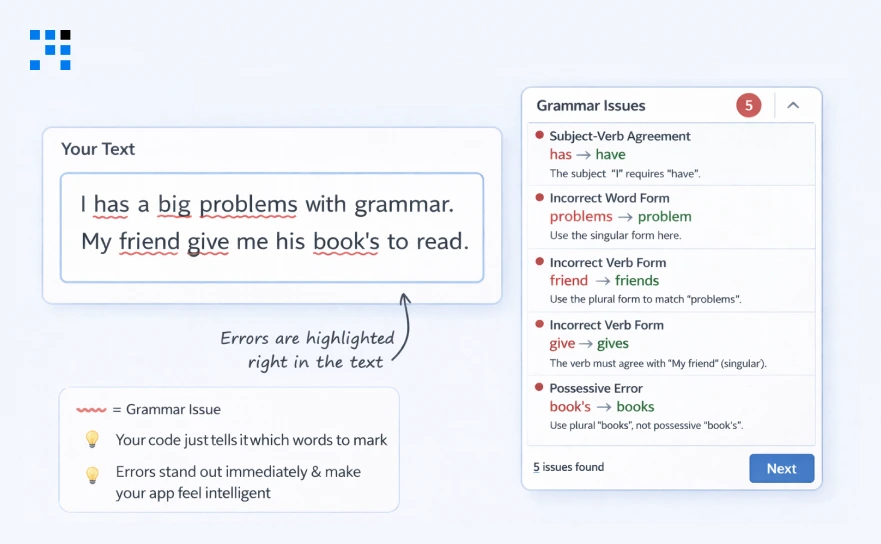
This makes errors visible directly in the text itself, the way Grammarly draws red underlines under specific words.
Your code simply tells it which words to mark, and it handles the underlining automatically.
This is the feature users notice first and remember most, it’s what makes the app feel intelligent rather than passive.
                        npm install react-highlight-words
                        import Highlighter from "react-highlight-words";

                        // Extract the specific error words from API response
                        const errorWords = suggestions.map(
                        (item) => text.substring(item.offset, item.offset + item.length)
                        );

                        // In your JSX:
                        <Highlighter
                        highlightClassName="highlight"
                        searchWords={errorWords}
                        autoEscape={true}
                        textToHighlight={text}
                        />
Step 6: Make It Production Ready
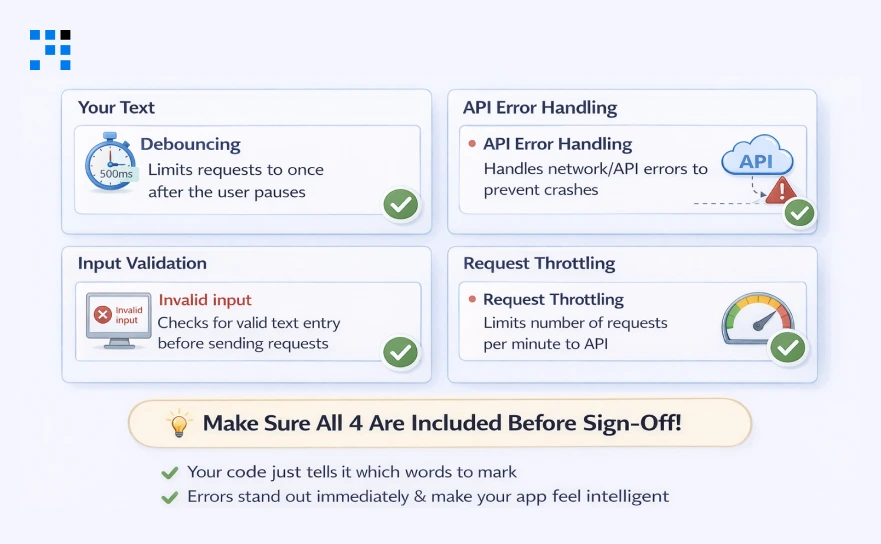
The four given below are what you need to ask for specifically and to verify are included before sign-off.
Each one is invisible to the user when working correctly, but becomes a serious problem if it’s missing.
- Rate limit error handling means that if the grammar API temporarily rejects a request when demand spikes, your app shows a friendly message rather than crashing or going blank.
- Loading states means your app shows a “Checking…” indicator while it waits for the API response.
- Feature gating means your server checks what plan a user is on before deciding which features to give them. Free users get basic grammar checking. Paid users get tone detection and rewrites.
- The right debounce setting (400ms) is the sweet spot between responsive and efficient. Too short and you hammer the API unnecessarily; too long and users notice a delay.
                        // 1. Rate limit error handling — show user-friendly message
                        try {
                        const res = await fetch(API_URL, options);
                        if (res.status === 429) {
                        setError("Too many requests — please wait a moment");
                        return;
                        }
                        } catch (err) {
                        setError("Grammar check unavailable — please retry");
                        }

                        // 2. Loading state — don't leave users wondering
                        {loading && (
                        <div className="checking-badge">
                        <span className="spinner" /> Analysing...
                        </div>
                        )}

                        // 3. Feature gating by subscription plan (API middleware)
                        const checkPlanAccess = (user, feature) => {
                        const planFeatures = {
                        free: ["grammar", "spelling"],
                        pro: ["grammar", "spelling", "tone", "rewrite"],
                        team: ["grammar", "spelling", "tone", "rewrite", "api"]
                        };
                        return planFeatures[user.plan]?.includes(feature);
                        };

                        // 4. Debounce config — 400ms is the right balance
                        const { suggestions } = useGrammarCheck(text, 400);
                        // 300ms = too aggressive (hammers API on fast typers)
                        // 600ms = too slow (feedback lag noticeable on short texts)
Now you have a working AI grammar checker app built with ReactJS. Here’s what your app can do:
- Users can type content in a simple editor.
- The app automatically checks grammar after typing stops.
- Errors are detected using a grammar API.
- Suggestions are shown clearly with fixes.
- Incorrect words are highlighted inside the text.
- The app handles errors, loading states, and usage limits properly.
You’ve built a functional writing assistant app similar to Grammarly (MVP version).
Advanced AI Features to Add to Your Writing Assistant App After MVP
Here’s what each feature actually does, followed by the code your development team uses to build it.
This is where your Grammarly clone with AI starts to meaningfully differentiate from generic grammar tools and where the premium pricing becomes easy to justify.
Tone Detection
Your app sends the user’s text to OpenAI with a specific instruction, “read this and tell me the tone.”
OpenAI returns a single word (formal, casual, aggressive, persuasive) along with a confidence score and a one-line explanation.
Your app then displays this above or beside the editor. The whole interaction takes about one second.
                        export async function detectTone(text) {
                        const res = await fetch("https://api.openai.com/v1/chat/completions", {
                        method: "POST",
                        headers: {
                        "Authorization": `Bearer ${process.env.OPENAI_API_KEY}`,
                        "Content-Type": "application/json",
                        },
                        body: JSON.stringify({
                        model: "gpt-4o",
                        messages: [{
                        role: "user",
                        content: `Analyse the tone of this text. Reply ONLY with JSON:
                {"tone": "formal|casual|aggressive|persuasive", "confidence": 0-100, "reason": "one sentence"}

                Text: "${text}"`
                        }],
                        max_tokens: 80,
                        }),
                        });
                        const data = await res.json();
                        return JSON.parse(data.choices[0].message.content);
                }
                // Returns: { tone: "formal", confidence: 87, reason: "Uses passive voice and technical vocabulary" }
AI Sentence Rewrite
When the app detects a sentence that’s technically correct but wordy, passive, or confusing, it surfaces a “Rewrite this” option.
The user clicks it, OpenAI produces a cleaner version in under a second, and the improved sentence appears as a card the user can accept or dismiss with one click.
                        export async function rewriteSentence(sentence) {
                        const res = await fetch("https://api.openai.com/v1/chat/completions", {
                        method: "POST",
                        headers: {
                        "Authorization": `Bearer ${process.env.OPENAI_API_KEY}`,
                        "Content-Type": "application/json",
                        },
                        body: JSON.stringify({
                        model: "gpt-4o",
                        messages: [{
                        role: "user",
                        content: `Rewrite this sentence to be more concise and clear.
                Return ONLY the rewritten sentence, no explanation.

                Original: "${sentence}"`
                        }],
                        max_tokens: 150,
                        }),
                        });
                        const data = await res.json();
                        return data.choices[0].message.content.trim();
                }

                // Before: "The thing that we need to do is make sure that the document gets reviewed before it is sent out."
                // After:  "Review the document before sending it out."
Not every feature needs to be built from scratch. Some are better purchased as third-party services and connected to your app with a few lines of code.
This table helps you and your development team make that decision for each feature and gives you a realistic sense of the time and cost involved in each one.
| Feature | Build Time | API Cost | Recommended Approach |
| Grammar check | 1 to 2 days | Free (LT) / ~$0.50/1k | Build with LanguageTool API |
| Spell correction | Included | Free | LanguageTool covers this |
| Tone detection | 1 to 2 days | ~$0.01 per check (GPT-4o) | Build with OpenAI |
| AI sentence rewrite | 1 day | ~$0.015 per rewrite | Build with OpenAI |
| Autocomplete | 3 to 5 days | ~$0.02 per completion | Build with OpenAI GPT-4o mini |
| Plagiarism check | 2 days integration | $0.05–0.10 per check | Buy, use Copyscape or Copyleaks API |
| Browser extension | 2 to 3 weeks | No extra API cost | Build a high-value retention feature |
How to Monetize Your Grammarly Clone: Pricing Models that Work?
Building the product is only half the business.
The other half is how you make money from it and specifically, how you price it so you get the customers you most need in the early days.
Here are the models that actually work for a writing assistant SaaS product, with real numbers behind each one:
Pricing Models With Real Benchmarks
For early-stage writing assistant app development, the better move is to charge from day one, even if the price is low, so you know who values it enough to pay.
Here’s a pricing structure that works well for this type of tool:
| Free | Pro | Team |
| $0 / month | $19 / month | $79 / month |
| 5,000 words / month | Unlimited words | Up to 10 seats |
|
|
|
B2B vs B2C: Which Gives You Faster Revenue
B2B (selling to content agencies and SaaS companies via API) closes faster and at significantly higher ACV than B2C consumer subscriptions.
| Factor | B2B (Agency / API Client) | B2C (Individual Subscriber) |
| Average Contract Value | $299/month | $19/month |
| Sales Cycle | 1 to 3 weeks | Immediate |
| Churn Risk | Low | Medium to High |
| Revenue Impact | One agency client ≈ 20 to 30 individual users. | Requires high volume to generate meaningful MRR. |
| Growth Effort | Fewer clients, higher value deals. | Needs strong marketing & free tier to convert users. |
The direction is clear. Now it’s about executing the right strategy to build, launch, & scale your product confidently.
Your first B2B client pays 15x more, Target them first.
How to Move Forward with Your App Idea?
If you’ve read this far, you’re ready to build a Grammarly clone that’s genuinely differentiated.
Here’s exactly what to do next to go from this guide to a live AI grammar checker app:
1. Clone the Repo and Run It locally in 30 minutes
- Get a working grammar checker on your machine before changing a single line. This gives you a concrete base to modify.
2. Use the Phase Table Above to Define your MVP scope
- Write down exactly which Phase 1 features you’ll ship. Share it with your team. Anything not on the Phase 1 list doesn’t get built until you have 100 users.
3. Get Your Build Plan Reviewed by Us
- Before you start development, it helps to validate your approach with people who have built similar products.
- We can help you modify your architecture, timeline, and feature scope based on your specific goals.
FAQs
- A working MVP with grammar check, error highlighting, and basic UX takes 3 to 5 weeks.
- A full product with user auth, subscription billing, usage limits, and an analytics dashboard takes 8 to 12 weeks depending on team size & scope.
- Choose a partner with real SaaS and AI product experience. We understand your business goals, help to create a lean MVP, and guide technical decisions.
- Our strong communication and ownership is the key. We help you launch faster and scale effectively.
- Start with LanguageTool. It is free up to a generous limit, has solid accuracy for standard grammar, and requires no prompt engineering.
- Switch to OpenAI GPT-4o when you need AI rewrites, tone detection, or context-aware suggestions; those are GPT-4o strengths that LanguageTool cannot match.
- Use Stripe for billing; it handles subscriptions, free trials, and usage-based billing out of the box.
- Pair it with a usage tracking table in your database and gate features by plan in your API middleware.
- Budget 1 to 2 weeks to implement this properly.
- Yes but you must debounce the API call (300–500ms after the user stops typing).
- Without debouncing you will hit API rate limits immediately and create a laggy UX.
- For real-time at scale, consider a self-hosted LanguageTool instance or the LanguageTool Premium API with higher rate limits.
- Pick a niche Grammarly underserves: legal writing, regional languages (Hindi, Arabic, & Portuguese), e-commerce product copy, or a specific industry like healthcare or SaaS.
- A tool that does one thing exceptionally well for a specific audience converts and retains far better than a generic Grammarly alternative.