Building a secure and automated MySQL backup system is one of the smartest steps for any business, developer, or startup handling important data.
Manual backups often fail, and a single mistake can lead to data loss, downtime, or corrupted records.
We will guide you step-by-step with clean code examples & a simple workflow that helps you automate your MySQL backups without any manual effort.
In this blog, you’ll learn how to build an Auto MySQL Backup Scheduler in ReactJS using NodeJS, Cron Jobs, and MySQL dump automation.
Why Do Modern Apps Need Automated MySQL Backups?
Modern apps store everything in their databases: Users, orders, payments, analytics, and business-critical data.
But most teams still rely on manual database backups, which are risky and outdated. Here’s why your app needs automated MySQL backup now more than ever.
Why do manual database backups fail?
- Manual backups depend on humans remembering to trigger the script.
- Developers miss schedules, server workloads interrupt tasks, and important data goes unprotected for hours or days.
Why should you go for MySQL backup automation over manual scripts?
- Automated MySQL backup tools run on time, every time. No human involvement, no forgotten tasks.
- With a MySQL auto backup scheduler, you get consistent backups, real-time logs, safer storage, & peace of mind.
- This is why modern developers, SaaS founders, and small businesses have shifted to MySQL backup automation instead of manual scripts.
What Is a MySQL Auto Backup Scheduler?
A MySQL auto backup scheduler is a system that automatically creates database backups at fixed intervals without any manual effort.
It ensures that your MySQL database is always safe, updated, and ready for recovery.
How does ReactJS + NodeJS + Cron work together?
- ReactJS lets you control, monitor, and manage backup tasks through a clean dashboard.
- NodeJS performs the actual automated MySQL backup using scripts and MySQL dump commands.
- Cron Jobs schedules when these backups should run (every minute, hour, midnight, your choice).
Together, they create a powerful scheduled MySQL backup workflow.
Key features every backup scheduler must have
- Auto backup creation based on time intervals.
- Logs showing each MySQL dump.
- Retry system for failed backups.
- Downloadable backup files.
- Notifications when backups succeed or fail.
This makes your app safer, faster, and more professional.
Tech Stack You Need for This Auto Backup Scheduler (ReactJS + NodeJS + Cron + MySQL)
To build a powerful ReactJS MySQL backup scheduler, you need a full-stack environment that can automate tasks and display real-time results.
Why is this the perfect full-stack combo?
- ReactJS: Clean UI to manage and view backups.
- NodeJS: Runs backend scripts efficiently.
- Cron: Handles scheduled MySQL backups with precision.
- MySQL: Stable database engine with strong backup support.
This setup ensures your NodeJS MySQL backup is consistent and reliable.
Tools + libraries with reasons
- ReactJS: Frontend UI.
- Axios / Fetch: API calls to backend.
- NodeJS + Express: Backend server.
- mysqldump library: To generate backup files.
- node-cron: To schedule automated backups.
- MySQL Client: Database connection.
Folder Structure
                /backup-scheduler
                /client (ReactJS)
                /server (NodeJS)
                    /backups (auto-generated dumps)
                    cronJobs.js
                    backupController.js
How Will Your Auto Backup System Work?
Here’s the simple workflow behind your database backup automation system:
Frontend request → backend scheduler → MySQL dump → file storage
- ReactJS sends a request to schedule a backup.
- NodeJS creates a cron job for that schedule.
- Cron triggers a MySQL dump at the exact time.
- The backup file gets saved in a safe directory or cloud bucket.
Real-time backup logs from ReactJS
Your React dashboard can show:
- Backup status
- Timestamp
- File size
- Download link
- Error messages
This makes the system transparent and easy to monitor.
Future-ready features (cloud storage, encryption, & notifications)
With the same architecture, you can add:
- Cloud backups to AWS S3 or Google Cloud.
- Encrypted backups for security.
- Email / SMS notifications for each job.
These upgrades make your ReactJS MySQL tools enterprise-ready.
Step-by-Step Tutorial to Build the Auto MySQL Backup Scheduler from Scratch
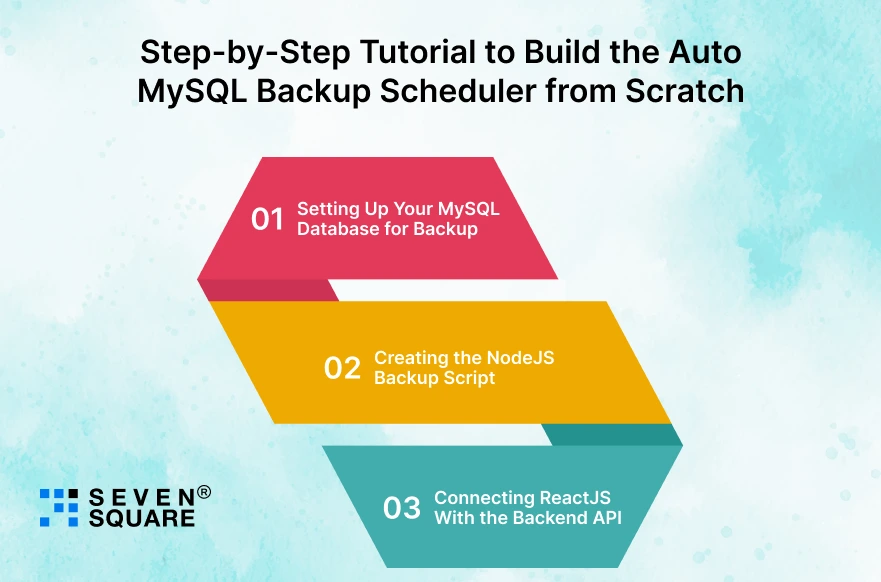
1. Setting Up Your MySQL Database for Backup
Ensure MySQL server is running and you have a user with SELECT and LOCK TABLES (and optionally RELOAD/SHOW VIEW) privileges for consistent dumps.
Create a user if needed:
CREATE USER ‘backup_user’@’localhost’ IDENTIFIED BY ‘StrongPassword!’;
GRANT SELECT, LOCK TABLES, SHOW VIEW, EVENT, TRIGGER ON your_database.* TO ‘backup_user’@’localhost’;
FLUSH PRIVILEGES;
.my.cnf (recommended for CLI security)
Create ~/.my.cnf on the server with:
                [client]
                user=backup_user
                password=StrongPassword!
Set secure permissions:
chmod 600 ~/.my.cnf
This avoids exposing the password in process lists when using the mysqldump CLI.
2. Creating the NodeJS Backup Script (MySQL Dump + Cron Job)
Create a server folder. Below is a complete server implementation using Express, node-cron, CLI fallback, and mysqldump npm.
Server: package.json (install dependencies)
                {
                    "name": "mysql-backup-scheduler-server",
                    "version": "1.0.0",
                    "main": "index.js",
                    "scripts": {
                        "start": "node index.js"
                    },
                    "dependencies": {
                        "express": "^4.18.2",
                        "node-cron": "^3.0.2",
                        "mysqldump": "^4.1.0",
                        "dotenv": "^16.0.3",
                        "body-parser": "^1.20.2",
                        "cors": "^2.8.5",
                        "uuid": "^9.0.0"
                    }
                }
Install:
                cd server
                npm install
Server: .env (example)
                PORT=5000
                DB_HOST=localhost
                DB_USER=backup_user
                DB_PASSWORD=StrongPassword!
                DB_NAME=your_database
                BACKUP_DIR=./backups
Server: index.js (full server + cron + backup script)
                // server/index.js
                require('dotenv').config();
                const express = require('express');
                const bodyParser = require('body-parser');
                const fs = require('fs');
                const path = require('path');
                const { exec } = require('child_process');
                const mysqldump = require('mysqldump'); // npm fallback
                const cron = require('node-cron');
                const cors = require('cors');
                const { v4: uuidv4 } = require('uuid');

                const app = express();
                app.use(cors());
                app.use(bodyParser.json());

                const PORT = process.env.PORT || 5000;
                const BACKUP_DIR = path.resolve(process.env.BACKUP_DIR || './backups');
                const DB = {
                host: process.env.DB_HOST || 'localhost',
                user: process.env.DB_USER,
                password: process.env.DB_PASSWORD,
                database: process.env.DB_NAME
                };

                const HISTORY_FILE = path.resolve('./backup-history.json');
                const SCHEDULES_FILE = path.resolve('./schedules.json');

                // ensure backup dir and json files exist
                if (!fs.existsSync(BACKUP_DIR)) fs.mkdirSync(BACKUP_DIR, { recursive: true });
                if (!fs.existsSync(HISTORY_FILE)) fs.writeFileSync(HISTORY_FILE, JSON.stringify([]));
                if (!fs.existsSync(SCHEDULES_FILE)) fs.writeFileSync(SCHEDULES_FILE, JSON.stringify([]));

                function addHistory(entry) {
                const history = JSON.parse(fs.readFileSync(HISTORY_FILE));
                history.unshift(entry); // newest on top
                // keep only last 200 entries
                fs.writeFileSync(HISTORY_FILE, JSON.stringify(history.slice(0, 200), null, 2));
                }

                async function runMysqldumpCLI(destPath) {
                // Using .my.cnf is recommended. If you pass password on the CLI it's visible in process list.
                // This example will attempt CLI without exposing password if ~/.my.cnf exists.
                const host = DB.host || 'localhost';
                const dbName = DB.database;
                // basic command (will use ~/.my.cnf if configured)
                const cmd = `mysqldump -h ${host} -u ${DB.user} ${dbName} > "${destPath}"`;
                return new Promise((resolve, reject) => {
                    exec(cmd, (error, stdout, stderr) => {
                    if (error) {
                        reject({ error, stdout, stderr });
                    } else {
                        resolve({ stdout, stderr });
                    }
                    });
                });
                }

                async function runMysqldumpNpm(destPath) {
                // fallback to mysqldump npm package
                return mysqldump({
                    connection: {
                    host: DB.host,
                    user: DB.user,
                    password: DB.password,
                    database: DB.database
                    },
                    dumpToFile: destPath
                });
                }

                async function createBackup(label = 'manual') {
                const id = uuidv4();
                const timestamp = new Date().toISOString().replace(/[:.]/g, '-');
                const filename = `${DB.database || 'db'}-${timestamp}-${id}.sql`;
                const destPath = path.join(BACKUP_DIR, filename);

                const start = Date.now();
                try {
                    // Try CLI first
                    await runMysqldumpCLI(destPath);
                    const duration = Date.now() - start;
                    const entry = { id, filename, path: destPath, method: 'cli', status: 'success', label, timestamp: new Date().toISOString(), duration };
                    addHistory(entry);
                    return entry;
                } catch (cliErr) {
                    // CLI failed — fallback to npm package
                    try {
                    await runMysqldumpNpm(destPath);
                    const duration = Date.now() - start;
                    const entry = { id, filename, path: destPath, method: 'npm', status: 'success', label, timestamp: new Date().toISOString(), duration };
                    addHistory(entry);
                    return entry;
                    } catch (npmErr) {
                    const duration = Date.now() - start;
                    const entry = {
                        id,
                        filename,
                        path: destPath,
                        method: 'none',
                        status: 'failed',
                        label,
                        timestamp: new Date().toISOString(),
                        duration,
                        error: String(npmErr)
                    };
                    addHistory(entry);
                    throw entry;
                    }
                }
                }

                // simple in-memory cron jobs registry (persisted in schedules.json)
                let scheduledJobs = {};

                // load schedules from file (if any)
                function loadSchedules() {
                const data = JSON.parse(fs.readFileSync(SCHEDULES_FILE));
                data.forEach(s => scheduleJob(s.cronExpr, s.label, s.id, false));
                }

                // persist schedules
                function persistSchedules() {
                const arr = Object.values(scheduledJobs).map(job => ({ id: job.id, cronExpr: job.cronExpr, label: job.label }));
                fs.writeFileSync(SCHEDULES_FILE, JSON.stringify(arr, null, 2));
                }

                // schedule a job (cronExpr e.g. '0 2 * * *' = daily at 02:00)
                function scheduleJob(cronExpr, label = 'scheduled', id = null, persist = true) {
                if (!cron.validate(cronExpr)) throw new Error('Invalid cron expression');
                if (!id) id = uuidv4();

                // if job exists, destroy it first
                if (scheduledJobs[id]) {
                    scheduledJobs[id].task.stop();
                }

                const task = cron.schedule(cronExpr, async () => {
                    console.log(`[cron] Running scheduled backup (${label}) - ${cronExpr}`);
                    try {
                    const res = await createBackup(label);
                    console.log('[cron] Backup success', res.filename);
                    } catch (err) {
                    console.error('[cron] Backup failed', err);
                    }
                }, { scheduled: true });

                scheduledJobs[id] = { id, cronExpr, label, task };
                if (persist) persistSchedules();
                return scheduledJobs[id];
                }

                function stopJob(id) {
                if (scheduledJobs[id]) {
                    scheduledJobs[id].task.stop();
                    delete scheduledJobs[id];
                    persistSchedules();
                    return true;
                }
                return false;
                }

                // load at startup
                loadSchedules();

                // API routes
                app.get('/api/history', (req, res) => {
                const history = JSON.parse(fs.readFileSync(HISTORY_FILE));
                res.json(history);
                });

                app.post('/api/backup-now', async (req, res) => {
                const label = req.body.label || 'manual';
                try {
                    const result = await createBackup(label);
                    res.json({ ok: true, result });
                } catch (err) {
                    res.status(500).json({ ok: false, error: err });
                }
                });

                app.post('/api/schedule', (req, res) => {
                const { cronExpr, label } = req.body;
                try {
                    const job = scheduleJob(cronExpr, label || 'scheduled');
                    res.json({ ok: true, job: { id: job.id, cronExpr: job.cronExpr, label: job.label } });
                } catch (err) {
                    res.status(400).json({ ok: false, error: String(err) });
                }
                });

                app.get('/api/schedules', (req, res) => {
                const arr = Object.values(scheduledJobs).map(j => ({ id: j.id, cronExpr: j.cronExpr, label: j.label }));
                res.json(arr);
                });

                app.delete('/api/schedule/:id', (req, res) => {
                const id = req.params.id;
                const ok = stopJob(id);
                res.json({ ok });
                });

                app.listen(PORT, () => {
                console.log(`Backup scheduler server running on http://localhost:${PORT}`);
                });
Notes on security & production:
- Use ~/.my.cnf to avoid putting DB password in the command line (recommended for CLI). The fallback uses the password from .env but keeps .env secure and out of Git.
- For production, push backups to S3 / GCS and rotate old backups (policies), we’ll show how to add cloud storage later.
- We store backup-history.json and schedules.json, you can replace that with a DB or disk-based queue for high-scale systems.
3. Connecting ReactJS With the Backend API
Create the client folder (React app). Use create-react-app or any React scaffolding.
Client: package.json (key deps)
                {
                    "name": "mysql-backup-scheduler-client",
                    "version": "1.0.0",
                    "dependencies": {
                        "axios": "^1.4.0",
                        "react": "^18.2.0",
                        "react-dom": "^18.2.0"
                    }
                }
Install:
                cd client
                npx create-react-app .
                npm install axios
Client: App.js (Dashboard)
                // client/src/App.js
                import React, { useEffect, useState } from 'react';
                import axios from 'axios';

                const API = process.env.REACT_APP_API || 'http://localhost:5000';

                function App() {
                const [history, setHistory] = useState([]);
                const [schedules, setSchedules] = useState([]);
                const [cronExpr, setCronExpr] = useState('0 2 * * *'); // default: daily at 2am
                const [label, setLabel] = useState('daily-backup');

                useEffect(() => {
                    fetchHistory();
                    fetchSchedules();
                    const id = setInterval(fetchHistory, 10000); // refresh every 10s
                    return () => clearInterval(id);
                }, []);

                async function fetchHistory() {
                    try {
                    const res = await axios.get(`${API}/api/history`);
                    setHistory(res.data);
                    } catch (err) {
                    console.error(err);
                    }
                }

                async function fetchSchedules() {
                    try {
                    const res = await axios.get(`${API}/api/schedules`);
                    setSchedules(res.data);
                    } catch (err) {
                    console.error(err);
                    }
                }

                async function triggerBackup() {
                    try {
                    await axios.post(`${API}/api/backup-now`, { label: 'manual-' + new Date().toISOString() });
                    fetchHistory();
                    alert('Backup triggered!');
                    } catch (err) {
                    console.error(err);
                    alert('Backup failed to trigger.');
                    }
                }

                async function createSchedule() {
                    try {
                    const res = await axios.post(`${API}/api/schedule`, { cronExpr, label });
                    fetchSchedules();
                    alert('Schedule created: ' + JSON.stringify(res.data.job));
                    } catch (err) {
                    console.error(err);
                    alert('Failed to create schedule.');
                    }
                }

                async function deleteSchedule(id) {
                    try {
                    await axios.delete(`${API}/api/schedule/${id}`);
                    fetchSchedules();
                    } catch (err) {
                    console.error(err);
                    }
                }

                return (
                    <div style={{ padding: 20, fontFamily: 'Arial, sans-serif' }}>
                    <h1>Auto MySQL Backup Scheduler (ReactJS Dashboard)</h1>

                    <section style={{ marginBottom: 20 }}>
                        <h2>Trigger Backup Now</h2>
                        <button onClick={triggerBackup}>Backup Now (MySQL dump automation)</button>
                    </section>

                    <section style={{ marginBottom: 20 }}>
                        <h2>Create ReactJS Cron Job (Schedule)</h2>
                        <label>
                        Cron expression:
                        <input value={cronExpr} onChange={e => setCronExpr(e.target.value)} style={{ marginLeft: 8, width: 300 }} />
                        </label>
                        <br />
                        <label>
                        Label:
                        <input value={label} onChange={e => setLabel(e.target.value)} style={{ marginLeft: 8 }} />
                        </label>
                        <br />
                        <button onClick={createSchedule}>Create Schedule</button>
                        <div>
                        <h4>Active Schedules</h4>
                        <ul>
                            {schedules.map(s => (
                            <li key={s.id}>
                                {s.label} — <code>{s.cronExpr}</code>
                                <button onClick={() => deleteSchedule(s.id)}>Delete</button>
                            </li>
                            ))}
                        </ul>
                        </div>
                    </section>

                    <section>
                        <h2>Backup History</h2>
                        <table border="1" cellPadding="8" style={{ borderCollapse: 'collapse', width: '100%' }}>
                    <thead>
                            <tr>
                            <th>Time</th>
                            <th>File</th>
                            <th>Method</th>
                            <th>Status</th>
                            <th>Duration (ms)</th>
                            <th>Download</th>
                            </tr>
                        </thead>
                        <tbody>
                            {history.map(h => (
                            <tr key={h.id}>
                                <td>{new Date(h.timestamp).toLocaleString()}</td>
                                <td style={{ maxWidth: 300, overflow: 'hidden', textOverflow: 'ellipsis' }}>{h.filename}</td>
                                <td>{h.method}</td>
                                <td>{h.status}</td>
                                <td>{h.duration || '—'}</td>
                                <td>
                                {h.status === 'success' ? (
                                    <a href={`/${h.path}`} target="_blank" rel="noreferrer">Download</a>
                                ) : '—'}
                                </td>
                            </tr>
                            ))}
                        </tbody>
                        </table>
                    </section>
                    </div>
                );
                }

                export default App;
Here you can see the Complete GitHub Code to Build an Auto MySQL Backup Scheduler in ReactJS.
Why Are We the Best Team to Build Your MySQL Auto Backup Scheduler?
Our team understands how important your data is, and we design backup solutions that work silently in the background, without errors, delays, or manual steps.
- Deep experience in building custom ReactJS tools and automated MySQL backup solutions.
- End-to-end development, from backend scripts to the ReactJS interface and real-time logs.
- Expertise in NodeJS, MySQL backup workflows, Cron scheduling, and MySQL dump automation.
- Strong knowledge of database backup automation for enterprise apps.
Want to Build a Customized ReactJs Solution With MySQL Database? Contact Us Now!
What Are the Advanced Features You Can Add Next?
Once your basic scheduler works, you can expand it with stronger, safer features.
- Encrypted backups: Secure your MySQL dumps using AES or custom encryption before saving.
- Cloud storage: AWS S3 & Google Cloud, Send backup files to the cloud to avoid local server risk.
- Backup notifications (email/SMS): Notify admins instantly when backups succeed or fail.
- Differential & incremental backups: Store only changed data instead of full dumps, faster & lightweight.
These upgrades help you follow MySQL backup best practices and build world-class database backup automation tools.
Why This ReactJS MySQL Backup Scheduler Is the Best Solution?
This system is built for modern apps that need reliability, scalability, and zero maintenance.
- Simplicity: Easy setup, clean UI, and beginner-friendly code.
- Scalability: Handles growing databases and multiple backup schedules.
- Security: Supports encryption, cloud storage, and safer backup workflows.
- Real-time monitoring: ReactJS gives instant visibility into what’s running and what’s backed up.
The best way to schedule MySQL database backups automatically is by combining ReactJS, NodeJS, Cron, and MySQL, simple, powerful, and future-ready.
FAQs
- You can automate MySQL backups by using ReactJS as the frontend, NodeJS for backend scripts, mysqldump to create backup files, and node-cron to schedule automatic backups.
- The best methods include automated MySQL backup using cron jobs, cloud storage backups, incremental backups, and encrypted dumps for maximum security.
- You can use node-cron on the backend to run a scheduled MySQL dump.
- Set the cron expression based on the time interval you want (hourly, daily, weekly).
- You can store them locally, on external storage, or in cloud platforms like AWS S3, Google Cloud, or Azure for better safety.