Most APIs don’t fail because of bugs; they fail because of unplanned changes.
A small response format update, renamed field, or removed endpoint can instantly break mobile apps, dashboards, and third-party integrations.
This is exactly why API versioning in Node.js becomes a production requirement. In many real projects, teams ship updates fast but forget version control.
Without a proper API deprecation strategy, older clients continue calling endpoints that silently change behavior.
The result? Broken apps, angry users, emergency rollbacks, and lost trust. Un-versioned APIs create hidden costs in production:
- Client apps stop working after backend updates.
- Partners must rush emergency fixes.
- Support tickets spike.
- Release cycles slow down.
- Backward compatibility becomes impossible.
Clients discover changes only after failure, which is the worst-case scenario for any business API. That’s why Node.js API versioning solutions go beyond simple routing.
They want systems that support version control + deprecation management + backward compatibility.
In this blog, you’ll build a Node.js API Versioning & Deprecation Manager with:
- Version registry.
- Deprecation tracking.
- Warning headers.
- Sunset enforcement.
- Backward compatibility layer.
What Is API Versioning in Node.js?
Node.js API versioning is the practice of maintaining multiple versions of your API so that existing clients continue to work even after you release updates.
Instead of replacing endpoints, you introduce new versions while keeping older ones stable.
In simple terms: API versioning lets your backend evolve without breaking existing users. Common REST API versioning patterns include:
- Version in URL (/api/v1/users).
- Version in header (Accept-Version: v2).
- Version in query (?version=v1).
- Version in media type.
But in production systems, versioning alone is not enough. You also need API lifecycle management. Here’s the difference:
- Versioning: Creating multiple API versions.
- Lifecycle management: Controlling release, support, deprecation, & retirement.
Without lifecycle control, versions pile up and become unmanageable.
Why Do Most API Versioning Tutorials Fail in Real Projects?
Most articles about API versioning best practices are too basic for real-world use. They show only route-based versioning and stop there.
That approach does not solve production API lifecycle problems. Typical tutorials only show:
- /v1/users
- /v2/users
- Done.
But real systems need much more to maintain backward compatibility in Node.js APIs.
- No coverage of header or media-type versioning patterns.
- No way to mark versions as deprecated or track usage.
- Clients are not informed that an API is being phased out.
- No automated expiry or removal schedule.
- No central place to control version status.
- No structured API deprecation policy or notification strategy.
That gap is exactly what we’ll solve by building a Node.js versioning and deprecation manager.
What Is an API Deprecation Manager? (And Why Do You Actually Need One?)
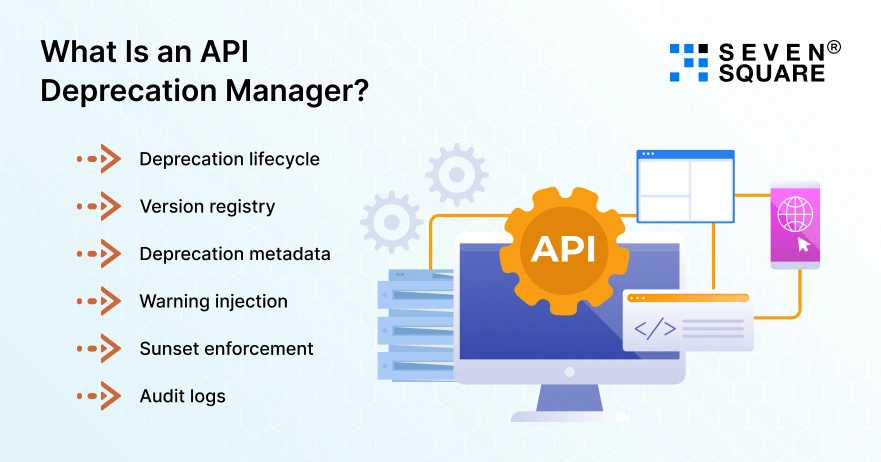
An API Deprecation Manager is a control layer that manages how API versions are phased out.
It turns your API deprecation policy into an automated system instead of a manual process.
Most teams track deprecation in spreadsheets or docs, which fails at scale. Proper deprecation management for Node.js APIs needs automation. Core components:
- Deprecation lifecycle: Define stages: active → deprecated → sunset → removed.
- Version registry: Central config listing all API versions and their status.
- Deprecation metadata: Store replacement version, timeline, and notes.
- Warning injection: Automatically add deprecation headers in responses.
- Sunset enforcement: Block or redirect calls after expiry date.
- Audit logs: Track which clients still use old versions.
This changes versioning from routing logic into a governed API lifecycle system.
What’s Our Architecture for Node.js API Versioning & Deprecation Manager?
We’ll build a modular Node.js versioning and deprecation manager that sits between routes and responses.
- Version registry module: Stores version list, status, and lifecycle stage.
- Middleware layer: Detects requested API version from URL/header/query.
- Deprecation config: Defines deprecated versions and sunset dates.
- Warning injector: Adds deprecation and migration headers automatically.
- Expiry controller: Blocks or reroutes expired versions.
- Client notification headers: Sends deprecation + sunset + replacement info.
Step-by-Step: How to Build the API Versioning Manager in Node.js?
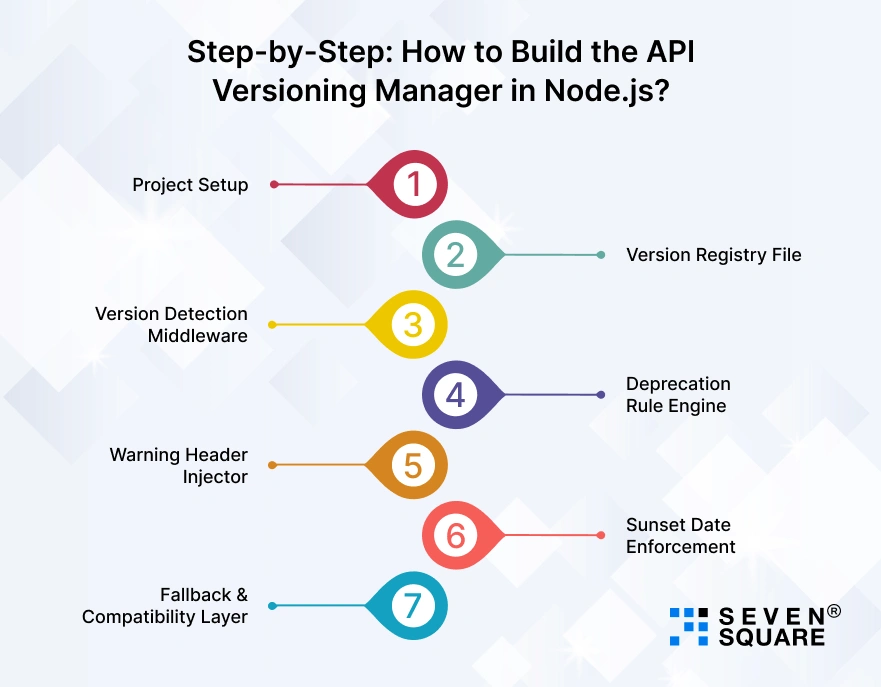
Here we will build a working Express API versioning system. You can directly use this in production or extend it for enterprise API lifecycle management.
Step 1: Project Setup (Express API Versioning Base)
First, create a Node.js Express project.
        mkdir node-api-versioning-manager
        cd node-api-versioning-manager
        npm init -y
        npm install express dayjs
Create folder structure:
src/
├── app.js
├── config/
│ └── versions.js
├── middleware/
│ ├── versionDetector.js
│ ├── deprecationEngine.js
│ ├── warningHeaders.js
│ └── sunsetEnforcer.js
├── routes/
│ ├── v1.routes.js
│ └── v2.routes.js
└── controllers/
└── user.controller.js
This modular structure helps build a scalable Node.js API versioning and deprecation manager.
Step 2: Version Registry File (Central Version Control)
This file acts as your API version registry, the heart of your API deprecation strategy.
src/config/versions.js
        module.exports = {
        current: "v2",
        versions: {
                v1: {
                status: "deprecated",
                deprecatedOn: "2025-12-01",
                sunsetOn: "2026-06-01",
                replacement: "v2"
                },
                v2: {
                status: "active",
                deprecatedOn: null,
                sunsetOn: null,
                replacement: null
                }
        }
        };
This enables:
- Version lifecycle tracking.
- Deprecation metadata.
- Sunset timeline.
- Replacement mapping.
Perfect for deprecation management in Node.js APIs.
Step 3: Version Detection Middleware (API Versioning Middleware Node.js)
This API versioning middleware in Node.js detects version using:
- URL /api/v1/…
- Header x-api-version
- Query ?version=
src/middleware/versionDetector.js
        const versions = require("../config/versions");
        function detectVersion(req, res, next) {
        let version = null;
        // URL versioning
        const urlMatch = req.path.match(/^\/api\/(v[0-9]+)/);
        if (urlMatch) {
                version = urlMatch[1];
        }
        // Header versioning
        if (!version && req.headers["x-api-version"]) {
                version = req.headers["x-api-version"];
        }
        // Query versioning
        if (!version && req.query.version) {
                version = req.query.version;
        }
        // Default to current
        if (!version) {
                version = versions.current;
        }
        req.apiVersion = version;
        next();
        }
        module.exports = detectVersion;
This supports multiple REST API versioning patterns in Express.
Step 4: Deprecation Rule Engine
This middleware checks if the requested API version is deprecated and attaches metadata.
src/middleware/deprecationEngine.js
        const versionConfig = require("../config/versions");

        function deprecationEngine(req, res, next) {
        const v = req.apiVersion;
        const meta = versionConfig.versions[v];

        if (!meta) {
                return res.status(400).json({
                error: "Unsupported API version"
                });
        }

        req.versionMeta = meta;
        next();
        }

        module.exports = deprecationEngine;
This forms the logic core of your API deprecation policy engine.
Step 5: Warning Header Injector (Client Communication Layer)
This adds deprecation warning headers automatically, a key missing feature in most Express API versioning tutorials.
src/middleware/warningHeaders.js
        function warningHeaders(req, res, next) {
        const meta = req.versionMeta;

        if (meta.status === "deprecated") {
                res.setHeader("X-API-Deprecated", "true");

                if (meta.replacement) {
                res.setHeader("X-API-Replacement-Version", meta.replacement);
                }

                if (meta.sunsetOn) {
                res.setHeader("Sunset", meta.sunsetOn);
                }

                res.setHeader(
                "Warning",
                `299 - "API version ${req.apiVersion} is deprecated"`
                );
        }

        next();
        }

        module.exports = warningHeaders;
This supports:
- Client migration.
- API lifecycle transparency.
- Backward compatibility communication.
Step 6: Sunset Date Enforcement (Automatic Expiry Control)
This enforces your API sunset policy automatically.
src/middleware/sunsetEnforcer.js
        const dayjs = require("dayjs");
        function sunsetEnforcer(req, res, next) {
        const meta = req.versionMeta;

        if (meta.sunsetOn) {
                const today = dayjs();
                const sunset = dayjs(meta.sunsetOn);

                if (today.isAfter(sunset)) {
                return res.status(410).json({
                error: "API version sunset reached",
                message: `Version ${req.apiVersion} is no longer supported`,
                upgradeTo: meta.replacement
                });
                }
        }

        next();
        }

        module.exports = sunsetEnforcer;
Now your API versioning and deprecation manager is self-enforcing, not manual.
Step 7: Fallback & Compatibility Layer (Backward Compatibility API Node.js)
This layer ensures backward compatibility when possible.
Example: v1 returns fullName, v2 returns split fields.
src/controllers/user.controller.js
        exports.getUser = (req, res) => {
        const baseData = {
                id: 1,
                firstName: "Aalay",
                lastName: "Joshi"
        };

        if (req.apiVersion === "v1") {
                return res.json({
                id: baseData.id,
                fullName: baseData.firstName + " " + baseData.lastName
                });
        }

        // v2 response
        res.json(baseData);
        };
This prevents breaking older clients and supports backward compatibility in Node.js APIs.
Express Route Wiring (Complete Working Setup)
src/routes/v1.routes.js
        const router = require("express").Router();
        const user = require("../controllers/user.controller");
        router.get("/users", user.getUser);
        module.exports = router;
src/routes/v2.routes.js
        const router = require("express").Router();
        const user = require("../controllers/user.controller");
        router.get("/users", user.getUser);
        module.exports = router;
Main App Integration
src/app.js
        const express = require("express");
        const detectVersion = require("./middleware/versionDetector");
        const deprecationEngine = require("./middleware/deprecationEngine");
        const warningHeaders = require("./middleware/warningHeaders");
        const sunsetEnforcer = require("./middleware/sunsetEnforcer");

        const v1Routes = require("./routes/v1.routes");
        const v2Routes = require("./routes/v2.routes");

        const app = express();

        app.use(express.json());

        // API versioning middleware chain
        app.use(detectVersion);
        app.use(deprecationEngine);
        app.use(warningHeaders);
        app.use(sunsetEnforcer);

        // Express API versioning routes
        app.use("/api/v1", v1Routes);
        app.use("/api/v2", v2Routes);

        app.listen(3000, () => {
        console.log("API Versioning Manager running on port 3000");
        });
Here’s the Complete GitHub Code to Build an API Versioning & Deprecation Manager in Node.js.
Our Proven Expertise in API Versioning & Lifecycle Strategy
- We design production-ready Node.js API versioning systems that prevent breaking changes & maintain long-term backward compatibility for business APIs.
- Our team implements a structured API deprecation strategy and lifecycle management, ensuring every API version follows controlled release, warning, and sunset timelines.
- We build scalable Express API versioning middleware that supports URL, header, and query-based REST API versioning patterns for flexible integration.
- Our team develops a centralized API version registry and deprecation managers to track version status, usage analytics, & replacement mapping automatically.
Want a Custom NodeJs Application? Contact Us Today!
A Smarter Way to Manage API Versions at Scale
You’re not just adding API versioning in Node.js; you’re building a full API lifecycle and deprecation management system. With this approach, you get:
- Controlled API evolution.
- Backward compatibility for clients.
- Automated deprecation strategy.
- Clear sunset timelines.
- Lower production risk.
Use this Node.js API versioning & deprecation manager in your own projects and standardize API governance across teams.
FAQs
- URL versioning is simplest, but header versioning is more scalable. The best choice depends on your client ecosystem and gateway setup.
- Yes for public and partner APIs. Internal microservices may use shared versioning with strict backward compatibility controls.
- Use deprecation headers, sunset headers, email alerts, dashboard notices, and documentation updates together.
- Express can support versioning via middleware, but you must build custom logic for lifecycle and deprecation management.