Global state management in ReactJS is more confusing today than it was a few years ago. The ecosystem has grown fast, and so have the choices.
Redux, Context API, Zustand, Jotai, and other tools all promise cleaner state management, but not every solution fits every React app.
Earlier, the common advice was simple: “Just use Redux.” That approach no longer works for modern React applications.
Many apps do not need the complexity Redux introduces, while others actually break or slow down when global state is used incorrectly.
Bad React state management strategies rarely fail immediately. They silently hurt performance, increase unnecessary re-renders, & make applications harder to scale.
What starts as a small state decision often becomes a long-term maintenance problem as the product grows.
Most React state management comparison blogs focus only on syntax or popularity. They don’t explain why a strategy works in one app and fails in another.
That missing context is why teams keep switching state libraries instead of choosing the right global state management strategy from the start.
What Does “Global State” Mean in Modern React Applications?
React global state management is often misunderstood. Not every shared value in your app needs to be global, and not all global data belongs in the same store.
Local state is limited to a component or a small feature. For example, form inputs, modal visibility, or dropdown state should stay local.
Global state, on the other hand, is data shared across multiple unrelated components like authentication status, user preferences, or feature flags.
Another critical distinction is server state vs client state in React. Server state comes from APIs, data like user profiles, product lists, or orders.
Client state is UI-driven, theme mode, selected filters, or navigation state.
Mixing server state into global client state often causes stale data, excessive re-renders, and complex update logic. You should not use global state when:
- The data is used in only one component.
- The state can be derived from props.
- Server state is better handled by data-fetching libraries.
Understanding these boundaries is the foundation of effective React global state management.
How We Evaluated React State Management Strategies?
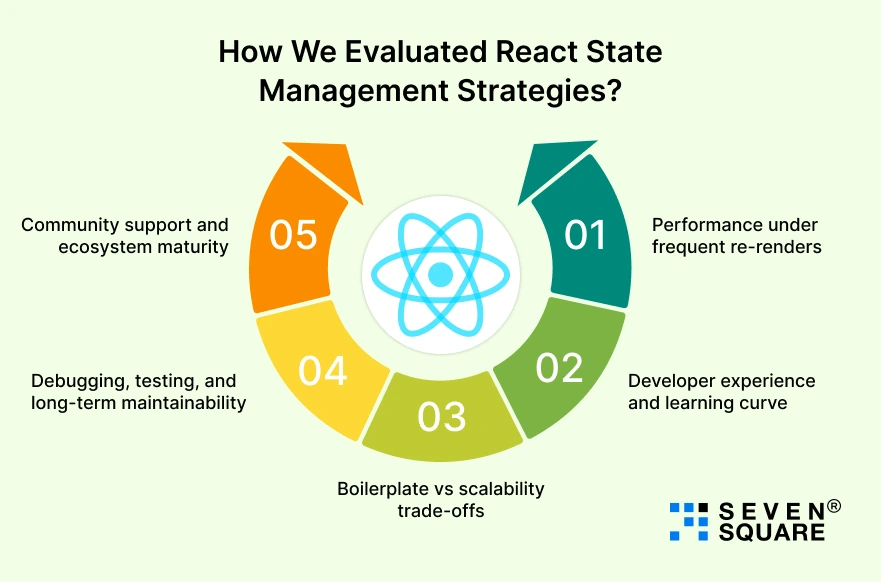
This ReactJS state management comparison is based on real project needs. We evaluated each approach using criteria that matter in production applications.
1. Performance under frequent re-renders
- We measured how each strategy behaves when state updates happen often.
- Poor state design leads to unnecessary re-renders and slower UI performance.
2. Developer experience and learning curve
- A good state management solution should be easy to understand, debug, & onboard new developers into, especially important for growing teams.
3. Boilerplate vs scalability trade-offs
- Some libraries reduce boilerplate but struggle at scale.
- Others add structure but increase complexity. We analyzed where each strategy fits best.
5. Debugging, testing, and long-term maintainability
- State that’s easy to test and reason about reduces bugs and improves long-term code quality.
6. Community support and ecosystem maturity
- Libraries with strong ecosystems, tooling, and documentation are safer choices for long-lived React applications.
These factors together define real-world React state management performance comparison.
Context API: Is Native React Enough for Global State?
The Context API for global state in React is often misunderstood. Many developers either overuse it or completely avoid it.
In reality, Context API works well when used for the right type of global state. Context API is a solid choice when:
- Global state changes infrequently.
- Data is mostly read-heavy.
- You want zero external dependencies.
- Your app is small to medium in size.
Code Example: Global Auth & Theme State Using Context API
AuthThemeContext.jsx
                import { createContext, useContext, useMemo, useState } from "react";
                const AuthThemeContext = createContext(null);

                export const AuthThemeProvider = ({ children }) => {
                const [isAuthenticated, setIsAuthenticated] = useState(false);
                const [theme, setTheme] = useState("light");

                const login = () => setIsAuthenticated(true);
                const logout = () => setIsAuthenticated(false);
                const toggleTheme = () =>
                        setTheme((prev) => (prev === "light" ? "dark" : "light"));

                const value = useMemo(
                        () => ({
                        isAuthenticated,
                        theme,
                        login,
                        logout,
                        toggleTheme,
                        }),
                        [isAuthenticated, theme]
                );

                return (
                        <AuthThemeContext.Provider value={value}>
                        {children}
                        </AuthThemeContext.Provider>
                );
                };

                export const useAuthTheme = () => {
                const context = useContext(AuthThemeContext);
                if (!context) {
                        throw new Error("useAuthTheme must be used inside AuthThemeProvider");
                }
                return context;
                };
Usage
                import { useAuthTheme } from "./AuthThemeContext";
                function Navbar() {
                const { isAuthenticated, theme, toggleTheme, logout } = useAuthTheme();

                return (
                        <nav>
                        <span>Theme: {theme}</span>
                        <button onClick={toggleTheme}>Toggle Theme</button>
                        {isAuthenticated && <button onClick={logout}>Logout</button>}
                        </nav>
                );
                } import { useAuthTheme } from "./AuthThemeContext";

                function Navbar() {
                const { isAuthenticated, theme, toggleTheme, logout } = useAuthTheme();

                return (
                        <nav>
                        <span>Theme: {theme}</span>
                        <button onClick={toggleTheme}>Toggle Theme</button>
                        {isAuthenticated && <button onClick={logout}>Logout</button>}
                        </nav>
                );
                }
This pattern keeps Context API fast, readable, and scalable for limited global state.
Redux Toolkit: Is Redux Still Worth It in 2026?
Redux once had a bad reputation for being verbose and difficult. That criticism was valid, but it’s outdated.
Modern Redux Toolkit state management has completely changed how Redux is used.
Redux Toolkit vs Classic Redux
You never write classic Redux. Redux Toolkit provides:
- createSlice instead of reducers + actions
- configureStore instead of manual setup
- Built-in DevTools and middleware
It’s faster to write, easier to maintain, and far more scalable.
Code Example: Scalable App State Using Redux Toolkit
store.js
                import { configureStore } from "@reduxjs/toolkit";
                import authReducer from "./authSlice";

                export const store = configureStore({
                reducer: {
                        auth: authReducer,
                },
                });
authSlice.js
                import { createSlice } from "@reduxjs/toolkit";
                const initialState = {
                user: null,
                isAuthenticated: false,
                };

                const authSlice = createSlice({
                name: "auth",
                initialState,
                reducers: {
                        loginSuccess(state, action) {
                        state.user = action.payload;
                        state.isAuthenticated = true;
                        },
                        logout(state) {
                        state.user = null;
                        state.isAuthenticated = false;
                        },
                },
                });

                export const { loginSuccess, logout } = authSlice.actions;
                export default authSlice.reducer;
Usage
                import { useDispatch, useSelector } from "react-redux";
                import { loginSuccess, logout } from "./authSlice";

                function Profile() {
                const dispatch = useDispatch();
                const user = useSelector((state) => state.auth.user);

                return (
                        <div>
                        {user ? (
                        <button onClick={() => dispatch(logout())}>Logout</button>
                        ) : (
                        <button
                        onClick={() => dispatch(loginSuccess({ name: "Alex" }))}
                        >
                        Login
                        </button>
                        )}
                        </div>
                );
                }
This pattern scales cleanly across large React applications.
When Redux Is the Right Choice for Large Applications?

Redux Toolkit is ideal when:
- The app has complex state transitions.
- Multiple teams work on the same codebase.
- Debugging and traceability are critical.
- Long-term scalability matters.
For enterprise-level React apps, Redux is still a safe and proven choice.
Zustand & Lightweight Libraries: The Modern React State Approach
Zustand state management in React has grown rapidly because it solves a real problem, too much complexity for a simple global state.
Code Example: Global State With Zustand
useAuthStore.js
                import { create } from "zustand";

                export const useAuthStore = create((set) => ({
                user: null,
                isAuthenticated: false,
                login: (user) =>
                        set({ user, isAuthenticated: true }),
                logout: () =>
                        set({ user: null, isAuthenticated: false }),
                }));
Usage
                import { useAuthStore } from "./useAuthStore";
                function Dashboard() {
                const { user, login, logout, isAuthenticated } = useAuthStore();

                return (
                        <div>
                        {isAuthenticated ? (
                        <>
                        <p>Welcome {user.name}</p>
                        <button onClick={logout}>Logout</button>
                        </>
                        ) : (
                        <button onClick={() => login({ name: "Alex" })}>
                        Login
                        </button>
                        )}
                        </div>
                );
                }
Only components using specific state values will re-render; no extra optimization is needed.
Here’s the Complete GitHub Guide to Implement Global State Management in ReactJs.
How Do We Solve Real React State Management Challenges?
- We implement ReactJS state management strategies using Context API, Redux Toolkit, and Zustand with clean, reusable code.
- Our team designs React global state management architectures that scale smoothly across multi-team and enterprise-level applications.
- Our React state libraries benchmark-driven decisions reduce technical debt and future refactoring costs.
Want to Implement Global State Management in ReactJs? Contact Us Now!
Performance Comparison: Which React State Strategy Actually Scales?
This React state libraries benchmark compares Context API, Redux Toolkit, and Zustand based on real-world performance, scalability, and maintenance behavior in production React apps.
| Feature | Context API | Redux Toolkit | Zustand |
| Re-render behavior | Triggers re-renders for all subscribed components when context value changes | Only re-renders components subscribed to specific state slices | Re-renders only components using changed state selectors |
| Control over re-renders | Limited without heavy memoization | High control using selectors and memoized slices | Very high due to fine-grained state subscriptions |
| Performance under frequent updates | Degrades quickly with frequent state changes | Stable and predictable even with high update frequency | Excellent performance with minimal overhead |
| Memory usage pattern | Low memory footprint but inefficient update propagation | Moderate memory usage due to structured store and middleware | Very low memory usage with lightweight internal store |
| State update efficiency | Entire context value recalculates on every change | Updates are isolated and optimized internally | Updates are localized and highly efficient |
| Debugging performance issues | Difficult due to implicit re-render chains | Easy using Redux DevTools and action tracing | Moderate; simple but fewer advanced debugging tools |
| Scalability in large apps | Poor beyond small to medium apps | Excellent for large and enterprise-scale applications | Good for medium to large apps with focused state |
| What breaks first at scale | Excessive re-renders and performance bottlenecks | Boilerplate fatigue if architecture isn’t planned well | Lack of strict conventions in very large teams |
| Team collaboration impact | Hard to manage across multiple teams | Very strong due to predictable patterns | Depends heavily on team discipline |
| Best use case | Simple, infrequent global state | Complex business logic and long-term scaling | Fast-moving products needing performance with simplicity |
The Right Global State Strategy Depends on Your App
There is no one-size-fits-all solution for React global state management. Every strategy comes with trade-offs in performance, scalability, and developer experience.
The best teams understand the problem they’re solving and choose a global state management strategy that fits their app’s size, complexity, and growth plans.
Small apps benefit from simplicity. Growing products need balance. Enterprise systems demand structure and predictability.
Testing these strategies yourself is the fastest way to make the right decision.
FAQs
- Yes, for large and complex applications where predictable state updates and strong tooling are required.
- Context API can cause performance issues if overused or applied to frequently changing data.
- Zustand works well for many apps, but Redux still fits large, highly structured applications better.
- A structured, scalable approach with clear patterns and strong debugging support works best.