If you’re thinking, “ Why is my Flutter app so large? ” then you’re not alone.
Flutter app size issues are one of the most common concerns for developers and businesses.
A basic Flutter app often starts around 18 to 22 MB (APK) and 30+ MB (AAB) even before adding features. That surprises many teams. Here’s why it happens:
Default Flutter Engine & Skia Overhead
Flutter ships its own rendering engine (Skia). This ensures consistent UI across devices but adds a fixed binary size cost. This is normal and manageable.
Debug vs Release Build Confusion
Many developers panic after checking the debug APK size. Debug builds include:
- Extra debugging symbols.
- Development tools.
- No optimizations.
A release build is significantly smaller. Always judge size using release mode.
Unused Widgets, Assets, and Dependencies
This is where real problems start:
- Unused packages stay bundled.
- High-resolution images increase in size quickly.
- Fonts, icons, and assets remain even if unused.
These silently increase Flutter binary size without you noticing.
Here in this blog, you can learn about app size optimization in Flutter with GitHub code.
Flutter App Size vs Performance: What You Should Not Optimize?
Many developers make the mistake of shrinking app size at the cost of performance. That’s dangerous.
Common Myths That Hurt Performance
- Removing core packages just to save KBs.
- Disabling features blindly.
- Over-compressing images.
These may reduce size but often slow down runtime performance.
Why Aggressive Code Removal Breaks Features?
Flutter uses tree shaking and compile-time optimizations. Manually removing code that’s dynamically used can:
- Break navigation.
- Causes runtime crashes.
- Introduce hidden bugs.
Safe vs Risky Optimizations
| Optimization Type | Impact on Size | Risk Level |
| Tree shaking | High | Safe |
| Removing unused dependencies | Medium | Safe |
| Asset optimization | High | Safe |
| Manual Dart code removal | Low | Risky |
| Disabling engine features | Low | High Risk |
Focus on safe Flutter app size optimization techniques that don’t hurt performance.
How to Analyze Flutter App Size Properly?
Before optimizing, you must analyze the Flutter app size correctly. Guessing leads to bad decisions.
Use flutter build apk –analyze-size
This command generates a detailed size breakdown of your Flutter app. It shows:
- Dart code size.
- Native libraries.
- Assets and fonts.
- Third-party dependencies.
Reading Size Tree Maps
Tree maps visually show which parts consume the most space. Focus on:
- Large image assets.
- Heavy plugins.
- Native binaries.
Ignore tiny files that won’t give meaningful reductions.
Detect Heavy Assets, Libraries, and Native Code
Ask these questions:
- Which package adds the most size?
- Are assets optimized for mobile screens?
- Are native libraries required?
When to Optimize Dart vs Native vs Assets?
- Assets → Fastest wins.
- Dependencies → Medium effort, big impact.
- Native binaries → Advanced, careful changes.
This structured Flutter app size analysis prevents wasted effort.
Step-by-Step Flutter App Size Optimization Techniques (With Code)
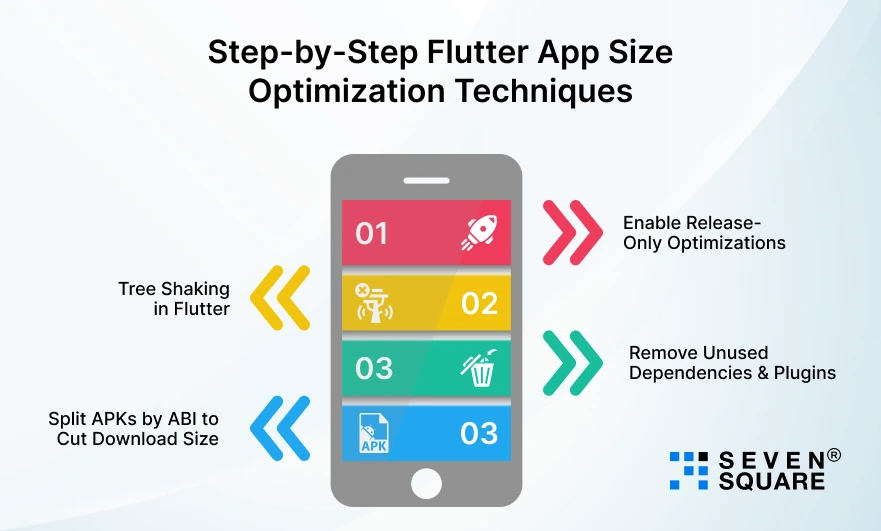
If your goal is to reduce Flutter app size without affecting performance, follow these steps in order. Each technique below is safe, tested, and used in production apps.
Step 1: Enable Release-Only Optimizations
One of the biggest reasons developers think their Flutter app is huge is that they check debug builds.
Release Build Flags That Instantly Reduce APK Size
Always measure app size using release mode.
Android – Release APK
flutter build apk –release
Android – App Bundle
flutter build appbundle
This alone can reduce Flutter APK size by 30 to 40% compared to debug builds.
Why Debug Builds Mislead Developers?
| Build Type | Size | Purpose |
| Debug | Very Large | Development |
| Profile | Medium | Performance testing |
| Release | Smallest | Production |
Step 2: Tree Shaking in Flutter: Remove Unused Code Automatically
What Is Tree Shaking in Flutter?
Tree shaking removes unused Dart code at compile time. If a function, class, or widget is never used, Flutter removes it from the final binary.
This is one of the most powerful ways to reduce Flutter app size safely.
How Flutter Tree Shaking Actually Works?
- The Dart compiler analyzes code usage.
- Unused code paths are eliminated.
- The final binary contains only used logic.
Tree Shaking With Code
Wrong approach (prevents tree shaking):
                final widgetMap = {
                'home': HomeScreen(),
                'profile': ProfileScreen(),
                };
Better approach (tree-shakable):
                Widget getScreen(String route) {
                switch (route) {
                    case 'home':
                    return HomeScreen();
                    case 'profile':
                    return ProfileScreen();
                    default:
                    return const SizedBox();
                }
                }
Result: Unused screens are removed from the binary, reducing Flutter app size automatically.
Step 3: Remove Unused Dependencies & Plugins
Why Dependencies Inflate Flutter App Size?
Each third-party plugin may add:
- Native Android libraries.
- iOS frameworks.
- Platform-specific code.
Even unused plugins increase Flutter binary size.
Identify Unused Packages Safely
Run:
flutter pub deps
Cleaning pubspec.yaml
Before
                dependencies:
                firebase_analytics: ^10.0.0
                intl: ^0.18.0
                provider: ^6.0.0
After
                dependencies:
                provider: ^6.0.0
Result: Smaller APK & IPA without touching performance.
Step 4: Split APKs by ABI to Cut Download Size
What Is ABI Splitting?
Different devices use different CPU architectures (ABI):
- armeabi-v7a
- arm64-v8a
- x86_64
By default, one APK contains all ABIs, making it large. ABI splitting creates smaller APKs per device.
How Much Size Can You Save?
Typical savings:
- 30 to 50% smaller download size per device.
- Same performance, same features.
Exact Flutter Build Command
flutter build apk --split-per-abi
Here’s the Complete GitHub Code to Reduce Flutter App Size Without Affecting Performance.
How Do We Reduce the Flutter App Size Before Publishing It?
- We help to reduce Flutter app size without affecting performance using proven optimization techniques and real production experience.
- Our team identifies Flutter app size issues early using advanced app size analysis and Flutter DevTools insights.
- We apply safe Flutter app size optimization strategies that improve download size while maintaining smooth runtime performance.
- Our experts use tree shaking in Flutter and dependency cleanup to remove unused code and reduce binary size effectively.
Want a Customized & Optimized Flutter App? Contact Us Now!
How to Reduce Android & iOS Binary Size Without Feature Loss?
1. Android: Flutter APK Size Smaller
APK vs AAB – What Should You Ship?
- Always ship AAB (Android App Bundle).
- Google Play delivers device-specific APKs, reducing download size automatically.
ProGuard & R8 Impact on Flutter Apps
ProGuard and R8 remove unused native code. They:
- Reduce binary size.
- Keep runtime performance intact.
- Work best with release builds.
2. iOS: Flutter IPA Size Reduction
Bitcode, Symbol Stripping & Build Settings
- Disabling Bitcode and enabling symbol stripping helps reduce Flutter IPA size without breaking features.
Why do iOS Builds Grow Unexpectedly?
Common reasons:
- Unused assets included.
- Debug symbols left enabled.
- Multiple architectures bundled.
Proper build configuration solves most Flutter iOS size issues.
Final Checklist to Reduce Flutter App Size Without Breaking Anything
Pre-Release Optimization Checklist
- Use release build only.
- Analyze app size before optimizing.
- Remove unused dependencies.
- Optimize images and fonts.
Safe Optimizations Every Flutter App Should Use
- Tree shaking enabled.
- AAB for Android builds.
- Asset compression.
- ABI splitting.
Before Play Store / App Store Upload
- Test performance after optimization.
- Verify all features work.
- Re-check binary size.
- Confirm no runtime crashes.
This checklist ensures app size reduction without feature loss.
Lightweight Flutter Apps Are Possible
With the right Flutter app size optimization strategies, you can reduce APK and IPA size without affecting performance.
If you want expert help or a review of your Flutter app size issues, feel free to reach out.
A lightweight, high-performance Flutter app is absolutely achievable.
FAQs
- Yes. Flutter tree shaking removes unused Dart code at compile time and significantly reduces binary size.
- Most production apps achieve 20 to 50% size reduction using proper Flutter app size optimization techniques.
- Indirectly, yes. Smaller apps load faster, install quicker, and often feel more responsive.
- Yes, with correct optimization, Flutter apps can be lightweight, fast, and scalable.