Can Slack AI really improve business productivity?
After the recent update of Slack, see how its AI chatbot and automation tools can simplify workflows, automate tasks, and help teams work faster with Salesforce-powered insights.
Most teams today are still stuck doing repetitive work.
Switching between tools, writing the same updates again and again, manually tracking tasks, and digging through chats to find information all waste hours every week.
We have seen companies invest in tools, but their teams still struggle with manual workflows and scattered communication.
But the latest Slack update by Salesforce looks promising, and it can be the solution.
Slack isn’t just a messaging platform now. It is growing into an AI-based work engine that can actually handle your daily tasks.
With the introduction of Slack AI bot, businesses can now automate conversations, manage workflows, and reduce manual effort.
The new Slack chatbot is replying to messages, understanding context, generating responses, and even taking actions.
This change is all about automation: Reducing repetitive work so teams can focus on what really matters.
So the big question is: Is Slack now doing your work for you?
What Changed in the Latest Slack Update by Salesforce?
The recent Slack update is a major change in how teams work.
Instead of adding small improvements, Salesforce has introduced a completely new layer of intelligence inside Slack.
Now, you interact with an AI Slack bot that helps you get work done faster. Here’s what’s changed:
- A smarter Slack chatbot that understands conversations, not just commands.
- An advanced Slack AI bot that can assist with tasks, content, and decisions.
- 30+ AI-powered capabilities designed to reduce manual work.
But the real difference is its workflow revolution.
Slack is moving from a communication tool to a platform where work actually happens automatically.
How to Implement Slack AI Automation in Your Business?
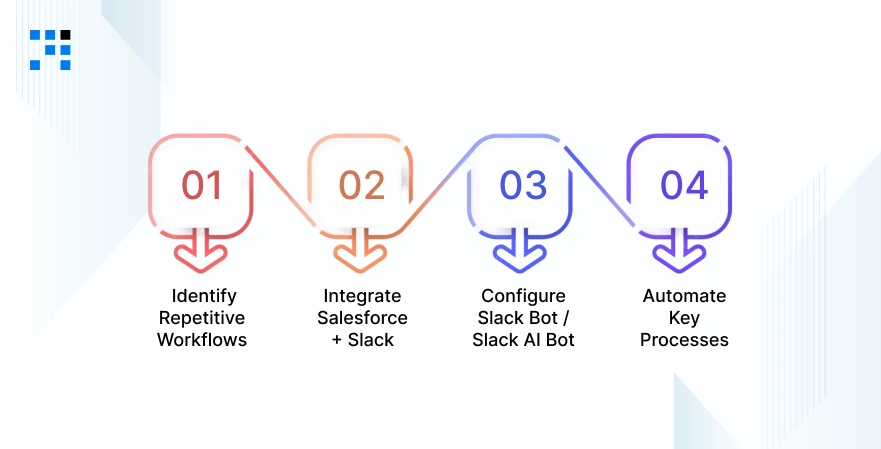
We follow a simple and effective approach to implement Slack AI automation.
Step 1: Identify Repetitive Workflows
Start by finding tasks that:
- Take time.
- They are repeated daily.
- Don’t need human creativity.
Step 2: Integrate Salesforce + Slack
This is the foundation.
With proper Salesforce integration, your Slack chatbot can access real-time data and automate workflows.
Step 3: Configure Slack Bot / Slack AI Bot
Set up your Slack bot or Slack AI bot to:
- Respond to queries.
- Trigger workflows.
- Perform actions automatically.
Step 4: Automate Key Processes
Now, automate:
- Communication.
- Reporting.
- Task management.
- Customer interactions.
Looking to Automate Your Business Tasks with Slack AI?
From Slack Bot to AI Agent: What’s Actually New?
Earlier, a Slack bot was simple.
It could send notifications, trigger alerts, or respond to basic commands. But it still required human input for most tasks.
Now, that has changed. The new Slack AI bot is more like an intelligent assistant, or even better, an AI agent. Here’s what makes it different:
- Context Understanding: The new Slack chatbot can understand conversations across channels. It knows what your team is discussing and responds accordingly.
- Decision-Making Capability: Instead of waiting for instructions, the Slack AI bot can suggest actions, prioritize tasks, and guide decisions.
- Task Execution: This is the biggest change. The AI does the work. From sending updates to creating tasks, the Slack bot is now actively participating in workflows.
In simple terms: Slack has evolved from a tool you use to a system that works for you.
Explore the Top 5 Slack Competitors for Faster Team Collaboration.
How Slack AI Automation Works?
Slack AI automation follows a very basic flow:
Input → AI Processing → Automated Output
- You ask something or trigger a workflow.
- The Slack chatbot understands the request.
- The Slack AI bot processes data and context.
- The system performs the task automatically.
How Does It Connect Everything?
The real power of Slack AI automation comes from integration. The Slack chatbot connects with your tools, data, and systems. Then the AI executes workflows without manual effort.
How Slack AI Bot Automates Daily Business Tasks?
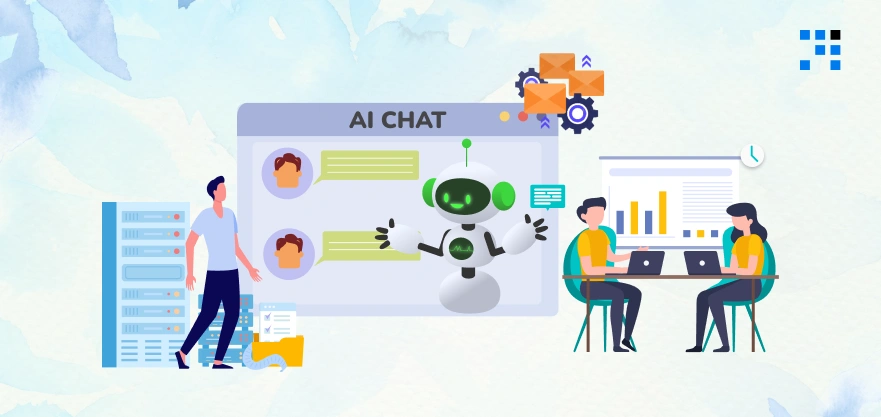
The Slack AI bot is actively automating daily business operations.
1. Automating Communication with Slack Chatbot
Communication takes up a huge part of the workday. With a Slack chatbot, you can automate:
- Auto-replies to common queries.
- Smart summaries of long conversations.
- Key insights from message threads.
Instead of reading hundreds of messages, your Slack AI bot gives you exactly what you need.
2. Task & Project Automation Using Slack Bot
Managing tasks manually can slow teams down. With Slack bot automation, you can:
- Automatically assign tasks.
- Track progress in real-time.
- Send reminders without manual follow-ups.
The Slack bot ensures nothing gets missed.
3. AI-Powered Meeting & Email Automation
Scheduling meetings and writing emails can be repetitive. Now, the Slack AI bot can:
- Draft emails based on context.
- Schedule meetings automatically.
- Share updates with teams instantly.
This saves hours every week.
4. Real-Time Data Access via Salesforce Integration
One of the biggest advantages of this Slack update is deep integration with Salesforce. This means:
- Access CRM data directly inside Slack.
- Get real-time insights without switching platforms.
- Make faster, data-driven decisions.
The Slack chatbot becomes your gateway to business data.
What Are the Use Cases of Slack AI Chatbot?
We help businesses actually implement them. And we’re already seeing how the new Slack AI bot is simplifying daily operations.
Here are some real-world use cases where Slack AI automation is making a difference:
Sales Teams Using Slack AI Bot for CRM Updates
Sales teams don’t need to switch between tools to check customer data. With Salesforce integration, the Slack AI bot can:
- Pull real-time CRM data.
- Share deal updates instantly.
- Summarize customer interactions.
Result:
- Reduce manual work by 40%.
- Save 8 to 10 hours per week.
Support Teams Automating Responses
Customer support teams deal with repetitive queries every day. With a Slack chatbot, businesses can:
- Automate responses to common questions.
- Route issues to the right team.
- Provide instant updates.
Result:
- Save 10+ hours per week.
- Improve response time and customer satisfaction.
This is how you can utilize Slack bot automation to change how your business works.
Want to Build a Powerful Slack AI Bot for Your Team?
Why Are Businesses Adopting Slack AI Automation in 2026?
Businesses are quickly moving towards AI workplace automation, and Slack is becoming a key part of that change. Here’s why:
Reduce Manual Work
Repetitive tasks slow teams down. With a Slack AI bot, businesses can automate:
- Updates.
- Reports.
- Task tracking.
This reduces dependency on manual effort.
Increase Team Productivity
When teams don’t have to handle repetitive work, they can focus on high-value tasks. Using Slack automation tools, companies are:
- Saving time.
- Improving efficiency.
- Delivering faster results.
Centralized Workflows
- Instead of switching between multiple tools, everything happens inside Slack.
- From communication to execution, Slack AI automation creates a single workspace for work.
That’s why businesses are investing in Slack automation tools and AI-driven workflows in 2026.
The Future of Slack Chatbots & AI Workspaces
The future is moving towards agentic AI, where systems act. Slack is heading in that direction. Soon, the Slack AI bot will:
- Handle complete workflows.
- Make decisions.
- Coordinate across tools.
We’re moving towards fully automated workplaces, where Slack becomes the AI operating system for work. The Slack chatbot becomes your team’s smartest member.
FAQs
- A Slack AI bot is an intelligent assistant inside Slack that can automate tasks, respond to queries, and help teams manage workflows efficiently.
- A Slack chatbot uses AI to understand messages, connect with tools, & automate actions like sending updates, generating reports, or managing tasks.
- Yes, with Slack AI automation, businesses can automate communication, reporting, scheduling, & many repetitive workflows using a Slack bot.
- Yes, the latest Slack update has AI features that improve productivity, reduce manual work, and simplify business operations.