Secure client-side encryption in ReactJS is a basic security requirement for modern web applications.
Why HTTPS Alone Is Not Enough Anymore?
HTTPS only protects data while it’s moving between the browser and server. But before data is sent:
- It exists in plain text in browser memory
- It can be accessed via DevTools, XSS attacks, or malicious extensions
This is where React client-side encryption becomes important.
What Are the Common Frontend Data-Leak Scenarios in React Apps?
Many React apps unknowingly expose sensitive data due to:
- Storing user data in localStorage without encryption.
- Sending unencrypted API payloads.
- Logging sensitive form data in the console.
- Third-party scripts are accessing browser memory.
These are real frontend security risks. Without React front end encryption security, attackers don’t even need backend access.
When Client-Side Encryption Actually Makes Sense?
Client-side encryption in React is useful when:
- You handle PII, financial, or healthcare data.
- You want defense-in-depth, not just HTTPS.
- Compliance (GDPR, HIPAA, SOC2) matters.
- Trust and brand reputation are critical.
If your React app handles sensitive data, encryption on the client side is necessary.
Here in this blog, you will learn how to implement secure client-side encryption in ReactJs with complete code.
What Is Client-Side Encryption in React?
Client-side encryption means encrypting data in the browser before it leaves the React app. Even if someone intercepts the request, the data is:
- Encrypted.
- Unreadable.
- Useless without the key.
Client-Side vs Server-Side vs End-to-End Encryption
- Client-side encryption: Data is encrypted in React before an API call.
- Server-side encryption: Data is encrypted after reaching the backend.
- End-to-end encryption: Only the sender and receiver can decrypt data.
React usually implements client-side + server-side encryption together.
What Data Should Be Encrypted on the Frontend?
- Passwords.
- FinancialPII (emails, phone numbers).
- Financial & medical data.
- Sensitive form submissions.
Proper React encryption is fast, safe, and effective.
How Encrypted Data Flows in a React App?

User Input → Encryption Layer → API Payload → Server Decryption
- The user enters data in a React form.
- Data is encrypted using Web Crypto API.
- Encrypted payload is sent to the backend.
- Server decrypts securely.
This architecture improves React front end encryption security.
Browser Limitations You Must Design Around
- JavaScript memory access risks.
- No long-term secret storage.
- XSS vulnerabilities.
That’s why key handling and lifecycle management are critical in React encryption.
Web Crypto API vs CryptoJS in ReactJS: Which One Is Actually Secure?
| Feature | Web Crypto API | CryptoJS |
| Native browser support | Yes | No |
| Performance | Fast | Slower |
| Security level | High | Medium |
Why Should Modern React Apps Prefer Web Crypto API?
- Built directly into the browser.
- Uses secure native implementations.
- Better performance and memory handling.
- Recommended by modern security standards.
Web Crypto API in React is the safest option for production apps.
When Does CryptoJS Make Sense?
- Legacy browser support.
- Quick demos or prototypes.
- Simple hashing (non-critical data).
For real applications, CryptoJS vs Web Crypto API is not needed; Web Crypto wins.
Step-by-Step: Implement Secure Client-Side Encryption in ReactJS
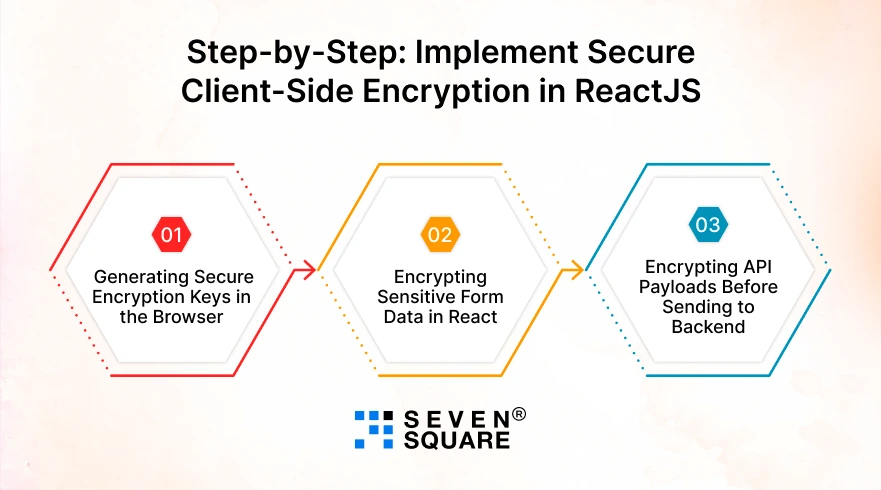
You will learn how to implement client-side encryption in React step by step, using real code you can directly use in your project.
Step 1: Generating Secure Encryption Keys in the Browser
AES-GCM is a modern encryption algorithm that:
- Encrypts data securely.
- Protects data integrity.
- Is fast and browser-friendly.
That’s why it’s ideal for secure client-side encryption in ReactJS.
Key Generation Code (Web Crypto API)
                // cryptoUtils.js
                export async function generateKeyFromPassword(password, salt) {
                const encoder = new TextEncoder();

                const keyMaterial = await window.crypto.subtle.importKey(
                    "raw",
                    encoder.encode(password),
                    "PBKDF2",
                    false,
                    ["deriveKey"]
                );

                return window.crypto.subtle.deriveKey(
                    {
                    name: "PBKDF2",
                    salt: encoder.encode(salt),
                    iterations: 100000,
                    hash: "SHA-256",
                    },
                    keyMaterial,
                    {
                    name: "AES-GCM",
                    length: 256,
                    },
                    false,
                    ["encrypt", "decrypt"]
                );
                }
- Secure.
- Browser-native.
- Ideal for React front end encryption security.
Step 2: Encrypting Sensitive Form Data in React
Preventing Plaintext Leaks in DevTools
We encrypt data:
- Immediately after form submission.
- Before logging or API calls.
- Before storage or transmission.
Encrypt Form Data Code
                // encryptData.js
                export async function encryptData(data, key) {
                const encoder = new TextEncoder();
                const iv = window.crypto.getRandomValues(new Uint8Array(12));

                const encrypted = await window.crypto.subtle.encrypt(
                    { name: "AES-GCM", iv },
                    key,
                    encoder.encode(JSON.stringify(data))
                );

                return {
                    iv: Array.from(iv),
                    data: Array.from(new Uint8Array(encrypted)),
                };
                }
React Form Example
                // SecureForm.jsx
                import { useState } from "react";
                import { generateKeyFromPassword } from "./cryptoUtils";
                import { encryptData } from "./encryptData";

                export default function SecureForm() {
                const [formData, setFormData] = useState({
                    email: "",
                    password: "",
                });

                const handleSubmit = async (e) => {
                    e.preventDefault();

                    const key = await generateKeyFromPassword(
                    "user-secret-password",
                    "unique-app-salt"
                    );

                    const encryptedPayload = await encryptData(formData, key);

                    console.log("Encrypted Form Data:", encryptedPayload);
                };

                return (
                    <form onSubmit={handleSubmit}>
                    <input
                        type="email"
                        placeholder="Email"
                        onChange={(e) =>
                        setFormData({ ...formData, email: e.target.value })
                        }
                    />
                    <input
                        type="password"
                        placeholder="Password"
                        onChange={(e) =>
                        setFormData({ ...formData, password: e.target.value })
                        }
                    />
                    <button type="submit">Submit Securely</button>
                    </form>
                );
                }
- No plaintext password.
- No DevTools exposure.
- Ideal for React to encrypt sensitive user data.
Step 3: Encrypting API Payloads Before Sending to Backend
Now let’s secure API communication by encrypting payloads before Axios sends them.
Why Encrypt API Payloads?
Even with HTTPS:
- Data appears in the Network tab.
- Browser memory is readable.
- Extensions can inspect requests.
Client-side encryption adds extra protection.
Axios + Encrypted Payload Example
                // api.js
                import axios from "axios";
                import { encryptData } from "./encryptData";
                import { generateKeyFromPassword } from "./cryptoUtils";

                export async function sendEncryptedData(payload) {
                const key = await generateKeyFromPassword(
                    "user-secret-password",
                    "unique-app-salt"
                );

                const encryptedPayload = await encryptData(payload, key);

                return axios.post("https://api.example.com/secure-endpoint", {
                    payload: encryptedPayload,
                });
                }
Here’s the Complete GitHub Code to Implement Secure Client-Side Encryption in ReactJs.
How Do We Ensure Security in ReactJs Solution?
We encrypt sensitive React form data, passwords, PII, and tokens before sending them to backend APIs securely.
- We focus on real attack scenarios while implementing client-side encryption in React applications.
- Our React encryption approach combines frontend security, backend validation, and HTTPS for defense-in-depth protection.
- We avoid outdated libraries and use Web Crypto API for secure, browser-native encryption performance.
- We help startups and enterprises reduce data breach risks while increasing user trust and platform credibility.
Want to Secure Your App with End-to-End Encryption? Contact Us Now!
What Are the Use Cases of Client-Side Encryption in React Apps?
Banking & Fintech Dashboards
- Encrypt account details before API calls.
- Protect transaction data in browser memory.
Healthcare Forms
- Secure patient records.
- Prevent exposure of medical data.
Admin Panels
- Encrypt role-based access data.
- Protect internal credentials.
SaaS Apps With Compliance Needs
- Meet GDPR and SOC2 requirements.
- Increase customer trust.
In all these cases, React encrypts sensitive user data before it reaches the server.
When Should You Use Client-Side Encryption in React?
Decision Checklist
- Handling sensitive user data.
- Security is a business priority.
- Compliance requirements exist.
- You want defense-in-depth.
When Encryption Helps vs Hurts?
- Helps: Protects data, builds trust, & reduces breach impact.
- Hurts: When used blindly on non-sensitive data.
How to Combine Frontend and Backend Security?
- Client-side encryption in React.
- HTTPS + backend validation.
- Secure key management.
- Regular security audits.
FAQs
- Yes, when combined with HTTPS and backend validation, it reduces data exposure risks.
- Only if encryption is implemented poorly. Secure key handling makes attacks extremely difficult.
- No. JWTs should be short-lived and stored securely, not encrypted unnecessarily.
- Yes, it’s supported in all modern browsers to make it ideal for production React apps.