Most Node.js applications are running with serious security risks, and many developers don’t even realize it.
API keys are hardcoded directly inside source files. Database passwords sit inside .env files. The same configuration is reused in development and production.
There is no encryption layer. There is no proper Node.js secrets management strategy. This is exactly why environment configuration security matters in Node.js.
A single leaked .env file pushed to GitHub can expose:
- Payment gateway credentials.
- JWT secret keys.
- Cloud storage access.
- Third-party API tokens.
And once secrets are exposed, attackers don’t need your source code; they already have the keys.
A secure multi-environment configuration server in NodeJs becomes important. Instead of scattering secrets across .env files, a centralized configuration server:
- Encrypts sensitive data.
- Controls who can access the configuration.
- Prevents accidental leaks.
- Scales with your application.
If you are building SaaS products, enterprise software, or scaling startups, configuration security is foundational.
What Is a Secure Multi-Environment Configuration Server in NodeJs?
A Secure multi-environment configuration server NodeJs is a centralized service that manages and securely distributes configuration settings across different environments, development, staging, and production.
Instead of storing secrets locally in .env files, your application fetches configuration securely from a protected configuration server.
It is a secure API that:
- Stores environment configuration in Node.js (dev, staging, prod).
- Encrypts sensitive secrets.
- Validates configuration before use.
- Controls access using authentication.
Proper environment configuration in Node.js (dev, staging, prod) prevents these disasters.
A Node.js configuration server tutorial goes beyond dotenv and learns how to implement secure distribution, encryption, and validation.
If your product is growing, adopting enterprise-grade configuration security early will save you from expensive breaches later.
What is the Architecture of a Production-Ready Configuration Server?
A production-ready configuration server Node.js tutorial must include strong architecture principles. Here’s what the architecture looks like:
Configuration API Layer
- Secure REST API.
- Serves environment-specific config.
- Authenticated requests only.
Encryption Layer
- Secrets encrypted at rest.
- Decrypted only when served.
- Strong encryption algorithms.
Validation Layer
- Schema validation (Joi/Zod).
- Prevents missing or invalid config.
- Enforces structure.
Environment Switch Logic
- Detects dev/staging/prod.
- Returns isolated configuration.
- Prevents cross-environment leaks.
How Do We Build a Production-Ready Secure Configuration Server in NodeJs?
- We design secure multi-environment configuration server NodeJs solutions for startups, SaaS platforms, and enterprise applications.
- Our experts implement NodeJs secrets management strategies that prevent hardcoded credentials and accidental secret exposure.
- We follow NodeJs configuration security best practices to protect sensitive configuration in Node.js environments.
- Our team builds a NodeJs multi-environment config server example code that separates dev, staging, and production securely.
- We implement a NodeJs config server with encryption for secrets using strong encryption and secure key management.
Want to Implement a Secure Multi-Environment Configuration Server in NodeJs?
Step-by-Step: How to Build a Secure Configuration Server in NodeJs?
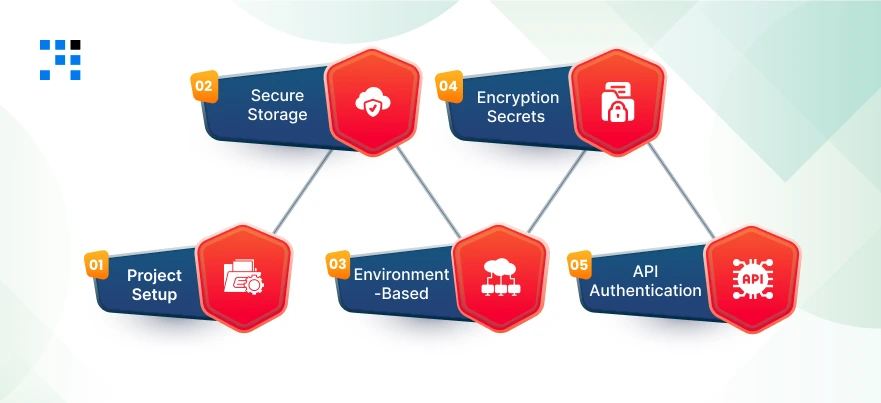
This is a real implementation of how to build a secure configuration server in Node.js, step by step.
Step 1: Project Setup
Initialize Project
                mkdir secure-config-server
                cd secure-config-server
                npm init -y
Install dependencies:
npm install express dotenv jsonwebtoken crypto-js joi
Folder Structure (Clean & Scalable)
secure-config-server/
│
├── config/
│ ├── dev.json
│ ├── staging.json
│ └── prod.json
│
├── middleware/
│ └── auth.middleware.js
│
├── utils/
│ ├── encryption.js
│ └── validator.js
│
├── routes/
│ └── config.routes.js
│
├── server.js
└── .env
This ensures proper environment separation for your multi-environment configuration server in NodeJs.
Step 2: Secure Config Storage Strategy (JSON + Encryption)
We store environment config in JSON files, but encrypt sensitive values.
Create config/dev.json
                {
                "DB_HOST": "localhost",
                "DB_USER": "dev_user",
                "DB_PASSWORD": "ENCRYPTED",
                "JWT_SECRET": "ENCRYPTED"
                }
Create similar files for staging.json and prod.json.
Encryption Utility
utils/encryption.js
                const CryptoJS = require("crypto-js");

                const SECRET_KEY = process.env.MASTER_SECRET || "super_master_key";

                function encrypt(text) {
                        return CryptoJS.AES.encrypt(text, SECRET_KEY).toString();
                }

                function decrypt(cipherText) {
                        const bytes = CryptoJS.AES.decrypt(cipherText, SECRET_KEY);
                        return bytes.toString(CryptoJS.enc.Utf8);
                }

                module.exports = { encrypt, decrypt };
This enables a Node.js config server with encryption for secrets.
Hashing Sensitive Secrets (Optional Improvement)
For secrets like API keys:
                const crypto = require("crypto");
                function hashSecret(secret) {
                        return crypto.createHash("sha256").update(secret).digest("hex");
                }

                module.exports = { hashSecret };
Step 3: Environment-Based Loading Logic
Now we dynamically detect the environment and load the correct config.
utils/validator.js
                const Joi = require("joi");

                const configSchema = Joi.object({
                        DB_HOST: Joi.string().required(),
                        DB_USER: Joi.string().required(),
                        DB_PASSWORD: Joi.string().required(),
                        JWT_SECRET: Joi.string().required()
                });

                function validateConfig(config) {
                        const { error } = configSchema.validate(config);
                        if (error) {
                        throw new Error(`Configuration validation error: ${error.message}`);
                        }
                }

                module.exports = { validateConfig };
Dynamic Environment Loader
routes/config.routes.js
                const express = require("express");
                const fs = require("fs");
                const path = require("path");
                const { decrypt } = require("../utils/encryption");
                const { validateConfig } = require("../utils/validator");

                const router = express.Router();

                router.get("/:env", (req, res) => {
                        const env = req.params.env;

                        if (!["dev", "staging", "prod"].includes(env)) {
                        return res.status(400).json({ error: "Invalid environment" });
                        }

                        const configPath = path.join(__dirname, `../config/${env}.json`);

                        const rawConfig = JSON.parse(fs.readFileSync(configPath));

                        // Decrypt sensitive values
                        rawConfig.DB_PASSWORD = decrypt(rawConfig.DB_PASSWORD);
                        rawConfig.JWT_SECRET = decrypt(rawConfig.JWT_SECRET);

                        // Validate configuration
                        validateConfig(rawConfig);

                        res.json(rawConfig);
                });

                module.exports = router;
This provides proper dynamic environment detection and a strong validation layer.
Step 4: Encryption Layer for Secrets
Before storing secrets inside JSON, encrypt them using this script:
encrypt-secrets.js
                require("dotenv").config();
                const { encrypt } = require("./utils/encryption");

                const encryptedPassword = encrypt("my_dev_password");
                const encryptedJWT = encrypt("my_dev_jwt_secret");

                console.log("Encrypted DB_PASSWORD:", encryptedPassword);
                console.log("Encrypted JWT_SECRET:", encryptedJWT);
Run:
node encrypt-secrets.js
Paste encrypted values into your JSON. Now you have a real Node.js config server with encryption for secrets that protects sensitive credentials.
Step 5: API Authentication Middleware
Now we secure the configuration server using JWT.
Create Authentication Middleware
middleware/auth.middleware.js
               const jwt = require("jsonwebtoken");

                const AUTH_SECRET = process.env.AUTH_SECRET || "auth_secret_key";

                function authenticate(req, res, next) {
                        const token = req.headers.authorization;

                        if (!token) {
                        return res.status(401).json({ error: "Access denied. No token provided." });
                        }

                        try {
                        const decoded = jwt.verify(token.replace("Bearer ", ""), AUTH_SECRET);
                        req.user = decoded;
                        next();
                        } catch (err) {
                        res.status(400).json({ error: "Invalid token." });
                        }
                }

                function authorize(role) {
                        return (req, res, next) => {
                        if (req.user.role !== role) {
                                return res.status(403).json({ error: "Forbidden access." });
                        }
                        next();
                        };
                }

                module.exports = { authenticate, authorize };
This implements:
- Token validation.
- Role-based access control.
Important for businesses handling secure secrets.
Server Setup
server.js
               require("dotenv").config();
                const express = require("express");
                const configRoutes = require("./routes/config.routes");
                const { authenticate } = require("./middleware/auth.middleware");

                const app = express();
                app.use(express.json());

                app.use("/config", authenticate, configRoutes);

                const PORT = process.env.PORT || 5000;

                app.listen(PORT, () => {
                        console.log(`Secure Configuration Server running on port ${PORT}`);
                });
Generate Test Token
Run this in Node:
               const jwt = require("jsonwebtoken");
                const token = jwt.sign(
                        { role: "admin" },
                        "auth_secret_key",
                        { expiresIn: "1h" }
                );

                console.log(token);
Use it:
               GET /config/dev
                Authorization: Bearer YOUR_TOKEN
Here’s the Complete GitHub Code to Build a Multi-Environment Configuration Server in NodeJs.
When Should You Build Your Own Configuration Server?
Not every project needs this level of complexity.
When dotenv Is Enough?
- Small internal tools.
- Single service apps.
- No sensitive external integrations.
- No scaling plans.
For early MVPs, dotenv may be sufficient.
When Microservices Require Centralized Config?
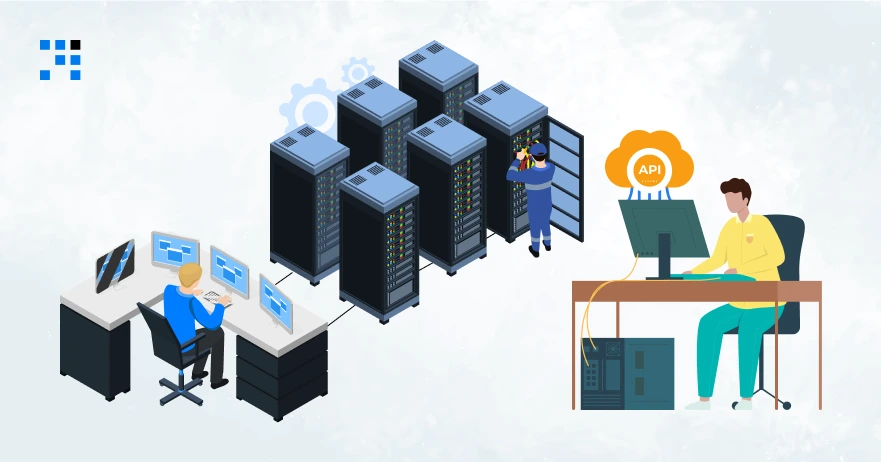
If you are building:
- Microservices architecture.
- SaaS platforms.
- API-based systems.
- Multi-tenant systems.
You need centralized configuration. Managing dozens of .env files becomes unmanageable.
A secure multi-environment configuration server in NodeJs simplifies control, improves consistency, and strengthens security.
When Enterprises Need Encrypted Config Distribution?
Enterprises must:
- Comply with security standards.
- Protect customer data.
- Implement strict access control.
- Rotate secrets regularly.
Encrypted configuration distribution is necessary. If your application handles real users and revenue, this is the right time to upgrade.
Build Once, Secure Forever
Security is infrastructure. A secure multi-environment configuration server gives you:
- Strong Node.js secrets management.
- Proper environment configuration in Node.js (dev, staging, prod).
- Enterprise-grade encryption.
- Scalable architecture.
- Long-term maintainability.
If you are serious about building secure, production-ready Node.js applications, investing in configuration security is one of the smartest technical decisions to make.
FAQs
- A secure multi-environment configuration server in NodeJs is a centralized system that stores & securely distributes configuration settings across dev, staging, and production environments.
- It encrypts sensitive data, validates configuration, and prevents secret leaks in Node.js applications.
- Dotenv is useful for loading environment variables, but it is not a complete security solution.
- It does not provide encryption, validation, centralized management, or access control.
- For production systems, a secure configuration server is strongly recommended.
- Node.js environment variables best practices include avoiding hardcoded secrets, separating configurations by environment, encrypting sensitive data, & validating required variables.