How do you prevent sensitive data exposure in React apps?
This blog shows how to build a client-side data masking engine with code to secure forms, APIs, and UI.
Most React apps unknowingly expose sensitive user data. Credit cards appear fully in UI, APIs return raw PII, and logs store personal details.
This creates serious risks like data leaks and loss of trust. Many teams secure the backend but ignore frontend data security.
That’s why client-side data masking in React is required to protect user data and prevent exposure.
Are You Accidently Exposing User Data in Your React App?
A user enters their credit card number, and it is fully visible on the screen.
Your app logs passwords in the console during debugging.
An API response sends personal data (PII) like email, phone number, or address, and your UI displays it without filtering.
Sounds harmless? It’s not. These small mistakes can lead to serious data leaks.
Users trust your app with their private information. If that data is exposed, even by accident, you risk:
- Losing customer trust instantly.
- Facing legal issues (like GDPR violations).
- Damaging your brand reputation.
The scary part? Most people don’t even realize this is happening.
That’s why here we tried to explain Client side data redaction in ReactJs and the importance of sensitive data masking in ReactJs.
Why Frontend Apps Leak Sensitive Data Without You Realizing?
Many developers focus only on backend security but forget one critical thing:
Your frontend is where data is actually visible.
Even if your backend is secure, your React app can still leak data in multiple ways. Here’s how:
- React renders everything you pass to it, including sensitive data.
- Debug logs (console.log) often contain private user details.
- Browser DevTools (Network tab) exposes full API responses.
- UI components display raw, unfiltered data.
This is why preventing sensitive data exposure in the frontend is so important. Following data privacy frontend best practices is necessary.
What is Client-Side Data Masking?
Client-side data masking means hiding sensitive data directly in the browser before showing it to users. PII masking in the frontend helps protect personal data like:
- Credit card numbers.
- Emails.
- Phone numbers.
Two key concepts:
- Masking: Hiding part of the data.
- Redaction: removing sensitive data completely.
Example:
Instead of showing:
9876 5432 1098 7654
You show:
**** **** **** 7654
This way:
- Users can still recognize their data.
- But sensitive parts stay protected.
That’s the core idea behind client-side data masking.
Go Through the Comparison of Angular vs React to Choose the Best for Your Project.
Most Common Places Where Your React App Leaks Data
Here are the most common areas where frontend data security fails:
- Forms (Input Fields): Users type sensitive data, and it remains fully visible or stored improperly.
- API Responses: Raw backend data is directly rendered without filtering or masking.
- Logs (console.log): Developers log user data for debugging, and forget to remove it.
- UI Display (User Profiles): Emails, phone numbers, or IDs are shown fully in dashboards.
- Error Messages: Errors sometimes expose internal or user-sensitive information.
If you don’t mask sensitive data in React, your app is likely leaking data right now.
Our Expertise in Client-Side Data Redaction & React Security
- We specialize in building data masking engines in JavaScript that detect and redact sensitive data before it reaches users.
- Our team develops frontend data redaction examples and real implementations customized for SaaS, fintech, and enterprise applications.
- We create secure React architectures that combine performance with strong data privacy and protection mechanisms.
- We ensure mask sensitive data in React apps across forms, dashboards, logs, and API integrations smoothly.
- Our developers implement client-side data masking strategies that enhance both security and user trust without complexity.
Want to Build a Secure React App Without Data Leaks?
How Does the Data Masking Engine Work?
A data redaction engine works like a smart filter.
Step-by-step flow:
- Input: Your app receives data (user input, API response, etc.).
- Detect Sensitive Fields: Identify what needs protection (email, phone, card number).
- Apply Rules: Mask or redact the sensitive parts.
- Output Safe Data: Show only safe, filtered data in your UI.
In short:
Raw Data → Filter → Safe Data
This is how you redact sensitive data in JavaScript before it reaches users.
How to Design a Redaction Engine?
If you want to build a data masking engine in JavaScript, keep it simple and structured. Here’s a clean architecture anyone can understand:
1. Detection Layer (Find Sensitive Data)
This layer identifies sensitive data using:
- Regex (for email, phone, card).
- Field names (like password, ssn).
Example: Detect emails or credit card numbers automatically.
2. Transformation Layer (Mask or Redact)
This is where masking happens:
- Replace characters with *.
- Hide parts of the data.
- Remove sensitive fields completely.
This is the core of your frontend data redaction example.
3. Integration Layer (React Components / Hooks)
Finally, connect it to your React app:
- Use a custom hook.
- Apply masking before rendering UI.
- Mask API responses in real time.
This is how you implement client-side data masking in React.
Here’s the
Client-Side Data Redaction Engine (With Code)
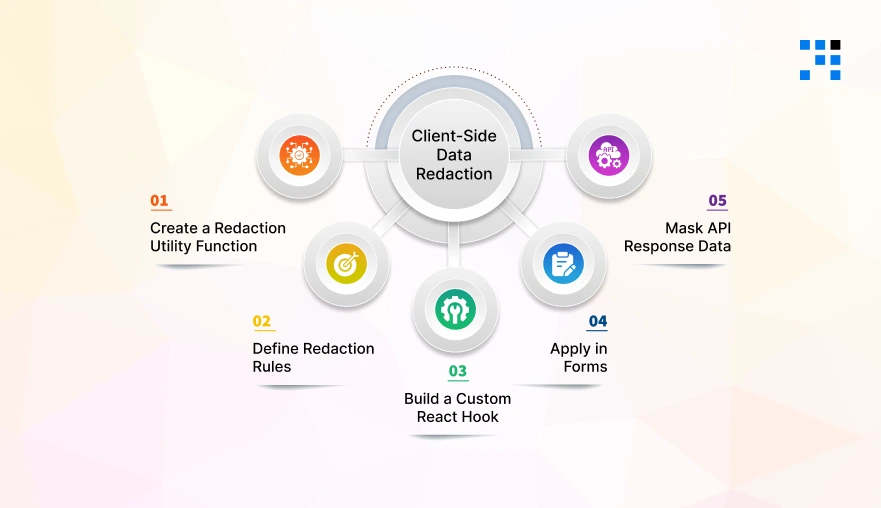
Now comes the most important part, actually building a client-side data masking engine in React. We’ll create a simple, reusable, and scalable system that:
- Masks sensitive data in real-time.
- Works with forms and API responses.
- Follows frontend data security best practices.
Step 1: Create a Redaction Utility Function
This is the core of your data masking engine in JavaScript. It will:
- Mask email addresses.
- Hide phone numbers.
- Secure credit card numbers.
redactionUtils.js
                // Utility to mask email
                export const maskEmail = (email) => {
                if (!email) return "";

                const [name, domain] = email.split("@");
                const maskedName = name.slice(0, 2) + "***";

                return `${maskedName}@${domain}`;
                };

                // Utility to mask phone number
                export const maskPhone = (phone) => {
                if (!phone) return "";

                return phone.replace(/\d(?=\d{2})/g, "*");
                };

                // Utility to mask credit card
                export const maskCard = (cardNumber) => {
                if (!cardNumber) return "";

                return cardNumber.replace(/\d(?=\d{4})/g, "*");
                };

                // Detect and mask dynamically
                export const redactSensitiveData = (key, value) => {
                if (!value) return value;

                const lowerKey = key.toLowerCase();

                if (lowerKey.includes("email")) return maskEmail(value);
                if (lowerKey.includes("phone")) return maskPhone(value);
                if (lowerKey.includes("card")) return maskCard(value);

                return value;
                };
This helps you redact sensitive data in JavaScript before rendering it.
Step 2: Define Redaction Rules (Reusable Config)
Instead of hardcoding logic everywhere, we define a reusable configuration.
redactionRules.js
                export const REDACTION_RULES = [
                {
                        field: "email",
                        mask: (value) => value.replace(/(.{2}).+(@.+)/, "$1***$2"),
                },
                {
                        field: "phone",
                        mask: (value) => value.replace(/\d(?=\d{2})/g, "*"),
                },
                {
                        field: "card",
                        mask: (value) => value.replace(/\d(?=\d{4})/g, "*"),
                },
                ];
Apply rules dynamically:
                export const applyRedactionRules = (data) => {
                const redactedData = {};

                Object.keys(data).forEach((key) => {
                        const rule = REDACTION_RULES.find((r) =>
                        key.toLowerCase().includes(r.field)
                        );

                        redactedData[key] = rule ? rule.mask(data[key]) : data[key];
                });

                return redactedData;
                };
This makes your client-side data masking scalable and maintainable.
Step 3: Build a Custom React Hook
Now we create a React hook for masking sensitive data. This will:
- Automatically mask data.
- Be reusable across components.
useRedaction.js
                import { useMemo } from "react";
                import { applyRedactionRules } from "./redactionRules";

                const useRedaction = (data) => {
                const maskedData = useMemo(() => {
                        if (!data) return data;

                        return applyRedactionRules(data);
                }, [data]);

                return maskedData;
                };

                export default useRedaction;
This is the easiest way to implement client-side data masking in React.
Step 4: Apply in Forms (Real-Time Masking)
Now let’s implement real-time data masking in a React form.
Example: Secure Form Input
                import React, { useState } from "react";
                import { maskEmail, maskPhone } from "./redactionUtils";

                const SecureForm = () => {
                const [formData, setFormData] = useState({
                        email: "",
                        phone: "",
                });

                const handleChange = (e) => {
                        const { name, value } = e.target;

                        let maskedValue = value;

                        // Apply real-time masking
                        if (name === "email") maskedValue = maskEmail(value);
                        if (name === "phone") maskedValue = maskPhone(value);

                        setFormData((prev) => ({
                        ...prev,
                        [name]: maskedValue,
                        }));
                };

                return (
                        <div>
                        <h3>Secure Form (Real-Time Masking)</h3>

                        <input
                        type="text"
                        name="email"
                        placeholder="Enter Email"
                        value={formData.email}
                        onChange={handleChange}
                        />

                        <input
                        type="text"
                        name="phone"
                        placeholder="Enter Phone"
                        value={formData.phone}
                        onChange={handleChange}
                        />
                        </div>
                );
                };

                export default SecureForm;
This ensures real-time data masking in React forms, improving frontend data security instantly.
Step 5: Mask API Response Data
One of the biggest risks is exposing raw API data. Let’s fix that using the mask API response data in frontend React.
Example: Mask API Data Before Rendering
                import React, { useEffect, useState } from "react";
                import useRedaction from "./useRedaction";

                const UserProfile = () => {
                const [user, setUser] = useState(null);

                useEffect(() => {
                        // Simulated API response
                        const fetchUser = async () => {
                        const response = {
                        name: "John Doe",
                        email: "johndoe@gmail.com",
                        phone: "9876543210",
                        cardNumber: "1234567812345678",
                        };

                        setUser(response);
                        };

                        fetchUser();
                }, []);

                // Apply masking here
                const safeUser = useRedaction(user);

                if (!safeUser) return <p> Loading...</p>

                return (
                        <div>
                        <h3>User Profile (Masked Data)</h3>
                        <p>Name: {safeUser.name}</p>
                        <p>Email: {safeUser.email}</p>
                        <p>Phone: {safeUser.phone}</p>
                        <p>Card: {safeUser.cardNumber}</p>
                        </div>
                );
                };

                export default UserProfile;
Now your app never exposes raw sensitive data in UI.
Do You Really Need This in Your App?
Not every app needs advanced security, but many do. You should use client-side data masking if you’re building:
- SaaS Apps: Handling user accounts, dashboards, or analytics.
- Fintech Apps: Dealing with payments, bank details, or transactions.
- Healthcare Apps: Managing patient records and sensitive health data.
- Admin Dashboards: Displaying internal or customer data to teams.
If your app handles any sensitive user data, you need this.
Worried About Data Privacy in Your App?
Small Feature, Big Impact on User Trust

Adding a data redaction engine might seem like a small feature. But its impact is huge.
- It builds user trust.
- Improves frontend data security.
- Makes your app look professional and reliable.
Today, users care about privacy more than ever. If your app protects their data, they’re more likely to trust and stay.
FAQs
- You can mask sensitive data in React by creating a utility function or custom hook that hides parts of data before rendering it in the UI.
- To redact sensitive data in JavaScript, detect fields like email or card numbers, and replace or remove them before displaying or logging.
- Client-side data masking means hiding or modifying sensitive data directly in the browser to prevent exposure in UI or logs.
- Frontend data security is important because sensitive data is visible in the UI, logs, and network requests, even if the backend is secure.