If your team is still writing release notes manually, you’re wasting valuable development time.
Every sprint ends with someone scrolling through commits, copying features, rewriting bug fixes, and formatting everything into readable notes.
This process is slow, repetitive, and prone to human error. Manual release notes often lead to:
- Missed features or undocumented bug fixes.
- Inconsistent formatting across versions.
- Confusing updates for clients and stakeholders.
- Delays in product launches.
That’s why modern teams prefer to auto generate release notes ReactJS applications instead of writing them manually.
With proper release notes automation, you can eliminate repetitive work and ensure structured updates every time you deploy.
A well-built React automatic release notes tool can fetch commits, categorize changes, and generate professional release notes within seconds.
Instead of spending hours documenting changes, your team can focus on building features.
What Is a Release Notes Generator in React?
Trying to figure out what a release notes generator is? It’s a tool that automatically converts development changes into structured, readable release notes.
A release notes generator in React is a web-based tool built using ReactJS that organizes it into categories like Features, Fixes, Improvements, and generates formatted release notes ready for publishing.
It can be used as an internal tool to:
- Save time after every deployment.
- Maintain consistency in product updates.
- Automatically structure version-based announcements.
- Improve communication with clients and users.
Now, many people confuse this with a changelog generator ReactJS tool.
Here’s the difference:
- A changelog generator focuses on maintaining a technical history of changes.
- A release notes generator focuses on user-friendly summaries meant for customers, stakeholders, and product teams.
A smart React-based generator bridges both worlds, technical accuracy + business-friendly clarity.
When Do You Actually Need a Smart Release Notes Generator?

If you are doing any of these, then you absolutely do.
- SaaS Product Updates: Writing release notes manually becomes exhausting. A release notes generator React tool automatically converts commits into readable updates for customers.
- Internal Developer Tools: Large teams working on microservices need structured updates. A React app for generating automated release notes from commits keeps everyone aligned.
- Version-Based Product Releases: When working with semantic versioning (v1.2.0, v2.0.1), you need structured semantic version release notes React formatting to separate features, fixes, and breaking changes clearly.
- GitHub-Based Deployments: If your deployment workflow is GitHub-driven, you can directly integrate GitHub commits to generate release notes in React and automate the entire documentation flow.
If you deploy frequently, automation is necessary.
How to Build a Release Notes Generator in ReactJS Step by Step?
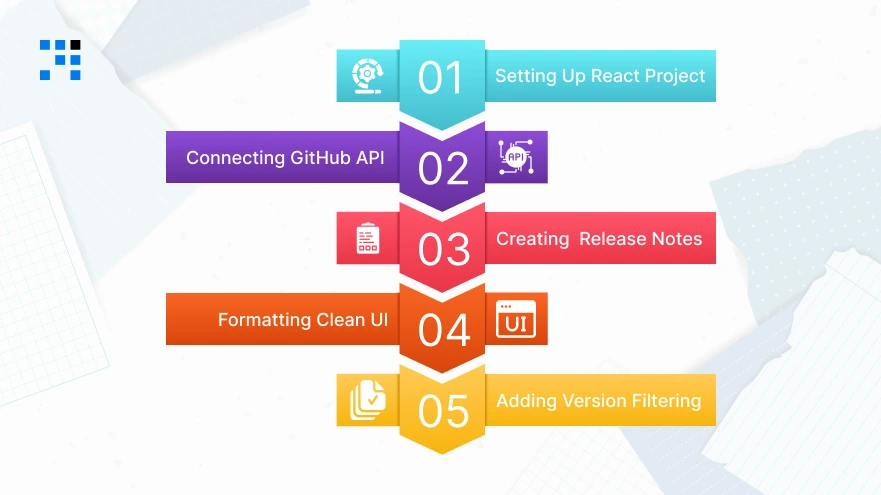
This is a real-world React app for generating automated release notes from commits.
Step 1: Setting Up the React Project
First, create a new React application.
                npx create-react-app smart-release-notes-generator
                cd smart-release-notes-generator
                npm install axios
If you prefer Vite:
                npm create vite@latest smart-release-notes-generator
                cd smart-release-notes-generator
                npm install
                npm install axios
Now clean your App.jsx file.
Step 2: Connecting to GitHub API
To auto generate release notes in ReactJS, we need commit data. Create a file:
src/api/github.js
                import axios from "axios";
                const GITHUB_BASE_URL = "https://api.github.com";

                export const fetchCommits = async (owner, repo, token) => {
                try {
                        const response = await axios.get(
                `${GITHUB_BASE_URL}/repos/${owner}/${repo}/commits`,
                        {
                        headers: {
                        Authorization: `Bearer ${token}`,
                        },
                        }
                        );
                        return response.data;
                } catch (error) {
                        console.error("Error fetching commits:", error);
                        throw error;
                }
                };
Important: For production use, store GitHub tokens securely in environment variables or a backend proxy.
Step 3: Creating a Release Notes Generator Component in ReactJS with Hooks
Now we build the core release notes generator component in ReactJS with hooks.
src/components/ReleaseNotesGenerator.jsx
                import React, { useState } from "react";
                import { fetchCommits } from "../api/github";

                const categorizeCommits = (commits) => {
                const categories = {
                        features: [],
                        fixes: [],
                        improvements: [],
                        others: [],
                };

                commits.forEach((commit) => {
                        const message = commit.commit.message;

                        if (message.startsWith("feat")) {
                        categories.features.push(message);
                        } else if (message.startsWith("fix")) {
                        categories.fixes.push(message);
                        } else if (message.startsWith("perf") || message.startsWith("refactor")) {
                        categories.improvements.push(message);
                        } else {
                        categories.others.push(message);
                        }
                });

                return categories;
                };

                const ReleaseNotesGenerator = () => {
                const [owner, setOwner] = useState("");
                const [repo, setRepo] = useState("");
                const [token, setToken] = useState("");
                const [releaseNotes, setReleaseNotes] = useState(null);
                const [loading, setLoading] = useState(false);

                const generateReleaseNotes = async () => {
                        setLoading(true);
                        try {
                        const commits = await fetchCommits(owner, repo, token);
                        const categorized = categorizeCommits(commits);
                        setReleaseNotes(categorized);
                        } catch (error) {
                        alert("Failed to generate release notes");
                        } finally {
                        setLoading(false);
                        }
                };

                return (
                        <div>
                        <h2>Smart Release Notes Generator</h2>

                        <input
                        type="text"
                        placeholder="GitHub Owner"
                        value={owner}
                        onChange={(e) => setOwner(e.target.value)}
                        />

                        <input
                        type="text"
                        placeholder="Repository Name"
                        value={repo}
                        onChange={(e) => setRepo(e.target.value)}
                        />

                        <input
                        type="password"
                        placeholder="GitHub Token"
                        value={token}
                        onChange={(e) => setToken(e.target.value)}
                        />

                        <button onClick={generateReleaseNotes} disabled={loading}>
                        {loading ? "Generating..." : "Generate Release Notes"}
                        </button>

                        {releaseNotes && (
                        <div>
                        <h3>🚀 Features</h3>
                        <ul>
                                {releaseNotes.features.map((item, index) => (
                                <li key={index}>{item}</li>
                                ))}
                        </ul>

                        <h3>🐛 Fixes</h3>
                        <ul>
                                {releaseNotes.fixes.map((item, index) => (
                                <li key={index}>{item}</li>
                                ))}
                        </ul>

                        <h3>⚡ Improvements</h3>
                        <ul>
                        {releaseNotes.improvements.map((item, index) => (
                                <li key={index}>{item}</li>
                                ))}
                        </ul>
                        </div>
                        )}
                        </div>
                );
                };

                export default ReleaseNotesGenerator;
This component:
- Fetches GitHub commits.
- Categorizes them using Conventional Commits.
- Automatically generates structured release notes.
- Works as a reusable React automatic release notes tool.
Step 4: Formatting Output into Clean UI
Now let’s format release notes properly into structured Markdown-style output.
Update inside component:
                const formatReleaseNotes = (notes) => {
                return `
                ## 🚀 Features
                ${notes.features.map((f) => `- ${f}`).join("\n")}

                ## 🐛 Fixes
                ${notes.fixes.map((f) => `- ${f}`).join("\n")}

                ## ⚡ Improvements
                ${notes.improvements.map((f) => `- ${f}`).join("\n")}
                `;
                };
Add below your categorized display:
                {releaseNotes && (
                <div>
                        <h3>📄 Markdown Output</h3>
                <pre>{formatReleaseNotes(releaseNotes)}</pre>
                </div>
                )}
Now your GitHub release notes generator React tool produces export-ready Markdown.
Step 5: Adding Version-Based Filtering
For semantic version release notes, React functionality, we filter by tags.
Update API:
                xport const fetchCommitsByTag = async (owner, repo, tag, token) => {
                const response = await axios.get(
                `https://api.github.com/repos/${owner}/${repo}/compare/${tag}...HEAD`,
                        {
                        headers: {
                        Authorization: `Bearer ${token}`,
                        },
                        }
                );
                return response.data.commits;
                };
Add version input in component:
                const [tag, setTag] = useState("");
                <input
                type="text"
                placeholder="Previous Version Tag (e.g. v1.0.0)"
                value={tag}
                onChange={(e) => setTag(e.target.value)}
                />
Modify generate function:
                const generateReleaseNotes = async () => {
                setLoading(true);
                try {
                        const commits = tag
                        ? await fetchCommitsByTag(owner, repo, tag, token)
                        : await fetchCommits(owner, repo, token);

                        const categorized = categorizeCommits(commits);
                        setReleaseNotes(categorized);
                } catch (error) {
                        alert("Failed to generate release notes");
                } finally {
                        setLoading(false);
                }
                };
Here’s the Complete GitHub Code to Build a Smart Release Notes Generator in ReactJs.
How Do We Build Smarter ReactJs Automation Tools?
- We build smart release notes generator ReactJS solutions that auto generate release notes directly from GitHub commits.
- Our React automatic release notes tool follows a clean architecture and a reusable release notes generator component in ReactJS with hooks.
- Our team develops a GitHub release notes generator, React systems with semantic version release notes, & React support for SaaS deployments.
- We create a React app for generating automated release notes from commits using a scalable API-driven architecture.
Want to Build a Customized ReactJs Solution? Contact Us Today!
What Are the Advanced Features That Make This Generator Powerful?
You should add these advanced features to your release notes generator to make it stand out:
- Auto-Detect Semantic Versions: Automatically identify version tags and generate structured semantic version release notes React output.
- AI-Ready Summary Generation: Add AI logic to summarize commits into clean product announcements.
- Tag-Based Filtering: Filter commits by tag, contributor, or feature branch.
- Downloadable Markdown Export: Allow exporting release notes instantly for documentation portals.
- Copy-to-Clipboard Functionality: Quick copy option improves developer productivity.
- CI/CD Ready Integration: Connect your tool with deployment pipelines to fully automate release documentation.
This turns your project into the best React project to auto generate release notes with GitHub.
Ready to Build Your Own Smart Release Notes Generator in ReactJS?

Manual documentation is outdated. Smart teams automate. With a properly structured release notes generator React application, you can:
- Save development time.
- Improve release clarity.
- Automate SaaS product updates.
- Standardize version-based communication.
You can extend it with AI summaries, CI/CD automation, or internal dashboards.
FAQs
- Yes. By fetching commit data from GitHub and parsing messages using structured formats like Conventional Commits, you can automatically generate release notes inside a ReactJS application.
- The best way is to build a React automatic release notes tool that connects to the GitHub API, categorizes commits, and formats output into Markdown or HTML automatically.
- Yes, you can build your own free release notes generator ReactJS tool using open-source libraries and GitHub APIs without additional cost.
- Create a modular React component using hooks for fetching, parsing, and rendering commits.