Why do APIs fail when traffic grows?
Learn how to design high-performance NodeJs APIs that handle global users, reduce latency, and scale without breaking.
Your API might work perfectly today, but that doesn’t mean it’s ready for global scale.
For startups targeting international markets, performance directly impacts user experience, retention, and revenue across regions.
What feels “fast enough” with 100 users can quickly become a bottleneck when you onboard thousands across different geographies.
If your NodeJs API starts slowing down as you grow, it’s rarely due to one major flaw. It’s usually the result of small architectural decisions that weren’t designed for scale.
Where things typically break:
- Excessive Database Calls: As your user base grows, unoptimized queries multiply. What worked locally becomes a latency issue globally.
- Blocking Operations: NodeJs thrives on non-blocking architecture, but even a few synchronous tasks can delay thousands of concurrent requests.
- Non-Scalable API Design: APIs built without scalability in mind struggle under real-world traffic, especially across regions with varying network conditions.
Fixing these early is about building a backend that can support global growth without constant rework.
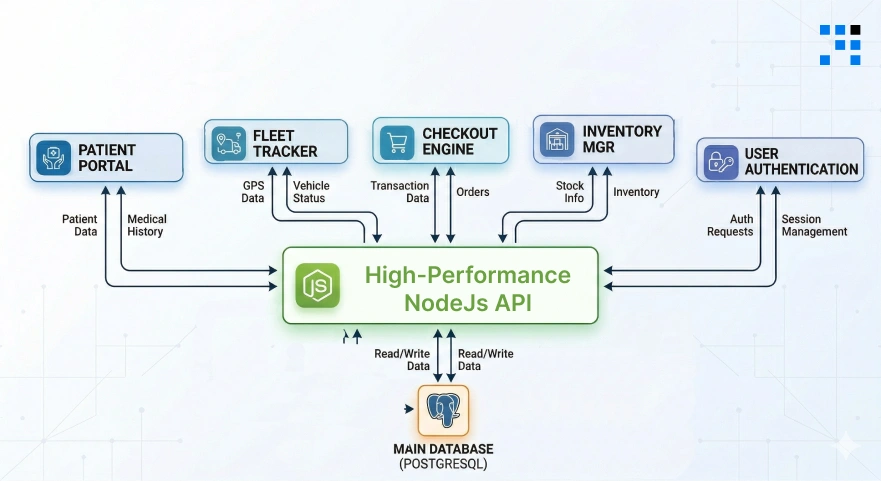
What Does “High-Performance API” Actually Mean?
A high-performance API is not just “fast.” It’s an API that stays fast even when your users grow. Let’s break it down in simple terms.
Metrics That Actually Matter
- Response Time: How quickly your API sends back a response. (Faster = better user experience)
- Throughput: How many requests your API can handle at the same time.
- Latency: The delay between request and response.
Real Example (Food Delivery App)
Imagine you’re building a food delivery app:
- User opens the app → API loads restaurants.
- User places order → API processes payment.
- Delivery tracking → API updates live location.
If your API is slow:
- Users leave the app.
- Orders fail.
- Revenue drops.
If your API is high-performance:
- Faster experience.
- More orders.
- Better user retention.
That’s the real difference.
Not Sure If Your API Can Handle Scale?
Why Your Current API Architecture Is Restricting Your Growth?
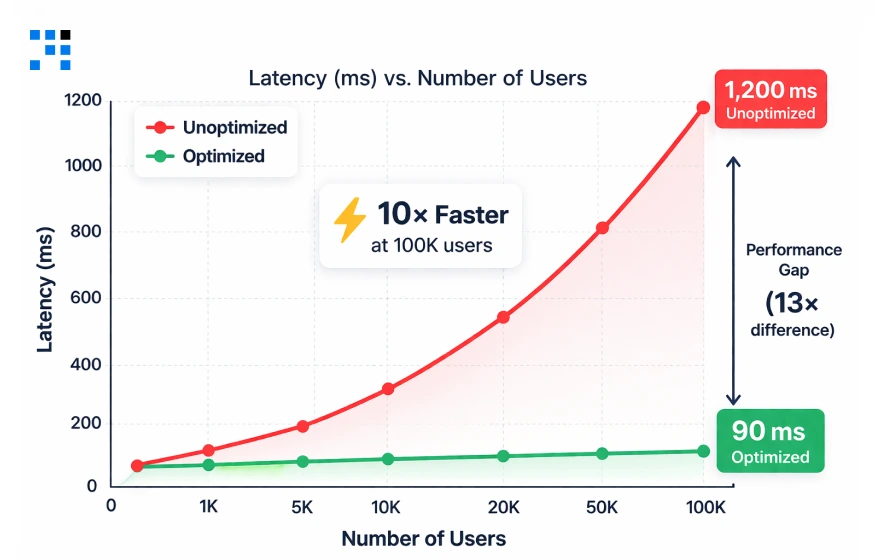
Mid-sized companies and growing SaaS products share a painful pattern: The backend that felt “good enough” at 1,000 users starts grinding at 10,000.
And by the time leadership notices, in churn data, support tickets, or a crashed demo, the cost to fix it is ten times what it would have been to design it correctly from the start.
The cause is rarely one catastrophic error. It is a compounding stack of small decisions that produce three silent killers of scaling products:
1. Latency
- Every 100ms of avoidable delay affects user experience & conversion, compounded across every request, every user, & every geography.
2. High Server Costs
- Unoptimized queries and missing caches force servers to do unnecessary work. Your AWS bill grows faster than your revenue.
3. Concurrency Crashes
- A traffic spike, a product launch, a press mention, a peak period, reveals every architectural weakness at once, publicly.
Healthtech: Balancing HIPAA Compliance and Speed
Healthcare APIs must balance strict compliance with real-time performance, and that’s exactly where most systems fail.
- We design Node.js backends where security layers don’t slow down workflows.
- By implementing asynchronous JWT validation, cached role-based access control, and non-blocking audit logging, we reduce authentication overhead from milliseconds to microseconds.
- Our architecture ensures encrypted, traceable, and compliant data flow without latency spikes.
The result?
Faster patient data access, smoother clinical operations, & APIs that help you retain contracts and scale confidently in regulated environments.
Logistics: Handling Real-Time Data Spikes
Logistics platforms don’t fail under normal load; they fail during spikes. We build APIs designed to absorb burst traffic without crashing.
- Using event-driven architecture, queue-based ingestion (BullMQ), and write-optimized database strategies, we decouple incoming IoT data from processing layers.
- Combined with intelligent rate limiting and connection pooling, your system handles thousands of simultaneous GPS pings without downtime.
- Whether it’s 500 or 5,000 vehicles, our backend ensures stability, real-time updates, and SLA reliability.
So your operations scale smoothly without costly infrastructure failures or contract risks.
E-commerce: Recovering Lost Revenue from API Latency
In e-commerce, every second of delay directly impacts revenue, especially at checkout. We optimize APIs to eliminate latency at high-intent moments.
- By introducing Redis caching for product/pricing data, compound indexing, and lightweight query strategies, we reduce response times dramatically.
- Our approach ensures that critical flows like checkout, inventory validation, and payments remain fast and consistent under load.
- The impact is immediate: lower abandonment rates, higher conversions, and measurable revenue recovery.
Instead of patching performance issues later, we create your backend to support growth from day one.
Our 4-Tier Blueprint for NodeJs Excellence
This is our proven framework designed to handle the real conditions your product faces at global scale: concurrent sessions, large datasets, geographic latency, and rapidly growing traffic.
Each tier addresses a distinct constraint. Together, they create a backend that handles your first 1,000 users and your first 1,000,000 with the same reliability.
1. Non-Blocking Architecture & Event-Loop Tuning
- Node.js is single-threaded. Its speed advantage comes entirely from its non-blocking, event-driven model.
- A single synchronous operation does not just slow one request; it blocks the entire server.
- In production, with hundreds of concurrent users, even one readFileSync() call can spike latency across every active session simultaneously.
- We implement async/await consistently across all I/O operations & use structured middleware to ensure no blocking code enters the request lifecycle.
- For compute-heavy tasks: PDF generation, image processing, bulk exports, email dispatch, we offload to BullMQ background queues so the API thread remains free to serve new requests instantly.
What does this mean for your business?
- Consistent response times under high concurrency.
- No sudden latency spikes during peak usage.
- Ability to handle thousands of parallel users without degradation.
2. Advanced Database Strategy (Indexing & Connection Pooling)
- A User.find() call on a collection with 10 million records and no index performs a full collection scan: every document examined, every time.
- At low traffic, that is a slow query. At scale, it is a service outage. An unindexed email lookup on 10M records can take over 4,000ms.
- With a compound index, that same query completes in under 5ms.
- We implement compound indexes on high-cardinality fields, use .select() to return only required fields, apply .lean() to strip Mongoose overhead on read-heavy endpoints, and enforce cursor-based pagination so result sets stay bounded regardless of collection size.
- Connection pooling eliminates the 50 to 150ms overhead of re-establishing a database connection per request, one of the most common sources of hidden latency in Node.js applications.
What does this mean for your business?
- Faster API responses even with millions of records.
- Reduced infrastructure costs due to efficient DB usage.
- Stable performance as your data grows over time.
3. Intelligent Edge Caching
- Not every request needs to touch the database. Product listings, user dashboards, pricing tables, and configuration data are read far more often than they change.
- Serving these from a Redis cache with a 60-second TTL eliminates the majority of database load for most production workloads, reducing server costs, reducing latency, and protecting the database from concurrency spikes.
- The important distinction we make explicit for every client: cache stable, high-traffic data aggressively.
- Never cache real-time transactional data: Payments, live inventory counts, or session tokens.
- The wrong caching strategy is as damaging as no caching at all.
What does this mean for your business?
- Up to 50 to 70% reduction in database load.
- Faster response times (often under 10ms).
- Better performance during traffic spikes without scaling costs.
4. Horizontal Scaling & Microservices
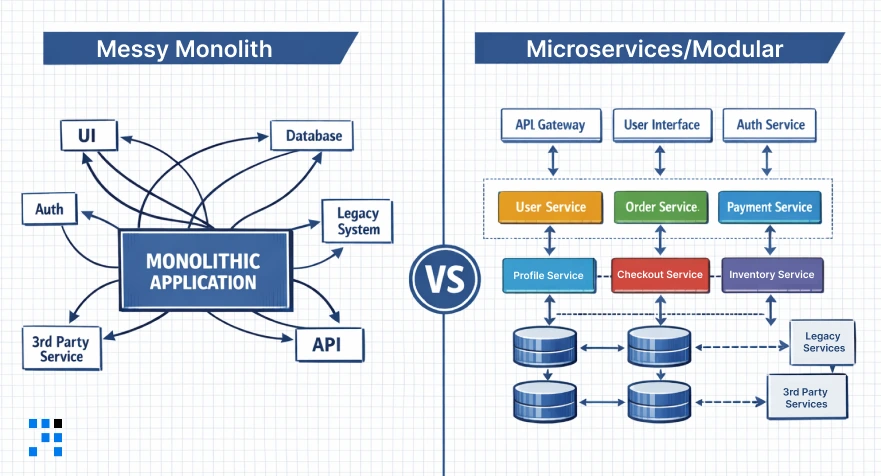
- Monolithic architectures are easy to start with and painful to scale.
- The moment a single service becomes the bottleneck: The order processor during a sale, the auth service during a product launch, the notification system during a marketing campaign, the entire product is degraded simultaneously.
- We design modular folder structures from day one: Controllers, Services, Models, Routes, & Middlewares, each with a single, testable responsibility.
- This is not over-engineering. It is the difference between extracting a service to its own independently scalable microservice in a sprint versus a six-month rewrite.
- Rate limiting, API versioning, structured error handling, and connection pooling are built in, not bolted on later when a crisis reveals they were missing.
What does this mean for your business?
- Scale specific components without affecting the entire system.
- Faster feature releases without risking performance.
- Long-term flexibility without expensive rewrites.
Here’s the
Engineered for Reliability: The Tech Stack
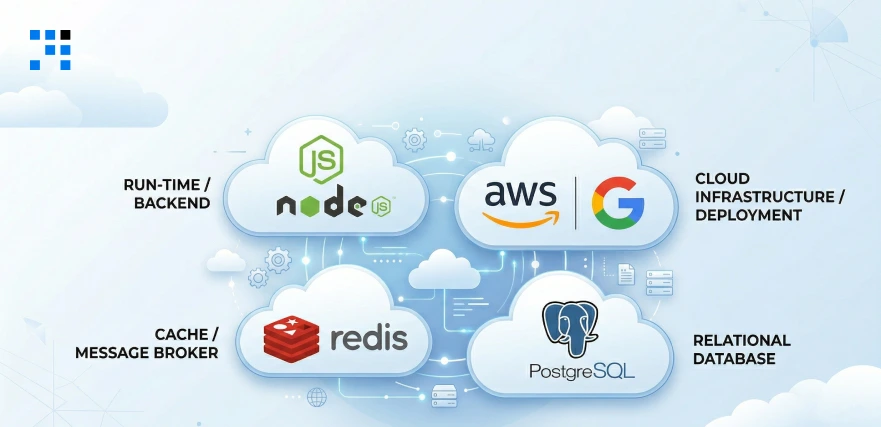
Every tool in this stack is chosen for a specific production reason.
If you are evaluating a backend engineering partner, this is what the current industry standard looks like for high-traffic NodeJs APIs built for global markets.
| Technology | Used For |
| NodeJS (LTS) | Async runtime, the non-blocking foundation. |
| Express / Fastify | API framework, routing, middleware, & compression. |
| Redis | In-memory cache, sub-millisecond read latency. |
| PostgreSQL | Relational DB, ACID, structured, & indexed at scale. |
| MongoDB | Document DB, flexible schemas at scale. |
| AWS / GCP | Cloud infra, multi-region, & auto-scaling. |
| BullMQ | Background jobs, async processing with retries. |
| Prometheus | Monitoring, p95 latency, throughput, error rates. |
| Rate Limiting | Traffic control prevents overload and abuse. |
Want a Fast & Scalable Backend for Your App?
How a Fast API Directly Impacts Your Revenue?
Backend performance is not an engineering concern in isolation; it is a business metric.
Here is how API speed maps directly to the numbers founders and product leaders track in their board decks.
| Fast APIs = Better Business | Slow APIs = Lost Revenue |
| Faster load times → lower bounce rate → higher conversion. | Users abandon apps that take more than 3 seconds to respond. |
| Reliable uptime → stronger enterprise contract renewals. | Checkout lag reduces GMV measurable, per millisecond. |
| Efficient infrastructure → lower cost per request as you scale. | Downtime during traffic peaks destroys enterprise trust. |
| Smooth experience → higher NPS, lower churn, better retention. | Reactive fixes at scale cost 10x more than proactive design. |
Learn to Create a Home Services App like Urban Company with NodeJS.
Is Your API High-Performance Ready?
Run through this audit before launching or before scaling marketing spend on a product whose backend has not been tested under real load conditions.
- API response time is consistently under 200ms for primary endpoints.
- The API has been load tested to at least 3x expected peak concurrent users.
- Database queries use compound indexes on all high-cardinality search fields.
- Redis caching is implemented on high-traffic, low-volatility endpoints.
- Rate limiting is configured per IP, a single client cannot overload the server.
- All heavy tasks (emails, reports, processing) are offloaded to background queues.
- Prometheus or equivalent is tracking p95 latency in production.
- API responses use compression and return only the fields the client needs.
If you answered “no” to three or more of these, your API has measurable performance debt, and it compounds faster the longer you wait.
FAQs
- It depends on the current architecture and scale requirements.
- For most startups, initial performance improvements (caching, query optimization, bottleneck fixes) can be implemented within 1 to 3 weeks.
- More advanced work like architecture redesign or scaling for global traffic may take 4 to 8 weeks.
- We usually start with a quick audit to identify high-impact wins first.
- In most cases, we optimize your existing stack. Rewrites are rare and only recommended if the current architecture cannot scale.
- Our approach is to improve performance without disrupting your product roadmap.
- We run a structured performance audit that includes API response time analysis, database query profiling, & load and stress testing.
- This helps us pinpoint exactly where performance is breaking, instead of guessing.
- No. We follow a staged rollout approach with testing environments, ensuring that optimizations are deployed without downtime or risk to live users.